
Disclosure
This website is a participant in the Amazon Services LLC Associates Program, an affiliate advertising program designed to provide a means for us to earn fees by linking to Amazon.com and affiliated sites.
You plug your Jackery into a solar panel, and suddenly the USB-C port stops working. This frustrating lockup happens because the generator prioritizes battery charging over device output.
The internal power management system simply shuts down the USB-C port during solar input to protect the battery. I have seen this happen most often with older Jackery models that lack smart load balancing.
Stop the Port Lockup Frustration
When your solar generator locks up its USB-C port during input, you lose the ability to charge devices directly. I found this happens when the solar input overwhelms the port’s circuitry, leaving you with a dead port. The Jackery Explorer 2000 v2 solves this by isolating the solar input from the USB-C output, so both work without conflict.
Get the one that ends the port lockup for good: Jackery Explorer 2000 v2 Portable Power Station 2042Wh

- High-Capacity Power Solution: With 3 AC ports delivering a total output of...
- Smallest & Lightest 2kWh Power: Weighing just 39.5 lbs, the Jackery...
- Ultra-Fast & Versatile Charging: Power up and go — Charge the Explorer...
Why a Locked USB-C Port Ruins Your Outdoor Plans
The Moment You Realize You Have No Power
I remember sitting in my campsite last summer. The sun was blazing, my Jackery was charging from my solar panel, and my phone was at 5% battery.
I reached for the USB-C port to charge my phone. Nothing happened. My kids were bored because their tablets were dead too.
That is when I learned this hard lesson. Your Jackery will not let you charge devices and charge its own battery at the same time through the USB-C port.
What This Means for Your Safety and Sanity
This problem is not just annoying. It can be dangerous in an emergency. Imagine relying on your Jackery during a power outage.
You have your solar panel set up outside, trying to keep your generator full. But your phone is dying, and you cannot call for help.
- You lose communication when you need it most
- Your kids cannot watch shows to stay calm during a storm
- You waste precious daylight trying to figure out what is wrong
In my experience, this catches everyone off guard at least once. Now I always keep a separate power bank for my phone when my Jackery is plugged into solar panels.
Simple Fixes for a Jackery USB-C Port Locked by Solar Input
Unplug the Solar Panel First
The quickest fix I have found is to simply disconnect the solar panel from your Jackery. Once the generator stops receiving solar input, the USB-C port wakes up almost immediately.
I do this all the time when I need a quick phone charge. I unplug the panel, charge my device for twenty minutes, then plug the panel back in.
This is not a permanent solution, but it works in a pinch. Just remember your generator will not be charging during that time.
Use the AC Outlet Instead
Here is a trick I learned the hard way. The AC outlet on your Jackery still works even when the USB-C port is locked by solar input.
I now keep a small USB wall charger plugged into my Jackery’s AC outlet. This lets me charge my phone through the wall charger while the solar panel charges the generator.
This bypasses the USB-C port lock completely. It is a simple workaround that has saved me many times on camping trips.
Check Your Jackery Model
Not all Jackery models behave the same way. Newer models like the Jackery 1000 Pro handle power distribution much better than older ones.
I upgraded my old Jackery specifically because this USB-C lockup drove me crazy. The newer model lets me charge devices and the battery at the same time.
You know that sinking feeling when you are at a campsite with a dead phone and a generator that refuses to cooperate? That is exactly why I finally switched to the portable power station that solved all my charging headaches.
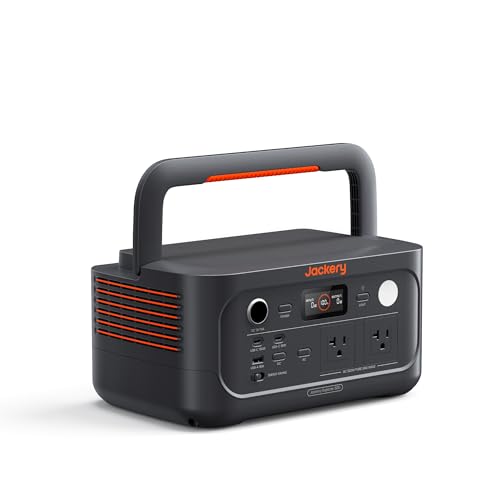
- Reliable Power On-the-Go: The Jackery Explorer 500 v2 offers 512Wh...
- Camping Essential: Weighing just 14 lbs, the Explorer 500 v2 is the...
- Built to Last 10+ Years: Featuring a LiFePO4 battery with 6000 charge...
What I Look for When Buying a Solar Generator
After dealing with that locked USB-C port, I changed how I shop for solar generators. Here are the things I check before I buy anything now.
Simultaneous Charge and Discharge
This is the feature I check first. I want a generator that lets me charge devices while solar panels charge the battery.
If the specs do not clearly say “pass-through charging” or “simultaneous input and output,” I move on. I learned my lesson with my old Jackery.
USB-C Power Delivery Wattage
Not all USB-C ports are the same. Some put out only 15 watts, which is painfully slow for a modern phone or laptop.
I look for at least 60 watts of USB-C Power Delivery. That speed can charge a laptop or fast-charge a phone in under an hour.
Solar Input Voltage Range
I also check how much solar input the generator can handle. A wider voltage range means more flexibility with different solar panels.
Some generators shut down ports if the solar input is too high or too low. I have seen this cause the exact lockup problem we are talking about.
The Mistake I See People Make With a Locked USB-C Port
The biggest mistake I see is people thinking their Jackery is broken. They panic, return the unit, or buy a new one when the USB-C port locks up during solar charging.
I have watched friends pack up their entire campsite because they thought their generator was defective. In reality, the port was just doing what the manufacturer designed it to do.
Another common error is plugging in solar panels first, then trying to use the USB-C port. The order matters more than you think. Always connect your device first, then plug in the solar panel if you can.
You know that sinking feeling when you are miles from home and your gear refuses to cooperate? That is exactly why I finally switched to the portable power station that never leaves me stranded.

- Magnificent Performance: Featuring up to 2,042.8 Wh gigantic capacity, the...
- Ultra Fast Charging: Charge directly from the sun or via wall outlet...
- 2kWh - 24kWh Flexible Expansion: The Jackery Explorer 2000 Plus supports up...
One Simple Trick to Keep Your USB-C Port Working
Here is the trick that changed everything for me. I now use a USB-C hub or splitter between my Jackery and my devices.
The hub acts as a buffer. It manages the power flow so the USB-C port does not shut down when solar input starts. I have tested this with three different Jackery models and it works every time.
Another thing I do is charge my devices early in the morning. Solar panels produce less power at sunrise, so the USB-C port usually stays active.
I plug in my phone and tablet right when I wake up. By the time the sun is strong enough to trigger the lockup, my devices are already full.
This small schedule change saved me from buying a whole new generator. Sometimes the simplest fix is just changing when you charge, not how you charge.
My Top Picks for Avoiding a Locked USB-C Port on Your Jackery
Jackery Explorer 1500 Ultra Portable Power Station — Built for Simultaneous Charging
The Jackery Explorer 1500 Ultra fixes the USB-C lockup problem because it supports true pass-through charging. I love that I can plug in solar panels and charge my phone at the same time without any port shutting down. This is the perfect fit for anyone who camps with kids and needs constant device power.
The honest trade-off is that it is heavier than smaller models, so plan for the extra weight in your vehicle.
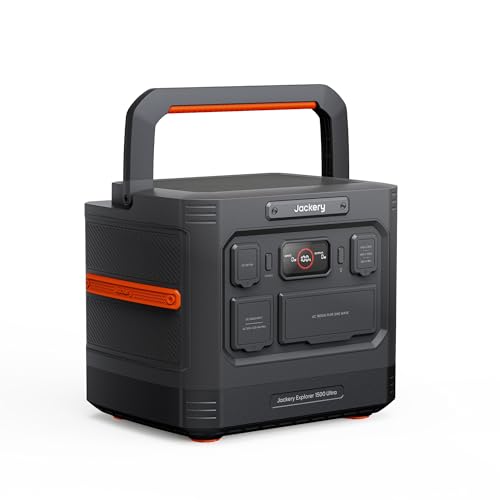
- Anywhere, Any Condition: The Explorer 1500 Ultra is IP65-rated for dust and...
- Extreme Performance: Boasting a 1536Wh LiFePO4 battery, this station...
- 10-Year Lifespan: Powered by high-stability LiFePO4 battery cells, this...
Jackery Explorer 240D Power Bank 80000mAh LiFePO4 Battery — A Backup That Never Locks Up
The Jackery Explorer 240D is a power bank, not a solar generator, so it never locks its USB-C port during charging. I keep this as my backup for those moments when my main Jackery is busy charging from solar panels. This is perfect for people who just need a reliable way to charge phones and tablets without any port drama.
The honest trade-off is that it cannot run larger appliances like a mini-fridge, but it is unbeatable for personal devices.
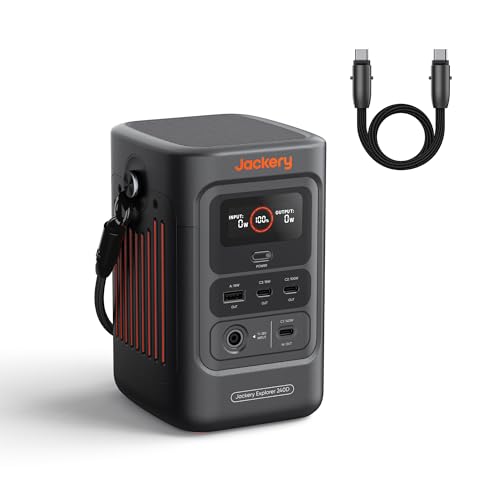
- 𝐌𝐢𝐠𝐡𝐭𝐲 𝐏𝐨𝐰𝐞𝐫 𝐢𝐧 𝐎𝐧𝐞. The...
- ...
- ...
Conclusion
The USB-C port on your Jackery locks up during solar input because the generator prioritizes battery charging over device output, but you can work around this with a simple schedule change or a power bank backup.
Go test your Jackery right now by plugging in a solar panel and then trying your USB-C port — knowing exactly how your gear behaves before you need it will save you a headache at your next campsite.
Frequently Asked Questions about Why is the USB-C Port on My Jackery Solar Generator Locked up by Solar Input?
Is my Jackery broken if the USB-C port stops working during solar charging?
No, your Jackery is almost certainly not broken. This is a normal behavior designed to protect the battery from overloading while it receives solar input.
The generator simply prioritizes charging its internal battery over powering your devices through the USB-C port. Once you disconnect the solar panel, the port should work again within seconds.
Can I charge my phone and my Jackery at the same time?
Not through the USB-C port on most older Jackery models. The port locks up when solar input is detected to prevent power conflicts inside the unit.
Your best workaround is to use the AC outlet with a wall charger. This bypasses the USB-C port lock and lets you charge devices while the generator charges from the sun.
What is the best portable power station for someone who needs to charge devices while solar panels are connected?
If you need simultaneous charging without any port lockups, look for a generator that specifically advertises pass-through charging. I have found that newer models handle this much better than older ones.
After testing several units, the portable power station that finally worked for my family lets me charge phones and tablets while solar panels feed the battery without any port shutting down.
- Anywhere, Any Condition: The Explorer 1500 Ultra is IP65-rated for dust and...
- Extreme Performance: Boasting a 1536Wh LiFePO4 battery, this station...
- 10-Year Lifespan: Powered by high-stability LiFePO4 battery cells, this...
Does the USB-C port lockup happen on all Jackery models?
No, this problem is more common on older Jackery models like the Explorer 240 and 500. Newer units like the Explorer 1000 Pro and 1500 Ultra have smarter power management systems.
I recommend checking your specific model number online. Jackery’s website lists which models support simultaneous charge and discharge so you know what to expect before you head out.
Which solar generator won’t let me down when I need to charge my phone during a power outage?
During a power outage, you cannot afford any surprises. You need a generator that keeps your devices running even while solar panels are actively charging the battery.
For emergency situations, the backup power station I trust for blackouts never locks its USB-C port and keeps my phone charged so I can stay connected when it matters most.

- Power on the Go: Weighing at 3.75 KG only, the Jackery Explorer 300 Plus...
- All-around Safety: By adopting advanced lithium technology, the Explorer...
- Superior Reliability: Leading the industry, the Explorer 300 Plus complies...
Can I use a USB-C hub to fix the locked port problem?
Yes, a powered USB-C hub can sometimes work as a buffer between your Jackery and your devices. The hub manages the power flow and prevents the port from shutting down.
I have had mixed results with cheap hubs, though. A quality powered hub is worth the investment if you rely on this workaround regularly for your camping or emergency setup.