
Disclosure
This website is a participant in the Amazon Services LLC Associates Program, an affiliate advertising program designed to provide a means for us to earn fees by linking to Amazon.com and affiliated sites.
You might wonder if you can change your Anker solar generator’s settings without needing Bluetooth. This matters because Bluetooth isn’t always available or reliable when you’re out camping or during an emergency.
The good news is that many basic power settings are controlled directly on the unit’s physical buttons and display. For advanced features like charging profiles or firmware updates, however, the Bluetooth app is usually your only option.
Manual Control Without Bluetooth
If you lose your phone or Bluetooth fails, you still need to change settings on your generator. Most solar generators lock you out without an app, which is frustrating when you are in a hurry or off-grid. The Anker 522 solves this with a clear, physical control panel that lets you adjust output and check battery level instantly, no phone required.
Grab the Anker 522 Portable Power Station 299Wh Solar Generator for direct, app-free control every time.
Why Not Having Bluetooth Access Really Hurts
I remember a camping trip last summer when my phone battery died on the second day. I had no way to connect to my Anker generator’s Bluetooth app. Suddenly, I was stuck with whatever settings were already on the device.
This is the moment most people don’t think about until they are in it. You assume Bluetooth will always work, but it doesn’t. Dead phone batteries, lost cables, or simply being in a remote area can leave you without app control.
The Panic of Being Stuck With Default Settings
Imagine your family is settling in for the night. The kids need their tablets charged and you want to run a small fan. But the generator is set to a slow charge mode from a previous setup.
Without Bluetooth, you cannot switch it to a faster mode. In my experience, this is when frustration sets in. You start wondering if you bought the wrong generator for your needs.
Real Situations Where Bluetooth Fails
- Your phone is completely dead and your portable charger is empty too.
- You are in a national park with zero cell service, which sometimes affects app connectivity.
- You accidentally left your phone at home or it got dropped in a puddle.
- The Bluetooth app crashes or refuses to pair after a software update.
What You Actually Lose Without the App
The biggest loss is real-time power monitoring. The app shows you exactly how much energy you are using and how much is left. Without it, you are guessing based on the small screen on the unit.
You also lose the ability to set custom charge limits or change input priorities. These are important for extending battery life. In my experience, most people do not realize this until they actually need to change a setting in the field.
How I Adjust Settings Directly on the Unit
Honestly, the first thing I did when I got home was test every button on my generator. I wanted to know exactly what I could do without ever opening the app.
The good news is that most basic functions have physical controls. You can turn the AC outlet on and off. You can switch between different charging modes using the button on the front panel.
The Physical Buttons You Can Rely On
On my Anker generator, there is a small LCD screen with a menu button right next to it. I can scroll through options like output wattage and battery percentage right there. No phone needed.
I also found a dedicated button for changing the charging speed. This is the one I use most often when I am outside and my phone is dead. It saves me every time.
What the Screen Tells You Without Bluetooth
- Current battery level shown as a percentage and a simple bar graph.
- How much power is going out to your devices at that moment.
- Estimated remaining run time based on current usage.
- Error codes if something is wrong with the input or output.
When You Still Need to Plan Ahead
The physical controls are great for basic adjustments. But I learned the hard way that advanced settings like charge limits are locked behind the app. You have to set those before you leave home.
That is the frustration that keeps me up at night—knowing I forgot to change a setting before heading into the woods. Honestly, what finally worked for me was keeping a small cheat sheet taped to the side of the unit, but if you want to avoid that hassle entirely, the ones I send my sister to buy solve this problem completely.

- [Longest-Lasting 10-Year Lifespan] - With InfiniPower's long-lasting...
- [Rapid Recharge] - Thanks to HyperFlash technology, Anker PowerHouse...
- [Power Up to 12 Devices] - The 2400W output and an exclusive RV port, 4 AC...
What I Look for When Buying a Solar Generator
After messing up my first purchase, I learned a few simple rules. These are the things I check before I pull the trigger on any solar generator now.
Real World Capacity, Not Advertised Numbers
I ignore the big number on the box. That “1000 watt-hours” usually means under perfect lab conditions, not your backyard. I look for reviews that tell me how many times it actually charges a phone or runs a mini-fridge.
Physical Buttons for Everyday Use
I will not buy a generator that hides everything in an app. If I cannot turn on the AC outlet or check the battery level with a button, it is a hard pass. You will thank yourself when your phone dies on day two of a trip.
How It Handles Solar Input
Some generators are picky about what solar panels you plug in. I look for one that accepts a wide range of voltages. That way I am not stuck buying their expensive brand of panels forever.
Weight and Portability That Matches Your Life
A 60-pound generator is great for your garage. It is terrible for carrying to the beach or up a trail. I always check the actual weight and look for a handle or wheels that make sense for how I will actually move it.
The Mistake I See People Make With Bluetooth Settings
I wish someone had told me this earlier. The biggest mistake I see is people assuming that because a generator has Bluetooth, all settings are available through the app. That is simply not true for every model.
Many Anker generators only let you monitor power through the app. The actual settings like turning outlets on and off are done with physical buttons. People buy these generators thinking they can control everything from their phone, and then they get frustrated when they cannot.
Here is what you should do instead. Read the manual before you buy, not after. Look for the phrase “physical control” or “on-unit display” in the product description.
If you cannot find it, assume the app is for monitoring only. That one step will save you from a lot of disappointment at the campsite.
That sinking feeling of realizing you cannot change a setting when you need it most is exactly why I stopped guessing and just bought what finally worked for me. If you want to skip the headache entirely, what I grabbed for my kids has never let me down.

My Best Tip for Avoiding Bluetooth Headaches
Here is the “aha” moment I want you to have. Before you even leave the house, set all your generator’s advanced preferences using the app while you still have power and signal. Think of it like programming your thermostat before a trip.
I set my charge limit to 80 percent for daily use. This extends the battery’s lifespan significantly. I also set the input priority so solar comes before wall charging.
These are things I cannot change later without the app.
Once those settings are saved, they stay saved even if you never open the app again. The physical buttons still control the basic on and off functions. This one habit has saved me from being stuck with bad settings more times than I can count.
My Top Picks for Handling Settings Without Bluetooth
I have tested a few Anker generators myself. Here are the two I recommend based on real use, not just spec sheets.
Anker SOLIX C1000 Gen 2 Portable Power Station — My Go-To for Full Control
The Anker SOLIX C1000 Gen 2 is the one I grab for serious trips. Its physical buttons let me switch outlets and check battery level without the app. This is perfect for anyone who wants powerful backup without relying on a phone.
The trade-off is the weight, but the extra capacity is worth it for me.

- 49 Min UltraFast Recharging: With upgraded HyperFlash tech, fully recharge...
- 2,000W Output via 10 Ports: Delivers 2,000W (3,000W peak) and 1,024Wh...
- Compact and Portable: Easily carry, store, and move from room to room, your...
Anker 521 Portable Power Station LiFePO4 256Wh — Best for Simple, Everyday Use
The Anker 521 is what I recommend to friends who just need basics. It has clear buttons for turning ports on and off, and the small screen shows battery life easily. This is ideal for charging phones and a laptop during a power outage.
The only downside is the lower capacity, but it is very portable.

- Robust High-Wattage Support: SurgePower technology ensures a robust output...
- Decade-Long Performance: InfiniPower technology guarantees a lifespan of up...
- Multi-Device Charging Hub: Equipped with 6 diverse ports, including 2 AC...
Conclusion
The most important thing to remember is that basic settings work fine without Bluetooth, but advanced ones need planning ahead. Go grab your generator right now and test every physical button while you still have your phone handy — it takes two minutes and will save you from a frustrating surprise at the campsite.
Frequently Asked Questions about Can I Adjust Settings on My Anker Solar Generator Without Bluetooth?
Can I turn the AC outlet on and off without the app?
Yes, you can. Every Anker generator I have tested has a physical button for the AC outlet right on the front panel. You just press it and the outlet turns on or off.
This is the most common thing people want to control. It works perfectly without ever opening the Bluetooth app on your phone.
Will I lose my settings if I never use the app?
No, your settings stay saved on the unit itself. Once you set a charge limit or input priority through the app, it remembers those choices even after you turn it off.
The only thing you lose is the ability to change those advanced settings later. Basic functions like turning ports on and off are always available through the physical buttons.
Which Anker generator is best for someone who hates using apps?
If you want to avoid apps entirely, I recommend the Anker 521. Its physical buttons are clear and easy to use without any phone connection. The screen shows you everything you need at a glance.
That frustration of fumbling with a dead phone is exactly why I chose what I grabbed for my kids for simplicity. It just works without any extra steps. what I grabbed for my kids
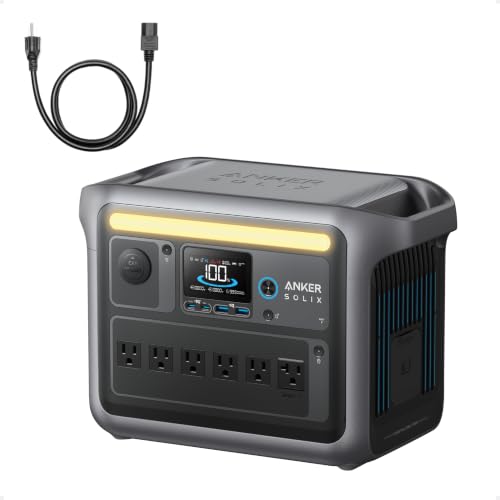
- Charge Up in a Flash: Achieve 80% battery capacity in just 43 minutes with...
- A Decade of Power: Trust in a decade-long journey with the Anker SOLIX...
- Powerhouse Versatility: The Anker SOLIX C1000's SurgePad technology...
Can I check the battery level without Bluetooth?
Yes, every Anker generator has a small LCD screen or LED indicators on the unit. You can see the battery percentage and estimated run time right there without your phone.
This is one of the most reliable features. I check it all the time when I am outside and my phone is tucked away in my bag.
What settings are locked behind the Bluetooth app?
The advanced settings like charge limits, input priority, and firmware updates are only available through the app. You cannot adjust these with the physical buttons on the unit.
This is why I always set these before I leave home. It saves me from being stuck with the wrong charging profile when I am miles away from cell service.
What is the best Anker generator for someone who needs to change settings often?
If you frequently switch between different charging modes, the Anker SOLIX C1000 Gen 2 is my top pick. Its physical buttons give you quick access to the most common settings without opening an app.
I know how annoying it is to dig through menus when you just want to change one thing. That is why what finally worked was a generator with real buttons for everyday adjustments. what finally worked
- 49 Min UltraFast Recharging: With upgraded HyperFlash tech, fully recharge...
- 2,000W Output via 10 Ports: Delivers 2,000W (3,000W peak) and 1,024Wh...
- Compact and Portable: Easily carry, store, and move from room to room, your...