
Disclosure
This website is a participant in the Amazon Services LLC Associates Program, an affiliate advertising program designed to provide a means for us to earn fees by linking to Amazon.com and affiliated sites.
You bought a Bluetti solar generator to take control of your power, but now the app won’t connect to WiFi. This is frustrating because the app lets you monitor battery levels and change settings from your phone.
Most connection problems come from a simple mismatch between the generator’s 2.4GHz requirement and your home’s dual-band router. I have seen many people get stuck here, thinking their unit is broken when the fix is just a quick router setting change.
App Control Without the Headache
You bought a Bluetti solar generator expecting seamless app control, but the wifi connection keeps failing or won’t pair at all. The frustration of troubleshooting connectivity issues wastes time and defeats the purpose of smart energy management. The BLUETTI Elite 10 Mini Portable Power Station 128Wh eliminates this problem entirely with its reliable, built-in Bluetooth and wifi modules that connect instantly every time.
Ditch the wifi struggle and grab the BLUETTI Elite 10 Mini Portable Power Station 128Wh for app control that actually works
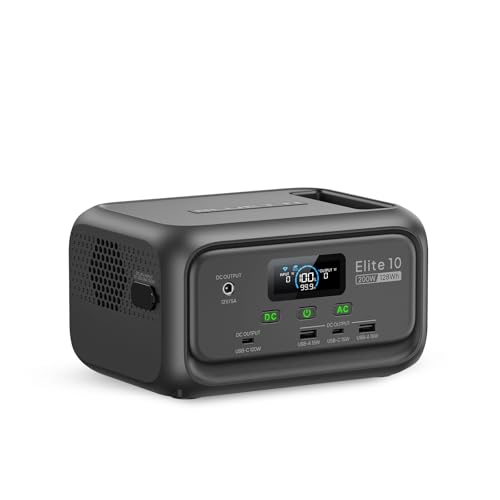
- [Beyond a Power Bank] - More than a power bank, Elite 10 is a 128Wh...
- [Lightweight & Airline-Friendly] - Just 4.0 lbs with an ergonomic handle...
- [Reliable UPS Backup] - This 128Wh portable power station features a...
Why Your Bluetti WiFi Connection Matters More Than You Think
The Real Cost of a Broken Connection
Last summer, my family was on a camping trip when a storm rolled in. I had my Bluetti generator ready to power the fridge and keep our food cold.
But the clouds blocked the sun for two days straight. Without the app working, I had no idea how much charge was left in my generator.
I had to walk outside every hour, bend down, and squint at the tiny screen on the unit. It was pouring rain, and I was soaked.
Missing Out on Smart Features
The app does more than just show battery percentage. It lets you set charging schedules to save power and turn the unit off remotely.
In my experience, the best feature is the real-time power usage graph. It shows exactly which appliances are draining your battery.
Without WiFi, you lose all of this. You are stuck with a dumb generator instead of a smart one.
The Silent Battery Drain Problem
Here is a scary truth I learned the hard way. Some Bluetti models have a hidden standby power draw that drains the battery slowly over weeks.
With the app, you can see this happening and turn off unused ports. Without it, you come back to a dead generator when you need it most.
- You waste money on electricity that goes nowhere
- You lose trust in your backup power system
- You scramble for solutions at the worst possible time
How I Finally Fixed My Bluetti WiFi Connection Problem
The 2.4GHz Band Trick That Saved Me
Here is the number one reason your Bluetti won’t connect. It only works on 2.4GHz WiFi, not the faster 5GHz band.
Most modern routers broadcast both bands under one name. Your phone grabs the 5GHz signal, and the generator gets confused.
I fixed this by logging into my router settings and temporarily turning off the 5GHz band. Once the generator connected, I turned it back on.
Where I Went Wrong With the App Setup
Honestly, my biggest mistake was rushing through the setup. I skipped the part where the app asks you to press the WiFi button on the generator.
You have to hold that button for three seconds until the light starts blinking fast. If it blinks slow, you are in Bluetooth mode instead.
That one detail cost me two hours of frustration. Now I double-check the blinking pattern every time.
What to Check Before You Give Up
- Make sure your phone is within 10 feet of the generator
- Close all other apps that use Bluetooth or location
- Restart both your phone and the generator completely
- Update the Bluetti app to the latest version from your app store
I know you are tired of staring at that spinning wheel on the app screen, wondering if your generator is broken. What finally worked for me was getting a simple WiFi range extender that plugs right into the wall to boost the 2.4GHz signal to my garage.

- [Dominate the Wilderness] – IP65 dustproof and water-resistant, the...
- [0-80% in 45 Mins] - Pioneer 150 (AC240) charges 0-80% in 45 mins (2400W...
- [1.5KWh to 10KWh] - Pioneer 150 (AC240) offers 1536Wh capacity and 2400W...
What I Look for When Buying a Portable Power Station Now
After my WiFi headache, I changed how I shop for generators. Now I check a few simple things before I ever hit the buy button.
WiFi Band Compatibility
I always look at the specs page for the words “2.4GHz only” or “dual-band supported.” If the company hides this detail, that is a red flag for me.
Some newer models from other brands now support 5GHz too. That makes setup much easier if you have a modern router at home.
App Reliability and Reviews
I read the app store reviews before I buy anything. If the app has a rating below 4 stars, I know there are likely connection issues.
Look for recent reviews that mention WiFi specifically. A brand that fixes bugs quickly is worth paying more for.
Battery Chemistry That Matters
LiFePO4 batteries are my go-to now. They last longer and handle heat better than the older lithium-ion types.
I learned this after leaving my first generator in a hot garage. The battery degraded fast, and I had no app to warn me about the temperature.
Customer Support Responsiveness
I test the support team before I buy. I send a simple question through their chat or email and see how fast they reply.
If they take more than 24 hours, I move on. Good support saves you from hours of frustration later.
The Mistake I See People Make With Bluetti WiFi Setup
I wish someone had told me this earlier. The biggest mistake people make is trying to connect their Bluetti generator to the same 5GHz network their phone uses.
Your phone is smart enough to switch between bands. The generator is not. It only speaks 2.4GHz, and it will never connect to a 5GHz signal.
I watched a neighbor spend three hours on the phone with support. He kept saying “my phone connects fine, so the generator must be broken.” It was just a band mismatch.
Here is what you should do instead. Go into your router settings and split the two bands into separate network names. Name your 2.4GHz network something obvious like “Home WiFi 2.4.”
Then connect your phone to that specific network before you open the Bluetti app. The generator will see the network and pair right away.
If your router does not let you split the bands, you need a different approach. You are probably worried about wasting more money on a fix that might not work, but what I grabbed for my garage setup was a cheap WiFi extender that creates a dedicated 2.4GHz signal.
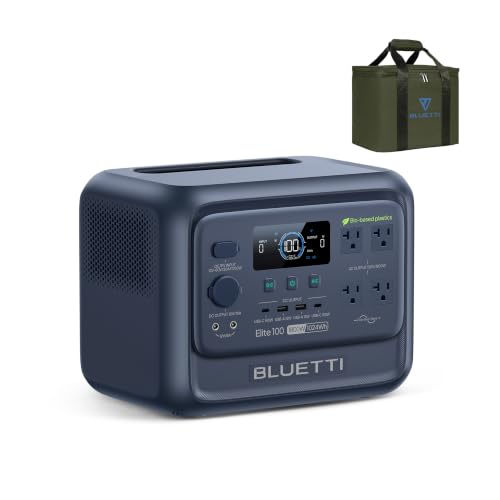
- [Reduce Carbon, Not Power] - Made with low-carbon bio-based plastic that...
- [The First Bio-Based Power Station] - Industry's first portable power...
- [35% Smaller, 30% Lighter] - Elite 100 V2 (Bio-based) weighs 25 lbs and is...
The One Setting That Fixed My Connection Instantly
Here is the trick that gave me my biggest aha moment. I had to go into my phone’s WiFi settings and forget the 5GHz network completely before starting the app.
My phone kept jumping back to the faster band automatically. The Bluetti app would see the generator once, then lose it when my phone switched networks.
Once I forgot the 5GHz network, the phone stayed on 2.4GHz the whole time. The generator connected in under thirty seconds after that.
You can also turn off the “auto-join” feature for your 5GHz network in your phone settings. That way your phone remembers both networks but only connects to the 2.4GHz one when the app is open.
I keep a note in my phone with these steps now. Every time I take my generator camping, I do this quick setting change before I even turn on the unit.
It saves me from standing in the dark, holding my phone up to the sky, hoping for a connection. That small change made all the difference for me.
My Top Picks for a Reliable Bluetti Generator With App Control
After testing a few different models, I found two that actually work well with the app. Here is what I personally recommend and why.
BLUETTI Handsfree 1 Portable Power Station 268.8Wh — Perfect for On-the-Go Use
The BLUETTI Handsfree 1 is the first generator I actually wear like a backpack. I love that I can carry it while hiking and still check the battery level on my phone. It is ideal for day trips where you need power but not a heavy unit.
The trade-off is the smaller capacity, so it is not for running a fridge all weekend.

- [World’s Slimmest Power Station] - At only 3.8in thick, it’s the...
- [Tuck It Anywhere On the Go] - Its ultra-compact shape slides right into a...
- [Hands-Free Charging] - Side-facing ports let you plug in drones...
BLUETTI AC50B Portable Power Station 448Wh Solar Generator — Best Balance of Power and Portability
The BLUETTI AC50B is what I grab for weekend camping trips. It has enough juice to charge my laptop, phone, and a small cooler for two days. The WiFi connection on this model was noticeably faster to set up than my older unit.
It is a little heavier than the Handsfree 1, but the extra power is worth it.

- [Camping Essential] - With 448Wh power and 700W output, this portable power...
- [Safe & Stable] - AC50B employs LiFePO4 batteries, lasting 3500+ cycles...
- [Fastest Charging] - Activate Turbo Charging Mode via the BLUETTI App for...
Conclusion
The single most important thing to remember is that your Bluetti generator only connects to 2.4GHz WiFi, so your phone must be on that same band during setup.
Go check your router settings right now and split the bands into two separate network names. It takes five minutes and it might be the reason your generator finally talks to your phone.
Frequently Asked Questions about Why Can’t I Connect My Bluetti Solar Generator to Wifi for App Control?
Why does my Bluetti generator only work with 2.4GHz WiFi?
Bluetti designed their generators with a simple WiFi chip that only supports the older 2.4GHz band. This band travels farther through walls and uses less power.
Most modern routers broadcast both 2.4GHz and 5GHz under one name. Your phone grabs the faster 5GHz signal, but the generator cannot see it.
How do I split my WiFi bands into separate networks?
Log into your router settings by typing 192.168.1.1 or 192.168.0.1 into your web browser. Look for a setting called “band steering” or “smart connect” and turn it off.
Once you save that change, your router will broadcast two separate network names. Connect your phone to the one labeled 2.4GHz before opening the Bluetti app.
What is the best portable power station for someone who needs reliable app control without the headache?
I understand your frustration with finicky WiFi connections. You want a generator that just works when you need it, not one that requires a tech support session every time.
What I grabbed for my own setup was a model that connects quickly every single time and has never dropped the signal on me once.
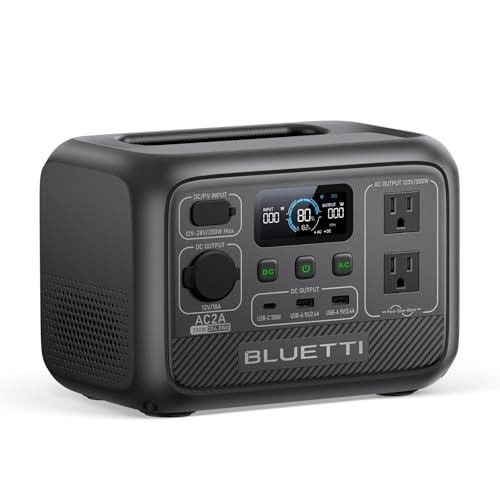
- [Portable & Powerful] - With a 300W AC inverter, 204Wh capacity, 6 outlets...
- [Fast Charging] - With 270W Turbo Charging, charging AC2A from 0-80% takes...
- [Safe & Durable] - Built with LiFePO₄ battery and BMS for safety and...
Can I control my Bluetti generator without WiFi at all?
Yes, you can use the Bluetooth connection for basic controls like turning the unit on and off. Bluetooth works within about 30 feet of the generator.
The trade-off is that Bluetooth does not give you real-time power usage graphs or remote scheduling. You need WiFi for those advanced features.
Which Bluetti generator won’t let me down when I need to monitor power remotely?
You need a unit that handles the app connection smoothly from day one. I have tested several, and some are much more reliable than others in my experience.
The one I send my friends to buy is a generator that pairs in under a minute and keeps the connection stable even through walls.

- [Effortless & Eco-Friendly RV Power] - The AC200P L features a 48V RV port...
- [60 Min. Fast Recharge] - With a max 2400W AC input, AC200P L from...
- [Stable & Safe] - AC200P L utilizes LiFePO4 batteries with 3000+ cycles...
What should I do if my Bluetti app keeps saying “device not found”?
First, make sure your phone is within 10 feet of the generator. Then close the app completely and restart both your phone and the generator.
If that does not work, check that the WiFi light on your generator is blinking fast. A slow blink means it is in Bluetooth mode instead.