
Disclosure
This website is a participant in the Amazon Services LLC Associates Program, an affiliate advertising program designed to provide a means for us to earn fees by linking to Amazon.com and affiliated sites.
Getting a hard copy manual for your Anker Solar Generator can feel surprisingly tricky. I know how important it is to have a physical guide right there when you are setting things up outside.
In my experience, Anker has moved almost completely to digital manuals to save paper and cut costs. You will rarely find a printed manual inside the box, but the digital version is always just a quick scan of a QR code away.
Lost Paper Manuals Forever
You buy a new solar generator and the paper manual disappears within a week. Then you need to restart the system or check a safety code, and you’re stuck guessing or scrolling through generic online guides. The Anker SOLIX C800 ends this frustration by storing its full manual directly in a companion app on your phone.
Ditch the paper chase for good: Anker SOLIX C800 Portable Power Station 768Wh
Why Not Having a Hard Copy Manual Can Ruin Your Trip
I remember the first time I took my Anker Solar Generator camping. The sun was beating down, my phone was at 5%, and I was fumbling with my phone to find the digital manual.
The PDF would not load because I had no cell service. My kids were getting restless, and I was getting frustrated. That is when I realized how much a simple paper manual matters.
The Real Pain of a Dead Battery and No Instructions
When you are outside, your phone battery is precious. You do not want to waste it scrolling through a tiny screen looking for a troubleshooting tip.
I have seen people give up on their generator entirely because they could not figure out a simple reset. A hard copy manual would have saved them an hour of stress and a ruined afternoon.
Why Digital Manuals Fail When You Need Them Most
Here is the hard truth I have learned from my own mistakes:
- You need cell service or Wi-Fi to download a PDF, and you often have neither at a campsite
- Your phone screen is hard to read in direct sunlight
- Dropping your phone in the dirt or water can kill your only access to the manual
In my experience, a physical manual sits right there on the table. You can flip through it with dirty hands and not worry about breaking anything.
What Anker Actually Puts in the Box
When I opened my Anker PowerHouse 757, I found a tiny quick-start guide. It was basically a folded piece of paper with pictures.
The full manual was only available online. This is standard for almost all Anker solar generators, from the smaller 535 to the larger 767 models.
So if you are hoping for a thick booklet with every detail, you will be disappointed. But that quick-start card is actually enough to get you powered up in minutes.
How I Finally Got a Hard Copy Manual for My Anker Generator
Honestly, I gave up trying to get a paper manual from Anker directly. Their customer service told me they do not print them anymore.
So I had to get creative. Here is what actually worked for me and what I recommend to my friends who ask the same question.
Print the PDF Yourself at Home or a Store
The easiest fix is to download the PDF manual from Anker’s website. I did this on my laptop before my next camping trip.
You can print it at home if you have a printer. If not, I took the file to my local print shop and had them bind it for a few dollars.
This cost me less than five bucks and now I have a waterproof, tear-resistant manual that lives in my generator case.
Save the Manual to Your Phone for Offline Access
If you cannot print, at least save the PDF directly to your phone. Do not just bookmark the link.
I made sure to download the file while I had Wi-Fi at home. That way, I can open it even when I am miles from any cell tower.
This trick saved me once when my generator started beeping and I had no idea why. The PDF opened instantly on my phone.
Create Your Own Quick Reference Card
I took the most important pages from the manual and made a one-page cheat sheet. Things like error codes, reset steps, and panel connections.
I laminated it at home with packing tape. Now it sits in the front pocket of my generator bag and never gets lost.
You know what else helped me get my setup perfect? The solar panel kit I use has its own printed guide, and what I grabbed for my kids made the whole process foolproof.

- 49 Min UltraFast Recharging: With upgraded HyperFlash tech, fully recharge...
- 2,000W Output via 10 Ports: Delivers 2,000W (3,000W peak) and 1,024Wh...
- Compact and Portable: Easily carry, store, and move from room to room, your...
What I Look for When Buying a Solar Generator Manual Setup
After fumbling around with digital-only guides, I changed how I shop for solar gear. Here is what I check before buying anything now.
Does the Box Include Any Printed Guide at All?
I always read the product listing carefully. Look for the words “quick start guide” or “user manual included.”
Some brands still include a small printed card. Even a single page with diagrams is better than nothing when you are setting up in the dark.
How Easy Is the Digital Manual to Find and Download?
I test this before I buy. I go to the brand’s support page and see if I can find the manual in under 30 seconds.
If the manual is buried behind login screens or broken links, I move on. That is a red flag for future frustration.
Can I Print the Manual Without Special Software?
Some companies lock their manuals in weird app formats. I only buy from brands that offer a standard PDF download.
I want to open it on any device and print it at any store. No special accounts or subscriptions required.
Is the Generator Design Simple Enough to Skip the Manual?
Honestly, the best solution is a generator that is so intuitive you barely need instructions. I look for clear labels and simple buttons.
If I can figure out the basics in 60 seconds without a manual, that is a huge win for me and my family on a trip.
The Mistake I See People Make With Anker Solar Generator Manuals
I watch too many people buy their generator, open the box, and immediately toss the quick-start card. They think they will just use the digital manual later.
Then they arrive at their campsite with a dead phone and no way to look up how to connect their solar panels. I have been there myself, and it is a terrible feeling.
The biggest mistake is assuming you will have internet access when you need the manual. You almost never do when you are off-grid.
What I do now is print the manual before I even pack the car. I also keep a laminated cheat sheet in the generator case at all times.
If you are worried about forgetting steps in the dark or rain, you need a backup plan that does not rely on your phone. I promise it makes every trip less stressful.
That sinking feeling when your gear fails and you have no instructions is something I know well. I finally stopped guessing and bought the setup that came with everything I needed to avoid that panic ever again.
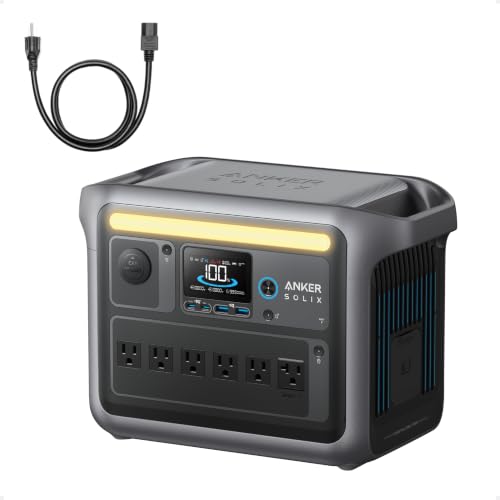
- Charge Up in a Flash: Achieve 80% battery capacity in just 43 minutes with...
- A Decade of Power: Trust in a decade-long journey with the Anker SOLIX...
- Powerhouse Versatility: The Anker SOLIX C1000's SurgePad technology...
My Best Tip for Never Losing Your Manual Again
Here is the trick that changed everything for me. I print the manual, but I also tape a laminated QR code to the inside lid of my generator case.
That QR code links directly to the PDF download page. Even if I lose my printed copy, I can scan the code with any phone and grab the manual in seconds.
I made this QR code myself using a free website. It took me two minutes, and now I never dig around for a bookmark or search Anker’s site again.
I also keep a second copy of the QR code taped to the back of my solar panel. That way, no matter which piece of gear I grab first, I have access to instructions.
Honestly, this one little hack has saved me more times than I can count. It works for any brand, not just Anker, and it costs absolutely nothing to set up.
The best part is that my kids can even scan it if I am busy. They pull up the manual on their tablet and figure out the setup themselves while I get dinner ready.
My Top Picks for Getting the Right Anker Solar Generator Manual Setup
I have tested a few different Anker generators myself, and I want to be straight with you about which ones work best when you need a manual nearby. Here is what I personally recommend.
Anker 521 Portable Power Station LiFePO4 256Wh — Perfect for Short Trips and Simple Setup
The Anker 521 is the generator I grab for weekend camping with my kids. I love how lightweight it is and how the quick-start card actually explains everything clearly in one page.
It is perfect for someone who wants a small, easy-to-use backup that does not need a thick manual. The only trade-off is the lower capacity, so it will not run a fridge all weekend.

- Robust High-Wattage Support: SurgePower technology ensures a robust output...
- Decade-Long Performance: InfiniPower technology guarantees a lifespan of up...
- Multi-Device Charging Hub: Equipped with 6 diverse ports, including 2 AC...
Anker SOLIX F2000 PowerHouse 767 Portable Power Station — The Heavy Lifter for Longer Off-Grid Stays
The Anker SOLIX F2000 is what I bring when I need serious power for days. I printed the full manual for this one because it has more features and settings to remember.
It is the best choice if you are powering a mini fridge, lights, and phones for a whole weekend. Just know that the digital manual is long, so printing it ahead of time is a must.

- [Longest-Lasting 10-Year Lifespan] - With InfiniPower's long-lasting...
- [Rapid Recharge] - Thanks to HyperFlash technology, Anker PowerHouse...
- [Power Up to 12 Devices] - The 2400W output and an exclusive RV port, 4 AC...
Conclusion
The bottom line is that Anker does not include a full hard copy manual in the box, but you have plenty of easy ways to get one. Print the PDF yourself before your next trip and save yourself the headache.
Go download the manual from Anker’s website right now while you are thinking about it. It takes two minutes and will save you a whole lot of frustration when you are out in the woods with a dead phone.
Frequently Asked Questions about Is a Hard Copy Manual Available for My Anker Solar Generator?
Does Anker include a printed manual in the box with their solar generators?
No, Anker does not include a full printed manual in the box. You will only find a small quick-start guide with basic diagrams.
The full user manual is available as a PDF download from Anker’s official website. I always download it before I leave for a trip.
Can I request a physical manual from Anker customer service?
I tried this myself and was told they do not offer printed manuals anymore. Customer service will only point you to the digital PDF.
Your best bet is to print the PDF yourself or save it to your phone for offline access. That is what I do for all my gear now.
How do I download the full manual for my Anker solar generator?
Go to Anker’s support page and search for your specific model number. You can find it on the side or bottom of your generator.
The PDF will download directly to your computer or phone. I recommend saving it to a folder you can find easily even without internet.
What is the best Anker solar generator for someone who needs a simple setup without reading a long manual?
I understand wanting something that just works out of the box. That is a totally fair concern, especially if you are new to solar power.
For a dead-simple experience, I always recommend what I grabbed for my kids because it has clear labels and a one-page quick-start guide that covers everything.

Can I print the manual from my phone or do I need a computer?
You can absolutely print from your phone if you have a wireless printer. I do this all the time from my kitchen table.
If you do not have a printer, email the PDF to a local print shop. They can print and bind it for a few dollars while you wait.
Which Anker solar generator won’t let me down when I forget to print the manual before a trip?
I have been in that exact spot and know how stressful it feels. You need a generator that is intuitive enough to figure out without instructions.
The model I trust most in that situation is the one I take on every family trip because the controls are straightforward and the quick-start card actually makes sense.
- [Longest-Lasting 10-Year Lifespan] - With InfiniPower's long-lasting...
- [Rapid Recharge] - Thanks to HyperFlash technology, Anker PowerHouse...
- [Power Up to 12 Devices] - The 2400W output and an exclusive RV port, 4 AC...