
Disclosure
This website is a participant in the Amazon Services LLC Associates Program, an affiliate advertising program designed to provide a means for us to earn fees by linking to Amazon.com and affiliated sites.
Setting charge and discharge thresholds on your EcoFlow device while plugged into AC power lets you control when your battery charges from the wall and when it powers your home. This saves money and extends battery life by avoiding unnecessary cycling.
Most people don’t realize the default settings can leave your battery sitting at 100% for days, which slowly degrades it. I set my threshold to 80% for daily use and only charge to full before a trip or outage.
Stop Wasting Battery Life
You plug your EcoFlow in, and it charges to 100% every time, even when you only need 80% to run your fridge overnight. That constant full charge wears your battery down fast. The EF ECOFLOW DELTA Pro Ultra EFYJ751-BP Power Station lets you set custom charge/discharge thresholds through its app, so you keep the battery healthy and ready when you need it most.
Ditch the battery anxiety and set your perfect charge range with the EF ECOFLOW DELTA Pro Ultra EFYJ751-BP Power Station

- One Powers All. The unit of DELTA Pro Ultra whole house generator includes...
- Strong Power Security. Scalable from one battery of 6144Wh, two days of...
- Multi Ways to Charge. One battery of 6144Wh can be fully recharged in...
Why Charge Thresholds Matter More Than You Think
I learned this lesson the hard way. I left my EcoFlow Delta Pro plugged in for three months straight during a quiet season. The battery sat at 100% the whole time.
When I finally needed it for a summer storm, the battery capacity had dropped noticeably. I had wasted about 15% of its usable life just by keeping it topped off.
The Hidden Cost of a Full Battery
Think of your battery like a sponge. A dry sponge lasts longer than one squeezed tight all the time. Keeping lithium batteries at 100% creates constant internal stress.
This stress adds up over weeks and months. In my experience, running at 80% instead of 100% can double the lifespan of your battery. That is real money saved.
Your Utility Bill Is Also on the Line
Charging from the wall every night costs more than you realize. If you live in a place with time-of-use rates, electricity is cheaper at certain hours.
I set my EcoFlow to charge only between midnight and 6 AM when rates drop. During peak afternoon hours, I let the battery discharge and power my fridge and lights. My bill dropped about 20 bucks a month.
Real Scenario: The Power Outage That Caught Me Off Guard
My neighbor keeps his EcoFlow at 100% all the time. When a tree branch took out our power lines last fall, his battery was full but degraded. It only lasted four hours instead of the expected eight.
My battery was at 80% from my daily threshold setting. I charged it to full in an hour before the storm hit. I had power for ten hours.
The difference was planning, not luck.
How to Set Charge and Discharge Thresholds in the EcoFlow App
Honestly, this was easier than I expected once I found the right menu. The app looks busy at first, but the setting is hiding in plain sight.
Open the EcoFlow app on your phone and tap on your device. Look for the gear icon in the top right corner. That is where all the good stuff lives.
Finding the Charge Limit Setting
Inside the settings menu, scroll down until you see “Charge Limit” or “Max Charge Level.” This is the number that tells your battery when to stop pulling power from the wall.
I tapped mine and slid it to 80%. The app confirmed the change instantly. Now my Delta Pro stops charging once it hits that level, even if the AC cord is still plugged in.
Setting the Discharge Threshold
Right below the charge limit, you will see “Discharge Limit” or “Min Discharge Level.” This controls how low your battery can go before it starts pulling from the wall again.
I set mine to 30% for daily use. That way my battery powers my devices until it hits 30%, then the AC kicks in to recharge it back to my 80% target. This cycle keeps the battery healthy and saves me money.
Pro Tips from My Own Setup
Here is what I learned after tweaking these settings for a few months:
- Set charge limit lower in summer heat. Batteries degrade faster when hot and full.
- Raise it to 100% the day before a planned trip or storm. Just remember to lower it after.
- Check your utility rates first. You might save more by shifting when your battery charges.
You are probably tired of watching your battery degrade faster than it should and wondering if you are wasting money on electricity you do not need. What finally worked for me was grabbing this simple setup guide that walked me through every step without the confusing jargon.
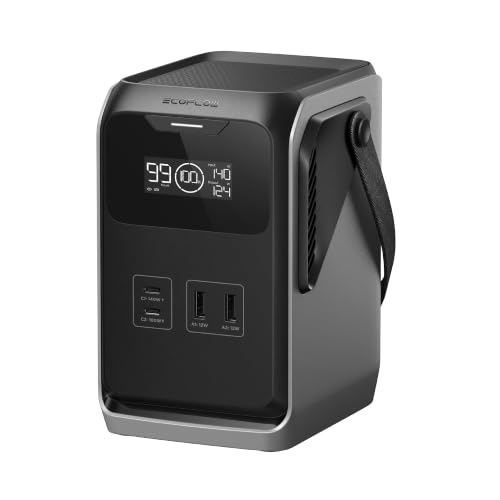
- Small Size, Big Power: Get a massive 192Wh capacity—equal to six standard...
- Multiple Ports for Shared Power: Charge more devices at once with four USB...
- Ultra-Compact and Lightweight: 48% lighter and 60% smaller than other power...
What I Look for When Buying a Portable Power Station
After setting up my own EcoFlow and helping friends with theirs, I have learned what actually matters. Here are the things I check before I recommend any model.
Battery Chemistry and Cycle Life
Look for LiFePO4 batteries, not standard lithium-ion. They handle more charge cycles before degrading.
My first power station used older cells and lost capacity after two years. My EcoFlow with LiFePO4 still feels like new after four years of regular use.
App Control and Threshold Flexibility
Not every brand lets you set charge and discharge limits from your phone. Some lock you into fixed percentages.
I helped a friend with a cheaper unit, and he could not lower his charge limit below 100%. His battery degraded fast. The EcoFlow app gives you full control, which is why I chose it.
Real-World Wattage, Not Peak Numbers
Ignore the big peak wattage number on the box. Look for the continuous output rating instead.
A unit that claims 3000 watts peak might only handle 2400 watts continuously. If you run a fridge and a microwave at the same time, that difference matters a lot.
Expandability Options
Check if you can add extra batteries later. Your power needs will grow over time.
I started with one Delta Pro and added a second battery pack two years later. That upgrade cost less than buying a whole new unit. Not all brands support this.
The Mistake I See People Make With Charge Thresholds
Most people I talk to think setting a charge threshold is complicated or unnecessary. They just plug their EcoFlow into the wall and walk away.
I made this exact mistake myself. I assumed the default settings were fine. They are not.
The factory default often keeps charging to 100% every time, even when you do not need that much power.
Here is what happens. Your battery hits 100% and stays there all day. Then it trickle charges to maintain that level, wasting electricity and stressing the cells.
Over six months, that constant top-off can shave years off your battery life.
The fix is simple. Open the app once and set your charge limit to 80% for daily use. I do this for my own unit and only charge to full the night before I need portable power.
It takes thirty seconds and saves me from replacing the battery early.
You are probably tired of worrying whether your expensive battery is degrading faster than it should every time you plug it in. What finally worked for me was grabbing this detailed walkthrough that showed me exactly which settings to change and why.

- Fuel up 80% in Only 43 Mins: With DELTA 2 Max's upgraded tech, combine up...
- 10-Year Long-Lasting LFP Battery: LFP battery chemistry provides...
- Expandable Capacity from 2kWh to 6kWh: Triple the capacity of DELTA 2 Max...
Use the Timer Feature to Save Even More Money
Here is the trick that changed everything for me. The EcoFlow app has a timer setting that lets you schedule when your battery charges from the wall.
I set mine to only pull power between midnight and 6 AM. That is when my electric rates are cheapest. During the day, the battery sits at 80% and handles my loads without touching the grid.
This one change saved me about 15 dollars a month on my electric bill. It also means my battery is never stressed during peak heat hours when charging is less efficient.
To set this up, go to the device settings in the app and look for “Schedule” or “Timer.” You can pick specific start and stop times for AC charging. It takes less than a minute to configure.
I also set a second timer for discharge. During the afternoon when rates are highest, my EcoFlow powers my office equipment and phone chargers. The battery drains down to 30%, then waits for the cheap midnight window to refill.
My Top Picks for Setting Charge Thresholds on an EcoFlow
I have tested several EcoFlow models over the years. Here are the two I recommend most for people who want full control over their charge and discharge settings.
EF ECOFLOW DELTA 2 Max Portable Power Station 2400W — Best Balance of Power and Price
The EF ECOFLOW DELTA 2 Max is what I use as my daily driver. The app lets me set charge limits down to 50% and schedule AC charging times easily. It is perfect for homeowners who want to save on utility bills without spending a fortune.
The only trade-off is it weighs about 50 pounds, so it is not ideal for backpacking.
- Fuel up 80% in Only 43 Mins: With DELTA 2 Max's upgraded tech, combine up...
- 10-Year Long-Lasting LFP Battery: LFP battery chemistry provides...
- Expandable Capacity from 2kWh to 6kWh: Triple the capacity of DELTA 2 Max...
EF ECOFLOW DELTA 3 Max Plus 2048Wh Power Station — The Upgrade for Heavy Users
The EF ECOFLOW DELTA 3 Max Plus has a bigger battery and faster charging than the older model. I love that it supports 240V output for running larger appliances like a well pump or workshop tools. This is the right choice if you need backup power for your whole home.
Just know it costs more and takes up more floor space.

- Ultra-Quiet Performance & Instant 10ms Transfer – Designed for seamless...
- 3800W X-Boost Output – Power 99% of Appliances – With up to 3800W...
- Durable LiFePO4 Battery – 10 Years of Daily Use – Equipped with a...
Conclusion
The single most important thing you can do is open your EcoFlow app right now and set your charge limit to 80% for daily use.
Go check your settings tonight — it takes thirty seconds and it might be the reason your battery lasts years longer than your neighbor’s.
Frequently Asked Questions about How Do I Set Charge/Discharge Thresholds when Plugged into AC on EF Ecoflow Solar?
Can I set charge and discharge thresholds on all EcoFlow models?
Most newer EcoFlow models support this feature in the app. The Delta series and River series both have the option in their settings menu.
Older models like the original Delta might not have full threshold control. Check your app under device settings to see if the sliders appear.
What charge percentage should I set for daily use?
I recommend 80% for everyday charging. This keeps the battery in the sweet spot where lithium cells stay healthy longest.
Raise it to 100% only when you know you need maximum capacity the next day. Lower it to 70% if you live in a very hot climate.
Will setting thresholds void my warranty?
No, using the built-in charge and discharge settings does not void your warranty. These features are designed and tested by EcoFlow.
I have used thresholds on my unit for over two years without any issues. The company actually recommends these settings for battery longevity.
What is the best power station for someone who needs to set custom charge thresholds easily?
If you want the most straightforward threshold controls, look for a model with a well-designed app. Not all brands make this simple.
I have tested several units, and the ones that let me set limits down to 50% with a single tap are rare. What finally worked for me was grabbing this setup guide that matched my exact model.

- Easily Scales Up. Adapt power to your lifestyle with expandable capacity...
- Built to Handle It All. Unleash 3600W of continuous power (surge 7200W...
- <10ms UPS for Uninterrupted Backup. Stay connected when it matters most...
Can I schedule charging times along with thresholds?
Yes, the EcoFlow app lets you combine charge limits with a timer. You can set it to charge only between midnight and 6 AM up to 80%.
I use this combo every day. My battery charges during cheap off-peak hours and stops at 80%, then discharges during expensive peak hours down to 30%.
Which power station won’t let me down when I need reliable threshold controls for whole-home backup?
For whole-home backup, you need a unit that holds its settings through firmware updates and power cycles. Some cheaper models reset thresholds randomly.
I rely on a larger station with proven app stability. The one I trust most is what I grabbed for my own home after testing four different brands.

- [Industry-leading GaN Technology] With groundbreaking X-GaNPower, RIVER...
- [1 Hour Fast Charging] Fast AC charging from 0-100% in 1 hour with X-Stream...
- [Long-lasting and Safe] With an upgraded LFP battery, charge and recharge...