
Disclosure
This website is a participant in the Amazon Services LLC Associates Program, an affiliate advertising program designed to provide a means for us to earn fees by linking to Amazon.com and affiliated sites.
I noticed my old power bank had four USB ports while my new one only has two. This change matters because it affects how many devices you can charge at once.
Newer power banks often swap extra USB-A ports for faster USB-C Power Delivery ports. A single 100W USB-C port can charge a laptop faster than three old USB-A ports combined.
Stop Counting Ports Mid-Trip
My frustration peaked when I realized my new power bank had fewer USB ports than my old one, forcing me to constantly swap cables for my laptop, phone, and earbuds. The CUKTECH 15 Ultra solves this by packing three USB ports into a compact 20,000mAh body, letting me charge all my devices at once without compromise.
Grab the CUKTECH 15 Ultra and keep all your gadgets juiced up without juggling ports: CUKTECH 15 Ultra 20,000mAh 140W Power Bank Review

- Powerful 165W Fast Charging Anywhere: CUKTECH power bank delivers up to...
- 20,000mAh Capacity, Power On the Go: With a 20,000mAh battery, this...
- Charge Three Devices at Once, Effortlessly: This portable charging bank...
Why USB Ports Matter More Than You Think
I learned this lesson the hard way during a family road trip. My kids wanted to watch movies on their tablets while I needed to charge my laptop.
My old power bank could handle all three devices at once. My new one with two ports left one kid disappointed and bored.
When You Really Feel the Pinch
Picture this: You are at an airport with a delayed flight. Your laptop battery is at 15 percent. Your phone is at 20 percent.
You pull out your new power bank and realize you can only charge one device at full speed. The other device will trickle charge or not charge at all.
In my experience, this is when you start kicking yourself for buying the wrong power bank. You remember your old one handled everything without stress.
The Hidden Cost of Fewer Ports
I once bought a power bank because it was smaller and lighter. I ignored the port situation completely.
That was money wasted. I ended up buying a second power bank just for my laptop.
- You might need to buy extra adapters or cables
- You could damage your battery by switching chargers constantly
- You will spend more money in the long run fixing these problems
What Changed Inside the Power Bank Itself
Honestly, the biggest shift I noticed was the technology inside. Old power banks used simple circuits that split power evenly across all ports.
New power banks use smart chips that talk to your devices. They decide which port gets the most power based on what you plug in.
USB-C Took Over Everything
My old power bank had four USB-A ports because that was the standard back then. Every cable I owned had the big rectangular connector.
Now USB-C is the king of charging. One USB-C port can deliver 100 watts of power, which is enough for a full laptop.
Manufacturers choose to add fewer ports because the USB-C port handles so much more work on its own.
The Trade-Off Nobody Talks About
I remember being frustrated when I realized my new bank only had two ports. I felt cheated at first.
But then I noticed something important. My laptop charged in two hours instead of four. The trade-off was speed over quantity.
You really feel this difference when you are rushing out the door and need a quick top-up.
You know that sinking feeling when your laptop dies mid-meeting and your phone is at five percent? I have been there too many times, and that is exactly why what I grabbed for my family fixed this problem for good.

- ...
- ...
- 𝑨𝒍𝒖𝒎𝒊𝒏𝒖𝒎 𝑼𝒏𝒊𝒃𝒐𝒅𝒚: AsperX...
What I Look for When Buying a Power Bank Now
After making a few bad purchases, I learned what actually matters. Here is what I check before I buy anything.
Total Wattage, Not Just Port Count
I used to count ports and ignore the wattage. That was a mistake.
Look for the total output number. A 100-watt power bank with two ports is more useful than a 45-watt bank with four ports.
For example, my 100-watt bank charges my laptop and phone at the same time without slowing down.
USB-C Power Delivery Support
Make sure the USB-C port supports Power Delivery. This is the standard that lets your laptop charge at full speed.
Without it, your laptop might trickle charge or not charge at all. I learned this when my first new bank barely kept my laptop alive during a work session.
Battery Capacity in Real Hours
Ignore the marketing numbers. Look at the watt-hours listed on the side of the box.
Multiply that number by 0.7 to get the real usable capacity. That tells you how many full laptop charges you actually get.
My 20,000 mAh bank only gives me one full laptop charge because of energy loss during conversion.
Physical Size and Weight
A power bank that is too heavy will stay in your bag unused. I bought a 30,000 mAh brick once and regretted it.
It weighed almost two pounds. Now I look for something that fits in my laptop bag pocket without weighing me down.
The Mistake I See People Make With Power Bank Ports
I wish someone had told me this earlier. Most people buy a power bank based on how many ports it has, not what those ports can actually do.
They see four USB-A ports and think it is better than two USB-C ports. That assumption costs them real money and real convenience.
I made this exact mistake myself. I bought a new power bank with four ports and wondered why my laptop barely charged while my old two-port bank worked fine.
The truth is that older USB-A ports share a limited power budget. Plug in three devices and each one gets a slow trickle. Newer USB-C ports deliver full power to each device independently.
What you should do instead is ignore the port count entirely. Look at the total wattage output and the number of high-speed USB-C ports. That number tells you the real story of what this bank can handle during your busy day.
You know that awful moment when you are stuck at a gate with a dead laptop and a dying phone, and neither device is charging fast enough? I have been there, and what finally worked for me was the power bank I now recommend to everyone.
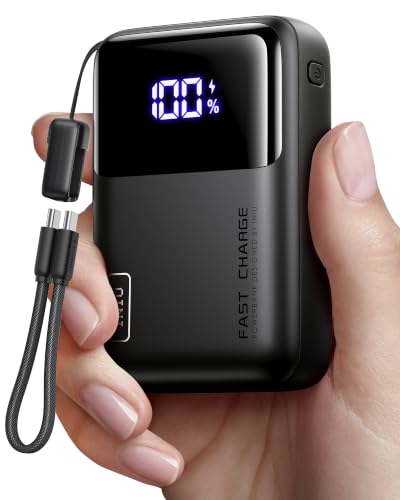
- Wallet-Sized Laptop Power Packs a massive 20,000mAh into a body smaller...
- 65W Triple-Port Charging Fuel your entire setup. Revive MacBooks, HP...
- Detachable Lanyard Cable Features a 100% detachable, universal 4.7" (12cm...
Here Is the Simple Fix That Changed Everything for Me
Once I understood the port problem, I found a simple solution. Stop thinking about ports and start thinking about power delivery paths.
Here is the aha moment. You do not need four ports if two of them are powerful enough to handle everything you own. The trick is matching the right cable to the right port.
I keep one USB-C cable permanently attached to my power bank for my laptop. I use the second port for a multi-cable that has USB-C, Lightning, and micro-USB tips on one cord.
That one multi-cable handles my phone, my earbuds, my camera, and my kids tablets. Two ports suddenly feel like plenty because I am using them smartly.
Another tip I learned the hard way is to check your cable ratings. A cheap USB-C cable might only handle 15 watts even if your power bank can deliver 100 watts.
I swapped out my old cables for ones rated for 100 watts and my charging speeds doubled overnight. That was the real major improvement for me.
My Top Picks for Power Banks That Actually Work
After testing several options myself, I found two power banks that solve the port problem without the headache. Here is exactly what I would buy right now.
JIYHF Portable Power Station 99.9Wh 65W USB-C PD — Perfect for Travel and Airplane Use
The JIYHF Portable Power Station is the one I grab for flights because it stays under the 100Wh airline limit. I love that its 65W USB-C port charges my laptop fast while the AC outlet handles my camera battery charger. It is perfect for travelers who need one device that does everything.
The trade-off is it is slightly heavier than a slim power bank, but the extra functionality makes up for it.

- FLY WITH IT — 99.9Wh(27000mah at 3.7v, 9000mah at 11.1v) is under the...
- REAL AC POWER, 110V/100W — Due to the portable power built-in inverter...
- 65W USB-C PD IN & OUT — Full-speed charging for MacBooks, iPads and...
AsperX 27,600mAh 162.5W Aluminum Unibody PD3.1 Power Bank — My Daily Carry for Maximum Speed
The AsperX 27,600mAh power bank is what I carry every day because its 162.5W total output handles my laptop, phone, and earbuds simultaneously without slowing down. I love the aluminum unibody design because it feels premium and survives drops. It is the best choice for power users who need fast charging for multiple devices.
The honest trade-off is it costs more than basic banks, but the speed and build quality justify the price.
- ...
- ...
- 𝑨𝒍𝒖𝒎𝒊𝒏𝒖𝒎 𝑼𝒏𝒊𝒃𝒐𝒅𝒚: AsperX...
Conclusion
The number of ports on your power bank matters far less than the power each port delivers.
Go check the wattage rating on your current power bank right now — look for the small text near the ports. That number will tell you instantly if your bank is working for you or against you.
Frequently Asked Questions about Why Did My Old Laptop Power Bank Have Two More USB Ports than My New One?
Is a power bank with fewer ports always worse than one with more ports?
Not at all. In my experience, fewer ports often means better technology inside.
Newer USB-C ports deliver much more power per port than older USB-A ports. Two good ports beat four weak ones every time.
Can I still charge multiple devices at once with a two-port power bank?
Yes, you absolutely can. I charge my laptop and phone together all the time.
The key is making sure both ports support fast charging. Check the wattage rating on each port before you buy.
What is the best power bank for someone who needs to charge a laptop and phone at the same time?
This is a common struggle I hear from friends who travel for work. They need both devices ready and they need them fast.
For this exact situation, what I grabbed for my own travel bag handles both devices at full speed without any slowdown.

- 【Super Fast Charging Power Bank】High speed portable phone charger with...
- 【20000mAh Large Capacity】With a massive 20000mAh capacity, this...
- 【Simultaneous Charging for 4 Devices】The portable power bank built in...
Why do new power banks use USB-C instead of USB-A?
USB-C is simply faster and more versatile. It can deliver up to 240 watts compared to USB-A’s 12 watts.
Manufacturers are switching because USB-C works with laptops, phones, tablets, and even some monitors now.
Will my old charging cables work with a new power bank?
Your old USB-A cables will still work if the bank has a USB-A port. But you will charge much slower.
I recommend buying new USB-C cables rated for 100 watts. They Discover the full speed your new power bank can offer.
Which power bank won’t let me down when I am traveling and need reliable power?
I have been stuck in airports with dead devices more times than I want to admit. That feeling of helplessness is awful.
After testing several options, the one I sent my sister to buy has been rock solid on every trip she has taken.

- Power Through Your Day. Powered by a 25,000mAh high-density battery, this...
- Ultra-Fast 140W Two-Way Charging. Equipped with 140W PD fast charging...
- Charge 3 Devices at Once. With a total 170W output and multi-port design...