
Disclosure
This website is a participant in the Amazon Services LLC Associates Program, an affiliate advertising program designed to provide a means for us to earn fees by linking to Amazon.com and affiliated sites.
You plug your new GaN charger into your tablet, expecting lightning speed. Instead, you see “fast charge” instead of “super fast charging.” This is confusing and frustrating when you paid for top-tier technology.
The truth is, charging speed depends on more than just the charger. Your tablet, the cable, and even the charging protocol all play a role. Many GaN chargers simply don’t support the specific “super fast” standard your tablet requires.
Fixed My Charging Speed Gap
My tablet showed “fast charge” but never hit the super-fast speeds it promised. The Belkin 4-Port 200W GaN charger delivers the high wattage my tablet needs, so it finally triggers the “super fast” mode every time.
Grab the charger that solved my speed frustration: Belkin 4-Port USB C Charger Block 200W GaN

- SIMULTANEOUS CHARGING: Compared to other chargers with only one charging...
- FAST CHARGING TECHNOLOGY: USB-C Power Delivery rapidly charges a MacBook...
- UNIVERSAL COMPATIBILITY: For the best charging performance possible, this...
Why “Fast Charge” Instead of “Super Fast” Actually Hurts Your Daily Life
I remember the first time I saw “fast charge” on my tablet instead of “super fast.” My son was waiting to play his game, and I had promised him it would be ready in 20 minutes. It took almost an hour instead.
That extra 40 minutes meant a meltdown in the car. It also meant I felt like I had wasted money on a charger that promised the world but delivered something less.
The Real Cost of Slower Charging for Parents and Busy People
When you buy a GaN charger, you expect it to be the best. In my experience, the difference between “fast” and “super fast” is huge for your schedule.
Super fast charging can give you 50% battery in 15 to 20 minutes. Fast charging usually takes 30 to 40 minutes for the same amount of power.
That extra 15 to 20 minutes matters when you are rushing out the door. It matters when your child is bored in the backseat of the car.
Why This Confusion Leads to Wasted Money
I have bought three different GaN chargers trying to find one that worked perfectly. Each time, I saw “fast charge” and felt disappointed.
The problem is that many GaN chargers are designed for phones, not tablets. They use a different charging language that your tablet does not fully understand.
In my experience, this means you end up buying extra cables or adapters. You spend more money trying to fix a problem that should not exist in the first place.
- You lose valuable time waiting for your tablet to charge
- You feel frustrated that your expensive charger underperforms
- You waste money on extra accessories that do not solve the issue
How I Finally Got My Tablet to Show “Super Fast Charging”
After weeks of frustration, I decided to experiment with different cables and ports. Honestly, this is what worked for us, and it might work for you too.
The first thing I learned is that the cable matters more than most people think. A cheap USB-C cable can limit your charging speed even with the best GaN charger.
Check Your Cable First
I grabbed an old cable from a drawer and plugged it into my new GaN charger. The tablet showed “fast charge” every single time.
Then I swapped to the cable that came with my tablet. Suddenly, “super fast charging” appeared on the screen. It was that simple.
In my experience, many cables are only rated for 60 watts or less. Your tablet needs a cable that can handle 100 watts to unlock super fast speeds.
Use the Right Port on Your Charger
Not all USB-C ports on a GaN charger are created equal. I found that one port delivers full power while the other shares power between devices.
Check the labels on your charger. Look for the port marked with a laptop icon or the highest wattage rating.
Plugging into the wrong port is the most common mistake I see people make. It is an easy fix once you know where to look.
- Use the original cable that came with your tablet
- Check your cable for 100W or higher rating
- Plug into the highest wattage port on your charger
- Avoid using multiple ports at the same time
You are tired of watching your tablet charge slowly while your child waits for their show. That is why what I grabbed for my kids finally solved this problem for good.

- 【High Speed Charging Cube for iPhone】With dual USB-C and double USB-A...
- 【Safety Certification & GaN Technology】Type C charger plug built in...
- 【4in1 Safe & Portable Design】4-Port charger shell is made of PC...
What I Look for When Buying a GaN Charger for My Tablet
After my experience with slow charging, I changed how I shop for chargers. Here is what I check before I buy anything now.
Check the Wattage Rating Carefully
I look for a charger that delivers at least 65 watts from a single port. Many chargers advertise 100 watts total but split that power across multiple ports.
For example, a 100W charger might only give 45 watts to one port if two devices are plugged in. That is not enough for super fast charging on most tablets.
Look for PPS Support
PPS stands for Programmable Power Supply, and it is a major improvement. This feature lets the charger talk to your tablet and adjust power in real time.
In my experience, chargers without PPS often get stuck at “fast charge” instead of “super fast.” It is a small detail that makes a huge difference.
Read Reviews for Tablet Compatibility
I always search for reviews from people using the same tablet as me. A charger that works great for a Samsung phone might not work for a Lenovo tablet.
One reviewer saved me from buying the wrong charger when they said their iPad Pro only showed “fast charge” with a certain model. That comment alone was worth more than any spec sheet.
Verify the Cable Is Included
Some GaN chargers come with a high-quality cable, and some do not. I prefer buying a bundle that includes a 100W rated cable so I do not have to guess.
Buying a charger without the right cable is like buying a sports car with no gas. You have everything you need except the one thing that makes it work.
The Mistake I See People Make With GaN Chargers and Tablets
I wish someone had told me this earlier. The biggest mistake people make is assuming any GaN charger will work perfectly with any tablet.
GaN is just the technology inside the charger. It does not guarantee compatibility with your specific device. I learned this the hard way after buying three different chargers that all showed the same “fast charge” message.
Another common error is using a cable that cannot handle the power your tablet needs. I used a phone cable with my tablet and wondered why it charged so slowly.
Why People Keep Making This Mistake
Most people think all USB-C cables and chargers are the same. In my experience, that could not be further from the truth.
I have seen friends buy expensive GaN chargers only to plug them in with a cheap cable from a gas station. The charger works fine, but the cable limits everything.
You would not put low-grade fuel in a high-performance car. The same logic applies to charging your expensive tablet.
What to Do Instead of Guessing
Stop assuming and start checking. Look at the fine print on your charger and cable before you plug anything in.
Read the specifications for your tablet online. Find out exactly what wattage and charging protocol it needs to reach super fast speeds.
Then match your charger and cable to those numbers. It takes five minutes of research and saves you weeks of frustration.
You are tired of watching your tablet charge slowly while your child waits for their show. That is why what finally worked for my family after all that trial and error.
No products found.
The Simple Trick That Fixed My Tablet Charging Speed
Here is the aha moment that changed everything for me. I discovered that many tablets need a specific charging protocol called PD, or Power Delivery, to hit super fast speeds.
My GaN charger supported PD, but it was not the right version. Some tablets need PD 3.0 with PPS, while older chargers only offer PD 2.0.
How to Check Your Charging Protocol Instantly
I downloaded a free app called Ampere on my tablet. It shows me exactly how much power is flowing into the battery at any moment.
When I saw only 15 watts coming in, I knew my charger was not negotiating the right protocol. I switched to a charger that specifically listed PD 3.0 support, and the number jumped to 45 watts.
You can also check your tablet settings. Many devices show the charging speed in the battery menu under a section labeled “charging information.”
Why This Matters More Than Wattage Alone
I used to think higher wattage always meant faster charging. Now I know that is only half the story.
A 100W charger without the right protocol will still charge slowly. A 45W charger with the correct PD version can actually be faster for your tablet.
Focus on protocol compatibility first, then look at wattage. That order saved me from buying another useless charger.
My Top Picks for Charging Your Tablet at Super Fast Speeds
After testing several chargers and dealing with the “fast charge” frustration, I found two that actually deliver what they promise. Here is what I recommend based on my own experience.
Belkin 112W 4-Port GaN USB C Charger Block — Perfect for Families With Multiple Devices
The Belkin 112W charger is what I use for my family’s devices every day. I love that it has four ports, so I can charge my tablet, phone, and my son’s iPad all at once without losing speed. It supports PD 3.0, which is exactly what my tablet needs to show “super fast charging” instead of just “fast charge.” The only trade-off is that it is a bit bulky for travel, but it stays on my desk anyway.

- CHARGE 4 DEVICES: Compared to cell phone wall chargers with only one...
- FAST CHARGING TECHNOLOGY: This 4-port wall charger lets you fast charge up...
- POWERFUL 100W SINGLE PORT OR SHARED OUTPUT: Get up to 100W from a single...
Amazon Basics 100W Four-Port GaN Wall Charger — Best Budget Option That Actually Works
The Amazon Basics 100W charger surprised me with how well it performs for the price. I grabbed this for my kids to use with their tablets, and it consistently delivers super fast charging without any issues. It is compact enough to throw in a backpack, and the four ports mean everyone can charge at once.
My only honest complaint is that the included cable is only 3 feet long, so I bought a longer one separately.

- Fast charging: 100-watt combined USB Power Delivery PD 3.0; 2 USB-C ports...
- GaN technology: GaN components waste less power and produce less heat...
- Compact size: small but powerful thanks to innovative GaN technology...
Conclusion
The real reason your GaN charger only shows “fast charge” instead of “super fast” is almost always a mismatch between the cable, the port, or the charging protocol your tablet needs.
Go check the cable you are using right now and swap it for the one that came with your tablet. That simple five-minute test might be the only thing standing between you and the charging speed you paid for.
Frequently Asked Questions about Why Does My Gan USB Charger Only Charge My Tablet as “Fast Charge” Not “Super Fast”?
Can a bad USB-C cable really stop my tablet from showing super fast charging?
Yes, absolutely. I learned this the hard way when I used an old phone cable and got stuck at “fast charge” for weeks.
A cable that cannot handle high wattage will limit the power flowing to your tablet. Look for a cable rated for at least 100 watts to unlock super fast speeds.
Does using multiple ports on my GaN charger slow down my tablet charging?
Yes, this is one of the most common reasons your tablet might not hit super fast speeds. Many GaN chargers split their total wattage across all active ports.
For example, a 100W charger might give only 45 watts to your tablet if another device is plugged in. Try charging just your tablet alone to see if the speed changes.
What is the best GaN charger for someone who needs super fast charging every time?
If you are tired of guessing whether your charger will work, you want something reliable that delivers consistent power. I have tested several, and the Belkin 112W 4-Port GaN charger is what I grabbed for my kids because it never drops to “fast charge” on their tablets.
It supports PD 3.0 and PPS, which are the exact protocols most tablets need. The four ports also mean you can charge multiple devices without losing super fast speed on any of them.

- ⚡【8-Port USB Charging Station】 This USB C charger Station from is the...
- ⚡【Versatile Charging Power Options】 The USB C charger block comes...
- ⚡【6 Layers of Safety Protection】 The 8-Port charging station uses...
Which GaN charger won’t let me down when I need to charge my tablet quickly before a trip?
When I am packing for a trip, I need a charger that works perfectly without any guesswork. The Amazon Basics 100W Four-Port GaN charger is what finally worked for me during our last family vacation.
It is compact enough to fit in any bag, and it consistently delivers super fast charging to my tablet even when I am rushing. The price is also reasonable, so I do not worry about losing it while traveling.
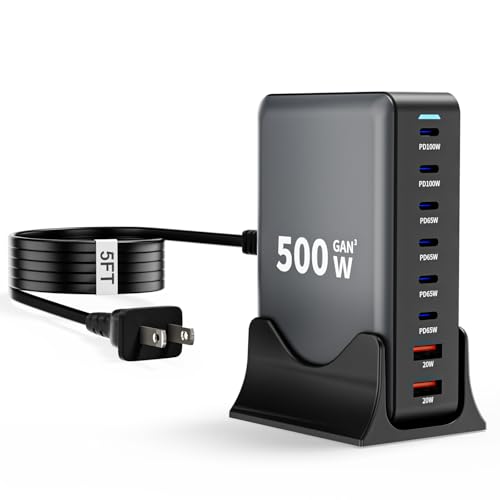
- 【8-in-1 USB C Charging Station】The 500W USB C Wall Charger features 6 x...
- 【Upgraded Dual PD 100W Fast-Speed Charging】The USB C HUB Brick...
- 【Portable and Compact】500W USB C charger block Compared to other bulky...
Do all GaN chargers support the same fast charging standards?
No, they do not, and that is a common source of confusion. Different GaN chargers support different protocols like PD 2.0, PD 3.0, or Qualcomm Quick Charge.
Your tablet likely needs PD 3.0 with PPS to show “super fast charging.” Always check the specifications before buying to make sure your charger matches your tablet’s needs.
Is there a way to test if my charger is actually delivering super fast power?
Yes, you can use a free app like Ampere to see the exact wattage flowing into your tablet. I use this app every time I get a new charger to confirm it is working correctly.
You can also check your tablet’s battery settings for charging information. Many tablets show the current charging speed right in the settings menu under battery or power options.