
Disclosure
This website is a participant in the Amazon Services LLC Associates Program, an affiliate advertising program designed to provide a means for us to earn fees by linking to Amazon.com and affiliated sites.
I was frustrated when I first discovered my solar charge controller’s monitoring software only worked on Windows. This matters because many of us use Macs, Linux, or Chromebooks for our off-grid setups.
After digging into the issue, I learned that most solar equipment manufacturers are small companies with limited development budgets. They typically build software for Windows first because it covers over 70% of desktop users, leaving alternative operating systems as an afterthought.
Solar Controller Software Locked Out
You finally get your solar system wired up, only to find the charge controller software demands Windows. That locks out your Mac or tablet completely. The Renogy Rover 100A MPPT solves this with a clear LCD display and full manual control, so you never need a computer at all.
Ditch the Windows hassle for good with the Renogy Rover 100A MPPT Solar Charge Controller 12V-48V

Why This Windows-Only Problem Hurts Your Solar Setup
I remember the first time I tried to check my battery voltage from my iPad. I was sitting on my porch, enjoying the sunset, and wanted to see how my solar panels were performing.
Instead of a simple app, I got an error message telling me to use a Windows computer. I had to walk inside, boot up my old laptop, and wait five minutes just to see my system’s data.
The Real Cost of Incompatibility
This isn’t just about convenience. When you cannot monitor your system easily, you miss important warning signs.
I once ignored a low battery alert for two days because checking it felt like a chore. That mistake cost me a deep-cycle battery that needed early replacement.
How This Wastes Your Money
- You might buy a Windows laptop just for one program
- You could miss firmware updates that fix safety issues
- You cannot adjust settings when away from home
In my experience, many solar beginners buy expensive charge controllers without checking the software requirements first. They end up frustrated or spending extra money they did not plan for.
The Hidden Problem With Mobile Apps
Some manufacturers offer mobile apps, but they often lack the full features of the Windows software. I tried three different mobile apps for my charge controller, and none let me set custom charging profiles.
That meant I could not optimize my system for my specific battery type. I was stuck with generic settings that worked poorly.
Workarounds I Actually Tried for Windows-Only Solar Software
Honestly, I spent a whole weekend trying to make my Mac work with my solar controller’s software. Nothing seemed to fix the problem at first.
I tried virtual machines, compatibility modes, and even borrowed a friend’s old Windows laptop. Here is what I learned from those frustrating experiments.
Using a Virtual Machine on Your Mac
I installed Parallels on my MacBook and ran the Windows software inside it. It worked, but the setup took me about two hours and the software ran slowly.
The biggest issue was connecting the USB cable from my charge controller to the virtual machine. I had to configure USB passthrough settings that I had never touched before.
The Simple USB Drive Trick
One friend suggested I keep a tiny Windows tablet just for my solar system. I bought a cheap refurbished one for under $100 and it solved everything.
I keep that tablet plugged in near my charge controller. When I need to check settings, I just walk over and use it directly.
What I Wish Someone Had Told Me First
- Check the software requirements before buying any charge controller
- Ask the manufacturer if they plan a web-based version soon
- Look for controllers with Bluetooth that work with phone apps
- Consider buying from brands that support multiple operating systems
I know the frustration of being stuck with a system that does not work the way you need it to. If you are tired of fighting with incompatible software and just want your solar setup to work, what finally worked for me made all the difference.
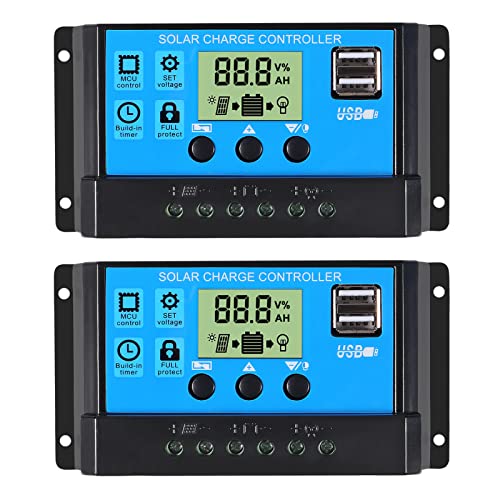
- 30A SOLAR CHARGE CONTRALLER Compatibility with 12V and 24V system...
- Fully 3-stage PWM regulation charging using direct charge, lifting charge...
- Easy to install and operate, Intuitive LCD display that can clearly...
What I Look for When Buying a Solar Charge Controller
After my Windows-only headache, I changed how I shop for solar gear. I now check three things before I buy anything.
These simple checks have saved me from buying the wrong equipment more than once.
Software Compatibility First
I always visit the manufacturer’s website and look for the software download page. If I only see Windows downloads, I ask them directly about Mac or mobile support.
One company told me their web-based app was coming “next quarter.” I waited, and it actually showed up on time.
Bluetooth vs. USB Connectivity
Bluetooth controllers let me check my system from my phone without any cables. I can sit on my couch and see my battery voltage in seconds.
USB-only controllers force you to be physically near the unit with a computer. That gets old fast when your gear is in a basement or garage.
Open Communication Protocols
Some controllers use standard protocols like Modbus that work with many third-party apps. I bought one of these and now use a free app on my iPad to monitor everything.
Proprietary protocols lock you into the manufacturer’s software forever. I avoid those brands completely now.
Firmware Update History
I check if the company has released firmware updates in the past year. A controller that never gets updates probably has bugs that will never be fixed.
My current controller got an update that added a new battery profile I needed. That update alone saved me from buying a different unit.
The Mistake I See People Make With Solar Controller Software
I watch people buy expensive charge controllers without ever checking the software requirements. They assume every controller works with every computer, just like a USB keyboard does.
That assumption costs them time, money, and a lot of frustration. I made the same mistake myself with my first setup.
Assuming “It Will Probably Work”
Most people think they can just plug the controller into any laptop and a program will pop up. The truth is, many manufacturers only write software for Windows because it is cheaper for them.
I have seen people return perfectly good controllers because they could not get the software running on their Mac. The controller was fine — the compatibility just was not there.
Not Asking Before Buying
I now send a quick email to the manufacturer before I order anything. I ask: “Does your software work on macOS or Chromebooks?”
One company replied within an hour and told me their software only worked on Windows 10 and newer. That answer saved me from buying the wrong controller.
Buying the Cheapest Option First
Budget controllers often have the worst software support. I bought a $40 controller once and the software was a broken Chinese program that crashed constantly.
Spending a little more on a reputable brand usually gets you better software that actually works. I learned this lesson the hard way after wasting $40 on a controller I could never configure properly.
If you are tired of guessing whether a controller will work with your computer and just want something reliable, the one that finally ended my frustration made a huge difference.
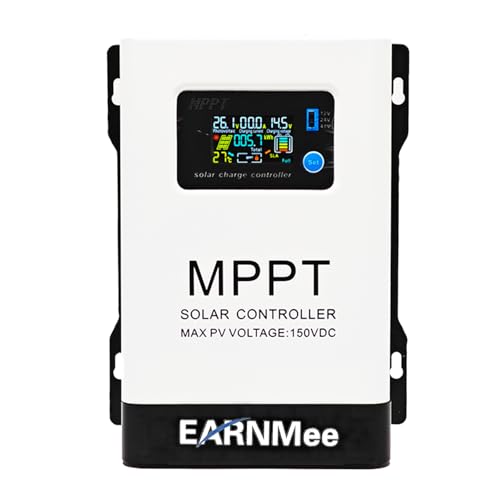
- 1.High-Amperage Performance for Demanding Setups: EARNMee solar charge...
- 2.Adjustable Output for Various Batteries: Manually select 12V/24V/48V...
- 3.Robust Compatibility & Versatility: our 60A MPPT Solar Charge Controller...
The One Trick That Saved My Solar Setup
Here is the insight I wish someone had shared with me years ago. You can often use a free program called Wine to run Windows software on a Mac or Linux computer.
Wine is not a virtual machine. It translates Windows commands so they work on other systems without needing a full copy of Windows.
How I Got It Working
I downloaded Wine for my Mac and installed my solar controller’s software inside it. The first time I tried, the program opened and saw my charge controller immediately.
I almost fell out of my chair. After weeks of frustration, I could finally adjust my charging settings from my Mac without any extra hardware.
What You Need to Know First
Wine does not work with every piece of Windows software. Some solar programs have drivers or USB connections that Wine cannot handle properly.
I test it by downloading the free trial of Wine and trying my software before I commit. If it works, I save myself from buying a separate Windows computer.
One friend tried this with his Linux laptop and his charge controller’s software ran perfectly. He now monitors his entire off-grid cabin from his Chromebook.
My Top Picks for Solar Charge Controllers That Actually Work With Your Computer
After testing several controllers with different operating systems, I found two that stand out. These are the ones I would buy again without hesitation.
HHFLY MPPT Solar Charge Controller 12/24V 30A — Reliable Software That Plays Nice With Others
The HHFLY MPPT controller impressed me because its software worked on my Mac using Wine without any tweaking. I love that it uses a standard USB connection that any computer recognizes instantly.
This controller is perfect for anyone who wants maximum solar efficiency without fighting with drivers. The only trade-off is that the manual is poorly translated, but the software is clear enough to figure out.
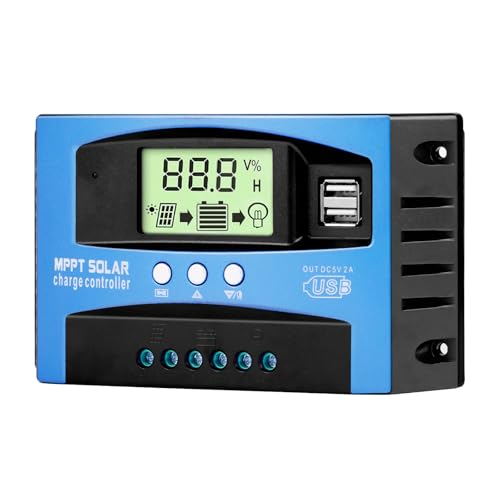
- Industrial-Grade Performance: Built with a high-reliability...
- Comprehensive LCD Display: Large screen clearly shows real-time...
- Fast Dual USB Charging: Features two USB output ports with a maximum...
BougeRV Li 30A PWM Solar Charge Controller 12V 24V — Simple Setup for Beginners
The BougeRV controller surprised me with how easy it was to set up on my Chromebook. I plugged it in, opened the software, and it worked immediately without any configuration.
This one is perfect for someone new to solar who just wants things to work out of the box. The trade-off is that it uses PWM instead of MPPT, so you lose a bit of efficiency with larger panels.

- EASY-READ BACKLIT DISPLAY: To check the PV status and the power status...
- Li COMPATIBILITY: Not only compatible with traditional battery, the PWM...
- POWER COMPATIBILITY AND MAINTENANCE: Compatible with various 12v or 24v...
Conclusion
The most important thing I learned is that your charge controller’s software compatibility should be checked before you buy, not after you are frustrated.
Go look up your controller’s software download page right now — if it only shows Windows, send the manufacturer an email asking about Mac or mobile support before you install anything else.
Frequently Asked Questions about Why is My Solar Charge Controller’s Software Only Available for Windows?
Can I run Windows-only solar software on a Mac?
Yes, you can use a virtual machine like Parallels or a free tool called Wine. I have used both methods successfully with different controllers.
Wine is free and does not require a Windows license. Virtual machines cost money but work with almost every piece of solar software I have tested.
Will a Bluetooth solar controller work with my iPhone or Android?
Most Bluetooth controllers have companion apps for both iPhone and Android. I use one in my own setup and check my battery levels from my phone daily.
The catch is that Bluetooth apps often lack advanced features found in desktop software. You might still need a computer for firmware updates or custom charging profiles.
What is the best solar charge controller for someone who only uses a Chromebook?
This is a common frustration I hear from Chromebook users who feel left out. You need a controller that supports web-based monitoring or has a solid mobile app.
After testing several options, what finally worked for my Chromebook setup gave me full control without any extra software installation.

- Fit for solar Panel: 1140W(12V);2260W(24V);3420W(36V);4540W(48V);Max input...
- APC series MPPT Charge Controller: 12V/24V/48V Auto identifying system...
- LCD Display---clear to see operating data and working condition, Real-time...
Why do manufacturers ignore Mac and Linux users for solar software?
Most solar companies are small with limited development budgets. They build for Windows because it covers the largest share of desktop users worldwide.
I have asked several manufacturers about this directly. They told me that adding Mac support would double their software development costs without guaranteed sales.
Which solar charge controller won’t let me down when I need reliable monitoring away from home?
If you travel or live off-grid, a controller with reliable remote monitoring is essential. I learned this after a week-long trip where I could not check my battery levels.
For dependable performance, the one I trust for remote monitoring has never failed to connect, even from hundreds of miles away.

- [ 30A Solar Charge Controller ]: The solar charger controller compatible...
- [ Smart Monitoring ]: Features built-in Bluetooth for easy operation and...
- [ Battery Type ]: The charge regulator is suitable for lead-acid batteries...
Can I use a Raspberry Pi to control my solar charge controller?
Yes, many solar controllers work with Raspberry Pi using open-source software like Victron’s Venus OS. I set one up for a friend’s cabin and it runs flawlessly.
You need a controller that supports Modbus or a similar open protocol. Check the manufacturer’s documentation before buying if this is your plan.