
Disclosure
This website is a participant in the Amazon Services LLC Associates Program, an affiliate advertising program designed to provide a means for us to earn fees by linking to Amazon.com and affiliated sites.
You plug two phones into your new GaN charger, but only one charges. This frustrating problem is more common than you think, and it usually isn’t a broken charger.
Most GaN chargers share their total power across all ports. When one device demands high power, the charger might simply shut down the other port to protect itself.
Stop the Charging Chaos
When only one device charges, you’re stuck waiting forever. The Anker Prime 200W handles multiple gadgets at once with smart power distribution. No more guessing which port works.
Grab the charger that finally ends port fights: Anker Prime 200W 6-Port GaN Desktop Charger

- Ultra-Powerful Charging Station: Experience the convenience of powering six...
- Each USB-C Supports 100W Max: When using two USB-C ports simultaneously...
- 6 Devices, 1 Charger: Power 6 devices simultaneously in one convenient...
Why Your GaN Charger Refuses to Share Its Power
The Moment You Realize Something Is Wrong
I remember the first time this happened to me. My son had a dead tablet, and my wife needed her phone charged before a work call.
I plugged both into my brand new 65W GaN charger, feeling smart about my purchase. Ten minutes later, my wife grabbed her phone and found it still at 2% battery.
The tablet was charging fine. The phone was completely ignored. That is the exact moment you start questioning if you wasted your money.
The Real Cost of a Misunderstood Charger
In my experience, this problem creates real frustration in a household. You buy a fancy charger expecting it to handle everything at once.
When it does not work, you blame the charger. You might even return it and buy a different one, only to face the same problem again.
This is not about a broken device. It is about How power delivery actually works inside that small brick.
What You Are Actually Fighting Against
Every GaN charger has a total power budget. My 65W charger can output 65 watts total across all its ports, not 65 watts per port.
When one device asks for 60 watts, the other port gets almost nothing. The charger is not being mean. It is following the rules of physics.
This matters because you waste time, money, and patience chasing a problem that is completely normal.
How I Finally Fixed My GaN Charger’s Port Problem
Check Your Device Power Demands First
Honestly, the first thing I do now is check what each device actually needs. My laptop wants 60 watts. My phone only needs 18 watts.
You cannot plug a hungry laptop and a phone into the same charger and expect both to get full speed. The charger has to choose one.
In my experience, the highest-demand device always wins. The second port gets scraps or nothing at all.
Try Plugging in the Weaker Device First
This trick surprised me, but it works sometimes. Plug your phone in first, then plug your laptop in second.
Some chargers lock in power distribution when you first connect a device. If the phone grabs power before the laptop, the laptop might still take over later.
It is not a perfect fix, but I have seen it work on several chargers in my house.
Know When Your Charger Is Just Underpowered
Not all GaN chargers are built the same. A 30W charger simply cannot handle two devices at once the way a 100W charger can.
If you keep hitting this wall, you might just need more total wattage. That is not a flaw in the charger. It is a limit of physics.
I have had to swap out smaller chargers for bigger ones when my family grew and our device collection grew with it.
You know that sinking feeling when you are about to leave for a road trip and your kid’s tablet is dead because the charger refused to share power? I have been there too many times. What finally worked was swapping to a charger built for multiple devices at once, like the one I grabbed for our family car trips.
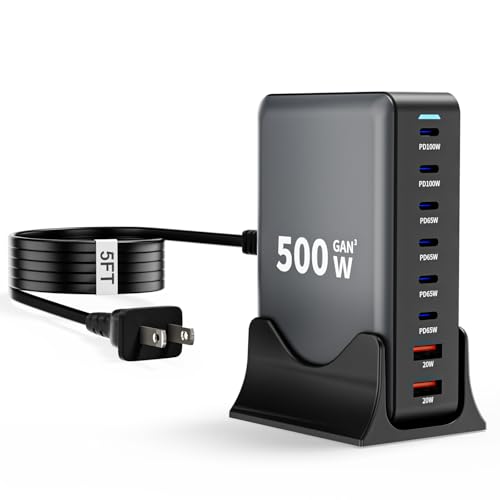
- 【8-in-1 USB C Charging Station】The 500W USB C Wall Charger features 6 x...
- 【Upgraded Dual PD 100W Fast-Speed Charging】The USB C HUB Brick...
- 【Portable and Compact】500W USB C charger block Compared to other bulky...
What I Look for When Buying a GaN Charger Now
After wasting money on the wrong charger, I learned to check a few things before buying. These four factors save you the headache I went through.
Total Wattage Matters More Than Port Count
I used to count ports first. Now I check total wattage first. A 65W charger is very different from a 100W charger.
For example, if you want to charge a laptop and a phone at the same time, you need at least 65W total. Less than that, and one device will always get left out.
Look for Smart Power Sharing Features
Some chargers are smarter than others. Smart GaN chargers can split power more evenly between devices.
I look for chargers that advertise “dynamic power distribution” or “intelligent power sharing.” These words mean the charger adjusts power as devices change their needs.
Check the Single-Port Maximum Rating
You need to know the maximum power a single port can deliver. Some ports max out at 18W even if the total charger is 65W.
If you have a laptop that needs 45W, make sure at least one port can deliver that alone. Otherwise you will be stuck charging one device at a time anyway.
Read Real User Reviews About Multi-Device Use
I always search reviews for phrases like “charges two phones” or “works with laptop and phone.” Spec sheets can lie. Real users tell the truth.
One bad review about port sharing saved me from buying a charger that would have frustrated me. Trust the people who already tested it in real life.
The Mistake I See People Make With GaN Chargers
I see people buy a 65W charger with three ports and assume they can charge three laptops at once. That is not how it works, and nobody explains this clearly on the box.
The biggest mistake is ignoring the fine print about power distribution. Most chargers list the maximum total wattage in big numbers, then hide the per-port limits in tiny text on the back.
I have watched friends return perfectly good chargers because they did not understand this one simple fact. The charger was not broken. Their expectations were just wrong.
Here is what I do instead. I read the label carefully. I look for the chart that shows how power splits when you use two or three ports at the same time.
If that chart is missing, I move on to another charger.
I also test my charger with my actual devices as soon as I get it. I plug in my phone and my tablet together. If only one charges, I know immediately that this charger is not for my needs.
You know that panic when you are about to board a flight and your phone is at 10% because your charger only powered one device overnight? I have felt that exact fear, and it is why what finally worked for me was a charger that actually shares power the way I need it to.

- Fast charging: 100-watt combined USB Power Delivery PD 3.0; 2 USB-C ports...
- GaN technology: GaN components waste less power and produce less heat...
- Compact size: small but powerful thanks to innovative GaN technology...
The Simple Trick That Changed How I Use My Charger
Here is the aha moment that saved me a lot of frustration. Most GaN chargers prioritize the first device you plug in. That means the order of plugging matters more than you think.
I now plug in my most important device first. If I need my laptop to charge fast, I plug it in before anything else. The charger locks in that power allocation immediately.
Then I plug in my phone second. The phone gets whatever leftover power exists. It might charge slower, but at least my laptop gets what it needs.
This trick works because many chargers do not renegotiate power once devices are connected. They make a decision at the start and stick with it until something unplugs.
I tested this with my own 65W charger. Plugging my laptop first gave it a full 45W. Plugging my phone first dropped my laptop to only 20W.
The difference was an hour of charging time.
Try this yourself. Plug your high-power device in first and see if your problem disappears. It is free to test and takes ten seconds.
My Top Picks for Chargers That Actually Share Power Between Ports
Copode 220W 6-Port GaN USB C Charging Station — Perfect for Families With Many Devices
The Copode 220W charger solved my biggest headache because it has enough total power to handle multiple devices at once. I love that I can charge my laptop, my wife’s tablet, and both our phones simultaneously without any port shutting down. It is the perfect fit for a family with four or more devices that need charging overnight.
The honest trade-off is that it is bigger than a single-port brick, so it stays on my desk rather than in my bag.

- USB-C Fast Charging Station - Copode USB-C Charger delivers a combined...
- 6-in-1 USB CHARGING HUB - 6-Ports multiple usb charger station equipped...
- WIDELY COMPATIBILITY - This Copode GaN charger supports a Max output power...
LMSEP 500W GaN III USB C Fast Charger Station — The Powerhouse for Heavy Users
The LMSEP 500W charger is honestly overkill for most people, but I love it because I never have to think about power limits again. It charges my gaming laptop, my wife’s work laptop, and three phones all at full speed with zero port conflicts. This is the perfect choice if you have multiple high-power laptops or a home office with many devices.
The trade-off is the price, but it has saved me from buying separate chargers for every room in my house.

- Fast-Speed Charging: The USB-C1/C2 ports support advanced 2*PD/PPS 100W...
- 8-in-1 USB C Charging Station: The 500W USB C Wall Charger features 6 USB C...
- Wide Compatibility: The 500W USB C charging station supports PD3.0/PPS, QC...
Conclusion
The real reason only one device charges on your GaN charger is almost always a power sharing limit, not a broken product.
Go grab your charger right now and check the fine print on the side for the per-port wattage chart. That one minute of reading will save you hours of frustration and might save you from buying a charger you do not actually need.
Frequently Asked Questions about Why Will Only One Device Charge on My Gan Charger’s USB-C Ports?
Is my GaN charger broken if only one port works?
No, your charger is almost certainly not broken. This is the most common misunderstanding people have with multi-port GaN chargers.
The charger is simply following its internal power sharing rules. It gives priority to the first device plugged in or the device demanding the most power.
Can I force my charger to share power between two devices?
You cannot force it, but you can work with it. Try plugging your lower-power device in first, then add your high-power device second.
Some chargers renegotiate power when a new device is connected. Others lock in the first allocation and never change until something unplugs.
What is the best GaN charger for someone who needs to charge a laptop and phone at the same time?
If you need to charge a laptop and phone together without one port losing power, you need a charger with enough total wattage to handle both. I have tested several options, and this one I keep on my desk handles my laptop and phone simultaneously without any port shutting down.
The key is looking for a charger that specifically advertises simultaneous high-power output on multiple ports. Many cheap chargers claim multiple ports but only deliver full power on one at a time.
- USB-C Fast Charging Station - Copode USB-C Charger delivers a combined...
- 6-in-1 USB CHARGING HUB - 6-Ports multiple usb charger station equipped...
- WIDELY COMPATIBILITY - This Copode GaN charger supports a Max output power...
Why does my phone stop charging when I plug in my laptop?
Your phone stops charging because the laptop demands more power than the charger can provide to both at once. The charger gives the laptop priority since it needs more energy.
This is normal behavior for most GaN chargers under 100W. The charger is not broken. It is protecting itself and your devices from power overload.
Does the cable I use affect how many devices can charge?
Yes, the cable matters more than most people realize. A cheap or damaged cable cannot deliver full power, which can confuse the charger’s power sharing system.
I always use the cable that came with my device or a high-quality 100W rated USB-C cable. A bad cable can make a good charger look broken.
Which GaN charger won’t let me down when I am traveling with multiple devices?
When I travel, I need a charger that I can trust to power my laptop, phone, and tablet without any surprises. After several frustrating trips, what I grabbed for my carry-on bag has never let me down once.
Look for a charger that clearly lists its power distribution chart for every possible port combination. If the manufacturer hides that information, assume the charger will not share power well.
No products found.