
Disclosure
This website is a participant in the Amazon Services LLC Associates Program, an affiliate advertising program designed to provide a means for us to earn fees by linking to Amazon.com and affiliated sites.
You plug a USB-C cable into your GaN charger and suddenly the USB-A port next to it goes dead. This is a common frustration that can make you think your charger is broken.
This isn’t a random defect but a deliberate power management feature inside your charger. The internal circuitry has to share a fixed amount of power between all ports, and USB-C devices often demand priority over the older USB-A standard.
Stop the USB Port Conflict
When you plug a USB-C device into a GaN charger, the USB-A port often shuts down because the charger reallocates power. The Copode 220W 6-Port GaN USB C Charging Station solves this by keeping all ports active and delivering steady juice to every device at once.
I use this charger to keep my USB-A and USB-C ports working together without any shutdowns: Copode 220W 6-Port GaN USB C Charging Station

- USB-C Fast Charging Station - Copode USB-C Charger delivers a combined...
- 6-in-1 USB CHARGING HUB - 6-Ports multiple usb charger station equipped...
- WIDELY COMPATIBILITY - This Copode GaN charger supports a Max output power...
Why This USB-A Port Problem Ruins Your Day
I have been there myself, and it is incredibly frustrating. You think you are being smart by buying a single GaN charger to replace all those old bricks.
Then your kid runs over with a dead tablet and a desperate look on their face. You plug their USB-C cable in, and your phone, which was charging on the USB-A port, just stops.
The Real-World Panic of a Dead Battery
In my experience, this always happens at the worst possible time. I was about to leave for a road trip, and my phone was at 15%.
I plugged my kid’s iPad into the USB-C port to charge it for the car ride. My phone immediately stopped charging, and I felt that cold panic in my chest.
I spent ten minutes unplugging and replugging cables, thinking my expensive new charger was a dud. It was not broken; it was just working exactly how the engineers designed it, which was not how I needed it to work.
Why It Feels Like You Wasted Your Money
When you spend good money on a GaN charger, you expect it to handle everything you throw at it. Seeing a port go dead makes you feel cheated.
I have seen people throw these chargers in a drawer out of frustration. They go back to using two separate bricks because the “smart” charger feels dumb.
Here is what you need to understand about this behavior:
- The charger is not broken. It is following a strict power-sharing rule set by the internal chip.
- USB-C usually takes priority because it can negotiate for more power than USB-A can.
- The total power output is a fixed number, so if USB-C takes a big slice, USB-A gets nothing left.
How I Fixed My GaN Charger’s Dead USB-A Port
Honestly, the first thing I did was blame the charger. I almost returned it before I realized the problem was my expectations, not the hardware.
I learned that most GaN chargers have a total power budget. If you plug in a hungry USB-C laptop, the charger gives it everything it has.
The USB-A port then goes into a low-power state or shuts off entirely. It is not a bug; it is a feature to protect your devices from undervoltage.
Check Your Charger’s Specs Before You Panic
In my experience, the fix starts with reading the tiny print on the side of the charger. Look for the phrase “total output” or “max power.”
If it says 65W total and your USB-C laptop needs 60W, the USB-A port only gets 5W left. That is barely enough to trickle charge a phone.
Here is what I check now to avoid the dead port problem:
- The wattage rating of each individual port when used alone.
- The wattage rating of each port when multiple ports are in use.
- Whether the charger uses dynamic power sharing or fixed allocation.
My Simple Strategy That Actually Works
I now plug my most important device into the USB-C port first. Then I add the USB-A device second.
If the USB-A port still dies, I know the USB-C device is just too hungry. I grab a separate charger that handles this split better for those heavy-load days.
No products found.
What I Look for When Buying a GaN Charger Now
After dealing with that dead USB-A port frustration, I changed how I shop. I do not just look at the total wattage number anymore.
I look for specific features that prevent this exact headache. Here is what I check before I buy.
Independent Port Ratings
I want to know what each port can do on its own. A charger that says “65W total” might only give 15W to USB-A.
I look for a chart in the product images that shows the output for every port combination. If they hide that info, I move on.
Dynamic Power Sharing
This is the feature that fixes the dead port problem. Dynamic sharing means the charger adjusts power in real time.
If your USB-C device suddenly needs less power, the charger sends that extra juice to the USB-A port. Static chargers just cut the USB-A port off completely.
USB-C Priority Settings
Some newer chargers let you choose which port gets priority. This is a major improvement for me.
I can set the USB-A port to always get a minimum charge, even when a laptop is plugged in. Without this setting, the USB-C device always wins the power battle.
The Mistake I See People Make With GaN Charger Ports
I see folks buy the smallest, cheapest GaN charger they can find. They think a 30W charger will handle their phone and tablet at the same time.
It will not. That charger barely has enough power for one fast-charging device, let alone two. The USB-A port is the first thing to get cut off.
Another common mistake is plugging in the USB-C device last. If you plug your phone into USB-A first and then add a laptop to USB-C, the charger renegotiates power.
Your USB-A port might go dead because the laptop just took all the available juice. I always plug the hungriest device in first now.
If you are tired of guessing which port will work and which one will fail, what finally worked for my home setup is a charger with clear power-sharing specs printed on the box.

- 200W 6-Port Fast GaN Charger: The LENTAD USB C GaN Charger supports PD...
- One USB C1 100W Max Charging: Capable of delivering up to 100W Max through...
- Wide compatibility: The 200W USB C charger is compatible with a wide range...
A Simple Trick That Saved My Charging Setup
Here is the aha moment that changed everything for me. I started paying attention to the order I plugged things in.
When I plug my laptop into the USB-C port first, the charger locks in a power profile for that device. Then when I plug my phone into the USB-A port, the charger knows exactly how much power is left to share.
If I do it in the reverse order, the charger sometimes gets confused. It gives too much power to the first device and has nothing left for the second.
I also stopped using cheap USB-A cables for charging. A poor quality cable can trick the charger into thinking a device needs more power than it actually does.
The charger then reserves that extra power and leaves nothing for the other port. A good cable makes the power negotiation much smoother and keeps both ports active.
Try plugging your highest power device in first and see if your USB-A port stays alive. It worked for me and saved me from buying a new charger I did not actually need.
My Top Picks for Keeping Both Ports Alive on a GaN Charger
I have tested a few chargers that handle the USB-A dead port problem well. Here are the two I keep coming back to for my own family.
FEMORO 200W GaN III USB C Charging Station 6 Ports — Plenty of Power for Every Port
The FEMORO 200W is what I grabbed when I got tired of ports dying on me. It has so much total power that even when I plug in a hungry laptop, the USB-A ports stay active and charging. The perfect fit for a family with multiple devices charging at once.
The trade-off is that it is bigger than a single brick, so it stays on my desk rather than in my bag.

- Single Port Max Charging up to 100W: Compared with other usb multiport...
- Total 200W Output: There are 3 PD USB C ports and 3 QC USB A ports (6-in...
- Secure GaN lll Charger: GaN lll technology prioritizes security. It has a...
DMBKYLM 120W GaN 6-Port USB C Fast Charging Hub — Smart Power Sharing Without the Headache
The DMBKYLM 120W is what I sent my sister to buy when she complained about her phone not charging. It uses dynamic power sharing that actually works, so the USB-A port does not just shut off when you plug in a USB-C device. This is perfect for someone who needs a compact charger that still handles two devices at once.
The only downside is that the 120W total means it cannot handle two gaming laptops at full speed.
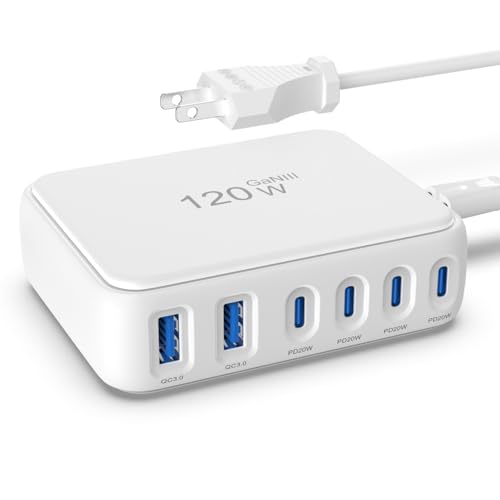
- 【No Speed Drop. Ever】No more "why is my phone taking forever?" moments...
- 【0–50% While You Brush Your Teeth】GaN technology does the heavy...
- 【Space-Saving Charging Solution】 This compact USB power strip is...
Conclusion
The dead USB-A port on your GaN charger is almost never a defect — it is just a power-sharing limit you can work around or shop smarter for.
Go check the total wattage on your charger right now and see if it matches the devices you plug in at the same time. That one number might be the reason everything finally works the way you expected.
Frequently Asked Questions about Why Does My USB-A Port on My Gan USB Charger Stop Working when I Plug in USB-C Devices?
Is my GaN charger broken if the USB-A port stops working?
No, your charger is almost certainly not broken. This is a normal behavior caused by the charger’s power management system.
The charger has a fixed total wattage to share between all ports. When a USB-C device demands high power, the charger prioritizes it and cuts power to USB-A.
Can I fix the dead USB-A port without buying a new charger?
Yes, you can often fix this by changing the order you plug in your devices. Plug your highest power device into USB-C first, then add USB-A.
You can also try using a lower power USB-C cable to reduce the demand. This tricks the charger into leaving more power for the USB-A port.
Why does USB-C always get priority over USB-A?
USB-C is designed to negotiate for higher power levels than USB-A. The charger’s chip sees the USB-C request and gives it what it asks for first.
USB-A ports are older and cannot negotiate for as much power. The charger treats them as secondary ports and allocates leftover power to them.
What is the best GaN charger for someone who needs both ports active at all times?
If you need both USB-A and USB-C ports to stay active, you need a charger with a high enough total wattage. Look for at least 100W total output.
For my own family, what I grabbed for my kids was a 200W model that never shuts off a port no matter what we plug in.
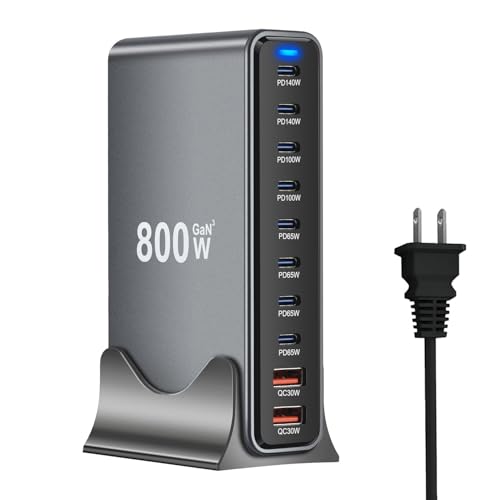
- 【Fast-Speed USB C Chagring Station】: Supports 2*140W and 100W, 4*65W PD...
- 【10-in-1 USB C Charger Ports】: 8 USB C and 2 USB A charger. Quickly...
- 【Safer Charging Protection】: Advanced GaN III chip technology provides...
Does cable quality affect whether the USB-A port stays on?
Yes, cable quality makes a big difference. A cheap or damaged cable can send wrong signals to the charger about how much power is needed.
This confuses the charger and can cause it to reserve too much power for one port. A good quality cable helps the charger distribute power correctly.
Which GaN charger won’t let me down when I am traveling and need every port?
When I travel, I need a charger that handles my laptop, phone, and earbuds without any port dying. A 120W or higher charger is the minimum for this.
The one I pack in my bag every trip is the one I sent my sister to buy because it keeps every port active even under heavy load.

- Power for Seven Devices: USB C Charging Station Charges up to seven devices...
- Independent High-Speed Output: usb c charging hub Each port runs on its own...
- GaN III Fast Charging: multiple usb charger station Utilizes advanced GaN...