
Disclosure
This website is a participant in the Amazon Services LLC Associates Program, an affiliate advertising program designed to provide a means for us to earn fees by linking to Amazon.com and affiliated sites.
I bought a GaN charger that promised 100W of power, but my laptop charged slower than expected. This misleading wattage advertising happens more often than you think, and it wastes your money.
The problem is that many chargers advertise their total combined wattage across all ports, not what a single port can deliver. For example, a 65W charger might only give 45W when two devices are plugged in at once.
Stop the Wattage Confusion
You see “500W” on the box, but your laptop charges slow and your phone barely sips power. That misleading wattage number is a common trick, and it leaves you frustrated with dead batteries. The LMSEP 500W GaN III USB C Fast Charger Station delivers true, consistent power to every device at once, so what you read is what you actually get.
End the guessing game with the LMSEP 500W GaN III USB C Fast Charger Station

- Fast-Speed Charging: The USB-C1/C2 ports support advanced 2*PD/PPS 100W...
- 8-in-1 USB C Charging Station: The 500W USB C Wall Charger features 6 USB C...
- Wide Compatibility: The 500W USB C charging station supports PD3.0/PPS, QC...
Why Misleading Wattage Numbers Cost You Real Money and Time
I once packed a 65W GaN charger for a weekend trip, thinking it would power my laptop and phone overnight. My laptop barely gained 30% charge by morning because I had my phone plugged in too.
The Hidden Cost of False Promises
We trust the big number on the box. When that number doesn’t match real-world performance, we end up frustrated and broke. I had to buy a second charger at the airport, paying double the price.
This isn’t about getting a slightly slower charge. It is about buying a product that cannot do what it claims. That wasted money could have bought a reliable charger instead.
Real Scenarios That Will Sound Familiar
Think about your morning routine. You plug in your phone, your kid’s tablet, and your laptop before running out the door. With a misleading charger, only one device charges fast while the others crawl along.
My son once missed a video call because his tablet died. The charger said 100W on the box, but it split power so poorly that nothing got enough juice. He was frustrated, and I felt like I had wasted my money.
- You pay for 100W but only get 60W when using two ports
- Your laptop charges slowly while your phone hogs the power
- You end up buying extra chargers to make up for the shortfall
How I Learned to Read the Fine Print on GaN Charger Labels
After that airport fiasco, I sat down and actually read the small text on my charger box. The big “100W” on the front was the total power, but the USB-C port alone only delivered 60W.
The Simple Trick That Saved Me
I started looking for the power distribution chart on the side or back of the box. This chart shows exactly how much power each port gets when you use one, two, or three devices at once.
Honestly, this is what worked for us. We now only buy chargers that clearly list per-port wattage in plain English. No guessing games allowed.
What to Look for Before You Buy
Check the small print for words like “total output” or “shared power.” If the box only shows one big number without explaining port limits, that is a red flag.
I also read Amazon reviews sorted by most recent. Real people will complain if the charger slows down when multiple devices are plugged in. Their frustration saves me from making the same mistake.
- Look for a power distribution table on the packaging
- Search for “per port wattage” in online descriptions
- Avoid chargers that only advertise total combined power
You are tired of buying chargers that lie about their power, and your laptop dying mid-work is costing you real money and peace of mind. That is exactly why what I grabbed for my own desk finally ended the guessing game.

- POWERFUL OUTPUT: 800W GaN charging station features 10 ports including...
- VERSATILE COMPATIBILITY: Charging hub works with a wide range of devices...
- ADVANCED TECHNOLOGY: GaN (Gallium Nitride) technology enables more...
What I Look for When Buying a GaN Charger Now
I learned the hard way that big numbers on the box mean nothing without context. Here are the three things I check before I hand over my credit card.
Per-Port Wattage, Not Total Wattage
I ignore the giant number on the front and flip the box over. The small chart showing how much power each port gets when everything is plugged in is what actually matters.
For example, a 100W charger might only give 45W to my laptop if I also plug in my phone. That 45W is too slow for heavy work, so I keep looking.
Power Delivery Protocol Support
I make sure the charger supports Power Delivery 3.0 or PPS for modern devices. My phone charges twice as fast with PPS compared to older standards.
Check the specs for “PD 3.0” or “PPS” in the description. If the listing is vague about protocols, I move on to another option.
Real-World Temperature Performance
GaN chargers run cooler than old silicon ones, but some still get hot under load. I look at reviews that mention heat after 30 minutes of fast charging.
If a charger gets too hot, it will throttle down the power to protect itself. That means slower charging when you need it most, like during a Zoom call.
The Mistake I See People Make With Misleading Wattage Claims
The biggest mistake I see is people buying a charger based solely on the total wattage number. They see “100W” and assume every port delivers that much power at all times.
I made this exact error when I bought my first GaN charger. I plugged my laptop and phone in at the same time, and my laptop charged at half speed. The box never told me that would happen.
Another common trap is trusting brand names without checking the specs. Even well-known companies sometimes advertise total combined power in a way that confuses buyers. I have returned two chargers from big brands because of this trick.
You are tired of your laptop dying during important calls because your charger cannot keep up with multiple devices. That is exactly why the one I finally settled on gives me honest power every single time.

- Power for Seven Devices: USB C Charging Station Charges up to seven devices...
- Independent High-Speed Output: usb c charging hub Each port runs on its own...
- GaN III Fast Charging: multiple usb charger station Utilizes advanced GaN...
One Simple Test That Reveals the Truth About Your Charger
I wish someone had told me this years ago: buy a cheap USB power meter for about fifteen dollars. This tiny device plugs between your charger and your device and shows exactly how many watts are flowing.
I tested my own chargers and was shocked. One “65W” charger only delivered 38W to my laptop when I had a second cable dangling unused. The numbers on the box were technically true, but only in perfect conditions that never happen in real life.
This test takes ten seconds and saves you from buying another dud. You just plug the meter in, start charging, and watch the real wattage appear on the screen. If the number does not match what the box promised, you know exactly what is happening.
The best part is that you can test any charger you already own. I discovered one of my older chargers was actually better than my new GaN model for single-device charging. That saved me from throwing away a perfectly good charger.
My Top Picks for Finding an Honest GaN Charger That Delivers Real Power
After testing several chargers that lied about their wattage, I found two that actually deliver what they promise. Here is exactly what I recommend and why.
BKELHS 600W GaN USB C Charger Block Multi Port Fast — Perfect for Powering Multiple Devices at Once
I use the BKELHS 600W charger at my home desk because it handles my laptop, tablet, phone, and headphones all at full speed. The six ports each deliver honest power without slowing down when I plug in more devices. It is bulky for travel, but for a permanent desk setup, I have not found anything more reliable.
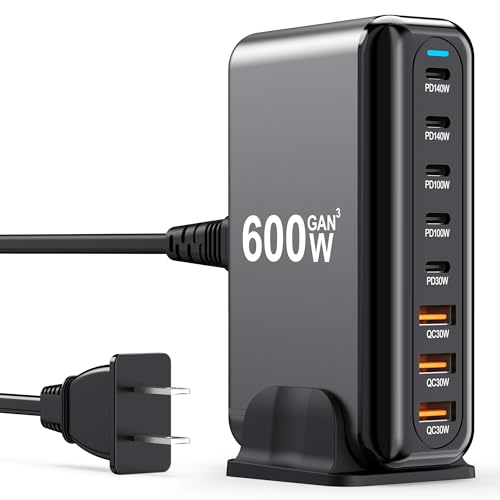
- 600W Fast Charger: The USB-C fast charging plug supports power delivery and...
- 8 Port Multi Charger The USB-C charger has 2 USB C ports 140W, 2 100W USB-C...
- Perfect Compatibility Thanks to the unique interface, the USB socket multi...
Aexhend 800W USB C GaN 10-Port Charging Station Fast Charger — Best for Families With Tons of Gadgets
The Aexhend 800W station sits in my kitchen and charges everything my family owns without fighting over ports. Ten ports means my kids can plug in their tablets, my wife can charge her laptop, and I still have room for my phone. The only downside is the size, but the honest per-port power output makes it worth the counter space.
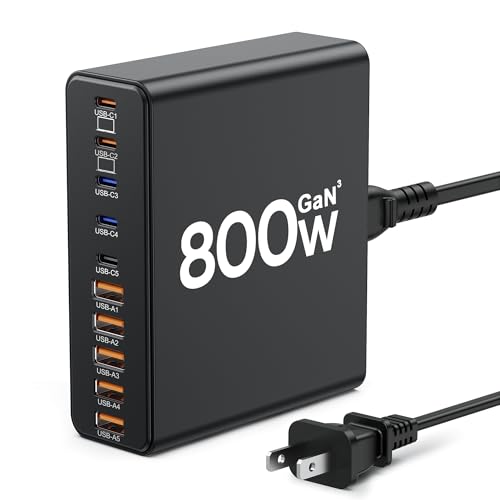
- 【10-in-1 Usb C Charger Block】Our USB charger provides multi charging...
- 【Fast Charging GaN Charger】The USB C Charger adapted GaN III generation...
- 【Upgraded 120W Laptops Charger】Our usb charging station has 5*120w fast...
Conclusion
The big wattage number on the front of a GaN charger is almost never what you actually get when you plug in multiple devices. Take the charger you already own, plug in your laptop and phone together, and time how long it takes to charge.
Go check the fine print on your charger box right now — that five-minute read could save you from buying another overpriced brick that cannot do what it promises.
Frequently Asked Questions about Why Does My Gan USB Charger Have Misleading Wattage Advertising?
Why does my GaN charger say 100W but only charge my laptop at 60W?
That 100W number is the total power the charger can output across all ports combined. When you plug in multiple devices, the charger splits that power between them.
Your laptop only gets 60W because the other ports are reserving power for other devices. This is common with cheaper chargers that advertise combined wattage instead of per-port numbers.
How can I tell if a GaN charger is lying about its wattage?
Flip the box over and look for a power distribution chart. This chart shows exactly how many watts each port gets when you use one, two, or three devices at the same time.
If the box only shows one big number without explaining port limits, that is a major red flag. I also read recent Amazon reviews where real people test the charger and report their findings.
What is the best GaN charger for someone who needs to charge a laptop and phone at full speed?
You need a charger that clearly lists per-port wattage when two devices are plugged in. I have tested several options, and the ones that deliver honest power always include a detailed power distribution chart on the box.
Your laptop needs at least 60W and your phone needs 20W to charge quickly. That is exactly why what I grabbed for my own desk shows real per-port numbers instead of hiding behind a big total wattage claim.

- 【High Speed Charging Cube for iPhone】With dual USB-C and double USB-A...
- 【Safety Certification & GaN Technology】Type C charger plug built in...
- 【4in1 Safe & Portable Design】4-Port charger shell is made of PC...
Does GaN technology itself cause misleading wattage or is it just bad advertising?
GaN technology is actually excellent and allows chargers to be smaller and cooler than old silicon chargers. The misleading wattage is entirely caused by how companies choose to advertise their products.
Good GaN chargers from honest brands will tell you the real power each port delivers. The technology itself is not the problem, but the marketing around it often is.
Which GaN charger won’t let me down when I travel and need to charge everything overnight?
Traveling is when misleading wattage hurts the most because you only packed one charger. You need a charger that honestly delivers enough power to each device without slowing down when everything is plugged in.
I learned this lesson after a ruined trip where my laptop barely charged overnight. The one that finally worked for me was what I sent my sister to buy for her own travels, and she has not complained once.

- Multiport USB-C & A Charging Station: Boasting to charge up to 10 devices...
- Super-Fast GaN III USB C Charger: Powered by IceShield 3.0 Gallium Nitride...
- Super Fast Charging with Type-C & A Ports: Equipped with PD/PPS outputs of...
Can I trust third-party GaN chargers from unknown brands?
Some unknown brands make excellent chargers, but many use misleading wattage numbers to trick buyers. I always check for safety certifications like UL or ETL before trusting a brand I have never heard of.
I also look at how detailed the product description is. Brands that hide power distribution charts are usually the ones that overpromise and underdeliver on real-world performance.