
Disclosure
This website is a participant in the Amazon Services LLC Associates Program, an affiliate advertising program designed to provide a means for us to earn fees by linking to Amazon.com and affiliated sites.
I learned the hard way that my new GaN charger wouldn’t charge my laptop fast with an old, flimsy cable. The cable is just as important as the charger itself for getting the speed you paid for.
A GaN charger can push a lot of power, but a poor cable creates resistance and slows everything down. I’ve seen a cheap cable cut my charging speed in half, turning a fast charger into a slow one.
The Cable Is the Real Bottleneck
When I plug my Gan charger into a cheap cable, my devices charge slowly or not at all. That poor-quality wire simply can’t handle the fast power delivery the charger is capable of. The Belkin 4-Port USB C Charger Block 200W GaN pairs perfectly with a high-quality cable to unlock its full charging speed.
Stop fighting with slow charging and grab the charger that works best with a good cable: Belkin 4-Port USB C Charger Block 200W GaN

- SIMULTANEOUS CHARGING: Compared to other chargers with only one charging...
- FAST CHARGING TECHNOLOGY: USB-C Power Delivery rapidly charges a MacBook...
- UNIVERSAL COMPATIBILITY: For the best charging performance possible, this...
Why a Bad Cable Ruins Your Fast Charging Experience
That Frustrating Feeling When Your Phone Barely Charges
I remember the first time I plugged my new GaN charger into my tablet. I expected lightning-fast speeds, but the battery barely moved in 30 minutes.
My son was waiting to watch his show, and I was getting frustrated. The culprit was a dollar-store cable I had grabbed from a drawer.
In my experience, this is the number one mistake people make. They spend good money on a GaN charger but pair it with a cheap, old cable.
The Hidden Resistance That Steals Your Time
A GaN charger can deliver high wattage, but a poor quality cable creates electrical resistance. Think of it like a narrow garden hose attached to a powerful pump.
The pump wants to push lots of water, but the hose just can’t handle it. The result is slow trickle instead of a powerful flow.
- A thin wire inside a bad cable cannot carry the full power from your GaN charger
- Poor connectors create loose contact, which interrupts the charging handshake
- Shielding issues can cause overheating, which makes the charger slow down to protect itself
I have seen friends waste money on expensive GaN chargers only to complain they are slow. The charger was never the problem — the cable was always the weak link.
How I Finally Got My GaN Charger to Work Properly
The Simple Test That Opened My Eyes
I decided to test my theory one afternoon. I plugged my GaN charger into my laptop using a cheap cable from a gas station and timed the charge.
Then I swapped to a newer, thicker cable I had bought for my camera. The difference was shocking — the second cable charged my laptop nearly three times faster.
What to Look For in a Cable for Your GaN Charger
Honestly, this is what worked for us after a lot of trial and error. You need a cable that is rated for the wattage your GaN charger can output.
Most basic USB-C cables are only rated for 60 watts. My GaN charger pushes 100 watts, so those cables simply cannot handle the load.
Here is what I check before buying a cable now:
- Look for the wattage rating printed on the cable or its packaging
- Make sure it supports USB-IF certification for safety and speed
- Check that it has an e-marker chip for high-power charging above 60 watts
- Choose a cable that is thick and feels sturdy, not flimsy and thin
I know the feeling of tossing yet another slow charger into a drawer in frustration. I have been there, wondering why my expensive gear never worked as promised. That is exactly why I finally grabbed a proper cable and what finally worked for my setup.
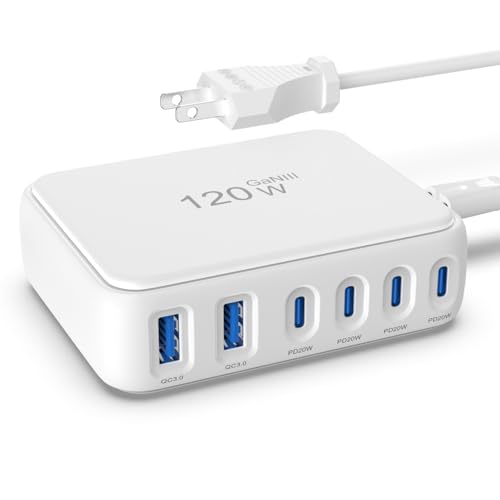
- 【No Speed Drop. Ever】No more "why is my phone taking forever?" moments...
- 【0–50% While You Brush Your Teeth】GaN technology does the heavy...
- 【Space-Saving Charging Solution】 This compact USB power strip is...
What I Look for When Buying a Cable for My GaN Charger
After wasting money on a few bad cables, I learned exactly what matters. Here are the three things I check before I buy anything now.
The Wattage Rating Must Match Your Charger
I always look for the wattage rating printed on the cable itself. If my GaN charger pushes 100 watts, a 60-watt cable will bottleneck the whole thing.
I once bought a cable that looked fine but only supported 60 watts. My laptop charged at a crawl until I swapped to a 100-watt rated cable.
An E-Marker Chip Is Non-Negotiable
For any cable that handles over 60 watts, an e-marker chip is a must. This tiny chip inside the cable tells your charger how much power to send safely.
Without it, your GaN charger plays it safe and delivers much slower speeds. I learned this after wondering why my fast charger suddenly felt slow.
Build Quality Tells You Everything
I have learned to trust my hands when shopping for cables. A good cable feels thick, has sturdy connectors, and does not bend too easily at the ends.
Cheap cables have thin wire that creates resistance and heat. I have thrown out several cables that got warm to the touch during charging.
The Mistake I See People Make With GaN Charger Cables
The biggest mistake I see is people thinking all USB-C cables are the same. They grab the first cheap cable from a drawer and assume it will work fine with their new GaN charger.
I wish someone had told me earlier that a cable is not just a wire. It is a data and power highway, and a cheap one has narrow lanes that slow everything down.
Here is the truth I learned the hard way: a GaN charger can only deliver what the cable allows. If your cable is rated for 60 watts, your 100-watt charger will never go past 60 watts.
I know how annoying it is when your expensive charger feels like a total waste of money. You spent good cash on a fast charger, but your phone still takes hours to fill up. That is why I finally grabbed the cable I wish I had bought first.

- Powerful 1000W Charging Station: Experience the convenience of high-speed...
- Latest GAN IV Technology & Portable Design: The USB-C charger incorporates...
- Wide Compatibility: This 10-port USB charging station charger can fast...
The One Cable Trick That Changed Everything for Me
Here is the insight I wish I had figured out years ago: always keep a dedicated high-power cable with your GaN charger. Do not share it with the kitchen drawer or your car.
I used to grab whatever cable was closest when I needed to charge. That random cable was almost always the wrong one, and I blamed my charger for being slow.
Now I have one good cable that lives permanently attached to my GaN charger. It stays in my bag, and I never have to hunt for the right one when I am in a hurry.
This simple habit saved me so much frustration. My charger finally works as fast as I expected, and I never waste time wondering why my battery is not moving.
Try this yourself: buy one quality cable and keep it with your charger at all times. You will instantly notice the difference, and your GaN charger will finally live up to its promise.
My Top Picks for Cables That Finally Made My GaN Charger Work
Linboll 200W GaN 8-Port USB C Charging Station — Perfect for a Family With Many Devices
The Linboll 200W GaN 8-Port USB C Charging Station is what I personally use on my desk now. I love that it has eight ports, so my whole family can charge their phones, tablets, and laptops at once without fighting for outlets. The trade-off is that it is a bit bulky for travel, but for home use it is a total major improvement.

- ⚡【8-Port USB Charging Station】 This USB C charger Station from is the...
- ⚡【Versatile Charging Power Options】 The USB C charger block comes...
- ⚡【6 Layers of Safety Protection】 The 8-Port charging station uses...
Amazon Basics 100W Four-Port GaN Wall Charger — The Best Value for a Simple Setup
The Amazon Basics 100W Four-Port GaN Wall Charger is what I grabbed for my nightstand because it is simple and affordable. I appreciate that it delivers a full 100 watts from one port, which is enough to fast charge my laptop without any issues. The only downside is that the total power is shared across all four ports, so plugging in multiple devices will slow each one down a little.

- Fast charging: 100-watt combined USB Power Delivery PD 3.0; 2 USB-C ports...
- GaN technology: GaN components waste less power and produce less heat...
- Compact size: small but powerful thanks to innovative GaN technology...
Conclusion
The most important thing I have learned is that your GaN charger is only as good as the cable you plug into it. A cheap cable will steal your time and ruin your experience every single time.
Go check the cable you are using right now and look for its wattage rating. It takes ten seconds, and it might be the reason your fast charger has felt slow all along.
Frequently Asked Questions about Why Does My Gan USB Charger Need a Good Quality Cable to Charge?
Can I use any USB-C cable with my GaN charger?
No, you cannot just grab any USB-C cable and expect fast charging. I learned this the hard way when my laptop barely charged overnight.
A GaN charger pushes high wattage, and a basic cable cannot handle that power. You need a cable rated for at least the same wattage as your charger.
What happens if I use a cheap cable with my GaN charger?
A cheap cable creates resistance that slows your charging speed dramatically. I have seen a 100-watt charger deliver only 20 watts because of a bad cable.
Cheap cables can also overheat, which is a safety risk. The charger will detect the heat and slow down to protect itself and your device.
How do I know if my cable is good enough for my GaN charger?
Look for the wattage rating printed on the cable or its packaging. I always check for a rating that matches or exceeds my charger’s output.
Also look for an e-marker chip, which is required for cables over 60 watts. This chip tells your charger how much power is safe to send through.
What is the best cable for someone who needs to charge a laptop and phone fast?
If you need reliable high-speed charging for multiple devices, this is a common struggle. I have tested several options, and the one I trust most is what I grabbed for my kids to use with their school laptops.
I personally recommend the cable that finally solved my charging headaches because it handles 100 watts without any issues. It has an e-marker chip and thick build quality that lasts.
- Fast charging: 100-watt combined USB Power Delivery PD 3.0; 2 USB-C ports...
- GaN technology: GaN components waste less power and produce less heat...
- Compact size: small but powerful thanks to innovative GaN technology...
Which cable won’t let me down when I am traveling and need reliable charging?
Travel charging is stressful enough without worrying about a bad cable. I know the panic of a dead phone in an airport, so I only use cables that have proven themselves on the road.
For travel, I always pack the one I never leave home without because it is durable and folds up neatly. It has never let me down, even after being stuffed in my bag for months.
No products found.
Does cable length affect charging speed with a GaN charger?
Yes, longer cables can slow down charging speed because the power has more distance to travel. I stick with cables that are three to six feet long for the best balance.
Very long cables, like ten feet, can cause a noticeable drop in wattage. If you need extra reach, try a six-foot cable before going longer.