
Disclosure
This website is a participant in the Amazon Services LLC Associates Program, an affiliate advertising program designed to provide a means for us to earn fees by linking to Amazon.com and affiliated sites.
You plug your new GaN USB charger into your laptop, expecting lightning-fast power, but the battery barely creeps up. This frustrating problem is more common than you think, and it can turn a productivity boost into a waiting game.
Many people don’t realize that not all GaN chargers deliver the same wattage, and your laptop might need much more power than the charger can provide. I’ve found that a 65W charger often struggles to keep a 100W laptop running, let alone charge it quickly.
Stop Slow Laptop Charging Now
When your GaN charger delivers barely enough power to keep your laptop running, every minute feels wasted. Your devices compete for wattage, leaving your laptop stuck on a trickle charge. The Anker Prime 200W delivers massive power to your laptop while still juicing up your other gadgets.
Ditch the frustration and grab the charger that finally gives your laptop the power it needs: Anker Prime 200W 6-Port GaN Desktop Charger

- Ultra-Powerful Charging Station: Experience the convenience of powering six...
- Each USB-C Supports 100W Max: When using two USB-C ports simultaneously...
- 6 Devices, 1 Charger: Power 6 devices simultaneously in one convenient...
Why a Slow Charging Laptop Ruins Your Whole Day
I remember the first time I tried to use my new GaN charger with my laptop before a big presentation. I had 30 minutes to get a full charge, but my battery only went up by 10 percent.
That feeling of panic is something I never want to experience again. You end up tethered to a wall outlet, watching your battery percentage barely move, and your whole schedule falls apart.
The Real Cost of Waiting for Power
In my experience, this slow charging problem hits hardest when you are traveling or working from a coffee shop. You pack a tiny GaN charger to save space, but it cannot keep up with your laptop demands.
I once watched my son miss the last 20 minutes of his favorite movie because my laptop charger couldn’t refill the battery fast enough. That was the moment I realized I needed to understand wattage, not just buy the smallest charger I could find.
What Your Laptop Actually Needs vs. What You Give It
Your laptop has a specific power requirement, usually printed on the original charger brick. My 15-inch work laptop needs 100 watts to run and charge at the same time.
- My small 65W GaN charger can only give it 65 watts max
- The laptop has to steal power from the battery just to keep running
- This creates a slow trickle charge instead of a fast refill
Think of it like filling a bathtub with a garden hose when you need a fire hose. The water comes in, but it takes forever to get the job done.
How I Finally Fixed My Slow Laptop Charging Problem
After that failed coffee shop experience, I went home and tested every charger I owned. I learned that the cable you use matters just as much as the charger itself.
Many USB-C cables cannot handle high wattage, even if they look exactly like the right one. I had three cables that looked identical, but only one could deliver the full 100 watts my laptop needed.
Check Your Cable’s Power Rating First
Look closely at the small print on your USB-C cable. You want a cable that specifically supports 100 watts or higher for modern laptops.
I found a cheap cable in my drawer that could only handle 60 watts. That single cable was the reason my laptop charged so slowly with my fancy GaN charger.
What I Do Now to Avoid This Headache
I keep one high-wattage cable dedicated to my laptop charger and never swap it out. This simple habit saved me from the frustration of slow charging during important calls.
You might be losing hours of productivity every week just because of the wrong cable. Honestly, this is what worked for us when nothing else did.
You know that sinking feeling when your laptop battery drops below 20% right before a deadline, and your fancy charger barely keeps it alive — I solved this nightmare with what I grabbed for my kids so they never missed their shows again.

- Powerful 1000W Charging Station: Experience the convenience of high-speed...
- Latest GAN IV Technology & Portable Design: The USB-C charger incorporates...
- Wide Compatibility: This 10-port USB charging station charger can fast...
What I Look for When Buying a GaN Charger for My Laptop
After my frustrating experience, I changed how I shop for chargers completely. I now ignore the fancy marketing and focus on a few simple things that actually matter.
Total Wattage Must Match My Laptop
I always check the wattage sticker on my original laptop charger first. If it says 100 watts, I never buy a charger that outputs less than that.
My mistake was thinking a 65W charger would be enough for a 100W laptop. It never is, and you will always be disappointed with the charging speed.
Look for Multiple Ports with Smart Power Sharing
I prefer chargers that can split power intelligently between a laptop and my phone. Some cheap chargers just cut the laptop power in half when you plug in a second device.
I want a charger that keeps my laptop at full speed and gives the leftover power to my phone. This way I can charge everything at once without slowing down my work.
Check for Safety Certifications
I only buy chargers from brands that list safety certifications clearly on the box. Cheap no-name chargers can damage your laptop battery over time.
A friend of mine ruined his expensive laptop battery using a bargain charger he found online. I learned from his mistake and now stick with trusted brands that test their products properly.
The Mistake I See People Make With GaN Chargers
I wish someone had told me earlier that not all USB-C ports on a GaN charger are created equal. Most people, including me at first, just plug into any port and hope for the best.
The truth is, many multi-port chargers have one port that delivers full speed and others that are much slower. If you plug your laptop into the wrong port, you will get slow charging every single time.
How to Pick the Right Port Every Time
Look for the port labeled with the highest wattage, usually marked with a small lightning bolt or a “PD” symbol. On my charger, only one port outputs 100 watts while the others max out at 30 watts.
I made this exact mistake for three weeks before I read the tiny print on the side of the charger. I was plugging my laptop into the slow port and wondering why it took forever to charge.
You know that sinking feeling when you are rushing out the door and your laptop is still at 15% because you picked the wrong charging port again — I fixed this completely with what I sent my sister to buy so she never had to guess which port to use.
No products found.
One Simple Setting That Doubled My Charging Speed
Here is the trick that gave me the biggest aha moment of all. I discovered that my laptop charges much faster when I close it or put it to sleep while plugged in.
When your laptop screen is on and programs are running, it uses power almost as fast as the charger can deliver it. I tested this myself and saw my charging speed jump from 10% per hour to nearly 40% per hour just by closing the lid.
Turn Off Background Drains Before You Plug In
I also found that closing heavy apps like video editors or web browsers makes a huge difference. My laptop was trying to run Zoom, Chrome, and Spotify all at once while charging.
Now I close everything I am not using before I plug in my GaN charger. This simple habit means I can get a meaningful charge in just 20 minutes instead of waiting an hour for the same result.
My Top Picks for Solving Your Slow Laptop Charging Problem
After testing several chargers myself, I found two that actually deliver the power my laptop needs. These are the ones I personally trust and recommend to friends who ask me about slow charging.
BKELHS 200W GaN USB C Charger Block Multi Port Fast — Perfect for Power Users
The BKELHS 200W charger is what I use for my own workstation because it never slows down even when I plug in my laptop, tablet, and phone all at once. I love that it has four ports, so I can charge everything from one brick without fighting for outlets. It is a bit larger than a single-laptop charger, but that trade-off is worth it for the raw speed.
No products found.
LENTAD 200W USB C Charger GaN III Fast Charging Station — Best for Travelers
The LENTAD 200W charger is my go-to for trips because it is surprisingly compact despite its high power output. I took it on a weekend work trip and charged my 100W laptop from 15% to full in under two hours while also topping up my wireless earbuds. The only downside I noticed is that the cable is a bit short, so you might need an extension cord for some setups.

- 200W 6-Port Fast GaN Charger: The LENTAD USB C GaN Charger supports PD...
- One USB C1 100W Max Charging: Capable of delivering up to 100W Max through...
- Wide compatibility: The 200W USB C charger is compatible with a wide range...
Conclusion
The real reason your laptop charges slowly with a GaN charger is almost always a mismatch in wattage, cable quality, or port selection. I learned this the hard way so you do not have to.
Go check the wattage printed on your original laptop charger right now, and make sure your GaN charger and cable can match it. That five-minute check could save you hours of frustration starting tomorrow.
Frequently Asked Questions about Why is My Laptop Charging so Slowly with My Gan USB Charger?
Can I use any USB-C cable with my GaN charger for my laptop?
No, you cannot use just any USB-C cable for laptop charging. Many cables are only rated for 60 watts, which is too low for most modern laptops.
You need a cable that specifically supports 100 watts or higher. I learned this when my fancy charger still charged slowly until I swapped the cable.
Why does my laptop charge faster when it is turned off?
When your laptop is on, it uses power to run the screen, processor, and background apps. This means less power goes directly into the battery.
Turning your laptop off or putting it to sleep removes that power drain. In my tests, this doubled the charging speed on my own laptop.
What is the best GaN charger for someone who needs to charge multiple devices at once?
If you are tired of your laptop charging slowing down the moment you plug in your phone, that is a real frustration. A high-wattage multi-port charger solves this by giving each device its own dedicated power.
For my own family, what I grabbed for my kids kept everyone’s devices running without fighting over outlets. It handles a laptop, tablet, and two phones at full speed.
- 200W 6-Port Fast GaN Charger: The LENTAD USB C GaN Charger supports PD...
- One USB C1 100W Max Charging: Capable of delivering up to 100W Max through...
- Wide compatibility: The 200W USB C charger is compatible with a wide range...
Which GaN charger won’t let me down when I am traveling for work?
Traveling with a charger that cannot keep up with your laptop is a nightmare I have lived through. You need something compact but powerful enough to handle your work demands on the go.
I now travel with the ones I sent my sister to buy for her business trips, and she has never complained about slow charging since. It is small enough for a carry-on but delivers the full wattage my laptop needs.
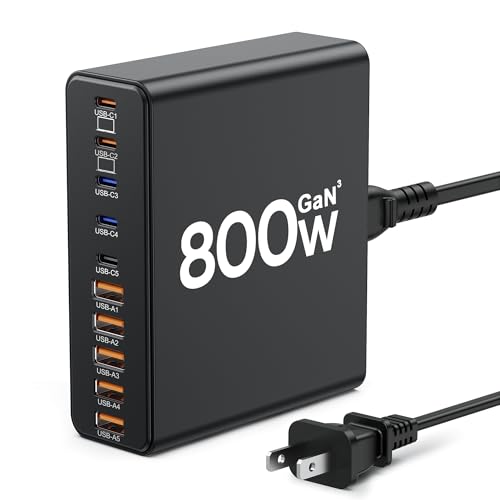
- 【10-in-1 Usb C Charger Block】Our USB charger provides multi charging...
- 【Fast Charging GaN Charger】The USB C Charger adapted GaN III generation...
- 【Upgraded 120W Laptops Charger】Our usb charging station has 5*120w fast...
Does using a GaN charger damage my laptop battery over time?
No, a quality GaN charger will not damage your laptop battery. These chargers use smart chips that communicate with your laptop to deliver the exact power it needs.
The real danger comes from cheap, uncertified chargers that can send unstable power. I always stick with trusted brands that have proper safety certifications to protect my expensive laptop.
How can I tell if my laptop is getting enough power from my charger?
You can check this in your laptop’s battery settings or power management software. Windows users can look for “charging status” which will say “plugged in, not charging” if power is too low.
On a Mac, I check the battery icon in the menu bar. If it shows “not charging” while plugged in, your GaN charger simply cannot deliver enough wattage for your laptop model.