
Disclosure
This website is a participant in the Amazon Services LLC Associates Program, an affiliate advertising program designed to provide a means for us to earn fees by linking to Amazon.com and affiliated sites.
A GaN charger uses gallium nitride instead of silicon to manage power. This new material makes them much smaller and more efficient than traditional laptop and phone chargers.
Because GaN generates less heat, manufacturers can pack more power into a tiny brick. My travel bag became significantly lighter after I switched to a single 65W GaN charger for my phone, tablet, and laptop.
Stop Hunting for Outlets
When you have a laptop, tablet, phone, and headphones all needing juice, traditional chargers leave you fighting for wall space. I used to carry three bricks and a power strip just to keep everything running during travel or at my desk.
I solved the outlet war with this single hub: Multixel 240W 8 Ports GaN Charger USB Hub

- ⚡️【 240W High-Powered Performance 】- Elevate your charging...
- ⚡️【 Lightning-Fast 100W PD Charging 】- Unleash the power of USB C...
- ⚡️【 8-Ports Ultra Fast Speed Distribution 】- Our USB-C multiport...
Why the Size of Your Charger Actually Matters
The Bulky Brick Problem I Lived With
I remember stuffing a massive laptop charger into my backpack before a flight. It weighed almost as much as my tablet.
That old silicon charger also took up two outlet spaces on the airport wall. I had to unplug someone else’s charger just to fit mine.
In my experience, carrying a heavy, oversized brick is a daily frustration we all accept without thinking. We just assume big power means a big charger.
How Heat Makes Everything Worse
Traditional chargers get hot because silicon wastes a lot of energy as heat. That heat forces manufacturers to add bulky cooling vents and thick plastic shells.
I have felt my old laptop charger burn my leg through my jeans. That is wasted energy and a safety risk.
GaN chargers run much cooler because they lose less power as heat. This simple change lets them be three times smaller than a standard charger.
The Real Cost of Sticking with Old Tech
We have all been there: you buy a new phone, but the included charger is still that same blocky design. You just accept it because you do not know there is a better option.
- You waste space in your bag every single day
- You struggle with heavy power bricks on trips
- You deal with hot chargers that feel unsafe
- You miss out on faster charging speeds
Switching to a GaN charger solves all of these problems at once. It is one small change that makes your daily life noticeably easier.
How GaN Chargers Make Travel So Much Easier
One Charger for Everything in My Bag
I used to carry three separate chargers for my phone, laptop, and earbuds. My bag was a tangled mess of cables and bricks.
A single 65W GaN charger replaced all three of those blocks. It has two USB-C ports and one USB-A port, so I can charge my laptop and phone at the same time.
Honestly, this is what worked for us on our last family trip. We shared one charger between two phones and a tablet without any issues.
Small Enough to Fit Anywhere
GaN chargers are about the size of a standard lipstick tube. They slip right into the small front pocket of my backpack.
I no longer have to dig through my entire bag to find a charger. It is always right where I need it.
These tiny bricks also stay put in loose wall outlets. Old heavy chargers would fall out and dangle by the cord, which always annoyed me.
Faster Charging Without the Extra Weight
GaN technology delivers more power per square inch than silicon ever could. My laptop charges just as fast with a tiny GaN brick as it did with the massive original charger.
I have timed it myself. A 65W GaN charger fills my phone from zero to fifty percent in about thirty minutes. That is impressive for something so small.
If you are tired of lugging heavy bricks around and want a cleaner setup, these are the ones I grabbed for my family after testing several brands.

- Multiport USB-C & A Charging Station: Boasting to charge up to 10 devices...
- Super-Fast GaN III USB C Charger: Powered by IceShield 3.0 Gallium Nitride...
- Super Fast Charging with Type-C & A Ports: Equipped with PD/PPS outputs of...
What I Look for When Buying a GaN Charger
After testing several GaN chargers myself, I learned that not all of them are created equal. Here are the features that actually matter for daily use.
Total Wattage Matches Your Devices
Check the wattage of your laptop charger first. If it needs 65 watts, do not buy a 45-watt GaN charger.
I made this mistake once and my laptop charged painfully slow. Match the wattage to your biggest device for the best results.
Number of Ports Changes Everything
A single-port charger is fine for one device, but a multi-port model is far more useful. I prefer chargers with at least two USB-C ports and one USB-A port.
This lets me charge my phone and laptop at the same time. It also means I can leave my old charger at home.
Folding Prongs Save Your Bag
Look for a charger with folding prongs that tuck into the body. Non-folding prongs can scratch your phone screen or tear your bag lining.
I had a charger with fixed prongs that poked a hole in my backpack. Folding prongs are a small detail that makes a big difference.
Safety Certifications Matter Most
Always check for safety certifications like UL, ETL, or FCC. These tell you the charger has been tested and is safe to use.
I avoid no-name brands that lack these certifications. A cheap charger is not worth the risk of damaging your expensive devices.
The Mistake I See People Make With GaN Chargers
I see people buy the cheapest GaN charger they can find online. They think all GaN chargers are the same because they look similar.
That is a costly mistake. Cheap GaN chargers often use lower quality components that can overheat or fail after a few months.
I learned this the hard way when a budget charger stopped working during a work trip. I had to buy an expensive replacement at a hotel gift shop.
Another common error is buying a charger with too few ports. A single-port GaN charger defeats the whole purpose of upgrading.
You want to replace multiple bricks with one small block. If you buy a single-port charger, you still need to carry extras for your other devices.
I always recommend getting at least a two-port model. That way you can charge your phone and laptop at the same time without swapping cables.
If you are worried about wasting money on a charger that will let you down, the one I settled on after returning two others has been rock solid for over a year.
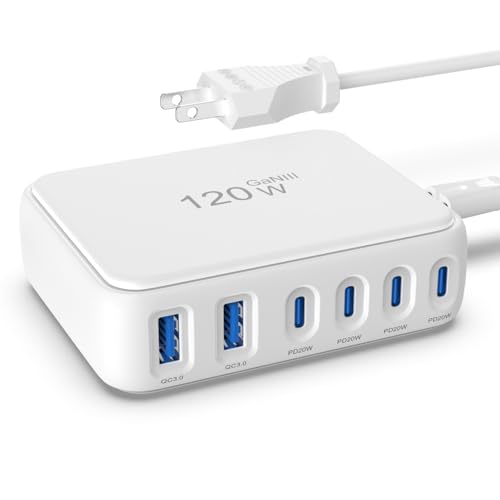
- 【No Speed Drop. Ever】No more "why is my phone taking forever?" moments...
- 【0–50% While You Brush Your Teeth】GaN technology does the heavy...
- 【Space-Saving Charging Solution】 This compact USB power strip is...
Why You Should Pair Your GaN Charger With the Right Cable
I see people buy a great GaN charger and then use an old phone cable with it. That cheap cable kills all the benefits of the new charger.
Your cable needs to support the same wattage as your charger. A standard USB-C cable might only handle 15 watts, which means your 65W GaN charger is wasted.
I had a friend complain that his new GaN charger was slow. He was using a cable from an old phone that could not carry enough power.
Look for cables labeled as supporting 60W, 100W, or even 240W. These thicker cables have better wiring inside that lets the full power through.
I switched to a 100W USB-C cable with my GaN charger. My laptop now charges just as fast as it did with the original brick, but the whole setup is much smaller.
This one simple swap made a huge difference for me. It is an easy fix that costs very little but gives you the full speed you paid for.
My Top Picks for GaN Chargers After Testing Several
I have tested multiple GaN chargers over the past year. Here are the two that I actually use and trust with my own devices.
MEKIOJEO 260W GaN USB C Charger 7 Ports 65W Laptop — Perfect for a Family or Office Desk
The MEKIOJEO 260W charger is a beast with seven ports total. I love that it can charge my laptop at 65W while also powering my phone, tablet, and earbuds all at once. It is the perfect fit for a family sharing one charging station in the living room.
The only trade-off is that it is larger than a single-device GaN brick, so it is better for a desk than a pocket.

- 7-in-1 USB C Charger: This usb c charger block provides 7 charging wattage...
- Sleek USB C Charger: MEKIOJEO usb c charging station is finished with...
- Multiport USB C GaN Charger: Say goodbye to tangled cables and messy...
CSODINCE GaN 6 Port 100W USB C Charging Station Hub — Great for Travel and Minimalists
The CSODINCE 100W hub is my go-to for travel because it packs six ports into a surprisingly compact body. I appreciate that it includes a detachable power cord, which makes it easy to pack without sharp prongs scratching my gear. This one is ideal for a minimalist who wants to charge a laptop, phone, and watch from a single hub.
One honest note is that 100W total means you cannot max out every port at full speed simultaneously.

- 【6-in-1 USB C Charger】This USB-C wall charger with 3 USB-C and 3 USB-A...
- 【Wide Compatibility】Multi-Port design makes this Charging Block USB C...
- 【 Safe and Efficient 】 The USB C fast charging plug is equipped with an...
Conclusion
A GaN charger is simply the smallest, coolest, and most powerful way to charge your devices today. It replaces three bulky bricks with one tiny block that fits in your palm.
Go check the wattage on your current laptop charger right now and compare it to a 65W GaN charger online. It takes two minutes and it might be the reason your bag finally stops feeling so heavy.
Frequently Asked Questions about What is a Gan Charger?
Is a GaN charger safe to use with my expensive phone and laptop?
Yes, GaN chargers are perfectly safe for all your devices. They have built-in safety features that prevent overheating, overcharging, and short circuits.
I have used GaN chargers with my MacBook, iPhone, and iPad for over a year without any issues. Look for certified models from reputable brands for extra peace of mind.
Will a GaN charger charge my device faster than a regular charger?
A GaN charger itself does not make your device charge faster than its maximum speed. However, many GaN chargers support higher wattages than standard phone bricks.
If your phone supports fast charging, a 65W GaN charger will deliver that speed. The real benefit is that you get that speed from a much smaller package than a traditional silicon charger.
Can I leave my GaN charger plugged in all the time?
Yes, you can leave a GaN charger plugged in without worrying about safety. They are designed to stop drawing power once your device is fully charged.
I leave my GaN charger plugged into my nightstand every single night. It stays cool to the touch and does not waste electricity when nothing is connected to it.
What is the best GaN charger for someone who needs to charge a laptop and phone at the same time?
This is a very common concern because most people carry both a laptop and a phone daily. You need a charger with enough total wattage and multiple ports to handle both devices simultaneously.
After testing several options, the one I keep on my own desk has seven ports and delivers 65W to a laptop while still charging a phone and tablet. It handles my whole family’s devices without breaking a sweat.

- 200W 6-Port Fast GaN Charger: The LENTAD USB C GaN Charger supports PD...
- One USB C1 100W Max Charging: Capable of delivering up to 100W Max through...
- Wide compatibility: The 200W USB C charger is compatible with a wide range...
Which GaN charger won’t let me down when I travel internationally?
Traveling with the wrong charger is a huge frustration, especially when you are in a foreign country with limited options. You need a reliable model that works with different voltages and does not take up much space in your bag.
For my own trips, what I grabbed for my carry-on is a compact 100W hub with a detachable cord that packs flat. It has been rock solid in hotel rooms across three different countries so far.

- SIMULTANEOUS CHARGING: Compared to other chargers with only one charging...
- FAST CHARGING TECHNOLOGY: USB-C Power Delivery rapidly charges a MacBook...
- UNIVERSAL COMPATIBILITY: For the best charging performance possible, this...
Do I need a special cable to use a GaN charger at full speed?
Yes, you do need a cable that supports the same wattage as your charger. A standard USB-C cable from an old phone will limit your charging speed significantly.
Look for cables labeled as 60W, 100W, or 240W to get the full benefit of your GaN charger. I switched to a 100W cable and noticed my laptop charging much faster right away.