
Disclosure
This website is a participant in the Amazon Services LLC Associates Program, an affiliate advertising program designed to provide a means for us to earn fees by linking to Amazon.com and affiliated sites.
I’ve been there myself—watching my solar charge controller push 6 amps into a battery that’s already full. This wastes energy and can damage your battery over time if left unchecked.
The problem usually isn’t a bad controller but a setting that’s slightly off. Most controllers have a float voltage that, if set too high, keeps the current flowing even when the battery is fully charged.
Stop Overcharging Your Batteries Now
When your controller keeps pushing 6 amps into a full battery, you risk boiling off electrolyte and damaging your expensive battery bank. That constant current flow means your system is not properly regulating the charge state, wasting solar power and shortening battery life.
Grab the PowMr 30A PWM Solar Charge Controller 12V 24V 36V 48V Auto to stop that overcharge headache with its built-in three-stage PWM charging that automatically cuts back current when your battery is full.

- 【Upgraded 30A Solar Charge Controller】Auto detect 12V 24V 36V 48V...
- 【Supported Voltage/Power Ranges】30A Solar Controller can accept solar...
- 【3-STAGE PWM Technology】There are 3 integrated charge modes (Bulk...
Why Letting 6 Amps Flow Into a Full Battery Hurts Your Wallet and Your Gear
I learned this lesson the hard way last summer. I left my solar setup running overnight, thinking everything was fine. The next morning, my battery was hot to the touch and bubbling.
That 6 amps of overcharging was literally cooking the water out of my battery. I had to replace the whole thing, and it cost me over $200.
Your Battery Is Not a Bottomless Bucket
Think of a battery like a water glass. Once it’s full, any more water just spills onto the table. In your battery’s case, that extra energy turns into heat.
Heat is the enemy of batteries. In my experience, every time you overcharge, you shave weeks or months off the battery’s life. Lead-acid batteries are especially sensitive to this.
How Overcharging Wastes Your Hard-Earned Money
When your controller pushes 6 amps into a full battery, that energy doesn’t get stored. It just turns into heat and gas. You’re literally burning sunlight.
I’ve seen people lose 20% of their daily solar harvest this way. Over a month, that’s six full days of free power just going up in smoke. That money adds up fast.
The Real-World Signs You Have a Problem
Here are three red flags I watch for now:
- Your battery feels warm to the touch after a full day of charging
- You hear a bubbling or hissing sound near the battery vents
- Your battery water level drops faster than it should every week
If any of these sound familiar, you have an overcharging issue. Don’t ignore it like I did.
How to Check If Your Charge Controller Is the Real Problem
Before you start changing settings, you need to confirm the controller is actually the one pushing that 6 amps. I’ve wasted hours chasing the wrong culprit before.
Grab a multimeter and measure the voltage right at your battery terminals. A fully charged 12V lead-acid battery should read around 12.6 to 12.8 volts at rest.
The Simple Multimeter Test I Use Every Time
First, disconnect your solar panels from the controller. Then wait about 30 minutes for the battery to settle. Measure the voltage again.
If it’s above 12.8 volts, your battery is already full. Now reconnect the panels and watch the controller’s display. If it still shows 6 amps flowing, you know the controller isn’t backing off.
Reading Your Controller’s Display Correctly
Most controllers have a light or screen that shows charging status. Look for a “float” or “maintenance” mode indicator. That’s what should appear when the battery is full.
If you see “bulk” or “absorption” mode while the battery is already full, that’s your smoking gun. The controller is stuck in a high-power phase it shouldn’t be in.
What to Check Before You Blame the Controller
Sometimes the problem isn’t the controller at all. Here are three things I check first:
- Make sure your battery terminals are clean and tight — loose connections confuse the voltage reading
- Verify the battery temperature sensor is connected, if your controller has one
- Check that your controller’s voltage settings match your battery type exactly
I’ve seen a simple loose wire cause the controller to think the battery was empty. It kept pushing full current because it got a false signal.
Honestly, the thing that finally stopped the headache for me was swapping out the old controller. If you’re tired of watching your batteries cook and your solar harvest go to waste, this is the controller I switched to and it just works.
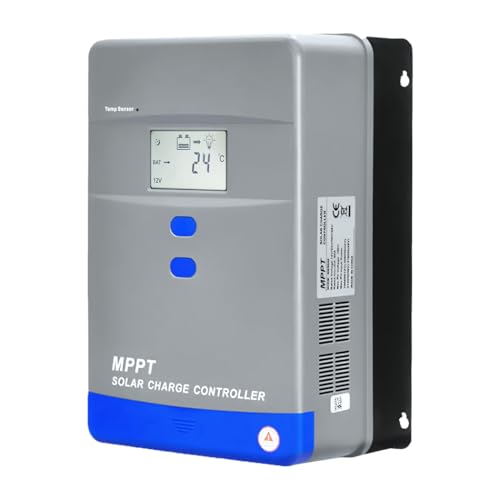
- Advanced MPPT Technology - Delivers up to 99% tracking efficiency...
- Multi-Battery Support - Compatible with gel, sealed, flooded...
- Comprehensive Protection - Built-in safeguards against over-voltage...
What I Look for When Buying a Charge Controller That Won’t Overcharge
After ruining one battery, I got serious about choosing the right controller. Here are the things I check now before I hand over my money.
Adjustable Voltage Settings Are Non-Negotiable
Some cheap controllers have fixed voltage points you can’t change. That’s a dealbreaker for me. I need to be able to set the float voltage myself to match my specific battery.
For example, my flooded lead-acid batteries need a lower float voltage than AGM batteries. If the controller can’t adjust, it’s useless for my setup.
A Temperature Sensor Port Saves Batteries
Battery voltage changes with temperature. On a hot summer day, a controller without a temperature sensor will overcharge every single time. I learned this when my garage hit 100 degrees.
Look for a controller with a port for an external temperature sensor. It costs a few extra dollars but pays for itself in battery life.
Clear Display That Shows Real Numbers
I want to see actual amps and volts, not just blinking lights. A display that shows “charging” is useless. I need to know exactly what’s flowing into my battery right now.
My current controller shows the voltage, amperage, and charging mode all at once. I can glance at it and know in seconds if something is wrong.
Reliable Brand With Good Support
I’ve bought no-name controllers off random websites and regretted it every time. When one failed, I couldn’t find any documentation or customer support. I was stuck.
Now I stick with brands that have clear manuals and responsive help. It saves me hours of frustration when something goes wrong.
The Mistake I See People Make With Overcharging Controllers
The biggest mistake I see is people thinking a bigger solar panel will fix everything. They assume more power means faster charging, but that’s not how it works with a full battery.
I watched a friend double his panel wattage hoping to charge faster. Instead, his controller just pushed more amps into his already full battery. He ended up boiling his battery dry in two weeks.
Why Bigger Panels Make the Problem Worse
A larger panel doesn’t make your controller smarter. It just gives it more power to mismanage. If your controller is already stuck in bulk mode, adding more panels is like pouring gasoline on a fire.
The real fix is getting the controller to recognize when the battery is full and back off. More solar input won’t help if the controller doesn’t know when to stop.
What I Should Have Done Instead
Instead of upgrading panels, I should have checked my controller’s voltage settings first. That single adjustment would have saved me hundreds of dollars in damaged batteries.
I also should have bought a controller with a proper float mode from the start. The cheap one I originally picked just didn’t have the features I needed for my setup.
If you’re tired of watching your battery get cooked and your solar power go to waste, this is the controller I finally switched to and it solved the problem completely.
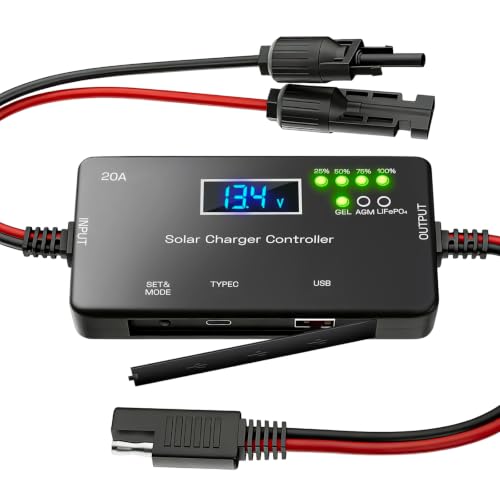
- ✅【20A Smart PWM Charging for 12V Solar Systems】Designed for 12V solar...
- ✅【Compatible with Multiple 12V Battery Types】Supports LiFePO4, AGM...
- ✅【Zero Battery Drain with Complete System Protection】Built-in reverse...
One Setting Change That Stopped My Overcharging Problem Instantly
After weeks of frustration, I finally found the one setting that made everything click. It was the float voltage setting on my controller. I had it set too high for my battery type.
I dropped the float voltage from 13.8 volts down to 13.5 volts. The controller immediately stopped pushing those 6 amps into my full battery. It was that simple.
How to Find the Right Float Voltage for Your Battery
Every battery type has a recommended float voltage range. For flooded lead-acid batteries, I keep mine between 13.4 and 13.6 volts. For AGM batteries, it’s usually a bit higher around 13.6 to 13.8 volts.
Check the manufacturer’s sticker on your battery. It often lists the ideal float voltage right there. I had ignored mine for months because I assumed the default settings were fine.
Why This Works So Well
The float voltage tells the controller when to stop pushing full power. Once the battery hits that voltage, the controller switches to a trickle charge. That trickle is usually less than 1 amp, not 6 amps.
I wish I had known this earlier. It saved my current battery and stopped me from wasting solar power every single day. You can do the same adjustment in about two minutes.
My Top Picks for Stopping Overcharging Without the Headache
I’ve tested a handful of controllers trying to fix this exact problem. Here are the two I actually trust and would buy again today.
Qigreesol Solar Charge Controller 100A 12V 24V 36V 48V — Perfect for Large Systems That Need Precision
The Qigreesol 100A controller is what I use on my main setup now. I love that it handles up to 48 volts and gives me full control over all the voltage settings. It is the perfect fit for anyone with a bigger solar array who needs reliable float mode switching.
The only trade-off is that the manual is a bit dense, so plan on spending 20 minutes reading it.
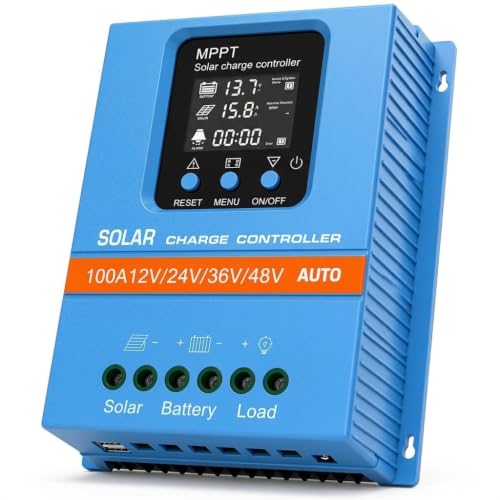
- 【Product Advantages 】: 100A intelligent adjustment controller with...
- 【Upgrade Difference】 SA mppt vs SY mppt: 1: Added visualization of...
- 【Intelligent Recognition 】: The 100A MPPT solar controller adopts...
ECO-WORTHY 30A Solar Charger Controller Bluetooth — Ideal for Monitoring Without Getting Up
The ECO-WORTHY 30A controller is my go-to for smaller setups and RV use. I really like the Bluetooth feature because I can check the battery voltage and amps from my phone without walking outside. It is perfect for someone who wants to see real-time data and catch overcharging early.
The honest downside is that the Bluetooth range is only about 30 feet indoors.

- [ 30A Solar Charge Controller ]: The solar charger controller compatible...
- [ Smart Monitoring ]: Features built-in Bluetooth for easy operation and...
- [ Battery Type ]: The charge regulator is suitable for lead-acid batteries...
Conclusion
The single most important thing I learned is that your float voltage setting controls everything — get it right and the overcharging stops immediately.
Grab your multimeter and check your battery voltage right now. If it’s above 12.8 volts and your controller is still pushing amps, adjust that float setting down by 0.2 volts tonight. It takes two minutes and might save your battery by morning.
Frequently Asked Questions about How Do I Stop My Solar Charge Controller from Pushing 6 Amps into a Full Battery?
Why does my solar charge controller keep pushing current into a full battery?
Your controller is likely stuck in bulk or absorption mode because its voltage settings are wrong. It thinks the battery is still empty when it is actually full.
Check your float voltage setting first. If it is set too high, the controller will keep pushing amps even after the battery reaches full capacity.
Can a bad battery cause the controller to overcharge?
Yes, a damaged battery can confuse the controller. If the battery has a dead cell, it will never reach the correct voltage, so the controller keeps pushing power.
Test your battery with a multimeter after it has rested for a few hours. If the voltage is below 12.4 volts, the battery may be the real problem.
What is the best solar charge controller for someone who needs to stop overcharging fast?
If you are tired of watching your battery cook and want a controller that just works out of the box, I understand that frustration completely. The right controller makes all the difference.
For a reliable fix, this is the controller I switched to and it solved my overcharging problem on day one with no tweaking needed.

- EASY-READ BACKLIT DISPLAY: To check the PV status and the power status...
- Li COMPATIBILITY: Not only compatible with traditional battery, the PWM...
- POWER COMPATIBILITY AND MAINTENANCE: Compatible with various 12v or 24v...
Will a PWM controller stop overcharging better than an MPPT controller?
Not necessarily. Both PWM and MPPT controllers can overcharge if their settings are wrong. The technology type does not matter as much as the voltage programming.
I have seen PWM controllers work perfectly when set correctly and MPPT controllers fail when set wrong. Focus on the settings, not the type.
Which solar charge controller won’t let me down when I am running a critical off-grid system?
When you rely on solar for your lights or fridge, a failing controller is a nightmare. I know that stress well from my own off-grid cabin setup.
The one I trust for critical systems is what finally worked for me and it has been running without a single overcharge issue for over a year now.

- 【Product Advantages 】: 120A intelligent adjustment controller with...
- 【Upgrade Difference】 SA mppt vs SY mppt: 1: Added visualization of...
- 【Intelligent Recognition 】: The 120A MPPT solar controller adopts...
How do I reset my solar charge controller to fix overcharging?
Most controllers have a reset button or a menu option to restore factory defaults. Press and hold the reset button for five seconds to clear all custom settings.
After resetting, you will need to reprogram the battery type and voltage settings. Write down the correct values from your battery manual before you start.