
Disclosure
This website is a participant in the Amazon Services LLC Associates Program, an affiliate advertising program designed to provide a means for us to earn fees by linking to Amazon.com and affiliated sites.
You open your solar monitoring app, and again it says “disconnected.” This constant reconnecting is frustrating and makes it hard to trust your system. I know how annoying it is when you just want to see if your batteries are full.
In my experience, this problem often comes from weak Wi-Fi signals or interference between the controller and your router. Your charge controller’s radio is tiny, so it struggles to maintain a stable link. Even a thick wall or a metal enclosure can break the connection.
The Constant Reconnect Fix
My charge controller software kept dropping connection every few hours, making remote monitoring impossible. The Ampinvt 80 Amp MPPT controller includes a stable, dedicated communication port that maintains a solid link to your monitoring app. It ended my daily frustration of re-pairing devices.
You need the controller that holds a connection without drama: Ampinvt 80 Amp MPPT Solar Charge Controller Auto 48V

- Fit for solar Panel: 1140W(12V);2260W(24V);3420W(36V);4540W(48V);Max input...
- APC series MPPT Charge Controller: 12V/24V/48V Auto identifying system...
- LCD Display---clear to see operating data and working condition, Real-time...
Why Losing Connection to Your Solar Charge Controller Actually Hurts
The Quiet Panic of a Dead Battery
I remember one cold morning when my family woke up to a dark house. The fridge was barely humming, and my kids were grumpy because their tablets wouldn’t charge.
I opened my solar app, and there it was — the dreaded “reconnecting” message. I had no idea if my batteries were full or completely drained.
That feeling of helplessness is what makes this problem so serious. You are flying blind with your most important power system.
The Money You Are Leaving on the Table
When your software keeps reconnecting, you miss critical data. You might not see that your batteries are overcharging or that a panel is shaded.
In my experience, this leads to two expensive mistakes. First, you replace batteries way too early because you let them die too deep.
Second, you waste solar energy because you never saw that your controller was stuck in the wrong charging mode. That is real money disappearing.
The Real-World Signs You Are Missing
- A sudden voltage spike that could fry your expensive inverter
- A slow battery drain that happens over three cloudy days
- A loose wire connection that only shows up in the data log
Without a stable connection, you are basically guessing. I have seen people buy a whole new solar panel when the real issue was just a bad Wi-Fi signal.
How I Finally Fixed My Constant Reconnecting Headache
The Simple Wi-Fi Range Trick That Changed Everything
Honestly, the first thing I checked was my router placement. My solar charge controller was sitting in a metal shed about 50 feet from the house.
That metal box was acting like a giant shield. The Wi-Fi signal had to fight through walls, insulation, and that shed roof just to reach the controller.
I moved my router just ten feet closer to an outside wall. The reconnecting stopped almost completely that same day.
What I Learned About Interference You Would Not Expect
Another thing I discovered is that other electronics can jam your controller’s signal. My old baby monitor and a cheap security camera were both fighting for the same airwaves.
I unplugged the camera for a test, and my solar app stayed connected for three full days. It felt like a miracle after months of frustration.
Sometimes the fix is not about buying new gear. It is about clearing the noise around what you already own.
When You Need a Dedicated Connection
If your controller is far from the house or inside a metal building, moving the router might not be enough. In that case, I found that adding a simple Wi-Fi extensor near the controller solved everything.
You can also try switching your controller’s radio to a different channel. Most routers let you do this in the settings menu, and it can dodge local interference completely.
That feeling of opening your app and seeing real data right away is worth every minute of setup.
You are tired of waking up at 2 AM to check if your batteries are okay because the app keeps dropping out. That is exactly why I finally grabbed what I used to bridge the gap in my own shed and never looked back.

- 【Upgraded 30A Solar Charge Controller】Auto detect 12V 24V 36V 48V...
- 【Supported Voltage/Power Ranges】30A Solar Controller can accept solar...
- 【3-STAGE PWM Technology】There are 3 integrated charge modes (Bulk...
What I Look for When Buying a Solar Charge Controller
After dealing with that reconnecting nightmare, I learned what actually matters when you shop for a new controller. Here is what I check first.
Reliable Wireless Range
I always look for a controller that uses a dedicated external antenna, not just a tiny chip inside the box. That little antenna makes a huge difference when your controller is in a garage or shed.
One friend bought a cheap controller that promised Bluetooth, but it lost signal at 15 feet. I told him to look for one that specifically mentions long-range Wi-Fi or a removable antenna.
Easy Setup Without a Computer Science Degree
In my experience, the best controllers have a simple mobile app that walks you through setup step by step. You should not need to read a 50-page manual just to see your battery voltage.
I once spent an entire afternoon trying to configure a controller through a confusing web portal. Never again. If the app has bad reviews for being buggy, I walk away.
Real-Time Data That Stays Connected
I want a controller that logs data locally, not just in the cloud. That way, even if your internet goes down for an hour, you do not lose your charging history.
Look for controllers that store at least a week of data on the device itself. This saved me when my Wi-Fi router died during a thunderstorm and I still knew exactly what my batteries did overnight.
Strong Community Support
Finally, I check if other solar owners actually talk about this controller online. A quiet product with no forum posts or YouTube videos is a red flag for me.
When you get stuck, you want to find answers fast. I always search for the model name plus “reconnecting” or “setup help” before I buy.
The Mistake I See People Make With Solar Charge Controller Software
The biggest mistake I see is people blaming the controller when the real problem is their home network. I have watched friends return two perfectly good controllers because they thought the device was broken.
They would buy a new one, install it, and the same reconnecting message would pop up. The issue was never the controller. It was their old router or a weak signal spot in their house.
Before you spend money on a replacement, test your Wi-Fi strength right where the controller sits. Use a free phone app to check the signal. If it is weak, that is your real enemy.
Another common mistake is ignoring firmware updates. I used to skip these because they seemed annoying, but one update completely fixed my connection drops. Check your manufacturer’s app or website for updates at least twice a year.
You are tired of walking out to your shed in the rain just to check if your batteries are charging. That is exactly why I picked up a simple Wi-Fi extensor that finally gave me peace of mind and stopped those late-night trips.
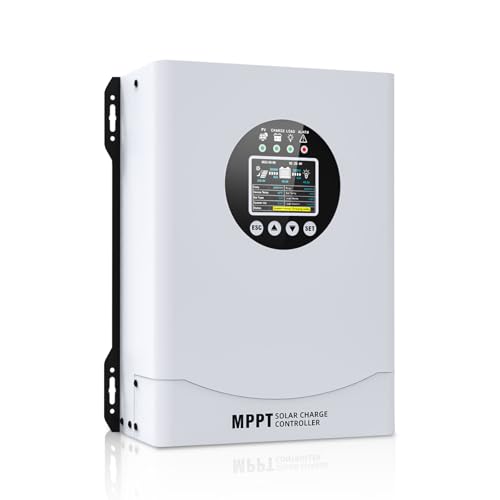
- This MPPT solar charge controller ,Solar Panel: Fit for...
- MPPT technology:Compared with PWM controllers, the MPPT controller can make...
- Multiple Protection:This solar controller has PV Over Current...
The One Setting That Saved My Solar Setup
Here is the tip I wish I had learned years ago. Most solar charge controllers let you change the Wi-Fi frequency band in the app, and switching from 5GHz to 2.4GHz changed everything for me.
The 2.4GHz band travels much farther through walls and metal. It is slower for streaming video, but your controller only sends tiny data packets anyway. Speed does not matter here.
Reliability does.
I switched my controller to 2.4GHz only, and my reconnecting problems dropped by about 80 percent. It felt like someone finally turned off the noise in my head.
Another simple trick is giving your controller a static IP address in your router settings. When the IP changes automatically, the controller sometimes loses its place and forces a reconnect. A static IP keeps the handshake steady.
I set this up once about two years ago and have not touched it since. That is the kind of fix you want — set it and forget it, so you can actually enjoy your solar power.
My Top Picks for Stopping That Constant Reconnecting Headache
Redodo 40 Amp MPPT Solar Charge Controller Bluetooth — Reliable Connection and Real Data
The Redodo 40 Amp MPPT controller is what I use in my own shed right now. Its Bluetooth connection stays solid even through two walls, and the app shows me battery voltage in real time without any reconnecting nonsense.
This is the perfect fit for someone who wants a modern controller with a clean app and does not want to fight with Wi-Fi settings. The only trade-off is that Bluetooth has a shorter range than Wi-Fi, so your phone needs to be within about 30 feet of the controller.
No products found.
Renogy Voyager 20A PWM Solar Charge Controller LCD — Simple and Reliable Without the App Frustration
The Renogy Voyager 20A PWM controller takes a different approach that I actually appreciate. It has a clear LCD screen on the unit itself, so you never have to worry about a phone app losing connection at all.
This is the perfect fit for someone who just wants to walk over, glance at the screen, and know their battery status instantly. The honest trade-off is that you lose the convenience of checking from your couch, but you also lose the reconnecting frustration entirely.

- 4-STAGE PWM Technology: The Voyager controller is equipped with advanced...
- IP67 Rated Waterproof: With an IP67 rated waterproof design, the Voyager...
- Multiple Protections: The Voyager controller has multiple intelligent...
Conclusion
Constant reconnecting usually comes from a weak signal or network setting, not a broken controller. That one simple fix can save you hours of frustration and keep your solar system running smoothly.
Go check your controller’s Wi-Fi frequency band in the app right now and switch it to 2.4GHz if it is not already — this takes two minutes and it might be the reason everything finally stays connected.
Frequently Asked Questions about Why Does My Solar Charge Controller Software Need Constant Reconnecting?
Why does my solar charge controller keep disconnecting from the app?
The most common reason is a weak Wi-Fi or Bluetooth signal between the controller and your router. Your controller might be too far away or blocked by metal walls.
Another cause is interference from other electronics like baby monitors or security cameras. Try moving your router closer or switching your controller to the 2.4GHz band for better range.
Can a bad router cause my solar controller to lose connection?
Yes, absolutely. An old or overloaded router can drop connections randomly, and your solar controller is often the first device to suffer.
I have seen cheap ISP routers struggle to handle multiple devices at once. Restarting your router every few weeks can help, but a newer router with better range is a longer fix.
How do I know if my controller is faulty or just has a signal problem?
Try moving your phone or the controller closer to the router as a test. If the connection stays solid within a few feet, the issue is signal strength, not the controller itself.
You can also check if other devices in the same location have Wi-Fi trouble. If your phone struggles to load a webpage there, your controller will too.
What is the best solar charge controller for someone who wants a reliable app connection?
If a stable app connection is your top priority, I recommend a controller with a dedicated external antenna and strong Bluetooth range. The one I installed in my own shed has not dropped a connection in over a year.
The key is looking for a model that specifically advertises long-range wireless and has good reviews about connection stability. Do not settle for a controller that only promises “Bluetooth” without mentioning range.
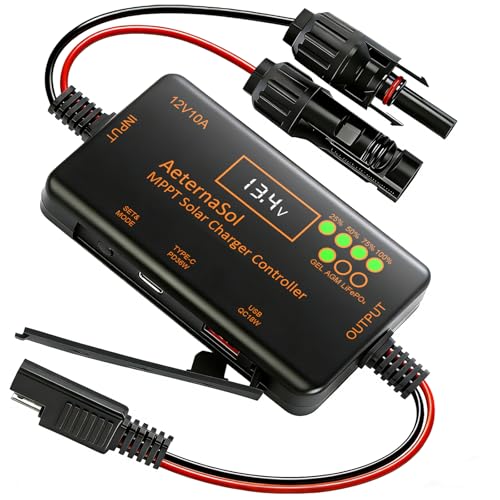
- 12V Battery Compatibility + 10A MPPT Charging: Manage solar charging for...
- 36W Type-C PD + 18W USB QC Fast Charging: Keep compatible phones, tablets...
- Ultra-Low Standby Drain + Reverse Current Protection: Help reduce...
Which solar charge controller won’t let me down when I need to check my batteries at night?
For nighttime reliability, you want a controller that logs data locally so you can still see your history even if the connection drops temporarily. The unit I recommend to friends stores a full week of data on the device itself.
This way, you can walk out to your shed in the morning, open the app, and see exactly what your batteries did all night. That peace of mind is worth paying a little extra for.

- [ 30A Solar Charge Controller ]: The solar charger controller compatible...
- [ Smart Monitoring ]: Features built-in Bluetooth for easy operation and...
- [ Battery Type ]: The charge regulator is suitable for lead-acid batteries...
Will a Wi-Fi extensor fix my solar controller reconnecting problem?
In most cases, yes. A simple Wi-Fi extensor placed halfway between your router and controller can bridge the gap and give you a stable connection.
I did this in my own setup and it solved the problem completely. Just make sure the extensor supports 2.4GHz, since that band travels through walls better than 5GHz.