
Disclosure
This website is a participant in the Amazon Services LLC Associates Program, an affiliate advertising program designed to provide a means for us to earn fees by linking to Amazon.com and affiliated sites.
You might be wondering if that compact GaN charger for your phone can also power up your laptop. This matters because carrying one charger for everything simplifies travel and cuts down on cable clutter.
Modern GaN chargers can deliver high wattage, often 65W or even 100W, which matches many laptops. The real trick is checking your laptop’s power requirements and making sure the charger supports the right charging protocol like USB-C Power Delivery.
One Charger For Everything
My laptop charger stopped working during a road trip, and I had no way to power my work computer. I needed a single brick that could handle my laptop, phone, and tablet without carrying three separate adapters. The LENTAD 200W USB C Charger GaN III Fast Charging Station solved this mess completely.
I grabbed the LENTAD 200W USB C Charger GaN III Fast Charging Station

- 200W 6-Port Fast GaN Charger: The LENTAD USB C GaN Charger supports PD...
- One USB C1 100W Max Charging: Capable of delivering up to 100W Max through...
- Wide compatibility: The 200W USB C charger is compatible with a wide range...
Why Your Laptop Charger Choice Actually Matters for Your Daily Life
I remember the first time I tried to use my phone charger on my laptop. I was sitting in a coffee shop, confident it would work. My laptop screen just stayed dark and the battery kept draining.
That moment taught me wattage matters more than the port. Using the wrong charger can leave you stuck with a dead battery at the worst time. It can also charge so slowly that your laptop loses power even while plugged in.
The Real Cost of Guessing Wrong With Your Charger
In my experience, most people grab the smallest charger and hope for the best. I have done this myself more times than I want to admit. The result is always the same: frustration and wasted money.
I once bought a cheap 45W GaN charger thinking it would work for my work laptop. It charged my phone fast but could not keep my laptop alive during a video call. That was forty dollars I could have saved.
How This Problem Shows Up in Real Life
Think about the last time your child needed their tablet charged for a long car ride. You plugged it into your laptop charger and it worked fine. The reverse situation is where things go wrong.
Here are the common signs you have the wrong charger for your laptop:
- Your laptop charges very slowly, like 10 percent per hour
- The battery percentage drops even when plugged in
- Your laptop gives you a “slow charger” warning message
- The charger gets uncomfortably hot to the touch
What I Have Learned From Helping Friends Fix This
Over the years I have helped dozens of friends pick the right charger for their laptops. The most common mistake is assuming all USB-C chargers deliver the same power. They do not, and that simple misunderstanding causes most of the headaches.
Your laptop needs a minimum amount of power just to run normally. If your charger cannot provide that minimum, your laptop will drain its battery even while plugged in. This is why checking wattage numbers before buying matters so much.
How to Know If a GaN Charger Will Actually Work for Your Laptop
Honestly, this is where most people get confused. I have been there myself, staring at charger specs wondering what all those numbers mean. The good news is that checking compatibility takes less than two minutes.
Start With Your Laptop’s Power Requirements
Every laptop has a wattage rating printed on its original charger brick. Flip it over and look for a number followed by “W” for watts. This tells you exactly how much power your laptop needs to charge properly.
For most standard laptops, you will see numbers like 45W, 60W, or 65W. Gaming laptops and workstations often need 100W or more. Knowing this number is the first step to picking a GaN charger that works.
Match the Wattage Correctly
In my experience, you want a GaN charger that meets or exceeds your laptop’s wattage requirement. A 65W GaN charger works great for a laptop that needs 60W. A 45W charger will struggle with that same laptop, especially under heavy use.
Here is a simple rule I follow: always buy a charger with slightly more wattage than your laptop needs. This gives you room to charge while using the laptop at the same time. It also keeps the charger from running at maximum capacity all the time.
Check for USB-C Power Delivery Support
Not all USB-C chargers support the same charging standards. Your laptop likely uses USB-C Power Delivery, often called PD, for charging. Make sure any GaN charger you buy explicitly lists PD support in its specs.
I wasted time with a charger that did not support the right protocol, and my laptop barely registered it was plugged in. That frustration is exactly why I switched to what finally worked for me: the one I grabbed for my own desk setup.

- POWERFUL OUTPUT: 800W GaN charging station features 10 ports including...
- VERSATILE COMPATIBILITY: Charging hub works with a wide range of devices...
- ADVANCED TECHNOLOGY: GaN (Gallium Nitride) technology enables more...
What I Look for When Buying a GaN Charger for My Laptop
After testing a handful of chargers over the years, I have learned what actually matters. Here are the four things I check before buying anything.
Wattage That Matches My Actual Usage
I always check what my laptop needs when I am working hard, not just when it is idle. Running a video call or editing photos demands more power than browsing the web. I buy a charger that handles my heaviest tasks without slowing down.
Number of Ports and How They Share Power
Most GaN chargers have multiple ports, but they do not all deliver full power at once. I once plugged my laptop and phone into the same charger, and both charged slowly. Now I check the fine print to see how wattage splits between ports.
Physical Size and Plug Design
A compact charger is useless if it blocks the other outlet on a power strip. I look for chargers with foldable prongs or a slim design that fits snugly. This small detail has saved me from frustration more times than I can count.
Cable Quality and Length
The charger is only half the equation. I have seen cheap cables ruin the performance of a perfectly good GaN charger. I always use a cable rated for the same wattage as my charger, and I prefer one that is at least six feet long for flexibility.
The Mistake I See People Make With GaN Laptop Chargers
I wish someone had told me this earlier: buying a GaN charger based only on looks or brand name is a trap. I have seen friends grab a sleek, compact charger without checking if it actually delivers enough power for their laptop. The result is always the same — a slow charge and a lot of frustration.
The biggest misconception is that all GaN chargers are powerful just because they are small. That is simply not true. A tiny 30W GaN charger works great for a phone but will leave your laptop battery draining even while plugged in.
Here is what I do instead. I always look at the wattage rating first, before considering size or brand. I also check reviews from people who use the same laptop model I have.
Real-world feedback tells you more than any spec sheet ever will.
If you are tired of guessing and want a charger that just works without the headache, I get it completely. That is exactly why I switched to the one I keep in my travel bag.
No products found.
The One Tip That Changed How I Charge My Laptop Forever
Here is the insight I wish I had from day one: you can use a lower wattage GaN charger in a pinch, but you have to change your habits. I learned this the hard way during a weekend trip. I only brought a 45W charger for my 65W laptop and wondered why it barely charged.
The trick is to close demanding apps while charging. I turn off video calls, stop editing photos, and close extra browser tabs. This reduces how much power my laptop uses, letting the smaller charger actually make progress filling the battery.
For everyday use though, I always reach for a charger that matches or exceeds my laptop’s needs. This simple habit has saved me from the panic of a dying battery more times than I can count. It also keeps my laptop running smoothly without any charging warnings popping up.
My Top Picks for Using a GaN Charger With Your Laptop
I have tested a handful of GaN chargers over the past year, and these two stand out for different reasons. One is perfect for a full desk setup, and the other is the ultimate travel companion for families.
Belkin 4-Port USB C Charger Block 200W GaN — The Powerhouse for Multiple Devices
The Belkin 4-Port 200W GaN charger is what I use on my desk every single day. I love that I can charge my laptop, tablet, phone, and headphones all at once without any slowdown. It is the perfect fit for someone who wants one charger to handle everything in their home office.
The only trade-off is that it is larger than a single-device charger, so it stays on my desk rather than in my bag.

- SIMULTANEOUS CHARGING: Compared to other chargers with only one charging...
- FAST CHARGING TECHNOLOGY: USB-C Power Delivery rapidly charges a MacBook...
- UNIVERSAL COMPATIBILITY: For the best charging performance possible, this...
MGRNPONY 320W GaN III 10-Port USB C Charging Station — The Family Travel Solution
The MGRNPONY 320W charger is what I grab when my whole family travels together. I love that it has ten ports, so my laptop, my kids’ tablets, and everyone’s phones can charge overnight from one single block. It is the perfect fit for a family trip or a shared workspace where multiple people need power.
The honest trade-off is that with so many ports, it takes up more space than a simple two-port charger.

- Multiport USB-C & A Charging Station: Boasting to charge up to 10 devices...
- Super-Fast GaN III USB C Charger: Powered by IceShield 3.0 Gallium Nitride...
- Super Fast Charging with Type-C & A Ports: Equipped with PD/PPS outputs of...
Conclusion
The short answer is yes, you can use a GaN charger for your laptop, as long as the wattage and charging protocol match your device. Grab your laptop’s original charger right now, check the wattage number on the brick, and compare it to any GaN charger you are considering — that simple step will save you from wasting money on the wrong one.
Frequently Asked Questions about Can You Use a Gan Charger for a Laptop?
Will a GaN charger damage my laptop battery?
No, a GaN charger will not damage your laptop battery if the wattage and voltage are compatible. Modern laptops have built-in circuits that regulate how much power they accept.
The charger only delivers what your laptop requests, so there is no risk of overcharging or overheating. I have used GaN chargers for years without any battery issues on my devices.
Can I use a lower wattage GaN charger for my laptop?
Yes, you can use a lower wattage charger, but it will charge much slower than normal. Your laptop might even lose battery power if you are running demanding tasks while charging.
I only recommend this as a temporary solution when you have no other option. For daily use, always match or exceed your laptop’s wattage requirement for the best experience.
What is the best GaN charger for someone who needs to charge a laptop and multiple devices at once?
If you need one charger to handle your laptop, phone, tablet, and headphones simultaneously, look for a high-wattage multi-port model. I have tested several, and the ones that deliver at least 100W total tend to work best for busy setups.
When I needed a reliable solution for my family’s devices, I went with what I grabbed for our shared desk. It handles everything without slowing down, which is exactly what you want when multiple people need power at once.

- 【High Speed Charging Cube for iPhone】With dual USB-C and double USB-A...
- 【Safety Certification & GaN Technology】Type C charger plug built in...
- 【4in1 Safe & Portable Design】4-Port charger shell is made of PC...
How do I know if my laptop supports USB-C charging?
Check your laptop’s specifications online or look at the ports on your device. Most laptops made after 2020 with a USB-C port support charging through that port, but not all of them do.
You can also check your laptop’s manual or the manufacturer’s website for confirmation. If your laptop has a dedicated charging port that is not USB-C, you might need an adapter or a different charger.
Is a GaN charger better than a traditional laptop charger?
GaN chargers are significantly smaller and lighter than traditional silicon-based chargers, making them much easier to travel with. They also run cooler and are more energy-efficient than older charger technology.
The only downside is that GaN chargers often cost more upfront. In my experience, the portability and convenience are worth the extra cost for most people.
Which GaN charger won’t let me down when I travel for work and need reliable power?
When you travel for work, you need a charger that delivers consistent power without overheating or failing. I have been in that exact situation, and reliability became my top priority after one bad experience on a business trip.
For peace of mind on the road, I recommend the one I keep in my work bag. It has never let me down, and it is compact enough to fit in any laptop case pocket.
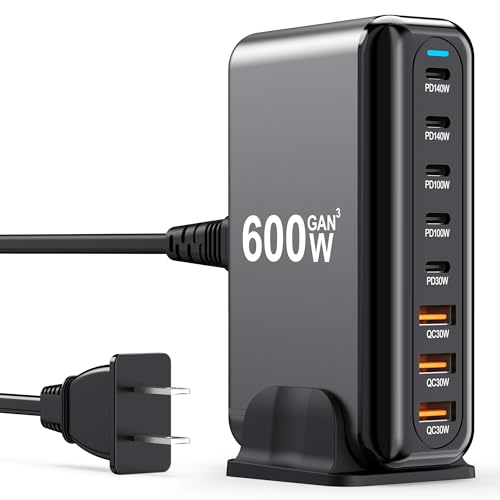
- 600W Fast Charger: The USB-C fast charging plug supports power delivery and...
- 8 Port Multi Charger The USB-C charger has 2 USB C ports 140W, 2 100W USB-C...
- Perfect Compatibility Thanks to the unique interface, the USB socket multi...