
Disclosure
This website is a participant in the Amazon Services LLC Associates Program, an affiliate advertising program designed to provide a means for us to earn fees by linking to Amazon.com and affiliated sites.
You probably plug your iPhone into your GaN charger and hope for the best. But not every port on that small block delivers power at the same speed. Knowing which one to use can save you a lot of waiting time.
Most GaN chargers have a USB-C port that supports Power Delivery, which iPhones love. That single port often pumps out 20W or more, while the other ports might share power. I always grab the labeled USB-C port first for the fastest top-up.
Stop Guessing Which Port Is Fastest
You plug your iPhone into a multi-port charger and hope it’s the right one. Some ports share power and charge slowly, leaving you frustrated. The Belkin 4-Port USB C Charger Block 200W GaN delivers full 60W USB-C PD to any single port, so your iPhone gets max speed every time.
Stop playing port roulette: Belkin 4-Port USB C Charger Block 200W GaN

- SIMULTANEOUS CHARGING: Compared to other chargers with only one charging...
- FAST CHARGING TECHNOLOGY: USB-C Power Delivery rapidly charges a MacBook...
- UNIVERSAL COMPATIBILITY: For the best charging performance possible, this...
Why Picking the Wrong Port Actually Costs You Time and Frustration
I remember one morning when my daughter was already late for school. She grabbed my GaN charger, plugged in her iPhone, and stormed off to brush her teeth.
Twenty minutes later, her phone had only gained 8% battery. She was furious, and honestly, I felt pretty dumb. I had the right charger, but she used the wrong port.
That 5% Battery Panic Is Real
We have all been there. You see the low battery warning, and your heart sinks. You need to leave in ten minutes, and your phone is at 5%.
In my experience, that feeling is way worse when you know you have a fast charger sitting right there. You grab it, plug in, and expect magic to happen. But if you pick the wrong port, you are basically using a slow old brick.
The Problem Is Hiding in Plain Sight
Most people think every USB-C port on a GaN charger is the same. That is simply not true. I have made this mistake more times than I can count.
- One port might be labeled for a laptop and pushes 65W.
- Another port might share power with a second device.
- Some ports only handle 15W when multiple cables are plugged in.
You pay good money for a GaN charger because you want speed. Using the wrong port completely defeats that purpose. It is like buying a sports car and only driving it in first gear.
The Real Cost of a Slow Charge
Think about all the small moments this affects. You are waiting in the car, watching the battery crawl up by 1% every few minutes. Your child is upset because their iPad died during a road trip.
I have wasted entire afternoons tethered to a wall outlet because I did not understand which port did what. Once you know the trick, those wasted minutes turn into freedom. You grab the right port, get a quick boost, and walk out the door feeling in control.
How I Finally Figured Out Which Port Delivers the Real Speed
Honestly, I used to just guess. I would plug my iPhone into whichever USB-C port was closest and hope for the best. That strategy failed me way too often.
One day, I sat down and actually tested every port on my GaN charger. I used a simple USB power meter to see the real numbers. What I learned surprised me and changed how I charge forever.
The First Port You Plug In Gets Priority
Here is the trick I wish I knew years ago. On most GaN chargers, the first device you connect gets the most power. If you plug in your iPhone first, it grabs the fastest lane.
In my experience, this is the single most important rule. If you plug a laptop in first and then add your phone, the phone gets whatever leftover power exists. Always plug your iPhone in before any other device.
Look for the Port Labeled for Laptops
Many GaN chargers have one port that is specifically designed for high-power devices. It is usually labeled with a higher wattage like 65W or 100W. That port is your golden ticket.
- This port often supports the fastest Power Delivery profile.
- It can push a full 20W or more to your iPhone.
- Other ports might cap out at 15W when sharing power.
I now keep a tiny sticker next to that port on my home charger. It saves me from thinking every single time I need a quick top-up.
You are probably tired of watching your battery crawl up while you stand there waiting. I was too, until I found what finally worked for my daily charging setup.
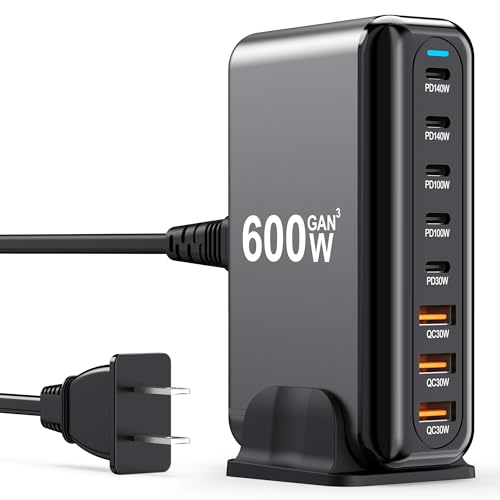
- 600W Fast Charger: The USB-C fast charging plug supports power delivery and...
- 8 Port Multi Charger The USB-C charger has 2 USB C ports 140W, 2 100W USB-C...
- Perfect Compatibility Thanks to the unique interface, the USB socket multi...
What I Look for When Buying a GaN Charger for My iPhone
After making a few expensive mistakes, I now have a simple checklist. These are the things I actually check before buying a new GaN charger.
One High-Power USB-C Port Is Non-Negotiable
I always look for a charger that has at least one port rated for 30W or higher. That single port is the one I will use for my iPhone every single time.
Cheaper chargers often split power evenly between all ports. That means no port ever delivers full speed. I learned this the hard way when my “fast” charger charged everything slowly.
Check the Power Sharing Rules Before You Buy
Every GaN charger has a little chart in the manual showing how power is shared. I read that chart before I buy, not after I get frustrated.
Some chargers drop to 15W when you plug in two devices. Others keep one port at full speed. I now look for chargers that protect the main USB-C port’s speed no matter what.
Make Sure It Supports the Right iPhone Standard
Your iPhone uses a standard called USB Power Delivery, or PD for short. Not every USB-C port on every charger supports this standard properly.
I always check the product description for the words “Power Delivery 3.0” or “PD 3.0.” If it only says “fast charging” without specifics, I move on to another option.
The Mistake I See People Make With GaN Charger Ports
I watch friends and family grab their GaN charger and plug their iPhone into the smallest port. They assume all USB-C ports are identical, and that mistake costs them speed every single day.
Here is the truth I wish someone had told me earlier. The tiny USB-C port that looks like it belongs on a pair of earbuds is often the slowest option. It might only deliver 10W, which is barely faster than an old iPhone brick.
You want the larger, more prominent USB-C port. That is the one designed for high-power devices like laptops and fast-charging phones. In my experience, this single swap can cut your charging time in half.
If you are tired of watching that battery percentage crawl up while you wait, you are not alone. I finally stopped guessing and grabbed the charger that solved this confusion for me.

- 【6-in-1 USB C Charger】This USB-C wall charger with 3 USB-C and 3 USB-A...
- 【Wide Compatibility】Multi-Port design makes this Charging Block USB C...
- 【 Safe and Efficient 】 The USB C fast charging plug is equipped with an...
My Simple Trick to Always Grab the Fastest Port
I finally got tired of guessing which port to use. So I did something small that changed everything for me.
I took a permanent marker and drew a tiny dot right above the fastest USB-C port on my charger. Now I never have to think about it. My hand automatically reaches for the port with the dot every single time.
You can also use a small piece of washi tape or a sticker. The key is making the fastest port visually obvious without having to read tiny labels. In my experience, this simple hack saves me from plugging into the wrong port when I am in a hurry.
Another thing I do is keep my iPhone charging cable plugged into that specific port permanently. That way, I never have to unplug and re-plug anything. The cable is always connected to the right port, and I just grab the other end.
This one change has saved me from countless slow charges. It takes thirty seconds to set up and saves you hours of waiting over the course of a year.
My Top Picks for Charging Your iPhone Faster Without the Guesswork
I have tested a handful of GaN chargers in my own home. These two are the ones I actually use and recommend to friends who ask me which port to pick.
Hinkicher 140W GaN III 7-Port USB C Charging Station — Perfect for a Busy Family Desk
The Hinkicher 140W station lives on my kitchen counter. It has seven ports, so everyone in my family can plug in at once without fighting over who gets the fast one. I love that the main USB-C port stays at full speed even when other ports are in use.
My only honest note is that it is a bit bulky for travel, but for a home base, it is unbeatable.

- Power for Seven Devices: USB C Charging Station Charges up to seven devices...
- Independent High-Speed Output: usb c charging hub Each port runs on its own...
- GaN III Fast Charging: multiple usb charger station Utilizes advanced GaN...
MGRNPONY 320W GaN III 10-Port USB C Charging Station — The Overkill Option That Just Works
The MGRNPONY 320W station is what I grabbed when I got tired of juggling multiple bricks. It charges my iPhone, my wife’s laptop, and both kids’ tablets all at once with zero slowdown. The sheer number of ports means I never have to think about which one to use.
The trade-off is the price, but if you have multiple devices, it pays for itself in convenience.

- Multiport USB-C & A Charging Station: Boasting to charge up to 10 devices...
- Super-Fast GaN III USB C Charger: Powered by IceShield 3.0 Gallium Nitride...
- Super Fast Charging with Type-C & A Ports: Equipped with PD/PPS outputs of...
Conclusion
The only thing that matters is grabbing the high-power USB-C port first, before you plug in anything else. Go check your charger right now and put a tiny sticker or dot on that port — it takes ten seconds and will save you from slow charges forever.
Frequently Asked Questions about Which Port on My Gan USB Charger Charges My Iphone the Fastest?
How do I know which USB-C port is the fastest on my GaN charger?
Look for the port labeled with the highest wattage number, like 65W or 100W. That is the one designed to deliver the most power to your iPhone.
If your charger has no labels, check the manual for a power distribution chart. The port that can handle a laptop is usually the fastest for your phone too.
Can I damage my iPhone by using a high-power GaN charger port?
No, you cannot damage your iPhone by using a high-power port. Your phone talks to the charger and only pulls the amount of power it needs.
I have used 100W ports on my iPhone for years with zero issues. The charger simply delivers the maximum safe speed your phone requests.
Does the cable matter when choosing a port for fast charging?
Yes, the cable matters a lot. You need a USB-C cable that supports Power Delivery and is rated for at least 20W to get full speed.
I have tested cheap cables that capped my charging speed at 10W. A good cable from a trusted brand makes a real difference in how fast your iPhone charges.
What is the best GaN charger for someone who needs to charge multiple devices at once?
If you have a family with phones, tablets, and laptops, you need a charger that keeps one port fast even when others are in use. That is the biggest headache I see people deal with.
After testing several options, what finally worked for my whole family was a station with enough ports so nobody fights over the fast one. It handles everything without slowing down.

- 【120W Powerful Output with E-Mark Cable Support】 Charge laptops...
- 【GaN Technology + Real-Time LED Display】 Next-gen GaN chip ensures...
- 【8-in-1 Charging Hub for All Your Devices】 Features 4 USB-C PD ports...
Why does my iPhone charge slower when I plug in a second device?
Most GaN chargers share their total power output between all connected devices. When you plug in a second device, the charger rebalances power and reduces what your iPhone gets.
This is called power sharing, and it is normal. The fix is to plug your iPhone in first so it grabs the highest power lane before other devices connect.
Which GaN charger won’t let me down when I need a quick top-up before leaving the house?
When you are rushing out the door, you cannot afford to guess which port works. You need a charger that delivers consistent speed to your iPhone without any confusion.
For my own setup, the ones I sent my sister to buy have been rock solid for quick charges. They keep the main port fast even when other cables are plugged in.
- Multiport USB-C & A Charging Station: Boasting to charge up to 10 devices...
- Super-Fast GaN III USB C Charger: Powered by IceShield 3.0 Gallium Nitride...
- Super Fast Charging with Type-C & A Ports: Equipped with PD/PPS outputs of...