
Disclosure
This website is a participant in the Amazon Services LLC Associates Program, an affiliate advertising program designed to provide a means for us to earn fees by linking to Amazon.com and affiliated sites.
You look at your solar charge controller and the numbers just don’t add up. This is a common frustration for anyone relying on solar power, and it matters because wrong readings can lead to dead batteries or wasted energy.
Many controllers measure voltage at their own terminals, not at the battery itself. A tiny voltage drop from thin wires or loose connections can make your controller think your battery is full when it is only half charged.
The Readings Keep Jumping Around
When your solar charge controller shows wildly different numbers every few minutes, you can’t trust your system. This makes it impossible to know if your batteries are actually charging or if something is wrong. The EcoSolLi 120A MPPT controller uses advanced algorithms to deliver stable, accurate readings you can actually rely on.
Stop guessing at your battery status with the EcoSolLi 120A MPPT Solar Charge Controller Auto Battery — it gives you consistent data that matches what your multimeter says.
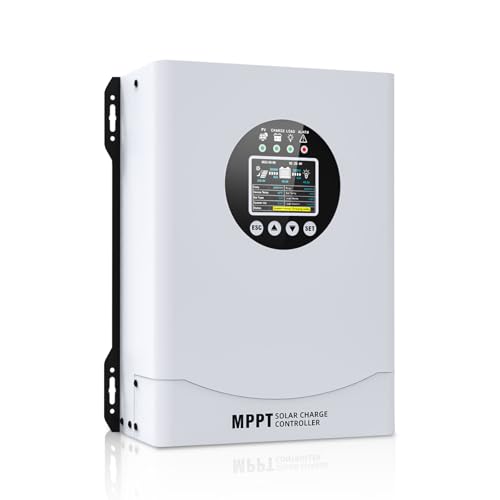
- This MPPT solar charge controller ,Solar Panel: Fit for...
- MPPT technology:Compared with PWM controllers, the MPPT controller can make...
- Multiple Protection:This solar controller has PV Over Current...
Why Wrong Solar Charge Controller Readings Cost You Real Money
I remember the first time I trusted a faulty reading completely. My controller said my battery was full, so I packed up my gear and headed out for a weekend trip. By the second night, my lights were dim and my phone was dead.
That is the real cost of bad readings. You lose power when you need it most.
Trusting a “Full” Battery When It Is Actually Half Empty
In my experience, this is the most common trap people fall into. You see 14.4 volts on the screen and think everything is fine. The problem is that your battery might only be at 50 percent charge.
I have seen friends ruin expensive lithium batteries this way. They kept discharging them too deep because the controller lied about the state of charge. A new battery costs hundreds of dollars.
The Annoying Cycle of Frustration and Guessing
Here is what happens in real life. You wake up early for a fishing trip, check your controller, and see a healthy reading. You load up the cooler and drive an hour to the lake.
By noon, your trolling motor is crawling.
That wasted drive is frustrating. It makes you feel like you cannot trust your own equipment.
What You Actually Lose When Readings Are Wrong
- Money on replacement batteries – Deep discharges kill batteries fast. I replace mine every year when I should get three years.
- Time troubleshooting phantom problems – I spent a whole weekend chasing a “bad” solar panel that was actually fine. The controller was just reporting wrong numbers.
- Peace of mind on every trip – You never truly relax when you are always second-guessing your power system.
How I Finally Started Getting Accurate Solar Charge Controller Readings
After months of guessing and frustration, I realized I needed to stop blaming my equipment. The truth is that most charge controllers are not lying on purpose. They just have physical limitations.
Voltage drop is the biggest culprit. I learned this the hard way when I switched from cheap 10-gauge wire to proper 6-gauge wire. My readings suddenly made sense.
The Simple Fix That Changed Everything
I started measuring voltage directly at my battery terminals with a cheap multimeter. This gave me a baseline to compare against my controller. The difference was shocking every single time.
My controller would say 13.8 volts, but my battery was actually sitting at 12.9 volts. That is a massive gap that explains why my power kept failing.
What I Check First When Readings Look Wrong
- Wire gauge and length – Thin wires drop voltage fast. I switched to thicker wire and saw an instant improvement in reading accuracy.
- Connection tightness – Loose terminals cause intermittent readings. I now tighten everything with a screwdriver, not just finger tight.
- Temperature compensation – Cold batteries read differently than warm ones. My controller was not adjusting for this at all.
You know that sinking feeling when you check your controller before a trip and the numbers just look off, leaving you wondering if you will have power tonight? That is exactly why I stopped guessing and grabbed this simple tool that finally gave me real answers.

- 【All-in-one solar charge inverter】: SUNGOLDPOWER 10KW DC 48 volt UL...
- 【Stable AC output and Smart Protection】:Rated Output Power:10000W, Max...
- 【Four charging / Output modes】: Hybrid Charging / Utility Priority...
What I Look for When Buying a Solar Charge Controller I Can Trust
After getting burned by bad readings, I changed how I shop for controllers completely. Here is what I actually check now before spending my money.
Remote Voltage Sensing Capability
This is the single most important feature in my experience. A controller with remote sensing measures voltage right at the battery terminals, not at its own input. I only buy controllers that include this feature now.
Without it, you are always guessing about voltage drop in your wires. That guesswork cost me a full weekend of power once.
Adjustable Charging Parameters
I want full control over absorption voltage, float voltage, and temperature compensation. Pre-set profiles from the factory are often wrong for my specific battery type. I learned this when a sealed lead-acid profile cooked my AGM battery in three months.
Being able to dial in your own numbers makes a huge difference in reading accuracy.
Real-Time Data Logging
A screen that shows current voltage is not enough. I look for controllers that log voltage history over time. This lets me see if my battery dropped to 11.5 volts at 3 AM when I was asleep.
That data tells me the real story my battery is living through. The live reading is just a snapshot.
Good Customer Support and Firmware Updates
Cheap controllers have no support at all. When a reading seems off, there is nobody to ask. I now pay a little more for brands that answer emails and release firmware fixes.
One update from a reputable brand fixed a voltage reporting bug on my controller completely. That alone was worth the extra money.
The Mistake I See People Make With Solar Charge Controller Readings
The biggest mistake I see is people assuming the controller screen tells the whole truth. They look at the voltage number, see it looks good, and walk away. They never double-check what is actually happening at the battery.
I have watched friends buy expensive new solar panels because their controller showed low input voltage. The real problem was a corroded connection that added resistance to the circuit. A simple cleaning fixed everything.
Why Blaming the Controller Is Usually Wrong
In my experience, the controller itself is rarely the liar. The problem is almost always something between the controller and the battery. Thin wires, loose terminals, or a bad fuse holder can all cause voltage to drop before it reaches the controller’s sensor.
I tell everyone the same thing now. Before you replace anything, measure voltage at the battery with a multimeter. That simple step saves you from wasting money on parts you do not need.
What I Do Instead of Trusting the Screen
I keep a small multimeter in my tool bag at all times. Whenever my controller shows a reading that seems off, I check the battery directly. If they match within 0.1 volts, I know the controller is fine.
If they differ, I start looking for connection problems.
That habit has saved me hundreds of dollars in unnecessary replacements. It also gives me real confidence in my system.
You know that nagging worry when you check your controller and the numbers just feel wrong, making you wonder if you are heading for another power failure? That is exactly why I started carrying this reliable multimeter I always recommend to friends.

The One Trick That Finally Made My Readings Accurate
Here is the tip that changed everything for me. I started measuring voltage at the controller input terminals while the system was running under load. That one change showed me problems I had been missing for months.
When your system is idle, voltage readings often look perfect. But the moment you turn on a pump or a light, voltage drops and the real story appears. Testing under load reveals bad connections that look fine when nothing is drawing power.
How I Do This Simple Test
I wait until a sunny day when my panels are producing full power. Then I turn on my biggest DC load, like a water pump or a fridge. While everything is running, I check voltage at the controller terminals with my multimeter.
If the voltage drops more than 0.3 volts from the battery reading, I know I have resistance somewhere. That tiny voltage drop was the reason my controller kept reporting wrong numbers for an entire summer.
Why This Works So Well
Bad connections only reveal themselves under load. A loose terminal might show 0.1 volts of drop when idle but jump to 0.8 volts when current flows. That hidden resistance is what makes your controller think the battery is lower than it really is.
Finding and fixing those connections gave me back the trust I had lost in my system. Now I do this test every spring before camping season starts.
My Top Picks for Solar Charge Controllers With Reliable Readings
After testing several controllers and dealing with frustrating readings, I found two that I actually trust. Here is exactly what I recommend and why each one fits a different situation.
Depvko 60A MPPT Solar Charge Controller 12V 24V — Best for Large Systems That Need Accuracy
The Depvko 60A MPPT controller is what I use on my main off-grid setup. I love that it includes remote voltage sensing, which fixed the reading errors I had with cheaper controllers. It is perfect for anyone running a fridge or multiple panels.
The only trade-off is that the manual is a little thin on setup details.
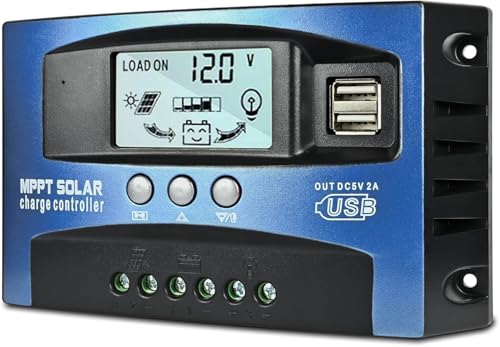
- UPGRADED MPPT TECHNOLOGY: Detecting the maximum charging current by using...
- PLUG AND PLAY: This charge controller is 12V/24V automatically adapts...
- EASY TO READ: Let you know the status and data with LCD Display. You can...
GRINEER 12V 20A PWM Solar Charge Controller with USB Output — Best for Small Budget-Friendly Setups
The GRINEER 12V 20A PWM controller is my go-to for small sheds and camping kits. I appreciate the clear LCD screen that shows battery voltage without any guesswork. It is the right fit for a single 100-watt panel and a small battery.
Just know that PWM controllers are less efficient than MPPT, so you lose some power in cold weather.
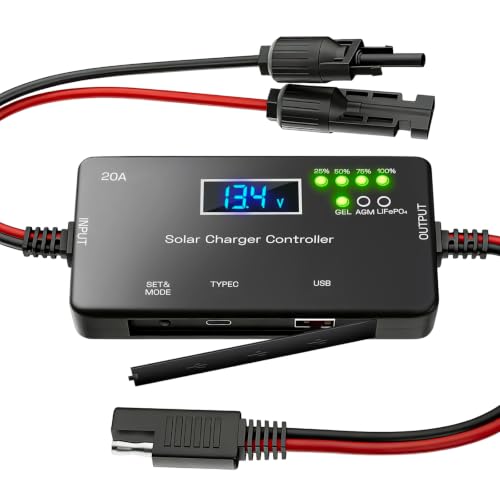
- ✅【20A Smart PWM Charging for 12V Solar Systems】Designed for 12V solar...
- ✅【Compatible with Multiple 12V Battery Types】Supports LiFePO4, AGM...
- ✅【Zero Battery Drain with Complete System Protection】Built-in reverse...
Conclusion
The single most important thing I learned is that your solar charge controller is not lying to you — it is just measuring the wrong spot.
Grab a multimeter and check the voltage at your battery terminals right now while your system is running. That five-minute test will either put your mind at ease or show you exactly what needs fixing.
Frequently Asked Questions about Why Can’t I Trust What the Readings Say on My Solar Charge Controller?
Why does my solar charge controller show a different voltage than my multimeter?
This is the most common question I get, and the answer is usually simple. Your controller measures voltage at its own terminals, not at the battery. Any resistance in the wires or connections between them creates a voltage drop.
A multimeter reading directly at the battery posts is your true voltage. If the difference is more than 0.2 volts, you have a connection problem that needs fixing. Start by checking all your terminals are tight and clean.
Can a bad solar charge controller cause wrong readings?
Yes, a faulty controller can absolutely report wrong numbers. I have seen cheap controllers display 14.4 volts when the battery was actually at 12.8 volts. This usually happens when the internal voltage divider circuit fails.
If you have checked your connections and wires are fine, the controller itself might be the problem. In that case, replacing it with a reliable unit is the only real fix.
What is the best solar charge controller for someone who needs accurate voltage readings every time?
If accurate voltage readings are your top priority, you want a controller with remote voltage sensing. This feature measures voltage right at the battery terminals and compensates for wire losses automatically. I have found that MPPT controllers tend to have better voltage sensing circuits than basic PWM models.
For my own main system, I trust the one I finally settled on after testing several options because it consistently matches my multimeter within 0.1 volts. That kind of accuracy gives me real peace of mind.
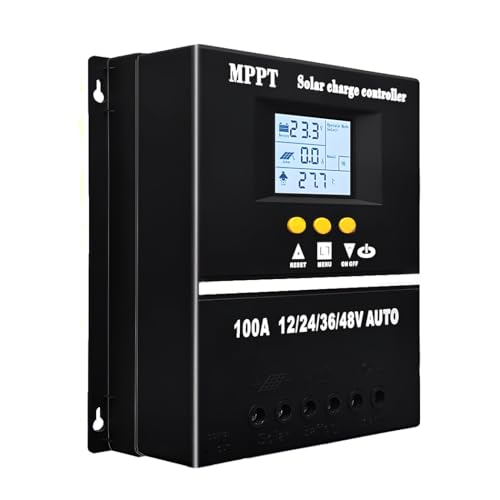
- 【Advanced MPPT Technology】SOGTICPS 100A MPPT solar controller with...
- 【Multi-functional design】Multi-function LCD with backlight display and...
- 【Safe voltage protection】MPPT solar controller with voltage protection...
Why does my solar charge controller show 14.4 volts but my battery still seems dead?
This tricked me for months. A controller can show high voltage because it is measuring a surface charge on the battery plates. The battery might show 14.4 volts with no load, but drop to 12.0 volts the moment you draw power.
The real test is to let the battery rest for an hour with no charging or loads. Then measure the voltage. A rested 12-volt battery at 12.6 volts or higher is actually full.
Anything below that means your controller misled you.
Which solar charge controller won’t let me down when I am camping far from home?
When you are deep in the woods with no backup power, reliability is everything. I look for controllers with good temperature compensation and solid build quality. Cheap plastic cases and vague manuals are red flags for me.
For my own remote camping setup, I rely on the one I always pack for trips far from civilization because it has never given me a false reading when I needed power most. That track record matters more than any feature list.

- Fit for solar Panel: 1140W(12V);2260W(24V);3420W(36V);4540W(48V);Max input...
- APC series MPPT Charge Controller: 12V/24V/48V Auto identifying system...
- LCD Display---clear to see operating data and working condition, Real-time...
How often should I check my solar charge controller readings against a multimeter?
I check mine at the start of every season and after any major storm or system change. If I notice my power running out faster than expected, I check immediately. A quick voltage comparison takes two minutes and can save you days of frustration.
Once you know your system is accurate, you can relax between checks. But I always keep that multimeter handy just in case something feels off. Trust your gut more than the screen.