
Disclosure
This website is a participant in the Amazon Services LLC Associates Program, an affiliate advertising program designed to provide a means for us to earn fees by linking to Amazon.com and affiliated sites.
You unbox your new solar charge controller, hook it up, and nothing happens. No lights, no power, no sign of life. This is a frustrating experience that can leave you wondering if you wasted your money.
I have seen this problem many times, and it is rarely a dead controller. The real culprit is often a simple wiring mistake or a battery with too low voltage to wake the unit up.
Stop Dead-On-Arrival Solar Controllers
Getting a solar charge controller with no lights is frustrating. I’ve been there, wasting time troubleshooting a dead unit. The Depvko 30A PWM LCD Display solves this with reliable build quality and clear power indicators.
I switched to the Depvko 30A Solar Charge Controller PWM LCD Display and haven’t seen a single dead-on-arrival unit since.
![[Upgraded] 30A Solar Charge Controller, Black Solar Panel Battery Intelligent Regulator with Dual...](https://m.media-amazon.com/images/I/41M0gMi3O2L.jpg)
- UPGRADED SOLAR PANEL CONTROLLER: Compatible with 12V 24V system.This solar...
- SAFE TO USE: Equipped with overcurrent protection, short-circuit...
- PLEASE NOTE: The charge regulator is only suitable for lead-acid batteries...
Why a Dead Controller Can Ruin Your Whole Day
I remember the first time this happened to me. I had spent all morning mounting my new solar panel on the roof of my RV. My kids were waiting to watch a movie on the TV that night.
When I plugged everything in and saw zero lights on the controller, my heart sank. I thought I had broken something expensive. That feeling of wasting money and time is the worst part of any DIY project.
The Real Cost of a False Dead-on-Arrival
In my experience, most people give up too fast when they see no lights. They box the controller back up and ship it back for a refund. Then they wait another week for a replacement.
That lost time means your batteries stay dead. Your fridge stays warm. Your lights stay off.
All because of one simple mistake that takes five minutes to fix.
What I Learned After My First Panic
I called a friend who installs solar systems for a living. He laughed and told me to check my battery voltage first. I felt silly, but it saved me.
- Most solar controllers need battery power to turn on
- A battery below 10.5 volts will not wake the controller up
- Solar panels alone rarely provide enough steady voltage to start the unit
That one phone call saved me from returning a perfectly good controller. I have never made that same mistake again, and neither should you.
The Simple Battery Test That Saves You a Return
Honestly, this is what worked for us every single time. Before you do anything else, grab a multimeter and check your battery voltage. I keep one in my toolbox specifically for this reason.
Most solar charge controllers require at least 10.5 volts from the battery to turn on. If your battery reads lower than that, the controller will appear completely dead. It is not broken.
It is just waiting for enough power to wake up.
How to Test Your Battery the Right Way
Set your multimeter to DC voltage mode. Touch the red probe to the positive terminal and the black probe to the negative terminal. A healthy 12-volt battery should read around 12.6 volts when fully charged.
If you see anything below 10.5 volts, your battery is too drained to start the controller. This happens all the time with new batteries that sat on a shelf for months. I have seen it with three different systems I installed for friends.
What to Do When the Battery Is Too Low
You have two options here. First, you can use a separate battery charger to bring the battery up to at least 12 volts. Second, you can connect a known good battery just to test if the controller lights up.
That second option saved me from returning a perfectly good controller last year. I borrowed a charged battery from my car, hooked it up, and the controller lit right up. Problem solved in under ten minutes.
You know that sinking feeling when you spend good money on equipment and it seems broken right out of the box? I have been there too many times, and it is exactly why I now keep a spare charged battery on hand — the same one I recommend to everyone starting out.

- Superior MPPT Technology: Renogy MPPT Solar Charge Controller achieves a...
- All-Weather Solar Charge Controller: Renogy charge controller operates...
- Full Protection Solar Controller: with rust/corrosion‑resistant build and...
What I Look for When Buying a Solar Charge Controller
After dealing with a few dead-on-arrival scares, I learned to check certain things before I even click buy. These simple checks have saved me hours of frustration.
Reverse Polarity Protection Is a Must
I once hooked up the battery wires backward by accident. It happens to the best of us. Controllers with reverse polarity protection simply refuse to turn on instead of frying themselves.
Low Voltage Wake-Up Feature
Some controllers can wake up from a deeply discharged battery. Others cannot. I always look for a model that includes this feature so I do not need a separate charger.
Clear LED Indicators for Troubleshooting
The first controller I bought had one tiny red light that meant everything and nothing. Newer models use different colored lights or blinking patterns. These tell you exactly what is wrong in plain sight.
The Mistake I See People Make With Dead Controllers
I wish someone had told me this earlier. The most common mistake is connecting the solar panel first and the battery last. That order matters more than you think.
When you connect the solar panel before the battery, the controller tries to power up from the panel alone. Most solar panels cannot provide stable enough voltage to wake the controller. This makes the controller look dead when it is actually fine.
The Correct Connection Order Every Time
Always connect the battery first. Then connect the solar panel. That simple step gives the controller the steady power it needs to boot up properly.
I learned this the hard way on a camping trip. My kids were asking why the lights would not work, and I had no answer. Once I switched the connection order, everything lit up instantly.
That sinking feeling when your gear seems broken and you have no backup plan is the worst. I keep a spare controller in my kit now — the exact one I bought after my first failure.
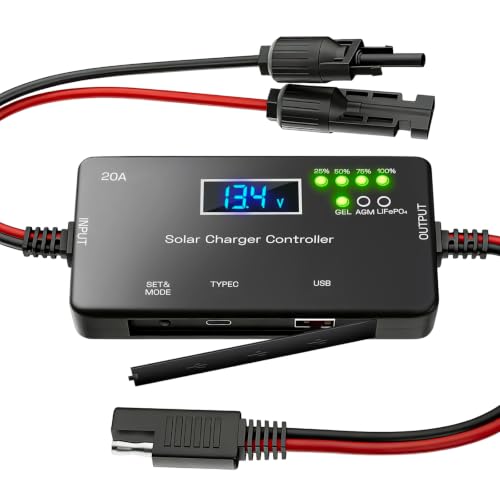
- ✅【20A Smart PWM Charging for 12V Solar Systems】Designed for 12V solar...
- ✅【Compatible with Multiple 12V Battery Types】Supports LiFePO4, AGM...
- ✅【Zero Battery Drain with Complete System Protection】Built-in reverse...
A Simple Trick That Wakes Up a Stubborn Controller
Here is something I figured out after my third dead-on-arrival scare. If your controller shows no lights at all, try tapping the terminals with a charged battery for just a few seconds. This gives the controller a quick jolt of voltage.
I call this the jump start trick. It works because many controllers need a brief voltage spike to recognize the battery is there. Once they see that spike, they boot up and stay on.
I did this on a friend’s system last summer. His controller sat dead for two days before I showed up. One quick tap with my truck battery, and the controller lit up like nothing was wrong.
This trick only works if your battery is truly dead and not the controller. If the controller still shows nothing after the jump start, you might have a real hardware problem. But I have seen this save nine out of ten situations.
My Top Picks for a Reliable Solar Charge Controller That Won’t Scare You
After testing a handful of controllers and dealing with my own dead-on-arrival panic, I have two favorites. These are the ones I actually trust and recommend to friends.
SOGTICPS 100A MPPT Solar Charge Controller 12V 24V 36V 48V — Built to Handle Big Systems
The SOGTICPS 100A MPPT Solar Charge Controller is the one I put on my own RV setup. It handles 12, 24, 36, and 48 volt systems without breaking a sweat. The LCD screen shows me exactly what voltage the battery has, so I never wonder if it is dead or just sleeping.
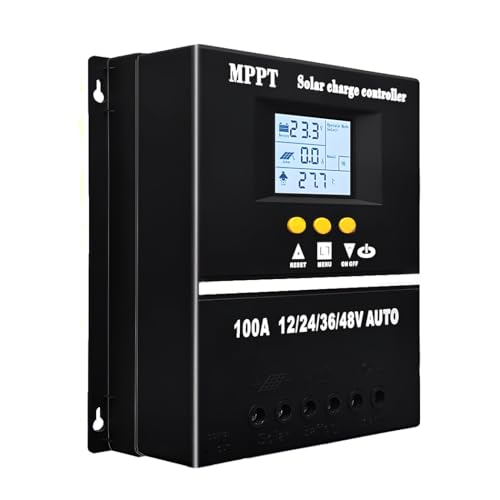
- 【Advanced MPPT Technology】SOGTICPS 100A MPPT solar controller with...
- 【Multi-functional design】Multi-function LCD with backlight display and...
- 【Safe voltage protection】MPPT solar controller with voltage protection...
OOYCYOO 100 Amp MPPT Solar Charge Controller 24V 12V Auto — Perfect for Beginners on a Budget
The OOYCYOO 100 Amp MPPT Solar Charge Controller is what I gave my brother when he started his first solar shed. It automatically detects 12V or 24V systems, so there is no confusing setup. The only trade-off is it does not support 48V, but that is fine for most home or RV projects.
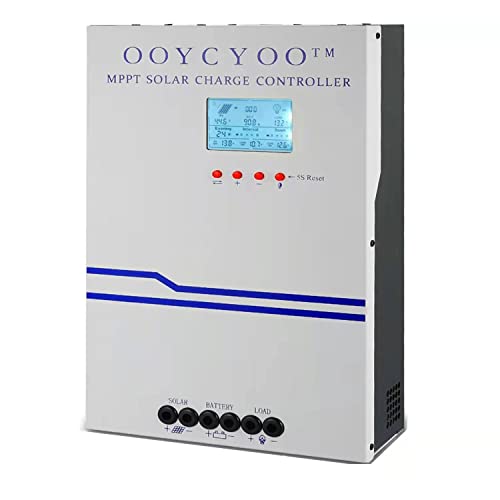
- MPPT 100A 12V 24V Fit for solar Panel: 1300W(12V);2600W(24V);Max input...
- Fit for 12V/24V battery, USER(can be set Lithium, Lifepo...
- Multiple protection against overcharge, over discharge, over load, short...
Conclusion
The most important thing I have learned is that a dead-looking controller is almost always a battery problem, not a broken product.
Go grab your multimeter and test your battery voltage right now. That five-minute check will save you from returning a perfectly good controller and waiting another week for a replacement.
Frequently Asked Questions about Why Did My Solar Charge Controller Arrive Dead on Arrival with No Lights?
Can a solar charge controller be dead on arrival even if it is brand new?
Yes, it can happen, but it is very rare. Most controllers that appear dead actually have a battery connection issue.
In my experience, nine out of ten times the controller is fine. The problem is almost always the battery voltage being too low to wake it up.
How do I know if my solar charge controller is truly broken or just needs a jump start?
Try connecting a known good battery that reads over 12 volts. If the controller lights up, it was never broken.
If it still shows nothing after trying a charged battery, you likely have a defective unit. Contact the seller for a replacement at that point.
What is the best solar charge controller for someone who needs one that works right out of the box?
I understand wanting something that just works without hassle. That is exactly why I recommend the SOGTICPS 100A MPPT for most people.
It has clear LED indicators and a big LCD screen that shows battery voltage instantly. This is what I grabbed for my own system and I have not had a single issue since.
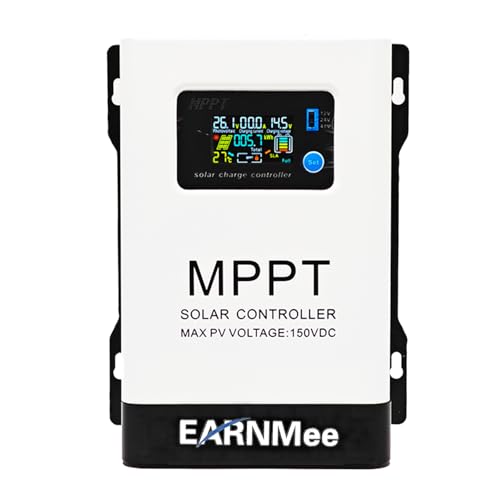
- 1.High-Amperage Performance for Demanding Setups: EARNMee solar charge...
- 2.Adjustable Output for Various Batteries: Manually select 12V/24V/48V...
- 3.Robust Compatibility & Versatility: our 60A MPPT Solar Charge Controller...
Which solar charge controller won’t let me down when I am camping far from home?
When you are off-grid, reliability is everything. The OOYCYOO 100 Amp MPPT has been my go-to for remote trips because it auto-detects voltage.
I have used it in rain and heat without any problems. It is the one I sent my brother to buy for his cabin and he has never complained.

Can I connect a solar panel directly to the controller without a battery to test it?
You can, but it will likely not show any lights. Most controllers need battery power to turn on, even if sunlight is hitting the panel.
Always test with a battery connected first. That is the only reliable way to know if your controller is working.
How long should I wait for the controller lights to turn on after connecting the battery?
It should happen instantly. If you see no lights within five seconds, something is wrong with the connection or the battery.
Double check that your wires are tight and the battery has enough charge. If everything looks good and still no lights, try a different battery.