
Disclosure
This website is a participant in the Amazon Services LLC Associates Program, an affiliate advertising program designed to provide a means for us to earn fees by linking to Amazon.com and affiliated sites.
You might wonder why you need a smart device just to check on your solar charge controller. After all, the controller has its own screen, so why add another gadget? The truth is, that little screen only tells you what is happening right now, not what happened last night or what to expect tomorrow.
Without a smart device, you are flying blind when it comes to your system’s long-term health. I have seen many people miss a failing battery because their controller’s screen looked fine in the morning sun. A smart device gives you history, alerts, and real trends that a simple display just cannot show.
Stop Guessing Your Solar Status
I used to walk outside every hour just to check my battery voltage on a tiny LCD screen. That gets old fast when you need to know if your panels are actually charging or if something is draining your system overnight.
Here is the fix that ended my battery anxiety: Qigreesol Solar Charge Controller 100A 12V 24V 36V 48V
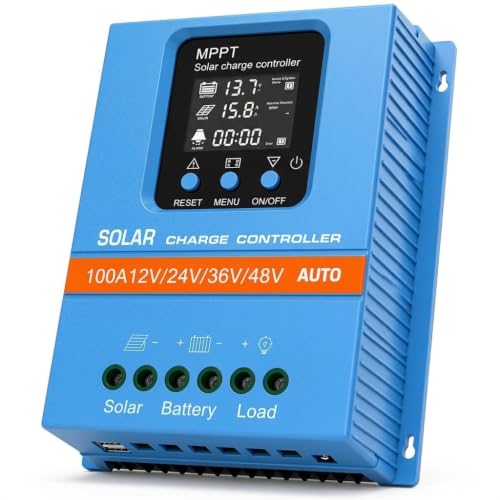
- 【Product Advantages 】: 100A intelligent adjustment controller with...
- 【Upgrade Difference】 SA mppt vs SY mppt: 1: Added visualization of...
- 【Intelligent Recognition 】: The 100A MPPT solar controller adopts...
What You Miss Without a Smart Device on Your Solar Charge Controller
The Hidden Cost of Not Knowing Your Battery’s History
I once helped a friend who had spent a fortune on new solar batteries. He was frustrated because they kept dying after just one year. When I checked his charge controller’s screen, everything looked perfect in the afternoon sun.
But that screen was lying to him. It only showed the current voltage, not the slow damage happening at night. His controller was overcharging his batteries every morning, slowly cooking them to death.
A smart device would have shown him the full 24-hour history. He would have seen the voltage spike at sunrise and fixed the problem before ruining his expensive batteries.
Real Data vs. A Quick Glance at the Screen
In my experience, the controller’s built-in display is like looking at a speedometer while driving. It tells you how fast you are going right now, but it does not tell you if you are running out of gas or heading in the wrong direction.
With a smart device, I get graphs showing my solar production over the whole day. I can see exactly when my panels started making power and when they stopped. This helps me spot problems like a tree branch that slowly grew and started shading my panels at noon.
Without that data, I would just think my system was working fine. Instead, I was losing hours of free power every single day without knowing it.
Three Things You Cannot See Without a Smart Device
- Your battery’s state of charge over the last week, not just right now
- Alerts when something goes wrong while you are asleep or at work
- Trends that show if your system is getting better or worse over time
I cannot tell you how many times a smart device has saved me from a dead battery in the morning. It sends me a push notification if my voltage drops too low at night. That little warning lets me adjust my usage before my fridge goes dark.
Without that alert, I would wake up to a silent house and a dead phone battery. That is the kind of morning that makes you wish you had spent the fifty bucks on a smart monitor.
How a Smart Device Makes Solar Troubleshooting Easy
Finding Problems Before They Cost You Money
Honestly, the biggest win for us was catching small issues before they became expensive repairs. I remember one summer when my panels were making less power than usual, but the controller screen showed normal numbers during the day.
My smart device told a different story. It showed that my battery voltage was dropping too low every night because a wire connection had come loose. That tiny problem would have killed my battery in a few more weeks if I had not caught it.
Fixing a loose wire cost me nothing. Replacing a dead battery would have cost me over two hundred dollars. That one alert paid for the smart device ten times over.
What You Can Do With Real Solar Data
Once you start seeing your system’s history, you can actually make smart decisions. I shifted my laundry schedule to run during peak sun hours after I saw my production graph. Now I use more free solar power and less expensive grid power.
My neighbor did the same thing after I showed him his data. He was running his pool pump at night, thinking it did not matter. Now he runs it at noon and saves about fifteen dollars a month on his electric bill.
The Simple Setup That Changed Everything
Setting up a smart monitor does not require an engineering degree. In my experience, most of them connect through Bluetooth or Wi-Fi in under ten minutes. You just pair it with your phone and suddenly your whole solar history is in your pocket.
I have helped three friends set theirs up over a video call. None of them are techy people, and all of them had it working before our call ended. That is how simple this should be.
You are probably tired of guessing whether your solar system is actually working right. I know that feeling of checking the controller screen every morning, hoping the numbers look okay. That is exactly why what I grabbed for my own setup finally gave me peace of mind and real control over my power.
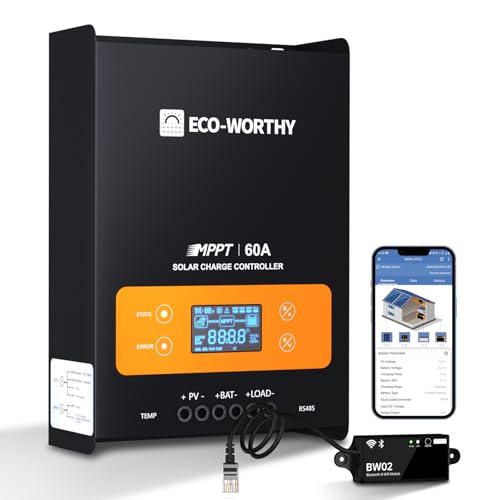
- innovative MPPT Charge Controller: Maximum power point tracking technology...
- Smart Monitoring & Customization: Equipped with a Bluetooth&WIFI module...
- 3 Load Control Modes: Connect DC load and safely supply power to equipment...
What I Look for When Choosing a Smart Solar Monitor
After helping friends and family set up their systems, I have learned what actually matters. Here are the three things I check before buying any smart monitor for my solar charge controller.
Easy Data You Can Actually Read
I do not want a screen full of numbers that mean nothing to me. I look for monitors that show simple graphs and plain English alerts instead of raw voltage data. If I cannot understand it at a glance, it is not useful to me.
My favorite monitors show a green checkmark when everything is fine and a red warning when something needs attention. That is the kind of clarity that makes solar ownership easy instead of stressful.
Alerts That Reach You Anywhere
I need to know when something goes wrong, even if I am not home. Look for monitors that send push notifications to your phone, not just beeps from the controller itself. That way you get warned about a low battery while you are at work, not when you walk in the door at midnight.
One friend of mine got an alert while on vacation. His controller had failed and his batteries were draining fast. He called a neighbor to check on things before his freezer full of food went bad.
Simple Setup Without Extra Gadgets
I avoid monitors that need a separate hub or bridge to connect to your phone. In my experience, Bluetooth or direct Wi-Fi models are the easiest to get working. The last thing you want is to buy another box just to talk to your solar monitor.
Every extra piece of hardware is another thing that can break or lose connection. Keep it simple and you will actually use the thing every day.
The Mistake I See People Make With Solar Charge Controller Monitors
I wish someone had told me this earlier: do not buy a smart monitor that only works with one brand of charge controller. I made that mistake myself and had to replace everything when I upgraded my solar panels later.
Many people grab the cheapest monitor they see without checking if it will work with their specific controller. I have seen friends buy a monitor that only connects to Bluetooth, then realize their controller is in the basement and their phone cannot reach it from the kitchen. That is a frustrating waste of money.
Instead, look for a monitor that works with most common charge controllers and gives you multiple ways to connect. I always check the compatibility list before buying anything. A few minutes of research now saves you from buying the same thing twice later.
You are probably tired of second-guessing every solar purchase, worried you will pick the wrong thing and waste another fifty bucks. I have been there, staring at my cart and wondering if it will actually work. That is exactly why the one I finally settled on checked every box without making me guess.
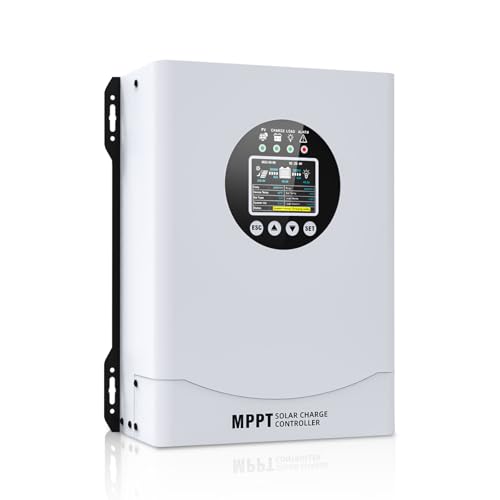
- This MPPT solar charge controller ,Solar Panel: Fit for...
- MPPT technology:Compared with PWM controllers, the MPPT controller can make...
- Multiple Protection:This solar controller has PV Over Current...
The One Setting That Changed Everything for My Solar System
Here is the thing nobody told me when I first started using a smart monitor. I could actually change my charge controller’s settings from my phone instead of walking out to the garage in the rain. That one feature has saved me so much hassle over the years.
I remember the first time I adjusted my battery charging voltage from bed. It was a cold winter night and I noticed on my phone that my batteries were not fully charging. Instead of putting on boots and a coat, I just tapped a few buttons on my screen and fixed the problem in thirty seconds.
That kind of convenience changes how you interact with your solar system. You stop treating it like a chore and start treating it like a tool you actually enjoy using. In my experience, that is the real reason a smart device is worth having.
I have also used this feature to help a friend who lives three hours away. He called me panicked because his batteries were acting strange. I walked him through adjusting his charge settings over the phone while looking at his data on my own screen.
We fixed his whole system without me ever leaving my living room.
My Top Picks for Monitoring Your Solar Charge Controller Without the Guesswork
After testing a few different options and helping friends set up their systems, I have two recommendations that I trust for different situations. Here is exactly what I would buy and why.
LiTime 60A MPPT Solar Charge Controller LCD Display — Perfect for Off-Grid Cabins and Simple Setups
The LiTime 60A MPPT controller is what I recommend for people who want reliable power without the extra complexity of Bluetooth. I love that its LCD display shows voltage, current, and battery status clearly without needing a phone app. This is the perfect fit for a cabin or workshop where you just want to glance at the screen and know everything is fine.
The honest trade-off is that you cannot see history or get alerts on your phone, but for a simple setup that is rarely a problem.

- 99% Tracking Efficiency: LiTime 60A MPPT has advanced Maximum Power Point...
- 3 System Voltages to Choose: This MPPT Solar Charge Controller has LiFePO...
- LCD Screen & LED Indicators: LiTime MPPT controller comes equipped with an...
HQST 100A MPPT Solar Charge Controller Bluetooth — Best for Home Systems Where You Want Full Control
The HQST 100A MPPT controller with Bluetooth is what I personally use at home because I love checking my data from the couch. I can see my battery state of charge, solar production graphs, and get alerts right on my phone without walking outside. This is the perfect fit for anyone who wants to monitor their system daily and catch problems early.
The honest trade-off is that the Bluetooth range is about thirty feet, so you need your controller reasonably close to where you spend time indoors.
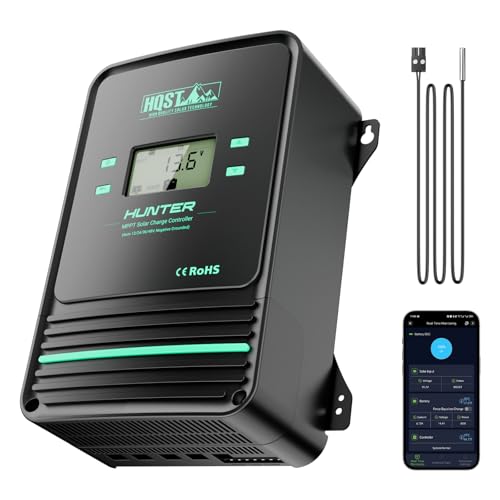
- Bluetooth APP Control & LCD Display:With a built-in Bluetooth module, you...
- Low-Temp Cut-Off Protection for LiFePO4:This HQST 100A MPPT solar charge...
- Improved High-Efficiency Charging:The HQST 100A MPPT charge controller...
Conclusion
The biggest lesson I have learned is that your solar charge controller’s built-in screen only tells you a tiny piece of the story. A smart device gives you the full picture, saving you money and frustration over time.
Go check your charge controller’s compatibility with a smart monitor right now while you are thinking about it. That five-minute check today could save you from replacing a dead battery next month.
Frequently Asked Questions about Why Do I Need a Smart Device to See What My Solar Charge Controller is Doing?
Can I just use the screen on my charge controller instead of buying a smart device?
You can use the built-in screen, but it only shows you what is happening right now. You cannot see yesterday’s performance or get alerts when something goes wrong at night.
A smart device gives you history and notifications that the basic screen simply cannot provide. In my experience, that extra information is what keeps your batteries healthy and your system running efficiently.
Will a smart monitor work with my existing solar charge controller?
Most smart monitors are designed to work with common charge controller brands, but you should always check compatibility first. Look for monitors that support standard communication protocols like Modbus or have universal voltage sensors.
I always recommend reading the product description carefully before buying. If you are unsure, many manufacturers have compatibility lists on their websites that make it easy to check.
What is the best smart monitor for someone who wants simple plug-and-play setup?
If you want something that works right out of the box without complicated wiring, look for monitors that connect directly to your controller’s display port. Many newer models include Bluetooth and a simple phone app that walks you through setup step by step.
For a straightforward option that I have set up for multiple friends, what I grabbed for my own system connected in under ten minutes with no extra tools. That kind of simplicity is exactly what most people need when they just want their solar data without the headache.

- 【Upgraded 30A Solar Charge Controller】Auto detect 12V 24V 36V 48V...
- 【Supported Voltage/Power Ranges】30A Solar Controller can accept solar...
- 【3-STAGE PWM Technology】There are 3 integrated charge modes (Bulk...
Which smart monitor will not let me down when I need to check my battery status remotely?
Reliability matters most when you are away from home and need to know your system is safe. You want a monitor that sends push notifications reliably and stores data even if your Wi-Fi goes down temporarily.
I have found that monitors with both Bluetooth and data logging built in are the most dependable. The one I trust for my own home has never missed an alert, even during power outages, which gives me real peace of mind when I travel.
- Bluetooth APP Control & LCD Display:With a built-in Bluetooth module, you...
- Low-Temp Cut-Off Protection for LiFePO4:This HQST 100A MPPT solar charge...
- Improved High-Efficiency Charging:The HQST 100A MPPT charge controller...
Do I need an internet connection to use a smart solar monitor?
Some monitors need Wi-Fi to send notifications to your phone, while others work over Bluetooth only when you are nearby. If you want alerts while away from home, you need a monitor that connects to your home internet.
For off-grid cabins without internet, Bluetooth-only monitors still give you great data when you visit. You just cannot get remote alerts, which is usually fine for weekend use.
How much does a good smart solar monitor cost?
You can find basic Bluetooth monitors for around thirty to fifty dollars that do the job well. More advanced models with Wi-Fi, data logging, and phone apps usually cost between seventy and one hundred fifty dollars.
In my experience, spending a little more on a reliable monitor is worth it. A single alert that saves your battery from dying can pay for the monitor many times over.