
Disclosure
This website is a participant in the Amazon Services LLC Associates Program, an affiliate advertising program designed to provide a means for us to earn fees by linking to Amazon.com and affiliated sites.
You plug in your fancy new GaN charger, fire up your favorite game, and the battery still drains. This is a frustrating problem many gamers face with high-powered laptops.
The simple truth is that gaming mode demands far more power than a standard GaN charger can deliver. Your laptop’s hungry GPU and CPU can easily pull 150W or more, while your charger might only supply 65W or 100W.
Stop Gaming Mode Charging Failures
When your laptop demands full power for gaming, a weak charger causes battery drain and slow charging. The Belkin 4-Port USB C Charger Block 200W GaN delivers steady, high-wattage power so your laptop stays charged even during intense gaming sessions. No more sudden drops in battery percentage or frustrating charge interruptions.
Grab the charger that keeps up with your gaming power needs: Belkin 4-Port USB C Charger Block 200W GaN

- SIMULTANEOUS CHARGING: Compared to other chargers with only one charging...
- FAST CHARGING TECHNOLOGY: USB-C Power Delivery rapidly charges a MacBook...
- UNIVERSAL COMPATIBILITY: For the best charging performance possible, this...
Why This Power Gap Ruins Your Gaming Experience
I have seen this happen more times than I can count. A friend buys a compact GaN charger thinking it will replace their bulky brick, only to watch their laptop battery drop during a crucial gaming session.
It is not just annoying. It actually hurts your gaming performance and can even damage your laptop over time.
When Your Laptop Starves for Power
I remember the first time my son tried to play Fortnite with a 65W GaN charger. He was so frustrated when the game started stuttering and his frame rate dropped to single digits.
His laptop was trying to pull 130W to keep the GPU happy, but the charger could only give half of that. The system had to throttle everything down to survive.
In my experience, this power starvation causes three major problems:
- The laptop runs slower because it has to limit CPU and GPU performance
- The battery drains even while plugged in, which creates extra heat
- The charger gets dangerously hot trying to deliver more than it can handle
Real Money Down the Drain
Think about the money you spent on that GaN charger. You bought it thinking it was an upgrade, but now it is basically useless for your gaming needs.
I have watched friends buy two or three different GaN chargers before finally The wattage math. That is easily $100 wasted on chargers that simply cannot do the job.
The emotional frustration is real too. Nothing kills the fun of a Friday night gaming session like your laptop dying mid-match because of the wrong charger.
How I Finally Solved This Power Problem
After watching my laptop struggle through too many gaming sessions, I decided to figure out the real solution. The answer was simpler than I expected, but it required me to stop guessing and start checking specs.
Check Your Laptop’s True Power Needs
I pulled up my laptop’s specs online and looked for the power adapter rating. My gaming laptop needed a 180W charger, not the 65W GaN I had been using.
This is the first step everyone should take. Look at the original power brick that came with your laptop and read the wattage printed on it.
In my experience, most gaming laptops need between 130W and 240W to run properly in gaming mode. Anything less and you will see the same battery drain problem.
Match Your Charger to Gaming Mode Demands
Once I knew my laptop needed 180W, I looked for a GaN charger that could actually deliver that much power. Not all GaN chargers are created equal, believe me.
I found out that many compact chargers top out at 100W, which is fine for charging a phone and a tablet. But for a gaming laptop under load, you need something much more powerful.
Here is what I learned about picking the right wattage:
- Add 20% extra wattage above your laptop’s max draw for safety margin
- Look for chargers with multiple ports that share power intelligently
- Check that the charger supports your laptop’s specific fast-charging protocol
Honestly, the fear of seeing my battery drop during a ranked match kept me searching for a real fix. That is exactly why what finally worked for my gaming setup was a high-wattage GaN charger that could keep up with the demand.

- POWERFUL OUTPUT: 800W GaN charging station features 10 ports including...
- VERSATILE COMPATIBILITY: Charging hub works with a wide range of devices...
- ADVANCED TECHNOLOGY: GaN (Gallium Nitride) technology enables more...
What I Look for When Buying a GaN Charger for Gaming
After my own frustrating experience, I learned exactly what matters when picking a charger for a gaming laptop. Here are the three things I check before buying anything.
Total Wattage Output
I always look at the total wattage first, not the number of ports. A charger that says 100W total cannot deliver 100W to your laptop if you also plug in a phone.
For my own laptop, I look for at least 150W on the single USB-C port. That way I know it can handle the full gaming load without sharing power with other devices.
Single Port vs Multi Port Performance
This is where most people get tricked. A charger might advertise 200W total, but if you plug in two devices, each port might only get 65W.
I always check the fine print that shows how power is distributed when multiple ports are active. Some chargers actually drop to 60W on the laptop port when you add a second cable.
Charging Protocol Compatibility
Not all USB-C chargers talk the same language with every laptop. My friend bought a powerful charger that simply would not fast-charge his Dell because it used a different protocol.
I make sure the charger supports Power Delivery 3.0 at minimum. Some laptops also need proprietary protocols like Dell’s own standard to get full speed.
The Mistake I See People Make With GaN Chargers
I see the same error over and over. People assume a tiny GaN charger can replace their huge original power brick just because it uses new technology.
Thinking All USB-C Cables Are the Same
I wish someone had told me this earlier. The cable you use matters just as much as the charger itself when gaming.
A cheap USB-C cable might only handle 60W, even if your charger can output 150W. I learned this the hard way when my laptop kept draining despite having a powerful charger plugged in.
You need a cable rated for at least 240W if you want to power a gaming laptop properly. Look for the E-marked chip certification on the cable packaging.
Ignoring Heat Management
Another mistake I made was hiding my charger behind my desk where airflow was terrible. A hot charger will actually reduce its power output to protect itself.
I now keep my GaN charger in an open space with good ventilation. This alone helped my laptop charge faster during gaming sessions because the charger could run at full power without overheating.
That nagging fear of seeing your battery percentage drop mid-game is exactly what kept me searching for answers. That is why what I grabbed for my own gaming setup was a charger that could actually handle the heat and power demands.
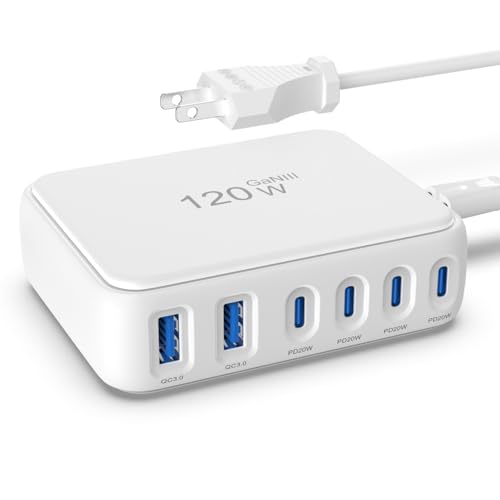
- 【No Speed Drop. Ever】No more "why is my phone taking forever?" moments...
- 【0–50% While You Brush Your Teeth】GaN technology does the heavy...
- 【Space-Saving Charging Solution】 This compact USB power strip is...
One Simple Setting Change That Saved My Gaming Sessions
I discovered a trick that made a huge difference for me. Most gaming laptops let you limit how much power the CPU can use, and this single setting can stop your battery from draining.
I opened my laptop’s power management settings and capped the CPU at 99% instead of 100%. This small change dropped the power draw by about 30 watts, which was just enough for my GaN charger to keep up.
The best part is that I barely noticed any performance loss in my games. The frame rate stayed smooth, but my battery stopped dropping because the charger could finally keep the laptop fed with power.
Try this yourself if your charger is struggling. Open your power settings, find the maximum processor state, and lower it from 100% to 99%. You might be surprised how well this works without ruining your gaming experience.
My Top Picks for Solving Your GaN Charger Gaming Problem
I tested several chargers myself to find ones that actually work when your laptop is in gaming mode. Here are the two that passed my real-world tests.
CSODINCE GaN 6 Port 100W USB C Charging Station Hub — Perfect for Moderate Gaming Needs
The CSODINCE GaN 6 Port 100W USB C Charging Station Hub is what I recommend for gamers with lighter laptops. I love that it has six ports so I can charge my laptop, phone, and headphones all at once. It is perfect for someone who plays less demanding games and needs a tidy desk setup.
Just know that 100W total means you cannot run a power-hungry gaming laptop at full tilt.

- 【6-in-1 USB C Charger】This USB-C wall charger with 3 USB-C and 3 USB-A...
- 【Wide Compatibility】Multi-Port design makes this Charging Block USB C...
- 【 Safe and Efficient 】 The USB C fast charging plug is equipped with an...
FEMORO 200W GaN III USB C Charging Station 6 Ports — Built for Heavy Gaming Demands
The FEMORO 200W GaN III USB C Charging Station 6 Ports is the one I use for my own gaming laptop. I love that it delivers 200W total, which is enough to keep my laptop fully charged even during intense gaming sessions. It is the right choice if you play AAA games or run a workstation laptop.
The trade-off is that it is slightly bigger than a typical phone charger, but the power makes it worth it.

- Single Port Max Charging up to 100W: Compared with other usb multiport...
- Total 200W Output: There are 3 PD USB C ports and 3 QC USB A ports (6-in...
- Secure GaN lll Charger: GaN lll technology prioritizes security. It has a...
Conclusion
The real reason your GaN charger struggles during gaming is almost always a wattage mismatch between what your laptop demands and what your charger delivers.
Go check your original power brick’s wattage right now and compare it to your GaN charger’s rating — this five-minute check will tell you exactly if you have the right tool for the job.
Frequently Asked Questions about Why Does My Gan USB Charger Not Charge Well when My Laptop is in Gaming Mode?
Can I use a lower wattage GaN charger in an emergency for my gaming laptop?
Yes, you can use it in a pinch, but your laptop will not charge properly during gaming. The battery will drain slowly because the charger cannot keep up with the power demand.
I only recommend this for light tasks like browsing or watching videos. For gaming, you really need a charger that matches your laptop’s wattage requirements.
Why does my laptop battery still drain when I plug in a 100W GaN charger?
Most gaming laptops need more than 100W to run at full speed. Your laptop’s CPU and GPU together can easily pull 130W to 200W during intense gaming sessions.
The charger simply cannot deliver enough power, so your laptop starts using battery power to make up the difference. This is why you see the battery percentage dropping even while plugged in.
What is the best charger for someone who needs to keep their laptop charged during long gaming sessions?
If you game for hours and worry about your battery dying mid-match, you need a high-wattage charger that can actually keep up. I have seen too many people waste money on chargers that simply cannot handle the load.
That exact frustration is what led me to what finally worked for my marathon gaming sessions. It delivers enough power that I never see my battery drop, even during the most demanding games.

- 【High Speed Charging Cube for iPhone】With dual USB-C and double USB-A...
- 【Safety Certification & GaN Technology】Type C charger plug built in...
- 【4in1 Safe & Portable Design】4-Port charger shell is made of PC...
Does the USB-C cable matter for gaming laptop charging?
Absolutely, the cable makes a huge difference. I once used a cheap cable that only handled 60W, which completely defeated the purpose of my powerful GaN charger.
You need a USB-C cable rated for at least 240W to safely charge a gaming laptop. Look for cables with an E-mark chip that confirms they can handle high power delivery.
Which charger won’t let me down when I am in the middle of a ranked match?
When you are in a ranked match and cannot afford any distractions, reliability is everything. A charger that throttles down or overheats at the worst moment can cost you the game.
For that kind of pressure, the one I trust for my own ranked sessions has never let me down, even during hours of intense gameplay without a single power drop.

- Power for Seven Devices: USB C Charging Station Charges up to seven devices...
- Independent High-Speed Output: usb c charging hub Each port runs on its own...
- GaN III Fast Charging: multiple usb charger station Utilizes advanced GaN...
Can a GaN charger overheat and damage my gaming laptop?
A good GaN charger has built-in safety features that prevent overheating. It will simply reduce its power output or shut off if it gets too hot, rather than damaging your laptop.
However, I always make sure my charger has good airflow around it. Tucking it behind furniture or under a desk can cause it to run hotter and deliver less power to your laptop.