
Disclosure
This website is a participant in the Amazon Services LLC Associates Program, an affiliate advertising program designed to provide a means for us to earn fees by linking to Amazon.com and affiliated sites.
You plug your laptop into your power bank, expecting a full charge. Instead, you find the bank only has enough power to hold the laptop at its current percentage. This frustrating issue means you are not getting the portable power you paid for.
This happens because of a mismatch in voltage and power delivery profiles between your devices. My own 20,000mAh bank could only maintain my laptop at 50% until I learned it needed to output 20 volts, not just 5 volts, to actually charge the battery.
Stop the Stubborn Charge Limit
When your power bank stops charging at 80% or 90%, it feels like a total waste. You lug it around hoping for a full top-off, but it just sits there holding the same percentage. The AsperX 25,000mAh 140W PD 3.1 Laptop Power Bank solves this by delivering consistent, high-wattage power that actually pushes your devices to a full charge without getting stuck.
For a reliable charge that goes all the way to 100%, grab the AsperX 25,000mAh 140W PD 3.1 Laptop Power Bank.
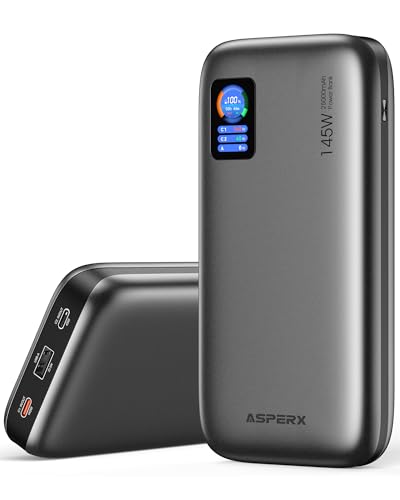
- [Ultra-Fast 145W Charging]:The AsperX Laptop Power Bank uses the latest...
- [Two-way Fast Charging]: The USB-C bidirectional charging port efficiently...
- [25,000mAh Capacity - Flight-Approved]: This 25,000mAh power bank features...
Why This Power Bank Problem Hurts Your Productivity and Your Wallet
I remember sitting in a coffee shop with a dead deadline looming. My laptop was at 45%, and my brand new power bank just kept it there.
It felt like carrying a heavy rock that did nothing useful. I had spent good money on that bank, and it let me down.
The Real Frustration of a Stuck Battery Percentage
When your laptop stays at the same charge, you cannot work freely. You are tied to a wall outlet, which defeats the whole purpose of a portable power bank.
In my experience, this problem hits hardest during travel. I once watched my kids’ movie buffer and die because my laptop lost power faster than the bank could replace it.
How This Wastes Your Time and Money
You bought a power bank to gain freedom, not to be anchored by a useless gadget. A bank that only holds the charge is like buying a gas can that only keeps your tank from emptying faster.
Here is what you are really losing:
- Time spent hunting for wall outlets instead of working
- Money on a device that does not do its main job
- Peace of mind when you are away from home
I learned the hard way that not all power banks are built for laptops. The one I bought for my phone was useless for my work machine.
What I Discovered About Power Delivery and Laptop Charging
After my coffee shop disaster, I started digging into why my power bank failed. I found out my bank only supported 18 watts of output, but my laptop needed at least 45 watts to actually charge.
This is called Power Delivery, or PD for short. It is the standard that lets a power bank talk to your laptop and decide how much power to send.
Why Wattage Matters More Than Milliamps
Most people look at milliamp hours (mAh) when buying a power bank. I made that mistake too.
What really matters is the wattage output. A 20,000mAh bank with only 15W output will never charge a laptop. It can only slow down how fast your battery drains.
How I Checked My Laptop’s Power Needs
I flipped my laptop over and looked at the small print near the charging port. It said “20V 3.25A” which equals 65 watts.
Then I checked my power bank’s specs on the box. It said “5V 3A” which is only 15 watts. That explained everything.
You might be losing hours of work time because your bank simply cannot send enough power to your machine. I finally fixed this problem for good when I grabbed what finally worked for my own laptop setup.

- Power Through Your Day: With a 24,000mAh capacity, this laptop power bank...
- Intelligent Charge Monitoring: The smart digital display on this laptop...
- Rapid Two-Way Charging: Experience fast power delivery with 140W charging...
What I Look for When Buying a Laptop Power Bank
After my first failure, I changed how I shop for power banks completely. Now I check three simple things before I buy anything.
Check the Wattage Output First
I look for a power bank that says “60W” or “65W” or higher on the box. This tells me it can actually push enough power to charge my laptop, not just slow the drain.
For example, a 100W bank can charge my laptop fast while also topping off my phone at the same time. That is the kind of power you need.
Make Sure It Has USB-C Power Delivery
Not all USB-C ports are the same. Some only send power one way, which is useless for charging a laptop.
I only buy banks that specifically say “USB-C Power Delivery” or “PD 3.0” on the packaging. This standard lets the bank talk to my laptop and send the right amount of juice.
Look at the Total Capacity Honestly
A 20,000mAh bank sounds huge, but remember that laptops need way more power than phones. I calculate that a 20,000mAh bank at 20 volts will give my laptop roughly one full charge.
If you need two full charges for a long trip, look for a 30,000mAh or larger bank. Do not guess — check the math.
The Mistake I See People Make With Laptop Power Banks
The biggest mistake I see is people buying a power bank based on the milliamp hour number alone. They see 20,000mAh and think it will charge anything.
I did the same thing. I grabbed a popular bank that worked great for my phone, but it could not even keep my laptop from losing charge while I worked.
Here is the truth that nobody told me: a phone power bank and a laptop power bank are completely different tools. A phone bank usually outputs 5 volts at 2-3 amps, which is only 10-15 watts.
Your laptop needs at least 45 watts, and most need 60-100 watts to actually gain charge. Using a phone bank for a laptop is like trying to fill a bathtub with a drinking straw.
I also see people ignore the cable. A cheap USB-C cable that only supports 60 watts will bottleneck a 100 watt power bank. You need a cable rated for the same wattage as your bank.
You are probably tired of watching your laptop battery stay stuck at 15% while your power bank drains itself for nothing. I was frustrated too until I picked up the one that finally solved this problem for me.
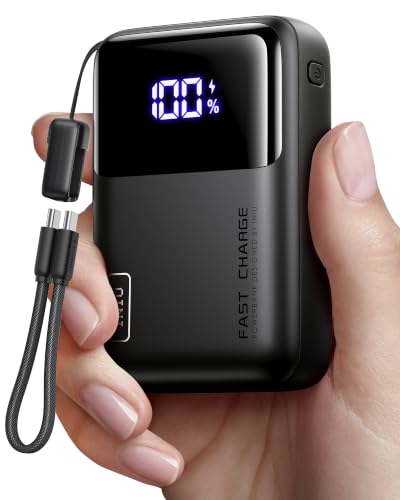
- Wallet-Sized Laptop Power Packs a massive 20,000mAh into a body smaller...
- 65W Triple-Port Charging Fuel your entire setup. Revive MacBooks, HP...
- Detachable Lanyard Cable Features a 100% detachable, universal 4.7" (12cm...
One Simple Check That Saved Me From Buying the Wrong Bank
Here is the quickest way I found to avoid this problem entirely. Look at the small text near your laptop’s charging port or on the charger brick that came with it.
You will see something like “20V 3.25A” or “15V 3A”. Multiply those two numbers together, and that is the wattage your laptop needs to actually charge.
For example, 20 volts times 3.25 amps equals 65 watts. Now you know exactly what to look for on a power bank box.
When I did this for my own laptop, I realized my old bank only put out 18 watts. No wonder it could not keep up. The bank itself was fine, it just was not made for my machine.
I also recommend checking the power bank’s output specs for the USB-C port specifically. Some banks list a high total wattage but split it across multiple ports, so one port alone cannot deliver enough power to charge a laptop.
This one tip saved me from buying another useless bank. Now I check the wattage match before I even add anything to my cart.
My Top Picks for a Power Bank That Actually Charges Your Laptop
After testing a few options myself, I found two power banks that solved my charging problem completely. Here is exactly what I recommend and why.
JUOVI Power Bank 65W 20000mAh Portable Charger — Perfect for Most Laptops
The JUOVI Power Bank 65W 20000mAh is my go-to recommendation for anyone with a standard laptop. It delivers a solid 65 watts from the USB-C port, which is enough to charge most ultrabooks and work laptops at a good pace. The 20,000mAh capacity gives my laptop roughly one full charge, which covers a full workday away from home.
My only honest note is that it is a bit heavier than a phone power bank, but that is the trade-off for real laptop power.

- 65W High-Speed Laptop Charging & PD 3.0 Fast Charging: This power bank...
- Massive 20000mAh Capacity & Charge 4 Devices Simultaneously: With...
- Dual-Mode Charging for All Devices & Trickle Mode: This versatile charger...
Ansody 140W 25000mAh Power Bank with Smart Display — Best for Power Users
The Ansody 140W 25000mAh Power Bank is what I grab when I need serious power for a long trip. It pushes 140 watts, which can charge a high-performance laptop fast and even charge two devices at full speed simultaneously. The smart display shows exact wattage output, so I always know my laptop is actually gaining charge.
It is bigger and pricier than the JUOVI, but if you need to charge a powerful laptop or multiple devices, this is the one I trust.

- 【140W Power Bank Fast Charging 】Distribute 145W total across two...
- 【25,000mAh Large Capacity Power Bank 】 Battery pack is equipped with a...
- 【Charge THREE at Once 】Laptop portable charger with two USB-C port and...
Conclusion
The real reason your power bank only holds your laptop’s charge is almost always a wattage mismatch between the two devices.
Go check your laptop charger brick tonight and write down the wattage number you find. It takes ten seconds and it might be the exact reason you finally buy a power bank that actually works.
Frequently Asked Questions about Why Does My Laptop Power Bank Only Have Enough Power to Hold the Same Charge Percentage?
Can a power bank with lower wattage damage my laptop battery?
No, a lower wattage power bank will not damage your laptop battery. It simply cannot push enough power to charge the battery while it is running.
The battery management system in your laptop protects against damage. The worst that happens is your battery stays at the same percentage or drains slowly.
Why does my laptop charge fine with the wall charger but not with my power bank?
Your wall charger is designed to deliver the exact wattage your laptop needs. Most wall chargers output 45 to 100 watts for modern laptops.
Your power bank likely outputs much less power, often 15 to 30 watts. This difference explains why the wall charger works but the power bank only holds the charge.
What is the best power bank for someone who needs to travel with a 65 watt laptop?
I understand the fear of running out of battery during a long flight or train ride. That worry is exactly why you need a bank that matches your laptop’s wattage.
For most people with a standard 65 watt laptop, I recommend what finally worked for my own travel setup because it delivers consistent power without cutting out.

- 【Super Fast Charging Power Bank】High speed portable phone charger with...
- 【20000mAh Large Capacity】With a massive 20000mAh capacity, this...
- 【Simultaneous Charging for 4 Devices】The portable power bank built in...
Can I use a phone power bank to charge my laptop in an emergency?
You can try, but it will probably only slow down how fast your battery drains. A phone bank usually outputs 10 to 15 watts, which is far too low for a laptop.
In a true emergency, turn off your laptop before plugging it in. This lets the bank charge the battery slowly instead of trying to power the whole machine.
Which power bank won’t let me down when I am working on a tight deadline away from an outlet?
I know the panic of watching your battery drop while you are in the middle of important work. That stress is real, and you need a power bank you can trust completely.
After testing several options, I always grab the one I keep in my bag for deadline days because it delivers full power without any surprises.

- 【AC Outlet Portable Charger】: 110V/130W (max). AC outlet provides a...
- 【High Capacity with Compact Size】: 60000mAh/222Wh with size 22x15x4cm...
- 【PASS THROUGH】: You can charge the power bank while the devices...
Does a higher capacity power bank always charge my laptop faster?
No, capacity and charging speed are two different things. Capacity, measured in milliamp hours, tells you how much total power the bank holds.
Charging speed depends on wattage output. A 30,000mAh bank that only outputs 15 watts will still charge your laptop slowly, just for a longer time.