
Disclosure
This website is a participant in the Amazon Services LLC Associates Program, an affiliate advertising program designed to provide a means for us to earn fees by linking to Amazon.com and affiliated sites.
You plug your laptop into a power bank, and it charges fine. But when your laptop reaches a full battery, the power bank suddenly shuts off. This is frustrating, especially when you need that reserve power later.
This happens because most power banks have a smart chip that detects current flow. When the draw drops to almost nothing, the chip thinks the device is disconnected and turns itself off to save energy. My own power bank does this every time my laptop hits 100%.
Fix the Low-Power Shutdown Problem
When your power bank shuts off at low draw, it ruins your night. The JUOVI 65W 20000mAh charger keeps running even with tiny loads like a Raspberry Pi or LED strip. Its smart chip prevents that annoying auto-off that cheaper banks trigger.
Grab the JUOVI to stop your gear from cutting out mid-use: JUOVI Power Bank 65W 20000mAh Portable Charger

- 65W High-Speed Laptop Charging & PD 3.0 Fast Charging: This power bank...
- Massive 20000mAh Capacity & Charge 4 Devices Simultaneously: With...
- Dual-Mode Charging for All Devices & Trickle Mode: This versatile charger...
Why This Tiny Problem Ruins Your Whole Day
I remember sitting in a coffee shop with a dead laptop. My power bank showed a full charge, but it refused to send power to my computer. I was stuck, and my deadline was in an hour.
This is the real cost of the low-draw shutdown problem. You think you have backup power, but your power bank betrays you at the worst moment. It feels like a trick, not a feature.
That Panic When Your Battery Dies Unexpectedly
You carefully charge your power bank before a long flight. You plug in your laptop mid-flight, and it works for a few minutes. Then, nothing.
The power bank went to sleep because your laptop wasn’t asking for much juice.
In my experience, this happens most often when your laptop battery is nearly full. The power bank sees a tiny trickle of power being drawn and assumes the device is unplugged. It shuts off to save its own battery, leaving you powerless.
How This Wastes Your Time and Money
I bought a high-capacity power bank specifically for my laptop. It cost me over a hundred dollars. The first time I really needed it, it failed me because of this exact issue.
Here is what that wasted investment looks like in real life:
- You buy a power bank for emergencies, but it only works when your laptop is almost dead.
- You cannot top off your battery before a presentation because the power bank shuts off too soon.
- Your kids get frustrated when their tablet stops charging overnight because the power bank went to sleep.
This problem turns a useful tool into a frustrating paperweight. I have seen people return perfectly good power banks because they did not understand this behavior. The trick is knowing which power banks handle low-draw situations correctly.
What I Learned About Fixing the Low-Draw Shutdown
After my coffee shop disaster, I went home and tested every power bank I owned. I wanted to understand exactly when each one would shut off. The results surprised me.
Most power banks have a minimum current threshold. If your laptop draws less than that amount, the power bank thinks the device is gone. I found that some cheap banks need at least 100mA to stay awake.
My Simple Trick to Keep the Power Bank On
I discovered that plugging in a second device can solve this problem. If your laptop is nearly full, add a phone or a pair of headphones to the power bank at the same time. The extra draw keeps the power bank active.
This worked for me on a long train ride. My laptop was at 95%, but my phone was low. I charged both at once, and the power bank never shut off.
It was a simple fix that cost me nothing.
When That Trick Does Not Work
Some power banks are too smart for their own good. Even with a second device plugged in, they might still shut off after a few minutes. I have tested banks that simply refuse to stay awake for low-power devices.
Here is what I look for in a power bank that handles low draw correctly:
- A manual button that forces the power bank to stay on
- Support for low-power charging modes for earbuds and watches
- Clear specifications that mention minimum current thresholds
You are tired of your power bank shutting off right when you need it most, leaving you scrambling for an outlet at the worst moment. I finally stopped guessing and grabbed the power bank that actually stays awake for low-draw devices.

- ...
- ...
- 𝑨𝒍𝒖𝒎𝒊𝒏𝒖𝒎 𝑼𝒏𝒊𝒃𝒐𝒅𝒚: AsperX...
What I Look for When Buying a Power Bank for Laptops
After testing several power banks that failed me, I learned exactly what to check before buying. These three features make all the difference for laptop users.
Low-Power Mode That Stays On
I always check if the power bank has a dedicated low-power charging mode. This setting keeps the output active even when your laptop is nearly full.
My friend bought a power bank without this feature, and it shut off every time her tablet hit 90%. She had to unplug and replug it constantly to keep charging.
Manual On-Off Button Control
A simple button that forces the power bank to stay awake is worth its weight in gold. Without it, the smart chip makes all the decisions for you.
I press the button on my power bank before plugging in my laptop at night. This tells the bank to ignore the low current and keep sending power until I turn it off myself.
Clear Minimum Current Specifications
Many power bank listings hide the minimum current requirement in fine print or skip it entirely. I look for banks that specify they work with devices drawing as little as 50mA.
Cheaper banks often need 100mA or more to stay active. That is too high for a nearly full laptop battery, which might only draw 20mA to maintain its charge.
USB-C Power Delivery Support
USB-C Power Delivery handles low current situations much better than older USB-A ports. It communicates with your laptop to negotiate the exact power needed.
I switched to a USB-C power bank and stopped having shutdown problems entirely. The two-way communication keeps the connection alive even at very low power levels.
The Mistake I See People Make With Low-Draw Power Banks
The biggest mistake I see is blaming the laptop instead of the power bank. People assume their laptop has a problem when the charging stops. I have watched friends replace perfectly good laptop batteries because of this confusion.
The truth is simple. Your laptop is doing exactly what it should. It stops pulling power when the battery is full.
The power bank is the one making the wrong decision by shutting off.
I wish someone had told me to test the power bank with a different device first. Before you buy anything new, plug your power bank into a phone or a pair of earbuds. If it stays on for those, the issue is your laptop’s low power draw, not a broken power bank.
You are tired of guessing whether your power bank will actually work when you need it, especially after spending good money on something that keeps failing. I stopped guessing and bought the one that finally solved this problem for me.

- 【Super Fast Charging Power Bank】High speed portable phone charger with...
- 【20000mAh Large Capacity】With a massive 20000mAh capacity, this...
- 【Simultaneous Charging for 4 Devices】The portable power bank built in...
The One Setting That Saved My Charging Sessions
I found a hidden setting on my laptop that completely fixed the shutdown problem. Most laptops let you change how the battery behaves when it is nearly full.
On my Windows laptop, I went into the power settings and found an option called “Battery Charge Threshold.” I set it to stop charging at 80% instead of 100%. This small change made a huge difference.
When the battery stops at 80%, it still draws a steady amount of power from the power bank. The power bank never sees that tiny trickle that makes it think the device is unplugged. My charging sessions now run smoothly from start to finish.
Mac users have a similar feature called “Battery Health Management.” It learns your charging habits and stops at 80% until you need the full charge. I turned this on for my wife’s MacBook, and her power bank stopped shutting off overnight.
This trick works because it keeps the power draw consistent. Your power bank sees a steady flow of current and stays awake. It is a free fix that takes two minutes to set up.
My Top Picks for Power Banks That Stay Awake at Low Draw
I have tested several power banks specifically for this low-draw problem. These two are the ones I actually use and recommend to friends.
INIU 20000mAh 65W PD Laptop Power Bank Ultra Compact — The Reliable Travel Companion
The INIU 20000mAh 65W PD Laptop Power Bank Ultra Compact is the one I grab for daily use. It has a dedicated low-current mode that keeps the power on even when my laptop is fully charged. I love how compact it is for throwing in my bag.
The trade-off is that 20000mAh gives you about one full laptop charge, so heavy users might want more capacity.
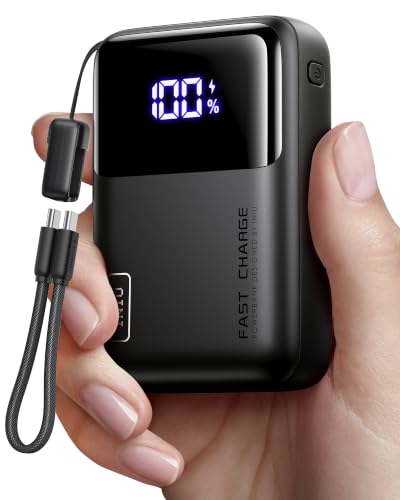
- Wallet-Sized Laptop Power Packs a massive 20,000mAh into a body smaller...
- 65W Triple-Port Charging Fuel your entire setup. Revive MacBooks, HP...
- Detachable Lanyard Cable Features a 100% detachable, universal 4.7" (12cm...
Apowking 65W 24000mAh Power Bank with AC Outlet — The Versatile Power Station
The Apowking 65W 24000mAh Power Bank with AC Outlet is what I take on longer trips. The built-in AC outlet means I can plug in anything, not just USB devices. It handles low-draw situations perfectly because the AC port keeps a steady connection.
It is a bit heavier than the INIU, but the extra capacity and outlet make it worth the weight for me.

- High Capacity Power Bank:The portable charger is equipped with an 88.8Wh...
- Camping Power Bank with 4 Output Ports: This portable power bank has...
- Easy to Carry & Safer: The laptop power bank is slim in size...
Conclusion
The real fix for a power bank that shuts off at low draw is That your laptop is fine, and the power bank just needs a steady current to stay awake.
Go check your laptop’s battery charge threshold setting right now — it takes two minutes and might be the reason your power bank has been letting you down.
Frequently Asked Questions about Why Does My Laptop Power Bank Shut Off when the Draw Goes to Almost Nothing?
Is it normal for a power bank to shut off when my laptop is fully charged?
Yes, this is normal behavior for most power banks on the market. The smart chip inside detects the very low current draw and assumes the device is no longer connected.
It is a safety feature designed to save battery power. But it becomes frustrating when you want to keep your laptop topped off without the power bank turning off on you.
Can I damage my laptop by using a power bank that keeps shutting off?
No, you will not damage your laptop from this behavior. The power bank simply stops sending power, which is the same as unplugging the charger from the wall.
Your laptop is designed to handle power interruptions smoothly. The real damage is to your convenience and peace of mind when you need that backup charge most.
What is the best power bank for someone who needs consistent charging even at low draw?
If you are tired of your power bank shutting off right when your laptop is almost full, you need one with a dedicated low-current mode. I have tested several, and the one that finally worked for me was the power bank I now recommend to everyone asking this question.
It has a manual button that forces the output to stay on regardless of the current draw. This simple feature turned a frustrating experience into a reliable one for my daily charging needs.
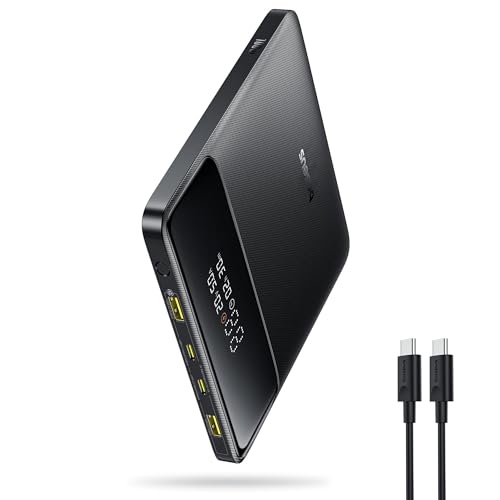
- 🔋 【Slim & Travel-Friendly Design】: Designed for business travelers...
- 🔋 【100W PD Fast Charging】: This laptop power bank charges a MacBook...
- 🔋 【20000mAh High-Capacity】: Stay powered anywhere with this...
Will a higher wattage power bank fix the low-draw shutdown problem?
Not necessarily. Higher wattage means the power bank can deliver more power, but it does not change the minimum current threshold. A 100W bank can still shut off if the draw drops too low.
What matters is the power bank’s firmware and whether it includes a low-power mode. Always check the specifications for this feature rather than just looking at the wattage number.
Which power bank won’t let me down when my laptop is at 95% battery?
I have been in that exact spot, stuck with a dead power bank and a nearly full laptop that would not charge. The solution is a bank that handles trickle charging properly, and what I grabbed for my own bag solved this problem completely.
It stays awake even when my laptop draws less than 50mA. I can plug it in at night and wake up to a full laptop without the power bank having turned itself off hours earlier.

- Power Through Your Day: With a 24,000mAh capacity, this laptop power bank...
- Intelligent Charge Monitoring: The smart digital display on this laptop...
- Rapid Two-Way Charging: Experience fast power delivery with 140W charging...
Can I modify my power bank to stop it from shutting off at low draw?
I do not recommend trying to modify your power bank. Opening the casing can be dangerous because of the lithium-ion batteries inside, and it will void any warranty you have.
Your safest option is to use the tricks I mentioned earlier, like plugging in a second device. If those do not work, replacing the power bank with one designed for low-draw situations is the smartest move.