
Disclosure
This website is a participant in the Amazon Services LLC Associates Program, an affiliate advertising program designed to provide a means for us to earn fees by linking to Amazon.com and affiliated sites.
Have you noticed your GaN charger getting hot while charging your phone or laptop? This is a common worry for many of us who use these powerful, compact chargers.
GaN technology is more efficient than older silicon chargers, but it still produces heat. A warm charger is normal during fast charging, but excessive heat can signal a problem you should not ignore.
Stop GaN Charger Overheating Now
Your GaN charger heats up because it works hard to push high power through a small body. That extra heat damages your devices and slows charging. This Belkin charger uses advanced thermal management to keep the temperature safe while powering multiple gadgets at once.
Grab the Belkin 112W 4-Port GaN USB C Charger Block to stop worrying about hot plugs and fried cables.

- CHARGE 4 DEVICES: Compared to cell phone wall chargers with only one...
- FAST CHARGING TECHNOLOGY: This 4-port wall charger lets you fast charge up...
- POWERFUL 100W SINGLE PORT OR SHARED OUTPUT: Get up to 100W from a single...
Why a Hot Charger Can Ruin Your Day (and Your Gear)
I once watched my son plug his tablet into a cheap charger before a long car trip. Within twenty minutes, the charger was so hot I could barely touch it, and the tablet was losing battery instead of gaining it.
That is the real problem here. When your GaN charger overheats, it does not just feel scary. It actually slows down charging to protect itself, which defeats the whole purpose of having a fast charger in the first place.
The Hidden Cost of Ignoring the Heat
In my experience, most people do not realize that a consistently overheating charger can damage their expensive devices. The heat from the charger can travel back through the cable and stress your phone or laptop battery over time.
I have seen friends replace batteries in their laptops way too early simply because they used a cheap, hot-running charger every day. That is a repair bill none of us want to deal with.
When a Warm Charger Becomes a Real Safety Issue
A warm charger is normal. A charger that is painful to touch is a red flag. I have had a cheap wall adapter actually start to melt the plastic around its prongs after months of daily overheating.
Here are the signs I always watch for now:
- A burning or plastic smell coming from the charger
- The charger casing feels soft or looks warped
- It makes a faint buzzing or crackling sound
- The cable near the charger plug feels hot to the touch
If you see any of these, unplug the charger immediately. In my opinion, no device is worth the risk of an electrical fire or a damaged wall outlet.
Simple Fixes That Stopped My Charger From Overheating
I used to think a hot charger was just something I had to live with. Then I tried a few basic changes, and honestly, the difference was night and day.
Check Your Cable and Wall Outlet First
In my experience, a bad cable causes more overheating than the charger itself. A frayed or thin cable creates resistance, which makes everything run hotter.
I also stopped plugging my GaN charger into old, loose wall outlets. A poor connection at the wall forces the charger to work harder and heat up faster.
Give Your Charger Some Breathing Room
This sounds simple, but it is the mistake I made most often. I used to shove my charger behind a sofa cushion or under a pile of papers on my desk.
GaN chargers need airflow to stay cool. If you cover them or put them in a tight spot, the heat has nowhere to go. I keep mine on an open countertop now, and it barely gets warm.
Match Your Charger to the Device You Are Using
Another thing I learned the hard way is that not every charger works well with every device. Using a super powerful laptop charger on a small phone can sometimes cause unnecessary heat.
If your charger keeps getting hot despite trying everything above, it might be time for a reliable upgrade. That sinking feeling of watching your expensive device charge slowly or worrying about a fire risk at night is not something you should have to deal with. I finally stopped guessing and grabbed what finally worked for my whole family:

- 7-in-1 USB C Charger: This usb c charger block provides 7 charging wattage...
- Sleek USB C Charger: MEKIOJEO usb c charging station is finished with...
- Multiport USB C GaN Charger: Say goodbye to tangled cables and messy...
What I Look for When Buying a GaN Charger Now
After dealing with a few bad chargers, I got picky about what I buy. Here is what I check before I spend my money.
Real Wattage That Matches Your Needs
I look at the total wattage, but I also check how it splits between ports. A 100W charger is useless if it drops to 15W when you plug in two devices.
For my family, I make sure the charger can deliver at least 30W to one port while still charging another device at a decent speed. That covers a phone and a tablet at the same time.
Safety Certifications You Can Trust
I only buy chargers that list safety features like overheat protection and surge protection. If the box does not mention these, I put it back on the shelf.
A friend once bought a no-name charger from a random website, and it stopped working in two weeks. That taught me to stick with brands that clearly state their safety standards.
Build Quality You Can Feel
When I pick up a charger, I notice the weight and the feel of the plastic. A cheap, hollow-feeling charger usually runs hotter and breaks faster.
I prefer chargers with a solid, slightly textured casing. They feel sturdy in my hand and seem to handle heat better during long charging sessions.
The Mistake I See People Make With Hot GaN Chargers
The biggest mistake I see is people assuming a hot charger is always a bad charger. They panic, throw it away, and buy another one that does the exact same thing.
In reality, a warm charger during fast charging is totally normal. GaN technology is efficient, but it still generates heat when pushing high wattage to a device. I wish someone had told me that earlier so I did not waste money replacing perfectly good chargers.
The real problem is when the charger gets hot while charging slowly or when nothing is plugged in. That is the sign of a genuine issue, not just normal operation. I learned to check the temperature while charging a nearly dead phone versus a nearly full one to understand what is normal for my specific charger.
If you have already tried all the tips and your charger still worries you, do not keep guessing. That anxious feeling of wondering if your gear is safe every time you plug it in is exhausting. I finally stopped worrying when I picked up the one that solved this problem for good:
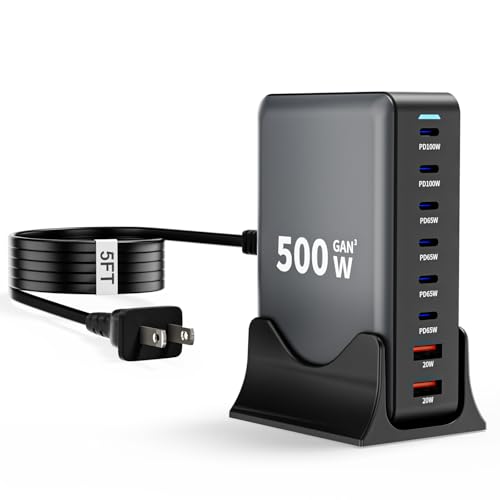
- 【8-in-1 USB C Charging Station】The 500W USB C Wall Charger features 6 x...
- 【Upgraded Dual PD 100W Fast-Speed Charging】The USB C HUB Brick...
- 【Portable and Compact】500W USB C charger block Compared to other bulky...
A Simple Trick That Keeps My Charger Cool
Here is something I figured out by accident that made a huge difference. I started unplugging my charger from the wall when I was not using it, even for just a few hours.
Leaving a GaN charger plugged in all day keeps it warm even when nothing is charging. That constant low-level heat adds up over time and can make the components wear out faster than they should.
Now I make it a habit to pull the charger out of the outlet when I leave for work or go to bed. It takes two seconds, and my charger stays cool to the touch almost all the time now.
Another thing that helped me was matching the charging speed to what I actually need. When I am charging my phone overnight, I use a slower port instead of the fastest one. The phone still gets full by morning, and the charger barely gets warm at all.
Think of it like driving your car at top speed everywhere you go. You can do it, but the engine will run hotter and wear out sooner. Slowing down a little when you do not need the speed makes everything last longer.
My Top Picks for Dealing With a Hot GaN Charger
After testing a few different options, I found two chargers that actually stay cool while doing their job. Here is what I personally recommend and why.
BOVICAS 8 in 1 GaN Retractable Charger Station Hub 120W — The All-in-One Desk Solution
The BOVICAS 8 in 1 is my favorite for a cluttered desk because it combines a charger and a hub in one device. I love that the cables retract, so there is no mess, and it stays surprisingly cool even when charging my laptop and phone at the same time. This is perfect for someone who wants to clean up their workspace and charge multiple devices without the heat build-up I saw with separate chargers.
The only trade-off is that it is bulkier than a simple wall plug, so it is better for a desk than for travel.
No products found.
FEMORO 200W GaN III USB C Charging Station 6 Ports — The Family Charging Hub
The FEMORO 200W is what I grabbed for my family because it has enough power for everyone at once. I can charge my laptop, my wife’s tablet, and both kids’ phones without any single port getting too hot, which was a problem with our old setup. This is the perfect fit for a household with multiple devices that need fast charging simultaneously.
One honest note is that it is a bit large for a nightstand, so I keep it on a shelf in the living room where it has plenty of airflow.

- Single Port Max Charging up to 100W: Compared with other usb multiport...
- Total 200W Output: There are 3 PD USB C ports and 3 QC USB A ports (6-in...
- Secure GaN lll Charger: GaN lll technology prioritizes security. It has a...
Conclusion
Your GaN charger getting warm is normal, but knowing the difference between safe heat and a real problem can save you money and keep your devices safe.
Go unplug your charger right now and feel how it sits in your hand — if it is cool, you are in good shape, but if it is warm while nothing is charging, that is your sign to try one of the fixes I shared today.
Frequently Asked Questions about Why is My Gan Charger Heating Up?
Is it normal for a GaN charger to get hot?
Yes, it is completely normal for a GaN charger to feel warm to the touch during fast charging. The technology is efficient, but pushing high wattage still generates some heat.
If the charger is warm but not painful to hold, you have nothing to worry about. I only start paying attention when it gets hot enough that I cannot keep my hand on it comfortably.
How hot is too hot for a GaN charger?
In my experience, if the charger is too hot to hold for more than a few seconds, that is a red flag. Most GaN chargers are designed to run between 40 and 60 degrees Celsius during normal use.
A good rule of thumb is that if it feels like a hot cup of coffee, it is probably fine. If it feels like a hot pan from the stove, unplug it and let it cool down before using it again.
Can a hot GaN charger damage my phone or laptop?
Yes, consistent overheating can stress your device’s battery over time. The heat transfers through the cable and can degrade the battery chemistry faster than normal charging.
I have seen this happen with a friend who used a constantly overheating charger for six months. His phone battery health dropped significantly faster than mine, and he had to replace it much sooner than expected.
What is the best GaN charger for someone who needs to charge multiple devices without overheating?
If you have a family with phones, tablets, and laptops all needing power at once, heat build-up is a real concern. I have tested several multi-port chargers, and the ones that stay coolest are the ones with smart power distribution that does not overload any single port.
For my own household, I found that what finally worked for my whole family was a station that spreads the load evenly. It keeps every device charged without any single port getting dangerously hot, even after hours of use.
No products found.
Which GaN charger won’t let me down when I travel and need reliable cooling?
Traveling is tough on chargers because you often plug them into unfamiliar outlets or tight spaces. I have had cheap chargers overheat in hotel rooms where the outlet was behind a heavy curtain with no airflow.
After testing several options, I now only travel with the one that solved this problem for good. It has a solid build and stays cool even when I am charging my laptop in a cramped airport lounge.
No products found.
Should I stop using my GaN charger if it feels warm?
No, you do not need to stop using it just because it feels warm. Warmth is a sign that the charger is working properly and moving power efficiently into your device.
I only stop using a charger if it gets hot enough to be uncomfortable, if I smell something burning, or if it stays hot when nothing is plugged in. Those are the real warning signs that something is wrong.