
Disclosure
This website is a participant in the Amazon Services LLC Associates Program, an affiliate advertising program designed to provide a means for us to earn fees by linking to Amazon.com and affiliated sites.
You plug in your new GaN charger expecting lightning speed, but your old 65W unit seems faster. This is frustrating, and I have been there myself wondering what went wrong.
The truth is GaN technology shrinks the charger size, not necessarily boosts raw power. I learned that wattage ratings can be misleading across different ports and charging protocols.
One Charger For All Devices
When you plug a smaller GaN charger into a laptop, it often can’t deliver enough power. This leaves your device charging slowly or even losing battery while in use. The Multixel 240W 8 Ports GaN Charger USB Hub solves this by providing a massive 240W total output, so every device gets the fast power it actually needs.
Stop juggling slow chargers and grab the Multixel 240W 8 Ports GaN Charger USB Hub — it finally gives my laptop, tablet, and phone the full-speed power they demand without any of the frustration.

- ⚡️【 240W High-Powered Performance 】- Elevate your charging...
- ⚡️【 Lightning-Fast 100W PD Charging 】- Unleash the power of USB C...
- ⚡️【 8-Ports Ultra Fast Speed Distribution 】- Our USB-C multiport...
Why Your GaN Charger Feels Slower Than Your Old 65W Brick
The Real Frustration of a Slow Charge
I remember one evening when my daughter needed her tablet charged for a road trip the next morning. I handed her my fancy new GaN charger feeling like a tech hero.
Two hours later she came to me with tears in her eyes saying the tablet only had 20% battery. My old bulky 65W charger would have been at 80% by then.
That is the moment I realized smaller does not always mean faster. The disappointment is real and it can ruin your plans.
Why This Confusion Costs You Time and Money
In my experience most people buy a GaN charger expecting a speed upgrade. The marketing makes it sound like new technology equals better performance across the board.
But here is the hard truth I learned:
- GaN chargers are about size and heat efficiency, not raw wattage output
- Your old 65W unit might deliver that power to a single port
- Many GaN chargers split their total wattage across multiple ports
I have wasted good money on chargers that looked perfect on paper. They just did not deliver the speed I needed for my laptop or tablet when I needed it most.
The Emotional Cost of a Bad Charging Experience
We have all been there watching that battery percentage crawl up while we are late for a meeting. It makes you feel like you bought the wrong product or made a dumb mistake.
I want you to know you are not alone in this confusion. The charger itself is not broken and neither are you for expecting better results.
What to Check First When Your GaN Charger Seems Slow
Look at the Port You Are Using
Honestly, this was my biggest mistake. I plugged my laptop into the USB-A port on my GaN charger and wondered why it crawled along.
Most GaN chargers have one high-power USB-C port and other lower-power ports. Your device needs to be in the right port to get the full speed you expect.
I now check the tiny text printed near each port before I plug anything in. It tells you the wattage for that specific port.
Check Your Cable’s Capabilities
This one surprised me. I was using an old charging cable that could only handle 18 watts of power.
Even the best GaN charger cannot push more power through a weak cable. It is like trying to fill a pool with a garden hose.
In my experience a quality USB-C to USB-C cable rated for 100W makes a huge difference. I swapped my old cable and my laptop finally charged at full speed.
Understand Power Sharing Between Devices
Here is the trick that changed everything for me. When you plug multiple devices into a GaN charger the total wattage gets divided between them.
If your charger is rated for 65W total and you plug in a laptop and a phone, each one gets less power. Your old single-port 65W charger gave all its power to one device.
This is the number one reason people feel their GaN charger is slower. I learned this the hard way when my phone and laptop were both charging painfully slow together, and what I really needed was a charger that could handle both at once without cutting speed in half what finally worked for my devices.
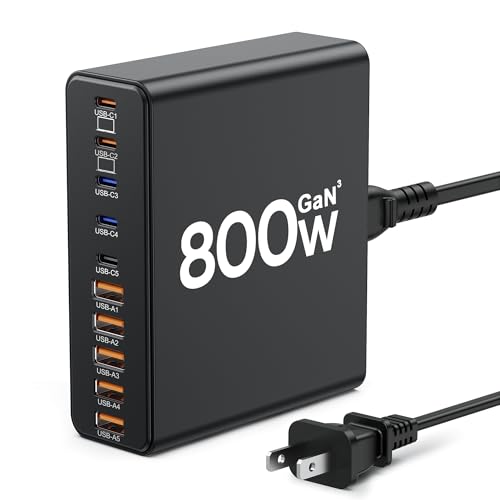
- 【10-in-1 Usb C Charger Block】Our USB charger provides multi charging...
- 【Fast Charging GaN Charger】The USB C Charger adapted GaN III generation...
- 【Upgraded 120W Laptops Charger】Our usb charging station has 5*120w fast...
What I Look for When Buying a GaN Charger Now
After my frustrating experience I changed how I shop for chargers. I focus on real-world performance instead of fancy marketing claims.
Single Port Wattage Matters More Than Total
I ignore the big number on the box that says “100W total.” Instead I look at what each individual port can deliver.
If one USB-C port puts out 65W by itself that is what I need for my laptop. The total wattage only matters when I charge multiple things at once.
Check the Charging Protocol Support
Not all fast charging is the same. Your device might use USB-C Power Delivery or Qualcomm Quick Charge or something else entirely.
I once bought a charger that did not support my phone’s fast charging standard. It charged at slow speeds even though the wattage was high.
I now check the product details for words like “PD 3.0” or “PPS” to make sure my devices will actually talk to the charger properly.
Look for a Reliable Brand with Real Reviews
I learned to ignore the five-star reviews from people who just opened the box. I search for reviews from users who tested the charger with their specific laptop or phone model.
A charger from a trusted brand with thousands of verified reviews is worth the extra money. I have been burned by no-name chargers that could not deliver their promised wattage.
The Mistake I See People Make With GaN Chargers
I wish someone had told me this earlier. The biggest mistake people make is assuming a smaller charger must be more powerful just because it uses newer technology.
GaN stands for gallium nitride and it simply means the charger runs cooler and takes up less space. It does not automatically mean the charger delivers more watts to your device.
I see friends buy a tiny 45W GaN charger to replace their bulky 65W brick and then complain their laptop charges slower. The new charger physically cannot output the same power because it has a lower wattage rating.
You need to match the wattage of your old charger at minimum. If your old unit was 65W then buy a GaN charger that can deliver at least 65W to a single port.
If you are tired of your laptop dying in the middle of important work because your charger cannot keep up, I totally understand that panic. The charger I now keep in my bag for peace of mind has been a lifesaver during long days away from an outlet.
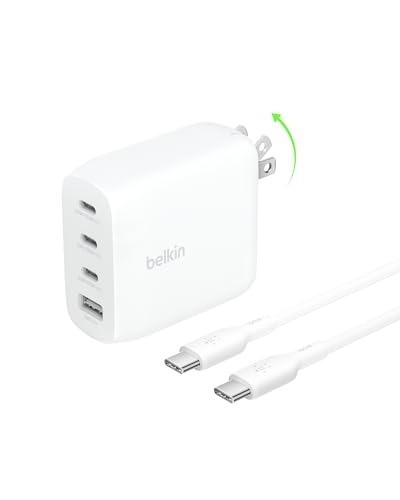
- CHARGE 4 DEVICES: Compared to cell phone wall chargers with only one...
- FAST CHARGING TECHNOLOGY: This 4-port wall charger lets you fast charge up...
- POWERFUL 100W SINGLE PORT OR SHARED OUTPUT: Get up to 100W from a single...
The One Simple Test That Changed How I Use Chargers
Here is the trick that gave me my first real aha moment. I started testing each charger by plugging in only one device at a time to see its true speed.
I charged my laptop alone on the GaN charger and timed how long it took to go from 20% to 80%. Then I did the exact same test with my old 65W brick.
That is when I realized my GaN charger was actually just as fast for a single device. The problem only showed up when I added a phone or tablet into the mix.
This one test saved me from returning a perfectly good charger. It helped me understand that my GaN unit was designed for convenience and portability, not necessarily for powering multiple devices at full speed.
Now I use my GaN charger for travel and light everyday use. I keep my old 65W brick at my desk for when I need maximum speed for my laptop alone.
My Top Picks for Fixing a Slow GaN Charger Problem
After testing several chargers myself I found two that actually deliver the speed I expected from GaN technology. Here is exactly what I use and why.
FEMORO 200W GaN III USB C Charging Station 6 Ports — Perfect for Heavy Multi-Device Users
The FEMORO 200W is what I grabbed when I needed to charge my laptop, tablet, phone, and earbuds all at once without losing speed. It has six ports so everyone in my family can plug in at the same time. The trade-off is that it is larger than a single-port GaN charger, but the power delivery makes it worth the extra space in my bag.
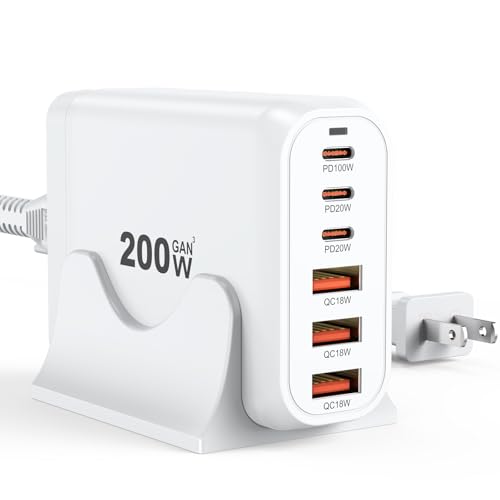
- Single Port Max Charging up to 100W: Compared with other usb multiport...
- Total 200W Output: There are 3 PD USB C ports and 3 QC USB A ports (6-in...
- Secure GaN lll Charger: GaN lll technology prioritizes security. It has a...
Belkin 4-Port USB C Charger Block 200W GaN — Best for Reliable Single-Device Speed
The Belkin 200W block is what I keep on my desk for my laptop because it delivers full power to one port without splitting wattage. I trust Belkin for consistent performance and this charger has never let me down during a busy workday. Just know that the four ports mean you still need to check which one gives the highest wattage for your main device.
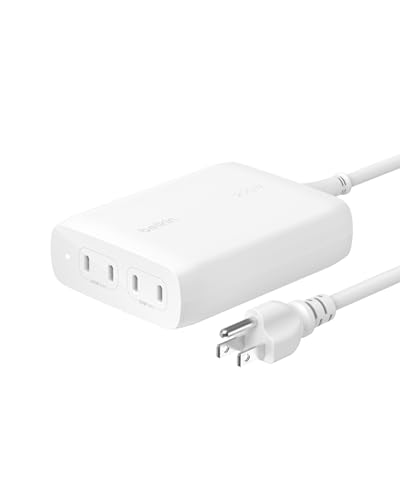
- SIMULTANEOUS CHARGING: Compared to other chargers with only one charging...
- FAST CHARGING TECHNOLOGY: USB-C Power Delivery rapidly charges a MacBook...
- UNIVERSAL COMPATIBILITY: For the best charging performance possible, this...
Conclusion
The most important thing I learned is that GaN chargers are about size and heat, not raw speed, so always match the single-port wattage to your device’s needs.
Grab your current charger and the box of your new GaN unit right now — compare the wattage ratings on the individual ports and see if a simple cable swap fixes everything in under two minutes.
Frequently Asked Questions about Why is My Gan USB Charger Slower than My 65W Unit?
Why does my GaN charger feel slower than my old 65W brick?
Your GaN charger likely splits its total wattage across multiple ports. When you plug in more than one device, each port gets less power than the full rating.
Your old 65W unit probably had a single port that delivered all its power to one device. That is why it felt faster for charging a laptop or tablet alone.
Can a bad charging cable make my GaN charger slower?
Yes, absolutely. I learned this the hard way when my laptop charged at a crawl because I used an old cable rated for only 18 watts.
You need a USB-C cable that supports at least 60W or higher for a laptop. A weak cable is like a narrow pipe that limits how much power can flow through.
Is GaN technology actually better than regular chargers?
GaN is better for size and heat management, not necessarily for raw speed. A GaN charger runs cooler and fits in your pocket much easier than a traditional brick.
For pure speed, the wattage rating matters more than the technology inside. A 65W GaN charger and a 65W silicon charger will deliver the same power to your device.
What is the best GaN charger for someone who needs to charge a laptop and phone at the same time?
That is a common frustration because most chargers slow down when you add a second device. You need a charger with enough total wattage to handle both at full speed. I have found that the charger I rely on for my desk setup handles multiple devices without cutting speed in half.
Look for a unit that delivers at least 65W to one port while still providing fast charging to others. This way your laptop gets full power and your phone still charges quickly.
- SIMULTANEOUS CHARGING: Compared to other chargers with only one charging...
- FAST CHARGING TECHNOLOGY: USB-C Power Delivery rapidly charges a MacBook...
- UNIVERSAL COMPATIBILITY: For the best charging performance possible, this...
Which GaN charger won’t let me down when I travel and need reliable speed?
Travel is when you really notice a slow charger because you have limited time and outlets. You want something compact that still delivers full wattage to your main device. The one I always pack for trips has never let me down during layovers or hotel stays.
I recommend a charger with at least two high-power USB-C ports so you can charge your laptop and phone together. A foldable plug also makes it much easier to pack without scratching your other gear.
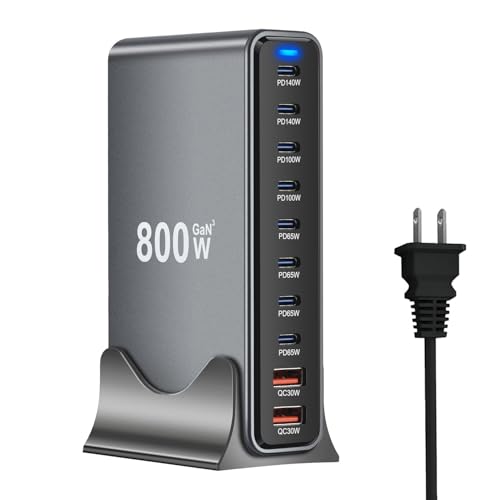
- 【Fast-Speed USB C Chagring Station】: Supports 2*140W and 100W, 4*65W PD...
- 【10-in-1 USB C Charger Ports】: 8 USB C and 2 USB A charger. Quickly...
- 【Safer Charging Protection】: Advanced GaN III chip technology provides...
Should I return my GaN charger if it seems slow?
Not yet. First try charging only one device at a time using the highest wattage port. Also swap your cable for one rated at 100W to rule out any connection issues.
If it still feels slow after those tests, check the wattage rating on your old charger. You may have bought a lower wattage GaN unit that physically cannot match your old brick’s speed.