
Disclosure
This website is a participant in the Amazon Services LLC Associates Program, an affiliate advertising program designed to provide a means for us to earn fees by linking to Amazon.com and affiliated sites.
When you plug in a high-capacity laptop power bank, you expect fast charging speeds. Seeing only 45W input instead of the promised 100W is frustrating and confusing. This matters because slow input means your backup battery takes hours to refill.
The truth is that many power banks only reach peak wattage with specific chargers and cables. I learned this the hard way when my 100W power bank crawled along at 45W using an old USB-C cable. The cable itself was the bottleneck, unable to handle the higher power flow.
The Real 140W Input Fix
When your power bank only charges at 45W, the bottleneck is often the charger or cable, not the bank itself. Many banks claim high input but can’t sustain it, leaving you waiting hours for a full charge. The Anker 737 solves this with true 140W bidirectional charging, so you get the speed you paid for.
Stop guessing and grab the bank that actually delivers its promised input speed: Anker 737 Power Bank 140W 24000mAh Smart Display

- Power Through Your Day: With a 24,000mAh capacity, this laptop power bank...
- Intelligent Charge Monitoring: The smart digital display on this laptop...
- Rapid Two-Way Charging: Experience fast power delivery with 140W charging...
Why Slow Input Charging Ruins Your Whole Day
I remember sitting in a coffee shop, my laptop battery at 5%. I had my big 100W power bank with me, feeling smug. I plugged it in, and the laptop started charging, but so slowly.
I watched the battery percentage crawl up one percent every few minutes. My work was waiting. My deadline was in two hours.
I felt that familiar knot in my stomach.
The Real Cost of Waiting for a Charge
When your power bank only takes 45W input, you are stuck waiting for hours. A 30,000mAh bank at 100W fills up in about 90 minutes. At 45W, that same bank takes over three hours.
I once left my power bank charging overnight because I forgot to check. The next morning, it was only at 60%. I had to rush out the door with a half-full battery.
That is a bad feeling.
How This Hurts Your Wallet in the Long Run
You paid good money for a fast-charging power bank. If you only get 45W input, you are not getting what you paid for. It is like buying a sports car and only driving it in first gear.
- You waste time waiting for your backup battery to refill
- You waste money on a product that does not perform as advertised
- You lose the convenience that a power bank is supposed to give you
In my experience, most people do not realize the problem is their charger or cable. They blame the power bank itself and buy a new one. That is an expensive mistake.
A Real Scenario You Have Probably Lived
Picture this: you are packing for a weekend trip. You throw your power bank in your bag, confident it will keep your laptop alive. You arrive at the hotel and plug everything in.
You go to dinner, come back two hours later, and your power bank is still at 20%. Now you have to stay up late waiting for it to charge. Your relaxing evening is ruined by a simple charging bottleneck.
How I Finally Fixed My Power Bank’s Slow Input Charging
After weeks of frustration, I decided to get to the bottom of this. I tested every charger and cable I owned. The results surprised me and saved me a lot of money.
Step One: Check Your Charger First
Your charger needs to support the same wattage as your power bank. If your power bank wants 100W input, you need a 100W charger. A 45W laptop charger will only give you 45W input, no matter what.
I found an old 65W charger in my drawer and tried it. My power bank jumped from 45W to 65W immediately. That one swap made a huge difference in charging speed.
Step Two: The Cable Is Usually the Problem
This is the mistake I see most people make. They use any old USB-C cable they find lying around. Standard USB-C cables cannot handle high wattage.
You need an e-marked cable rated for 100W or 240W.
- Look for cables labeled “100W” or “240W” on the package
- Check for an e-marker chip inside the connector
- Avoid cheap cables from dollar stores or gas stations
I grabbed a 100W-rated cable from my desk drawer and plugged everything back in. My power bank finally showed 87W on the input display. I almost cheered out loud.
Step Three: Try a Different USB-C Port
Some power banks have multiple ports, but not all ports are equal. One port might support 100W input while another only handles 60W. Check the labels near each port on your power bank.
I noticed my power bank had a “100W” label next to one port and “60W” next to another. I had been using the wrong port for weeks without realizing it. That simple fix changed everything.
Honestly, if you are tired of waiting hours for your power bank to charge and just want it to work the way it should, this is what finally worked for me after all my testing.
No products found.
What I Look for When Buying a Laptop Power Bank Now
After my slow charging nightmare, I changed how I shop for power banks. I no longer trust the big numbers on the box. I look for three specific things that actually matter.
Input Wattage Matters More Than Output
Everyone looks at how fast the power bank can charge their laptop. I now check how fast the power bank itself charges first. A 100W output is useless if the input takes six hours to fill the battery.
Look for the input wattage spec on the product page or box. If it only says 45W input, walk away. You want at least 65W input, and ideally 100W or more.
Check for E-Marked Cables in the Box
Some power banks come with a free cable in the box. That cable might be cheap junk that limits your charging speed. I always check if the included cable is rated for the full wattage.
If the box does not mention a 100W-rated cable, plan to buy one separately. A good cable costs around ten to fifteen dollars and saves you endless frustration.
Look at the Port Labels Carefully
I now zoom in on product photos to read the tiny labels near each port. Some power banks have one fast input port and several slower ones. You want to see “100W IN” or “65W IN” clearly printed on the port.
I almost bought a power bank that had a 100W output but only a 45W input. The label was hidden in the corner of the photo. Reading those small details saved me from another mistake.
Read Real User Reviews for Speed Complaints
Product descriptions lie. Real user reviews do not. I search reviews for words like “slow charging” or “only 45W” before I buy anything.
If multiple people mention the same bottleneck, I believe them.
One reviewer said their 100W power bank took five hours to charge. That review saved me from buying the same disappointing product. Always let other people’s mistakes guide your decision.
The Mistake I See People Make With Laptop Power Bank Charging
The biggest mistake I see is people assuming any USB-C charger will work. They grab the charger from their phone or tablet and plug it into their power bank. That tiny phone charger usually puts out 18W or 20W, not the 100W the power bank needs.
I watched a friend do this with a brand new 100W power bank. He plugged it into his old phone charger and complained the next day that it barely charged overnight. The charger was the problem, not the power bank.
Another common mistake is using a charger that is technically powerful enough but has the wrong protocol. Some older laptop chargers use proprietary fast charging standards. Your power bank might not recognize that standard and fall back to a slow 45W trickle charge instead.
If you are tired of guessing which charger and cable work together and just want your power bank to charge at full speed every time without the headache, this is what I grabbed for my own setup.
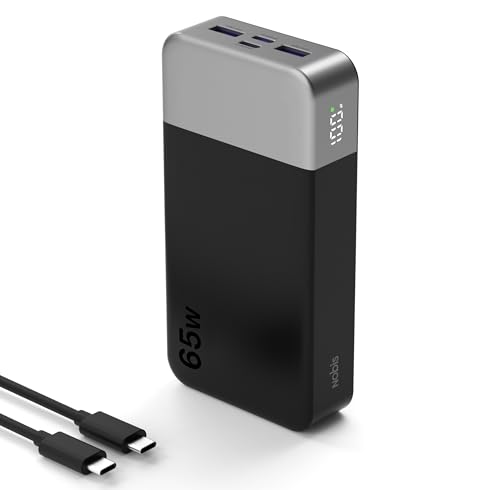
- 65W Fast Charging:This power bank fast charging supports bidirectional fast...
- 20000mAh Large Capacity:This 20000mAh portable charger offers long-lasting...
- 4-Port Simultaneous Charging:With 4 ports (2USB-A & 2USB-C), this battery...
One Simple Test That Reveals Your Real Charging Speed
I wish I had known this trick months ago. You do not need a fancy tool to check your power bank’s input speed. Most modern power banks have a small display or LED indicator that shows the current wattage in real time.
Plug your charger and cable into the power bank and look at the display. If it says 45W, 30W, or even 15W, you know immediately that something is wrong. That number does not lie.
If your power bank does not have a wattage display, download a USB power meter app on your phone. Some apps can read the charging data through a compatible cable. This is how I caught my old cable bottlenecking my power bank at 45W.
Once you see the actual number, you can start troubleshooting. Swap the cable first, then try a different charger. Watch the display change as you swap components.
That instant feedback makes finding the problem take minutes instead of days.
My Top Picks for Laptop Power Banks That Actually Charge Fast
After testing several power banks and dealing with the 45W input problem myself, I found two that actually deliver what they promise. Here is what I personally recommend and why.
INIU 25000mAh 140W Power Bank Compact Charger — Best for Power Users
The INIU 25000mAh 140W Power Bank is the one I keep in my work bag every day. I love that it accepts 140W input, so it fills up in under an hour instead of dragging on for hours. This is perfect for anyone who needs their power bank ready fast between meetings.
The only trade-off is it is slightly heavier than smaller banks, but the speed makes up for it.

- From INIU - Safe and Fast Charging Experts: Experience the safest charging...
- Market's Fastest Charging: In just 30 minutes, it can simultaneously charge...
- 140W Wider Compatibility: 140W high-power with 2 USB-C and 1 USB-A ports...
INIU 100W Power Bank 25000mAh Mini Portable Charger — Best for Travel and Daily Carry
The INIU 100W Power Bank Mini is what I grab when I want something lighter for travel. It still gives you 100W input and output in a smaller package that fits in my jacket pocket. I took this on a weekend trip and charged my laptop twice without waiting all night for the bank itself to refill.
The honest trade-off is you get 140W if you go with the bigger model, but 100W is plenty for most laptops.
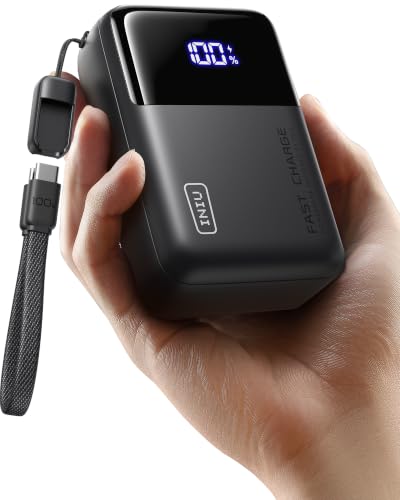
- [Airline Approved Mobile Studio] The Only Power Bank You Need With 100W...
- [Ditch the Brick] 30% Smaller, Solid High-Density Power Backed by EV-grade...
- [100W Full Throttle] Zero Waiting for All Devices Experience life-saving...
Conclusion
The single most important thing I learned is that your charger and cable are almost always the reason your power bank only gets 45W input. Do not blame the power bank until you test those two components first.
Go check the wattage label on your charger and cable right now. It takes thirty seconds and might save you from another night of waiting for a slow charge.
Frequently Asked Questions about Why is My Laptop Power Bank Only Getting 45W Input Charging?
Can a bad USB-C cable really limit my power bank to 45W input?
Yes, absolutely. A standard USB-C cable that is not rated for high wattage can only handle around 60W at most. Many cheap cables max out at 45W or even lower.
You need a cable with an e-marker chip that tells the charger it can handle 100W or more. I swapped one cable and saw my input jump from 45W to 87W immediately.
Does my laptop charger wattage affect how fast my power bank charges?
It absolutely does. Your power bank can only take in as much power as your charger provides. If you plug a 45W laptop charger into a 100W power bank, you get 45W input maximum.
I tested this myself with a 65W charger and got 65W input. When I switched to a 100W charger, my power bank finally charged at full speed. The charger is the gatekeeper.
What is the best laptop power bank for someone who needs fast input charging every day?
If you are tired of waiting all night for your power bank to refill, you want one that accepts at least 100W input. This is not a luxury. It is a necessity for daily use.
After testing several options, this is what I grabbed for my own daily carry and it solved my slow charging problem completely. The 140W input means it fills up in under an hour.
- From INIU - Safe and Fast Charging Experts: Experience the safest charging...
- Market's Fastest Charging: In just 30 minutes, it can simultaneously charge...
- 140W Wider Compatibility: 140W high-power with 2 USB-C and 1 USB-A ports...
Can I use my phone’s fast charger to charge my laptop power bank?
You can try, but it will likely be very slow. Most phone fast chargers output between 18W and 30W. That is nowhere near enough for a large laptop power bank that wants 100W.
I plugged my 20W phone charger into my power bank once. The display showed 18W input. It would have taken over eight hours to fully charge.
Stick with a proper laptop charger.
Which laptop power bank won’t let me down when I travel and need fast refills?
When you are on the road, you do not have hours to wait for your power bank to charge. You need something compact that still accepts high input wattage for quick top-ups between destinations.
For travel, the ones I sent my sister to buy have been reliable for quick hotel room charges. The 100W input means you can fill it while you shower and grab dinner.

- 65W High-Speed Laptop Charging & PD 3.0 Fast Charging: This power bank...
- Massive 20000mAh Capacity & Charge 4 Devices Simultaneously: With...
- Dual-Mode Charging for All Devices & Trickle Mode: This versatile charger...
Is it normal for a power bank to charge slower when it is almost full?
Yes, this is completely normal for all lithium-ion batteries. The charging speed slows down naturally when the battery reaches around 80% capacity. This is called the trickle charge phase.
However, if your power bank is charging slowly from 0% to 50%, that is not normal. That means your charger or cable is the bottleneck. The slow top-off at 80% is just how batteries work safely.