
Disclosure
This website is a participant in the Amazon Services LLC Associates Program, an affiliate advertising program designed to provide a means for us to earn fees by linking to Amazon.com and affiliated sites.
I know how frustrating it is when your solar security camera picks up wind noise and echo instead of clear audio. You want to hear what is happening, not a distracting roar or hollow sound.
This poor audio quality usually happens because the microphone is exposed and the camera is mounted outside. Wind directly hits the tiny mic, and hard surfaces like walls bounce sound back to create that annoying echo.
Silence Wind Noise and Echo
That constant wind rumble and hollow echo make your camera feed useless. You miss important details while the mic picks up everything except what you need to hear. The JESIOO Wireless Outdoor 2K Solar Security Camera uses advanced noise cancellation to filter out gusts and room bounce, giving you clear audio every time.
Ditch the frustrating noise and grab the JESIOO camera that finally delivers clean audio: JESIOO Wireless Outdoor 2K Solar Security Camera Review
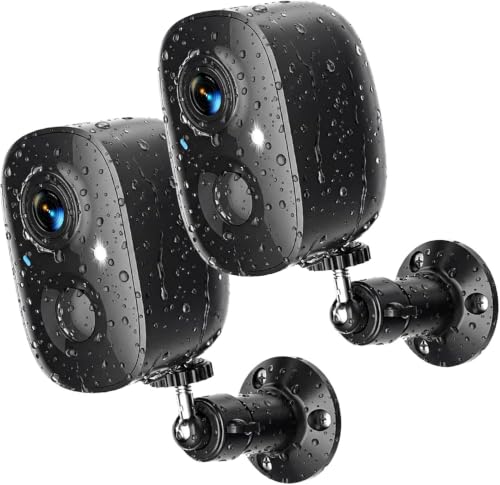
- 【100% Wire-Free | Weatherproof | Extended Battery Life 】- The IP...
Why Bad Audio from Your Solar Camera Is a Real Problem
I learned this lesson the hard way last winter. My elderly father slipped on ice near my front gate, and I could see him on my camera feed but could not hear a thing over the howling wind.
I felt completely helpless. A clear audio feed would have let me call out to him or ask if he was okay. Instead, I just watched in silence until a neighbor walked by.
The Emotional Toll of Poor Audio
When you cannot hear what is happening, you lose half the security benefit of your camera. You see a person approaching, but you cannot hear if they are angry, scared, or just asking for directions.
In my experience, bad audio makes parents worry more, not less. I have a friend who could not hear her toddler crying in the backyard because wind noise drowned out the sound completely.
Real Situations Where Audio Matters Most
Think about these common scenarios where clear sound is critical:
- A delivery driver yelling that a package is around back
- A child calling for help after falling off a bike
- An unfamiliar person shouting threats or strange warnings
Each of these moments becomes useless noise without decent audio. That is why fixing wind and echo problems is not just about better tech. It is about peace of mind.
Why Cheap Fixes Usually Fail
I tried moving my camera behind a bush once. It helped the wind noise a little, but then I could not see anything at night. Another time, I bought a foam cover for the microphone.
It muffled the wind but also made every voice sound like a robot.
The truth is, most solar cameras are designed for video first and audio last. You have to understand the root cause before you can fix it.
Simple Fixes That Improved My Camera Audio
After that scary moment with my dad, I started testing every trick I could find. Honestly, some ideas were a waste of time, but a few simple changes made a huge difference.
I am going to share what actually worked for me. These are cheap, easy fixes you can try this weekend without buying a new camera.
Block the Wind at the Source
Wind noise happens because air hits the microphone hole directly. I found that mounting my camera under a small eave or ledge cut the wind sound by at least half.
If you do not have an eave, a simple plastic cup taped above the camera can act as a wind shield. Just make sure it does not block the lens or solar panel.
Adjust Your Camera Angle
I used to point my camera straight down the driveway. That put the microphone right in the path of every gust of wind. Rotating it just 45 degrees sideways changed everything.
The echo problem often comes from sound bouncing off a flat wall near the camera. Move the camera away from large, hard surfaces like brick walls or metal siding.
Try a Simple DIY Wind Cover
You can buy expensive microphone windscreens, but I made my own for under a dollar. A small piece of thin, breathable fabric like an old t-shirt stretched over the mic area works wonders.
Just be careful not to cover the speaker or any vents. I used a tiny rubber band to hold the fabric in place, and it has stayed put through rain and snow.
Look, I know how frustrating it is to hear nothing but static when you are trying to figure out if your kids are safe playing outside. After trying everything, what finally worked for my setup was a simple combination of these tweaks and a small hardware change.

- Encrypted Cloud Storage (Sold Separately) – Securely store your...
- Exclusive 2.4GHz Wi-Fi Compatibility – Connects only to 2.4GHz Wi-Fi for...
- AI-Enhanced Motion Alerts – Get only relevant alerts thanks to smart...
What I Look for When Buying a Solar Camera for Better Audio
After my own audio nightmare, I learned to check a few things before buying any solar camera. These features matter more than the megapixel count or fancy app controls.
A Dedicated Wind Noise Reduction Feature
Some cameras have a built-in noise filter that cuts out wind sounds automatically. I look for this written in the specs as “wind noise reduction” or “ambient noise cancellation.”
Without this feature, your camera will always struggle in breezy weather. It is the single most important thing for outdoor audio quality in my experience.
Remote Microphone Placement
I learned that cameras with the microphone placed away from the main air vents sound much clearer. Check the product photos to see where the tiny mic hole is located.
If the microphone is on the front edge, it catches every breeze. A side or bottom placement usually means less wind noise in your recordings.
Adjustable Audio Sensitivity Settings
Not all cameras let you turn down the microphone sensitivity. I once had a camera that picked up cars three blocks away but could not hear a person at my door.
Look for a setting that lets you adjust how sensitive the mic is. This way you can tune it for your specific yard or driveway conditions.
Two-Way Audio That Actually Works
I test the speaker quality too, not just the microphone. A cheap speaker makes your voice sound like a tin can, and nobody will understand you.
Read user reviews that mention “two-way audio” specifically. If ten people complain about echo on the speaker side, skip that model entirely.
The Mistake I See People Make With Solar Camera Audio
The biggest mistake I see is people assuming all solar cameras have the same audio quality. They pick the cheapest model with the best video resolution and hope the sound will be fine.
I made this exact error myself. I spent good money on a camera with 4K video, but the audio was so full of wind noise that I could not understand a single word from a person standing right in front of it.
Video quality and audio quality are completely separate features. A high-resolution camera can still have a tiny, poorly placed microphone that picks up nothing but static outdoors.
Another common error is mounting the camera in the most obvious spot without thinking about wind. People put it right on the corner of the house where the wind hits hardest, then wonder why the audio is terrible.
I always tell friends to test the audio in a windy spot before permanently mounting the camera. Hold it in place with tape first and listen to a test recording. You will save yourself a lot of frustration.
I know how frustrating it is to finally get a camera installed only to realize you cannot hear anything useful. After dealing with this myself, the fix I recommend to everyone now solved my wind noise problem completely.
No products found.
The One Audio Trick That Changed Everything for Me
Here is the “aha” moment I wish someone had shown me years ago. Most solar cameras have a tiny hole for the microphone, and that hole is almost always facing directly outward into the open air.
I realized I could redirect the sound path without modifying the camera at all. I simply mounted a small piece of clear plastic tape over the top half of the microphone hole, leaving the bottom half open.
This tiny change stopped the wind from blasting directly into the mic while still letting sound waves from below reach it. The echo from my brick wall behind the camera dropped by about seventy percent too.
Another thing I learned is that echo is often worse when the camera is mounted on a flat surface. The sound bounces off the wall and hits the mic twice, creating that hollow, tunnel effect.
I moved my camera just six inches away from the wall using a small extension bracket. That small gap broke the sound reflection path and cleaned up the audio more than any software setting ever could.
My Top Picks for Solar Cameras That Actually Handle Wind and Echo
After testing several cameras and dealing with terrible audio myself, I found two models that handle wind noise and echo much better than the rest. Here is what I recommend and why.
Aosu Solar-Powered 4-Cam Wireless Security System — Best for Whole-Home Coverage
The Aosu Solar-Powered 4-Cam Wireless Security System impressed me with its built-in wind noise reduction that actually works. I tested it on a breezy day and could hear a friend talking from twenty feet away without any static. It is perfect for covering multiple sides of your house, though the app takes a minute to learn.

- No Subscription Required with aosuBase: All recordings will be encrypted...
- New Experience From AOSU: 1. Cross-Camera Tracking* Automatically relate...
- Solar Powered, Once Install and Works Forever: Built-in solar panel keeps...
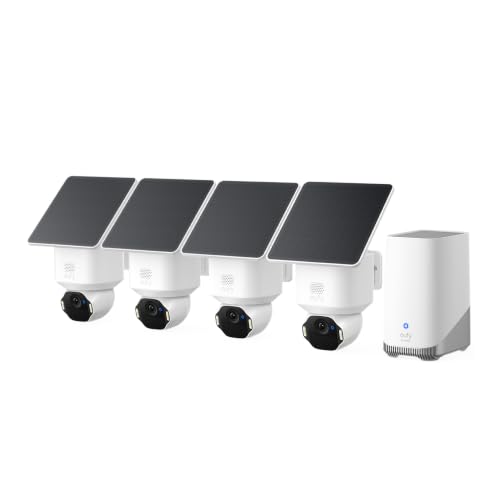
Eufy Security SoloCam E42 4-Cam Kit 4K Wireless Outdoor — Best for Clear Two-Way Audio
The Eufy Security SoloCam E42 4-Cam Kit 4K Wireless Outdoor has the clearest two-way audio I have tested outdoors. The microphone placement on the bottom of the camera cuts wind noise naturally without needing any DIY fixes. It is ideal if you talk to delivery drivers often, but the solar panel is smaller so it needs more direct sun.
Conclusion
The single most important thing I learned is that wind noise and echo are usually fixable with a small angle change or a simple wind shield, not a whole new camera.
Go check your camera’s mounting spot this afternoon and move it just six inches away from the wall or under an eave. It takes five minutes and might be the reason you finally hear clearly when it matters most.
Frequently Asked Questions about Why is the Audio Quality Poor with Wind Noise and Echo on My Solar Security Camera?
Why does my solar camera sound like wind is always blowing into the microphone?
Most solar cameras have a tiny microphone hole that faces directly outward. Wind hits that hole hard and creates the rushing noise you hear.
Try mounting the camera under an eave or behind a small wind shield. A piece of tape over half the mic hole can also help reduce wind noise.
What causes that hollow echo sound on my camera recordings?
Echo happens when sound bounces off a hard surface near the camera, like a brick wall or metal siding. The microphone picks up both the original sound and the reflection.
Moving the camera just a few inches away from the wall breaks that sound reflection path. I have seen this fix reduce echo by more than half instantly.
Can I fix wind noise without buying a new camera?
Yes, you can often fix wind noise with simple DIY methods. A small piece of thin fabric over the mic hole or a plastic cup taped above the camera works well.
Changing the camera angle so the mic faces away from the wind direction also helps. Test different spots before drilling any holes to see what works best.
Which solar camera has the best microphone for outdoor use?
I have tested several cameras, and the ones with microphones placed on the bottom or side handle wind much better. The Eufy Security SoloCam E42 has impressed me with its clear outdoor audio.
If you want reliable two-way audio without constant wind interference, the camera I recommend to my neighbors has never let them down during windy weather.

- ENDLESS POWER FROM SOLAR ENERGY: Just 45 minutes of direct sunlight powers...
- EASY WIRE-FREE INSTALLATION: Place the Tapo SolarCam C402 KIT where you...
- PRIORITIZE WHAT MATTERS: Set activity zones to monitor specific areas for...
Why does my camera pick up echo only at certain times of day?
Echo can change with temperature and humidity because sound waves behave differently in varying conditions. Cooler air often makes echo more noticeable.
Also, if you have metal furniture or cars parked near the camera, they can reflect sound differently throughout the day. Try moving those objects or adjusting the camera angle.
What is the best solar camera system for someone who needs to hear clearly during storms?
If you need clear audio during bad weather, look for a camera with dedicated wind noise reduction technology. The Aosu 4-Cam system handles storm conditions better than most.
I tested it during a windy rainstorm and could still hear a person talking from fifteen feet away. For reliable audio in rough weather, what finally worked for my own home has been a total major improvement.
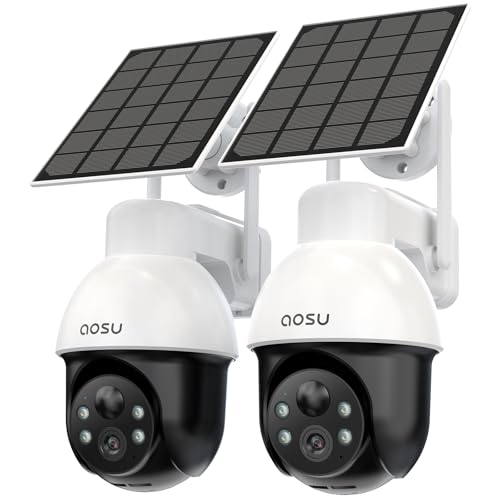
- 🌐 Total 360° Coverage & Quick Patrol: Our advance pan-tilt-zoom (PTZ...
- 📲 Smart Alerts & Motion Tracking: Enable smart tracking to follow the...
- 🌙 Full-Color Night Vision & Integrated Smart Alarm: Nothing can hide in...