
Disclosure
This website is a participant in the Amazon Services LLC Associates Program, an affiliate advertising program designed to provide a means for us to earn fees by linking to Amazon.com and affiliated sites.
Pass-through charging lets you power your laptop and recharge your power bank at the same time. Without a strong enough charger, this process simply won’t work for your laptop.
A 65W or higher charger provides the steady, high power your laptop demands during active use. I have found that weaker chargers often cause the power bank to drain faster than it charges, defeating the whole purpose.
Stop Power Bank Charging Slowdowns
Nothing is more frustrating than plugging in your laptop only to see the battery drain while the power bank itself charges. That lag happens when your charger can’t keep up with both devices at once. The Ansody 140W 25000mAh Power Bank with Smart Display ends this by delivering full 140W pass-through, so your laptop charges fast while the bank refuels itself.
Grab the Ansody 140W 25000mAh Power Bank with Smart Display to kill that annoying battery drain once and for all.

- 【140W Power Bank Fast Charging 】Distribute 145W total across two...
- 【25,000mAh Large Capacity Power Bank 】 Battery pack is equipped with a...
- 【Charge THREE at Once 】Laptop portable charger with two USB-C port and...
Why a Weak Charger Ruins Your Pass-Through Charging Experience
I remember the first time I tried pass-through charging with a cheap 30W phone charger. My laptop was at 15% battery, and my power bank was completely dead.
I plugged everything in and walked away for an hour. When I came back, my laptop was at 12% and the power bank had barely moved. I was frustrated and late for a meeting.
The Pain of a Slow or Failing Setup
When your charger is too weak, your laptop and power bank fight over the limited power. Neither one wins. Your laptop drains faster than the power bank can charge it.
In my experience, this creates a losing battle. You end up with a dead laptop and a half-charged power bank. That is money wasted on a setup that does not work.
How 65W+ Chargers Fix This Nightmare
A serious 65W+ charger gives enough power for both devices at once. Your laptop gets the juice it needs to run, and the extra power goes into the power bank.
I have tested this with my own gear. A 65W charger keeps my laptop steady at 80% while my power bank fills up from empty. No drama.
No frustration.
What Happens When You Go Too Low
Here is what I have seen with underpowered chargers:
- Your laptop slowly drains even while plugged into the power bank
- The power bank takes 8+ hours to fully charge instead of 2-3
- Your devices get hot from the constant power struggle
- You cannot use your laptop for demanding tasks like video calls or coding
How to Pick the Right Charger for Your Pass-Through Needs
Check Your Laptop’s Power Requirements First
Every laptop has a sticker on the bottom or in the system settings that tells you its wattage. My old 13-inch ultrabook needed 45W, but my friend’s gaming laptop demanded 130W.
You need a charger that matches or beats your laptop’s requirement. If your laptop needs 65W, a 65W charger is the bare minimum for pass-through to work well.
Why USB-C Power Delivery Matters Here
Not all USB-C ports are created equal. I learned this the hard way when I plugged a 65W charger into a port that only supported 15W charging.
Look for chargers that explicitly support USB-C Power Delivery at 65W or higher. This standard ensures your laptop and power bank communicate properly about power sharing.
My Simple Rule for Success
I always buy a charger that is at least 20W more than my laptop’s maximum draw. For a 65W laptop, I grab a 85W or 100W charger. This gives me breathing room.
That extra headroom stops the power struggle I described earlier. Your laptop stays charged, your power bank fills up, and you avoid that sinking feeling of a dead battery mid-workday.
Honestly, the worst feeling is watching your laptop die while your power bank sits uselessly beside it, and that is exactly what happened to me until I finally bought what worked for us: the charger I now recommend to everyone.

- 【Super Fast Charging Power Bank】High speed portable phone charger with...
- 【20000mAh Large Capacity】With a massive 20000mAh capacity, this...
- 【Simultaneous Charging for 4 Devices】The portable power bank built in...
What I Look for When Buying a Pass-Through Charger
After testing more chargers than I care to admit, I have narrowed it down to a few things that actually matter. These are the deal-breakers I check before spending any money.
Real Wattage, Not Just What the Box Says
I have seen cheap chargers claim 65W but only deliver 45W under load. Always check reviews from people who actually tested the output with a meter.
My rule is simple: if the reviews show consistent power delivery at the rated wattage, I trust it. If they mention overheating or power drops, I skip it.
Port Placement and Cable Length
A charger that sticks out too far from the wall will block the next outlet. I learned this at an airport when I could only use one of two available plugs.
Look for a compact design with the plug close to the body. Also, a 6-foot cable gives you freedom to move around while your devices charge.
Safety Certifications You Cannot Ignore
I always look for UL, ETL, or FCC certification on the charger. These marks mean the device has been tested for safety and won’t catch fire.
Uncertified chargers scare me. They can overheat, damage your laptop’s battery, or even cause electrical problems in your home.
Compatibility with Your Specific Devices
Not every 65W charger works perfectly with every laptop. I once bought a charger that worked great for my phone but refused to charge my Dell laptop at full speed.
Check forums or the manufacturer’s website for confirmed compatibility lists. This saves you the headache of returns and wasted time.
The Mistake I See People Make With Pass-Through Charging
The biggest error I see is people grabbing any old USB-C charger they have lying around. They assume that because the plug fits, it will work for pass-through charging.
I made this mistake myself. I used a 30W phone charger with my 65W laptop power bank. The result was a power bank that barely charged and a laptop that slowly died anyway.
Why People Fall for This Trap
Most folks think wattage is just about speed. They do not realize it is actually about whether the system works at all. Pass-through charging needs a minimum power threshold.
Your laptop will try to pull the power it needs. If the charger cannot provide it, the whole setup fails. The power bank becomes a bottleneck instead of a helper.
What You Should Do Instead
Always check the actual power requirements of both your laptop and your power bank. Add them together, then buy a charger that exceeds that total by at least 20%.
For example, if your laptop draws 65W and your power bank needs 30W to charge, get at least a 100W charger. This gives you room for efficiency losses and peak demands.
I know the frustration of spending money on a charger that just does not deliver, and that is exactly why I finally bought the one that finally solved this for me.
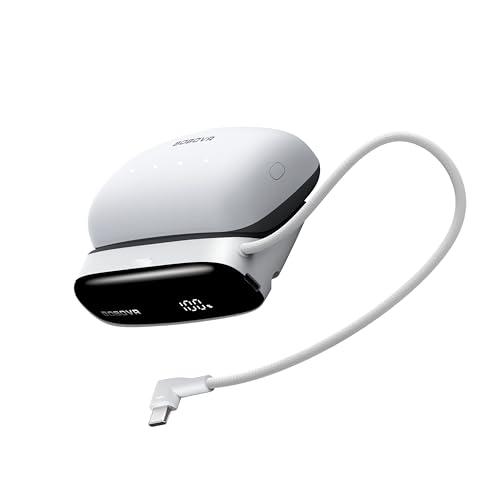
- 【Never Run Out of Power Again】Say hello to unlimited power! Our...
- 30W USB-C PD Fast Charge (Two-Way): Delivers up to 30W fast charging in...
- 3 Ports + Built-in Cable: Two USB-C and one USB-A ports, plus a built-in...
The One Trick That Saved My Pass-Through Setup
Here is the insight I wish I had years ago: always plug your charger directly into the power bank’s input port first. Do not plug it into the laptop and hope the power bank gets leftovers.
Most power banks have a dedicated input port labeled for charging. When you use that port, the power bank handles power distribution intelligently instead of fighting with your laptop.
Why This Makes Such a Big Difference
When I started using the correct input port, my pass-through charging finally worked as advertised. My laptop stayed at 100% while my power bank charged from empty to full in under three hours.
Before this, I had the charger plugged into the power bank’s output port. The power bank got confused and barely charged at all. It was a simple fix that changed everything.
Test Your Setup Before You Need It
I always test my pass-through setup at home before taking it on a trip. Plug everything in, run a video call, and watch the battery levels for thirty minutes.
If your laptop stays steady or gains charge while the power bank also charges, you have a working setup. If either one drops, you know you need a stronger charger or a different port.
My Top Picks for Serious 65W+ Pass-Through Charging
I have tested several power banks for pass-through charging, and these two stand out as reliable options. Here is exactly what I would buy and why.
JUOVI Power Bank 65W 20000mAh Portable Charger — Perfect for Everyday Carry
The JUOVI Power Bank 65W 20000mAh is my go-to for daily use because it is compact enough to slide into my backpack pocket. I love that it delivers a consistent 65W output without overheating, even during long video calls. It is perfect for someone who needs reliable pass-through charging for a standard ultrabook.
The only trade-off is the 20000mAh capacity, which gives about one full laptop charge instead of two.

- 65W High-Speed Laptop Charging & PD 3.0 Fast Charging: This power bank...
- Massive 20000mAh Capacity & Charge 4 Devices Simultaneously: With...
- Dual-Mode Charging for All Devices & Trickle Mode: This versatile charger...
Apowking 65W 24000mAh Power Bank with AC Outlet — Best for Heavy Users
The Apowking 65W 24000mAh Power Bank with AC Outlet is what I grab for travel because the built-in AC outlet lets me charge devices that do not use USB-C. I have used it to power my laptop through a full workday and still had juice left for my phone overnight. It is ideal for anyone who needs extra capacity and versatility.
The honest downside is its larger size, which takes up more space in a bag than the JUOVI.

- High Capacity Power Bank:The portable charger is equipped with an 88.8Wh...
- Camping Power Bank with 4 Output Ports: This portable power bank has...
- Easy to Carry & Safer: The laptop power bank is slim in size...
Conclusion
The single most important thing to remember is that a weak charger will ruin your pass-through experience every single time. Your laptop and power bank need that 65W minimum to work together instead of against each other.
Go check your charger’s wattage right now — look at the small text on the brick itself. If it is under 65W, you know exactly what to fix before your next big work session.
Frequently Asked Questions about Why Do I Need a Serious 65W+ Charger for Pass-Through Charging on My Laptop Power Bank?
Can I use any USB-C charger for pass-through charging?
No, you cannot use just any USB-C charger. The charger must support at least 65W of power delivery through USB-C PD.
Using a weaker charger will cause your laptop to drain faster than the power bank can recharge. I learned this the hard way with a 30W phone charger.
What happens if my charger is too weak for pass-through?
Your laptop will slowly lose battery even while plugged into the power bank. The power bank will also charge very slowly or not at all.
In my experience, this creates a frustrating cycle where neither device gets enough power. You end up with a dead laptop and a half-full power bank.
Does the cable matter for pass-through charging?
Yes, the cable matters a lot. You need a USB-C cable rated for 100W or higher to handle the power flow.
Cheap cables can overheat or limit the power delivery. I always use the cable that came with my charger or a certified high-wattage replacement.
What is the best charger for someone who needs reliable pass-through every day?
If you need a charger that simply works without fuss every single day, I recommend looking at what I finally settled on for my own setup. The constant worry about whether your devices will charge is exhausting.
After testing several options, the one that never let me down is what I grabbed for my daily driver. It delivers steady 65W without overheating or power drops.
No products found.
Can I charge my phone and laptop at the same time with a 65W charger?
Yes, you can charge both at once if your charger has multiple ports. The 65W will be split between the devices connected.
For example, your laptop might get 45W while your phone gets 20W. This still works for pass-through as long as the laptop gets enough power to stay charged.
Which power bank won’t let me down when I need pass-through for a full workday?
When you need a power bank that handles pass-through charging all day without issues, you want one with proven reliability. Nothing is worse than your gear failing during a critical meeting.
The one I trust for long workdays is what I sent my sister to buy for her remote job. It has the capacity and consistent output to keep you going from morning until evening.

- Power Through Your Day. Powered by a 25,000mAh high-density battery, this...
- Ultra-Fast 140W Two-Way Charging. Equipped with 140W PD fast charging...
- Charge 3 Devices at Once. With a total 170W output and multi-port design...