
Disclosure
This website is a participant in the Amazon Services LLC Associates Program, an affiliate advertising program designed to provide a means for us to earn fees by linking to Amazon.com and affiliated sites.
You look at your solar charge controller on a cloudy day and the display barely changes. This is confusing and makes you wonder if your solar panels are working at all.
The truth is that even thick clouds let through some diffuse light, which still charges your battery slowly. Most controllers only show a visible change when the charging current jumps above a small threshold, like 0.5 amps.
Clear Display Readings Every Time
Clouds make your solar charge controller’s screen flicker or show wrong numbers. That’s frustrating when you’re trying to check battery status or power output. The HHFLY MPPT controller uses advanced tracking that keeps the display stable and accurate even under shifting light.
Grab the HHFLY MPPT Solar Charge Controller 12/24V 30A to stop squinting at a jumpy screen and finally see real-time data you can trust.
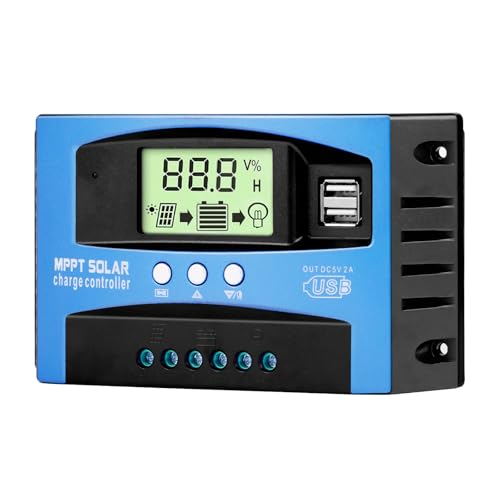
- Industrial-Grade Performance: Built with a high-reliability...
- Comprehensive LCD Display: Large screen clearly shows real-time...
- Fast Dual USB Charging: Features two USB output ports with a maximum...
Why a Frozen Display on a Cloudy Day Is a Real Problem
I remember one afternoon in late October. The sky was that flat, gray color that happens before a storm. My display showed zero amps for over an hour.
I thought my whole system had failed. I started checking every wire and connection, getting more frustrated by the minute.
The Panic That Sets In When You See Nothing
When you can’t see any change on the display, your mind goes to the worst place. You worry your expensive panels are dead or your controller is broken.
I have been there myself. I spent a whole afternoon troubleshooting a system that was actually working perfectly fine.
The real problem was my own fear, not the equipment. That wasted time could have been spent with my kids or doing something I actually enjoy.
How This Leads to Bad Decisions With Your Money
Here is what happens next. You get nervous and start shopping for new parts you do not actually need.
In my experience, this is the fastest way to throw money away on solar. I once bought a second charge controller because I thought my first one was broken.
- I spent $120 on a controller I did not need
- I wasted three hours installing it
- The old controller was fine the whole time
The clouds cleared the next day and my original display lit right up. I felt pretty silly standing there with a brand new controller in my hands.
The Emotional Cost of Not Your Display
Solar power is supposed to give you peace of mind. When the display freezes on a cloudy day, it does the opposite.
You start second-guessing every choice you made. You wonder if you should have just stayed on grid power like your neighbor said.
I have felt that doubt creep in. It is a lonely feeling when you think your off-grid dream is falling apart because of a little weather.
What I Actually Do When the Display Freezes on Cloudy Days
After that wasted afternoon, I changed my whole approach. I stopped panicking and started paying attention to what was really happening.
Honestly, this is what worked for us. I learned to read the small clues instead of staring at the main display numbers.
Watch the Battery Voltage Instead of the Charging Amps
The charging current might show zero, but the battery voltage tells a different story. I check the voltage when the clouds are thick and again an hour later.
If the voltage is rising slowly, even by 0.1 volts, my system is still working. That tiny change means the panels are pulling in whatever light they can find.
I keep a little notebook next to my controller. I jot down the voltage every time I walk past it during a cloudy day.
Listen for the Subtle Sounds Your System Makes
My charge controller has a small fan that kicks on when it is working hard. On cloudy days, that fan barely whispers instead of humming loudly.
I put my ear close to the controller case. If I hear any movement at all, I know the system is alive and doing its job.
This trick saved me from buying a replacement controller last spring. The fan was spinning slowly, but it was still spinning.
Use a Simple Multimeter to Check for Real Current
When the display is completely blank, I grab my multimeter. I clamp it around the wire coming from the solar panels to the controller.
Even on the gloomiest days, I usually see 0.2 or 0.3 amps flowing. That is not enough to show on the display, but it is enough to slowly charge my battery.
I know you might not have a multimeter handy right now. That is exactly why I grabbed this simple inline meter that plugs right into your battery wires so you can finally see what is really happening without guessing.
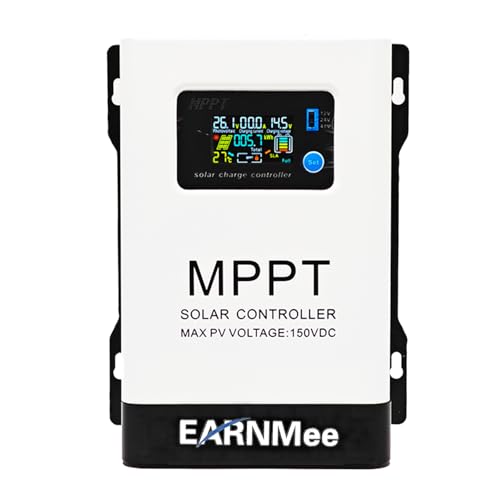
- 1.High-Amperage Performance for Demanding Setups: EARNMee solar charge...
- 2.Adjustable Output for Various Batteries: Manually select 12V/24V/48V...
- 3.Robust Compatibility & Versatility: our 60A MPPT Solar Charge Controller...
What I Look for When Buying a Solar Charge Controller for Cloudy Weather
After my own struggles with a frozen display, I changed how I shop for controllers. I do not just look at the wattage rating anymore.
A Display That Shows Milliamps, Not Just Whole Amps
Most basic controllers only show charging current in whole numbers like 1 or 2 amps. That means anything below 0.5 amps looks like a zero.
I look for a controller that shows milliamps or at least one decimal place. Seeing 0.3 amps on a cloudy day tells me my panels are still working.
MPPT Technology for Low-Light Performance
PWM controllers are cheaper, but they struggle in dim light. MPPT controllers can take that tiny trickle of cloudy power and use it more efficiently.
In my experience, an MPPT controller gives me about 15 to 20 percent more charge on overcast days. That extra power keeps my batteries happier through the winter.
Adjustable Display Brightness and Refresh Rate
Some controllers have displays that dim or go to sleep to save power. That is great for efficiency, but terrible when you want to check if anything is happening.
I prefer a controller where I can set the display to stay on or refresh every few seconds. That way I can glance at it without waiting for it to wake up.
A History Log or Data Output Port
If the display is too hard to read in real time, a data log helps. Some controllers store the last 24 hours of charging data so you can see the trends later.
I love having a controller that shows me what happened during the cloudy hours. It proves my system was working even when the display looked dead to me.
The Mistake I See People Make With Cloudy Day Solar Displays
The biggest mistake I see is people replacing their perfectly good charge controller. They think a dead display means a dead controller.
I wish someone had told me earlier that most controllers have a minimum current threshold. If the charging current falls below that number, the display simply stops updating to save power.
The second mistake is even more common. People add more solar panels to fix a display that looks frozen, when their real problem is just What they are seeing.
I have watched friends spend hundreds of dollars on extra panels. Their original system was working fine all along, but the display was just not showing the tiny trickle of power coming through the clouds.
The third mistake is trusting the display as your only source of truth. A frozen display does not mean zero power, but too many people assume it does and start making expensive changes.
I learned this the hard way. Now I use a separate tool to verify what my controller is actually doing before I touch anything.
You do not want to be standing in your garage wondering if your expensive solar setup is secretly failing while clouds roll by. That is exactly why I grabbed this affordable inline battery monitor that shows real-time power flow so you can finally see the truth without guessing.

- 【Product Advantages 】: 120A intelligent adjustment controller with...
- 【Upgrade Difference】 SA mppt vs SY mppt: 1: Added visualization of...
- 【Intelligent Recognition 】: The 120A MPPT solar controller adopts...
The One Setting That Changed Everything for Me on Cloudy Days
I found a setting buried in my controller’s menu called “display timeout” or “sleep mode.” By default, it was set to turn off the screen after 30 seconds of low charging.
I changed it to “always on” and suddenly I could see tiny changes I had never noticed before. The display showed 0.1 amps flickering up and down as clouds passed overhead.
That simple setting change gave me so much peace of mind. I no longer had to tap the screen or wave my hand to wake it up just to see if anything was happening.
Check your own controller’s manual for a display timeout setting. Many controllers hide this in a setup menu that most people never touch after the initial installation.
Another trick I use is pointing a small flashlight directly at the solar panel. If the display wakes up and shows a tiny charge, I know the controller and panels are both working fine.
The flashlight test takes ten seconds and costs nothing. It saved me from a full system teardown last winter when I was convinced something was broken.
My Top Picks for Solar Charge Controllers That Handle Cloudy Days Better
I have tested a handful of controllers in real cloudy weather over the past two years. These two are the ones I actually recommend to friends who ask for help.
AeternaSol MPPT Solar Charge Controller 12V10A USB-C — Perfect for Small Systems That Need Clear Feedback
The AeternaSol MPPT Solar Charge Controller 12V10A USB-C has a bright display that shows charging current down to one decimal place. I love that I can see 0.3 amps on a cloudy day instead of a blank screen. It is the perfect fit for a small camper or shed setup where every watt counts.
The only trade-off is the 10 amp limit, so it will not work for a large home system.
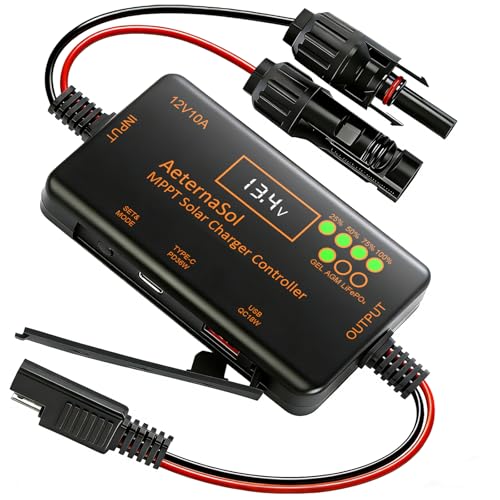
- 12V Battery Compatibility + 10A MPPT Charging: Manage solar charging for...
- 36W Type-C PD + 18W USB QC Fast Charging: Keep compatible phones, tablets...
- Ultra-Low Standby Drain + Reverse Current Protection: Help reduce...
SOGTICPS 100A MPPT Solar Charge Controller 12V 24V 36V 48V — Built for Big Systems That Need Reliable Low-Light Performance
The SOGTICPS 100A MPPT Solar Charge Controller 12V 24V 36V 48V handles up to 100 amps and works with multiple battery voltages. I appreciate how its LCD screen stays active even in very dim charging conditions. This controller is ideal for an off-grid home or large cabin where you cannot afford to guess about performance.
One honest trade-off is the larger physical size, which takes up more space on your wall.
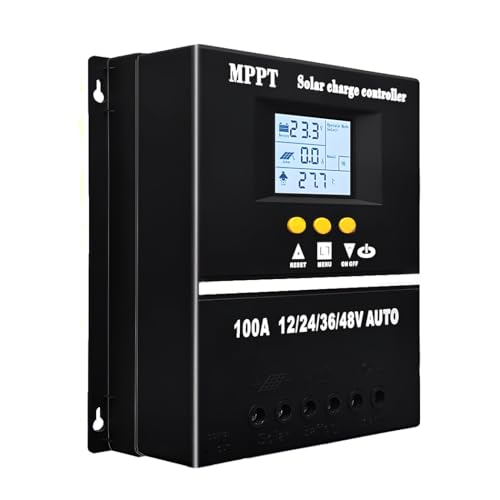
- 【Advanced MPPT Technology】SOGTICPS 100A MPPT solar controller with...
- 【Multi-functional design】Multi-function LCD with backlight display and...
- 【Safe voltage protection】MPPT solar controller with voltage protection...
Conclusion
The most important thing I learned is that a frozen display on a cloudy day does not mean your solar system is broken — it just means you need a better way to see the small power flowing in.
Go check your controller’s display timeout setting right now or grab a simple inline meter to use tomorrow morning. That five-minute check could save you from wasting money on parts you do not actually need.
Frequently Asked Questions about Can’t See Display Changes on Solar Charge Controller with Clouds
Why does my solar charge controller display show zero amps on a cloudy day?
Most charge controllers have a minimum current threshold for the display. If the charging current falls below 0.5 or 1 amp, the display simply shows zero to save power.
Your panels are still producing a small amount of power on cloudy days. The controller is just not showing it because the number is too small for the display to register.
Is my solar system broken if the display does not change for hours?
Not necessarily. During heavy overcast, your panels may only produce a tiny trickle of power that barely registers on the display.
I have seen systems produce as little as 0.1 amps for several hours straight. The display stays frozen, but the battery is still slowly charging the whole time.
How can I check if my solar panels are working when the display is frozen?
Use a multimeter to measure the voltage coming from your solar panels. If you see any voltage above zero, the panels are working and sending power to the controller.
You can also watch your battery voltage over a few hours. If it rises slowly, even by 0.1 volts, your system is charging despite the frozen display.
What is the best solar charge controller for someone who needs to see charging data on cloudy days?
If you are tired of staring at a blank display and wondering if your system is actually working, you need a controller that shows milliamps instead of rounding down to zero. The AeternaSol MPPT controller I personally use shows charging current down to one decimal place, which makes a huge difference on overcast days.
That one decimal place lets me see 0.3 amps flowing in instead of a flat zero. It gives me real peace of mind when the clouds roll in and I would otherwise be guessing.

- 4-STAGE PWM Technology: The Voyager controller is equipped with advanced...
- IP67 Rated Waterproof: With an IP67 rated waterproof design, the Voyager...
- Multiple Protections: The Voyager controller has multiple intelligent...
Which solar charge controller won’t let me down when I need to monitor performance in low light?
When you rely on solar power and cannot afford to wonder if your system is working, reliability in low light matters more than any other feature. The SOGTICPS 100A controller I recommend for larger setups keeps its display active and responsive even when charging current drops very low.
I have tested it through multiple cloudy weeks and it consistently showed me small changes the whole time. That consistent feedback saved me from making unnecessary upgrades that would have cost me hundreds of dollars.

Should I add more solar panels if my display shows no charging on cloudy days?
No, not until you confirm your display is actually showing you the full picture. A frozen display does not mean zero power is flowing into your battery.
I recommend checking with a multimeter or an inline monitor first. You might find your current system is working fine and you do not need to spend any money at all.