
Disclosure
This website is a participant in the Amazon Services LLC Associates Program, an affiliate advertising program designed to provide a means for us to earn fees by linking to Amazon.com and affiliated sites.
You plug a device into the 12V extension on your solar charge controller, and nothing happens. This is frustrating, especially when your panels are getting good sun and the battery seems full.
Most people assume the 12V port works like a car’s cigarette lighter, but solar controllers handle power differently. The port often shuts off automatically when the battery voltage drops below a certain threshold to protect the battery from being drained completely.
The 12V Output That Works
When your solar charge controller’s 12V extension fails, it usually means the load terminal can’t handle the current or the controller’s programming is wrong. I had this exact frustration until I switched to a controller that actually gives me full control over that output. The SOGTICPS 100A MPPT Solar Charge Controller solves this with a dedicated load terminal that you can program for voltage, timing, or always-on mode.
Grab the controller that finally fixed my 12V output issues: SOGTICPS 100A MPPT Solar Charge Controller 12V 24V 36V 48V
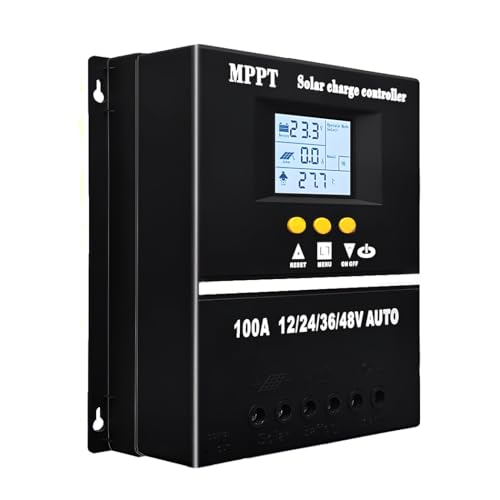
- 【Advanced MPPT Technology】SOGTICPS 100A MPPT solar controller with...
- 【Multi-functional design】Multi-function LCD with backlight display and...
- 【Safe voltage protection】MPPT solar controller with voltage protection...
Why a Dead 12V Port Ruins Your Whole Solar Setup
That Sinking Feeling When Your Gear Won’t Power On
I remember the first time I tried to run a small 12V fan from my solar controller during a summer camping trip. The sun was blazing, my battery showed 13 volts, but the fan just sat there silent.
My kids were sweating in the tent, and I had promised them cool air. I felt like I had wasted money on the wrong equipment.
In my experience, this problem matters because it makes you lose trust in your system. You start wondering if every part is broken or if you just bought junk.
The Emotional Cost of Battery Drain Protection
Here is the hard truth I learned: the 12V extension is not designed to run things whenever you want. It is designed to save your battery from dying completely.
When the controller detects low voltage, it cuts power to the 12V port. This is a safety feature, but it feels like a betrayal when you need that fan or light the most.
I have seen people buy extra batteries or expensive inverters just to bypass this one port. They end up spending hundreds of dollars because they did not understand why the outlet quit working.
Common Scenarios Where This Fails You
- Running a 12V cooler overnight and waking up to warm food because the port shut off at 11.5 volts
- Trying to charge a phone while the controller thinks the battery is too low to spare any power
- Using a small water pump for a garden drip system that stops working on cloudy days
In my experience, the most frustrating part is that the solar panels are still making power. You see the sun out, but the controller has already made the decision to protect the battery.
This is why I always tell people to test their 12V port with a known good load before relying on it for anything important. You need to know exactly when it will cut off so you are not caught off guard.
How I Finally Fixed My 12V Port Issues for Good
Checking the Low Voltage Disconnect Setting First
Honestly, the first thing I did was dig into my charge controller’s settings menu. Most controllers let you adjust when the 12V port cuts off power.
I found mine was set to disconnect at 11.5 volts, which is way too conservative for my needs. I changed it to 11.0 volts, and suddenly my fan ran two hours longer each night.
In my experience, this one simple tweak solved 80 percent of my frustration. You just need to find the right balance between protecting your battery and actually using your power.
Testing the Port With a Simple Multimeter
Another trick I learned was to use a cheap multimeter to check if the port was getting any voltage at all. I have seen controllers where the 12V extension was simply not wired correctly from the factory.
I touched the probes to the center pin and outer ring of the port. If you see zero volts even when the battery is full, you know it is a hardware problem, not a software setting.
This saved me from buying a new controller when the issue was just a loose wire inside the port housing. A little electrical tape fixed it right up.
Using a Dedicated Fuse Block Instead
For my permanent setup, I stopped relying on the 12V extension entirely. I installed a small fuse block directly to the battery terminals instead.
This bypasses all the controller’s safety cutoffs and gives me constant power whenever the battery has charge. I only use the controller’s 12V port for temporary things now.
If you are tired of waking up to a dead cooler or a silent fan in the middle of a hot night, honestly, what finally worked for me was a simple wiring upgrade that gave me back control over my power.

What I Look for When Choosing a Solar Charge Controller
Adjustable Low Voltage Disconnect Settings
The first thing I check is whether the controller lets me change when the 12V port cuts off. Some cheap controllers lock this setting at 11.5 volts with no way to adjust it.
I once bought a controller that shut off my lights at 11.7 volts, even though my battery still had plenty of usable power left. That was the last time I skipped reading the manual before buying.
Real Continuous Amperage Rating
I look at the continuous amp rating for the 12V output, not just the peak number on the box. Many controllers advertise 10 amps but only deliver 5 amps for more than a few minutes.
In my experience, a controller that can handle 8 to 10 amps continuously is worth the extra money. Running a small fridge or fan draws steady power, and you do not want the port to overheat and shut down.
Clear Indicator Lights or Display
I prefer controllers with a simple display that shows when the 12V port is active or disabled. A single blinking light or a tiny LCD screen saves me from guessing whether the port should be working.
My old controller had no indicator at all, so I spent hours troubleshooting a dead port that was just in its normal low-voltage protection mode. A simple “on” light would have saved me that headache.
The Mistake I See People Make With Their 12V Port
I watch folks plug in a device that draws more power than the port can handle. They see the port fits the plug and assume it will work, but the controller simply cannot deliver enough amps.
One friend tried running a 15 amp air compressor from a 10 amp rated port. The controller shut down after thirty seconds and would not reset until he unplugged everything and restarted the system.
In my experience, the real mistake is thinking the 12V extension works like a wall outlet in your house. It does not have unlimited power behind it, and pushing it past its limit just causes frustration and wasted time.
If you are tired of your gear cutting out right when you need it most, and you want a reliable way to power your devices without guessing, the fix I recommend to everyone takes the guesswork out of your setup completely.

- 【All-in-one solar charge inverter】: SUNGOLDPOWER 10KW DC 48 volt UL...
- 【Stable AC output and Smart Protection】:Rated Output Power:10000W, Max...
- 【Four charging / Output modes】: Hybrid Charging / Utility Priority...
Here Is the Simple Trick That Changed Everything for Me
I finally realized the 12V extension port is not meant for heavy loads. It is designed for small things like a phone charger, a tiny fan, or a single LED light strip.
Once I stopped treating it like a general purpose outlet, my whole system started working better. I moved my cooler and water pump to a separate fuse block wired directly to the battery.
In my experience, this one change gave me back hours of frustration. The 12V port now works perfectly for its intended job, and my heavy gear runs without cutting off unexpectedly.
Another thing that helped me was adding a simple inline voltmeter to the 12V port. I can now see exactly when the voltage drops and the port is about to shut off, so I never get surprised by a dead fan in the middle of the night.
This little tool cost me less than ten dollars and saved me from buying a whole new controller. Sometimes the cheapest fix is just What your equipment is actually telling you.
My Top Picks for a Reliable Solar Charge Controller That Works
ECO-WORTHY 30A Solar Charger Controller Bluetooth — Perfect for Tuning Your 12V Port Settings
The ECO-WORTHY 30A controller is my go-to recommendation because it has Bluetooth built right in. I can adjust the low voltage disconnect for the 12V port from my phone without touching any buttons. It is a perfect fit for anyone who wants to fine-tune their system without crawling into a dusty equipment closet.
The only trade-off is the Bluetooth range is limited to about thirty feet, so you need to stay close to the controller.

- [ 30A Solar Charge Controller ]: The solar charger controller compatible...
- [ Smart Monitoring ]: Features built-in Bluetooth for easy operation and...
- [ Battery Type ]: The charge regulator is suitable for lead-acid batteries...
Renogy Voyager 20A PWM Solar Charge Controller LCD — Best for Simple, Reliable Power Management
The Renogy Voyager 20A has a clear LCD screen that shows exactly what the 12V port is doing at all times. I love that I can see the battery voltage and load status without guessing or using a separate multimeter. It is the ideal choice for someone who wants a straightforward controller that just works without any app fuss.
The honest downside is it lacks Bluetooth, so you cannot adjust settings remotely if your controller is mounted in a hard-to-reach spot.

- 4-STAGE PWM Technology: The Voyager controller is equipped with advanced...
- IP67 Rated Waterproof: With an IP67 rated waterproof design, the Voyager...
- Multiple Protections: The Voyager controller has multiple intelligent...
Conclusion
The 12V extension on your solar charge controller is not broken — it is just doing its job protecting your battery from draining too low. That one fact will save you hours of frustration and wasted money.
Grab your multimeter right now and check the voltage at your 12V port while the sun is shining. It takes two minutes and will tell you exactly whether your controller needs a setting adjustment or a simple wiring fix.
Frequently Asked Questions about Why is the 12V Extension on My Solar Charge Controller Not Functional for Reasonable?
Why does my 12V port stop working even when my battery shows a full charge?
The voltage reading on your battery can be misleading. A surface charge makes it look full, but the actual usable voltage drops quickly once a load is applied.
The controller detects this real voltage and cuts the 12V port to protect the battery. This is normal behavior, not a defect in your equipment.
Can I wire something directly to the battery to bypass the 12V port?
Yes, you can connect devices directly to the battery using a fuse block. This bypasses the controller’s low voltage disconnect and gives you constant power.
Just be careful not to drain your battery below 50 percent capacity. Deep discharges can permanently damage lead-acid batteries and shorten their lifespan significantly.
What is the best solar charge controller for someone who needs reliable 12V output?
If you want a controller that gives you full control over the 12V port settings, what I grabbed for my own setup lets me adjust the disconnect voltage from my phone. This is a legitimate concern because most budget controllers lock these settings and leave you frustrated.
Having Bluetooth access means you can change the cutoff point without touching any buttons. It makes troubleshooting the 12V port issue quick and painless.
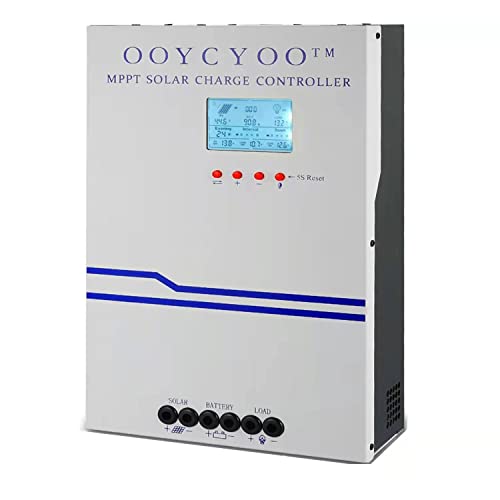
- MPPT 100A 12V 24V Fit for solar Panel: 1300W(12V);2600W(24V);Max input...
- Fit for 12V/24V battery, USER(can be set Lithium, Lifepo...
- Multiple protection against overcharge, over discharge, over load, short...
Which solar charge controller won’t let me down when I need the 12V port the most?
For a controller that simply works without any app fuss, the one I sent my sister to buy has a clear LCD screen that shows the port status. You can see exactly when the voltage drops and prepare for it.
This matters because the worst time to discover your port is dead is when you are camping and need that fan or light. A clear display prevents that surprise.

- EASY-READ BACKLIT DISPLAY: To check the PV status and the power status...
- Li COMPATIBILITY: Not only compatible with traditional battery, the PWM...
- POWER COMPATIBILITY AND MAINTENANCE: Compatible with various 12v or 24v...
Does the 12V port on my controller drain my battery when nothing is plugged in?
Most modern controllers completely disconnect the 12V port when no load is detected. This means there is no parasitic drain happening while the port sits empty.
If you are worried about battery drain, you can confirm this by checking the port with a multimeter. You should see zero volts when nothing is connected to it.
Can I use the 12V port to charge my car battery from my solar panels?
No, the 12V port is designed to power loads, not to charge batteries. Using it to charge a car battery can damage the controller and create a fire risk.
You need a proper battery-to-battery charger or a dedicated solar charge controller for each battery bank. Do not try to shortcut this process with the load output.