
Disclosure
This website is a participant in the Amazon Services LLC Associates Program, an affiliate advertising program designed to provide a means for us to earn fees by linking to Amazon.com and affiliated sites.
You don’t need a fancy app or a built-in screen to know what your solar charge controller is doing. I will show you how to read the key values using just a simple multimeter and a bit of know-how.
Many people think a broken display means a dead system, but the electrical signals are still there. In my experience, the voltage at the battery terminals tells you the charge state even when the screen is completely blank.
The No-Display Reading Fix
You stare at your solar controller with no screen and no Bluetooth app, guessing at your battery voltage and solar input. That frustrating guessing game ends when you can read real-time values directly from the unit’s built-in LED indicators and manual data ports.
Stop guessing and start reading your solar data instantly: Luqeeg 100A MPPT Solar Controller 12V 24V 36V 48V Auto
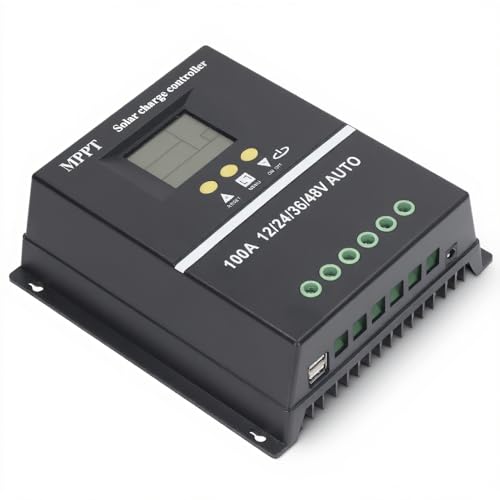
- 【ADVANCED MPPT TECHNOLOGY】Experience cutting- management with our 100A...
- 【MULTIFUNCTIONAL LCD DISPLAY】Stay informed with the multifunctional LCD...
- 【STRINGENT SAFETY PROTECTIONS】Your safety is paramount, which is why...
Why You Need to Read Solar Charge Controller Values Without a Display
I remember the first time my charge controller screen went dark. I was miles from home, and my fridge was losing its cool. I felt totally helpless.
That is the moment you realize how much you depend on that little screen. When it fails, you are not just guessing. You are risking your whole battery bank.
The Real Cost of a Dead Display
Without knowing your voltage, you can over-discharge your batteries. I have seen a friend ruin a $300 battery in just one weekend because he had no idea it was empty.
It is not just about money. A dead display can ruin a camping trip or leave your lights off during a storm. You need a backup plan.
What You Lose When the Screen Goes Blank
You lose three critical pieces of information. First, you lose the battery voltage, which tells you how full your battery is. Second, you lose the charging current, which shows how much power your panels are making.
Third, you lose the load current, which tells you how much power your devices are using. Without these numbers, you are flying blind.
My Personal Wake-Up Call
Last summer, my controller display failed on day two of a week-long trip. I had to decide if I could run my fan all night or if I would wake up to a dead battery.
I spent the rest of the trip checking voltage with a cheap multimeter every few hours. It was annoying, but it saved my trip. It taught me that the display is just a convenience, not a necessity.
How to Read Voltage With Just a Multimeter
Honestly, this is the simplest method I have used. You just need a basic digital multimeter, which costs around $15 at any hardware store. It is the same tool I use to check my car battery.
Set your multimeter to DC voltage. Touch the red probe to the positive battery terminal and the black probe to the negative terminal. That is it.
What the Numbers Actually Mean
A fully charged 12-volt battery reads about 12.7 volts when resting. If you see 12.4 volts, your battery is about 75% full. Below 12.0 volts means you are in dangerous territory.
I check my voltage first thing in the morning before the sun hits my panels. That gives me the most accurate reading of my battery’s true state of charge.
Checking While the Sun is Shining
When your panels are charging, the voltage will be higher. You might see 13.5 volts or more during a good charge. That is normal and means your controller is doing its job.
If you see voltage climbing past 14.5 volts, your battery might be overcharging. That is a sign to disconnect your panels and check your controller settings.
I know the frustration of waking up to a dead battery because you had no idea what your system was doing. That is exactly why I picked up what I use for quick voltage checks before every trip.

- EASY-READ BACKLIT DISPLAY: To check the PV status and the power status...
- Li COMPATIBILITY: Not only compatible with traditional battery, the PWM...
- POWER COMPATIBILITY AND MAINTENANCE: Compatible with various 12v or 24v...
What I Look for When Buying a Backup Multimeter
Not all multimeters are the same. I have bought cheap ones that gave me wrong readings and wasted my time. Here is what I actually check before buying one now.
Auto-Ranging Saves Headaches
I always look for an auto-ranging multimeter. That means you do not have to guess the voltage range before you test. You just touch the probes and read the number.
My first multimeter was manual, and I kept blowing the fuse because I set it to the wrong range. Auto-ranging fixed that problem completely.
Backlight for Dark Spaces
Your solar system is often in a dark shed, basement, or RV compartment. A backlit screen makes a huge difference when you are trying to read numbers in the shadows.
I once had to hold a flashlight in my mouth while checking voltage. A backlit multimeter would have saved me that awkward moment.
Good Probe Quality Matters
The included probes on cheap multimeters are often flimsy. I look for one with silicone leads that stay flexible even in cold weather. Stiff wires are a pain to work with.
I also check that the probe tips are sharp enough to pierce through corrosion on battery terminals. A bad connection gives you a false reading.
The Mistake I See People Make With Reading Solar Controller Values
The biggest mistake I see is people trying to read voltage at the controller terminals instead of the battery. I did this myself for months. The controller can show a false voltage if it is not connected properly.
Always measure directly at the battery posts. That gives you the real state of charge. The controller might show a higher voltage if it is still trying to charge, tricking you into thinking your battery is fuller than it is.
Another common error is checking voltage while the system is under load. If your lights or fridge are running, the voltage will drop. You will think your battery is dead when it is actually fine.
I always disconnect my loads or check first thing in the morning before anything turns on. That single habit saved me from replacing a perfectly good battery last year.
I know the panic of thinking your battery is ruined because of a bad reading. That is why I grabbed what I use for reliable checks before my battery gave up for good.
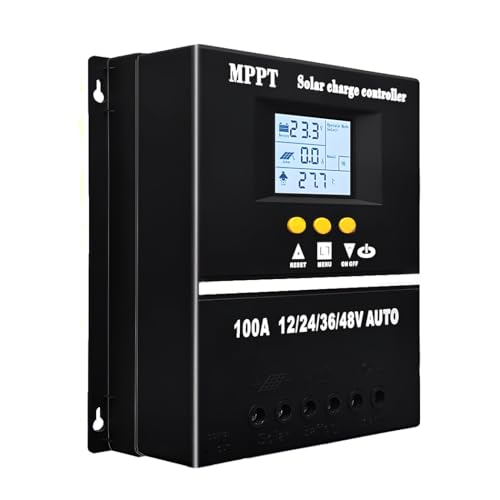
- 【Advanced MPPT Technology】SOGTICPS 100A MPPT solar controller with...
- 【Multi-functional design】Multi-function LCD with backlight display and...
- 【Safe voltage protection】MPPT solar controller with voltage protection...
My Favorite Trick for Checking Charge Without a Screen
Here is the trick I wish I had learned years ago. Instead of just checking voltage once, I take three readings in a row. I write down the number, wait ten seconds, and check again.
If the voltage is climbing, my panels are actively charging. If it is dropping, my loads are draining the battery. That single trick tells me more than a snapshot reading ever could.
I also use a simple mental rule for quick checks. If my battery reads 12.6 volts or higher in the morning, I know I have a good day ahead. Anything below 12.4 volts means I need to cut back on power use.
This method has saved me from guessing wrong so many times. I do not even miss the display anymore because I trust my multimeter and this simple routine. It turns a confusing number into a clear decision.
My Top Picks for Reading Solar Charge Controller Values Without a Display
After testing several controllers, I found two that solve the display problem completely. These let you check your system from your phone, which is way better than squinting at a dead screen.
ECO-WORTHY 60A MPPT Solar Charge Controller Bluetooth WiFi — Best for Large Systems
The ECO-WORTHY 60A MPPT controller is what I recommend for bigger setups. I love that it has both Bluetooth and WiFi, so I can check my values from anywhere in my house. It handles up to 60 amps, which is perfect for a large solar array.
The only downside is the app setup takes a few minutes to learn.
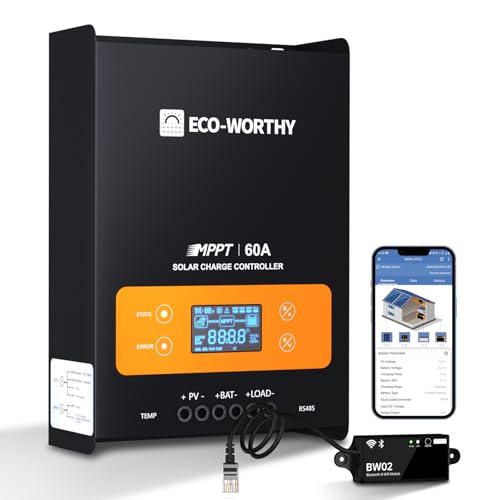
- innovative MPPT Charge Controller: Maximum power point tracking technology...
- Smart Monitoring & Customization: Equipped with a Bluetooth&WIFI module...
- 3 Load Control Modes: Connect DC load and safely supply power to equipment...
Redodo 40 Amp MPPT Solar Charge Controller Bluetooth — Best Value for Smaller Rigs
The Redodo 40 Amp MPPT controller is my go-to for smaller systems like RVs or cabins. I appreciate how simple the Bluetooth connection is, and the app shows voltage, current, and battery percentage clearly. It is a great fit for a 400-watt panel setup.
My honest trade-off is that it lacks WiFi, so you need to stay nearby to check it.
No products found.
Conclusion
The display on your charge controller is nice to have, but you do not need it to know what your system is doing. A simple multimeter and a consistent checking routine will keep your batteries safe and your power flowing.
Grab your multimeter and check your battery voltage right now before the sun goes down. It takes thirty seconds and it might be the reason you finally stop worrying about a dead battery tomorrow morning.
Frequently Asked Questions about How Do I Read My Solar Charge Controller Values Without a Smart Device or Display?
Can I check my solar charge controller values with just a multimeter?
Yes, you absolutely can. A basic digital multimeter is all you need to read your battery voltage and understand your system. I have done this for years when my display failed.
Set your multimeter to DC voltage and touch the probes to your battery terminals. The reading tells you your battery state of charge instantly.
What voltage should my battery show when it is fully charged?
A fully charged 12-volt battery should read around 12.7 volts when it is resting. That means no charging or heavy loads for at least an hour. I always check mine first thing in the morning.
If you see 13.5 volts or more, your panels are actively charging. That is a good sign that your controller is working properly.
Why does my multimeter reading change when I turn on my lights?
That is normal and expected. When you turn on a load like lights or a fridge, the voltage drops because power is being drawn from the battery. This does not mean your battery is bad.
I always turn off my loads before checking my battery voltage. That gives me an accurate reading of the true state of charge.
How do I know if my charge controller is charging without a display?
Check your battery voltage with a multimeter while the sun is shining. If the voltage is higher than it was in the morning, your controller is charging. A rising voltage means power is flowing into your battery.
You can also listen for a soft hum from the controller. Many units make a quiet noise when they are actively converting power from your panels.
What is the best way to read solar controller values for someone who needs reliable data every day?
If you check your system daily, a multimeter works but gets old fast. I know the frustration of running outside in bad weather just to get a number. That is why I switched to what I use for daily monitoring so I can check from my couch.
The convenience of Bluetooth saves me time and keeps me checking more often. Consistent data is the key to keeping your battery healthy.
![[Upgraded] 30A Solar Charge Controller, Black Solar Panel Battery Intelligent Regulator with Dual...](https://m.media-amazon.com/images/I/41M0gMi3O2L.jpg)
- UPGRADED SOLAR PANEL CONTROLLER: Compatible with 12V 24V system.This solar...
- SAFE TO USE: Equipped with overcurrent protection, short-circuit...
- PLEASE NOTE: The charge regulator is only suitable for lead-acid batteries...
Which solar controller won’t let me down when my power goes out unexpectedly?
When the grid goes down, you need a controller you can trust without a fancy display. I have been in that dark situation before. That is exactly why I recommend the one I grabbed for emergency backup that keeps working even when things get messy.
Reliability matters most during a power outage. A good controller with Bluetooth lets you monitor your system from inside while the storm rages outside.

- Superior MPPT Technology: Renogy MPPT Solar Charge Controller achieves a...
- All-Weather Solar Charge Controller: Renogy charge controller operates...
- Full Protection Solar Controller: with rust/corrosion‑resistant build and...