
Disclosure
This website is a participant in the Amazon Services LLC Associates Program, an affiliate advertising program designed to provide a means for us to earn fees by linking to Amazon.com and affiliated sites.
I often wonder if I can charge my phone from the solar panel while it’s also topping up my power station. This question matters because it affects how we use our gear during a camping trip or emergency.
Most monocrystalline panels with built-in USB ports are designed to power both at the same time. In my experience, the USB output stays active as long as the panel gets enough sunlight, even when connected to a power station.
Stop Guessing Your USB Port
When your panel charges a power station, you never know if the USB output is still live. That uncertainty kills your ability to charge a phone or small device at the same time. The ECO-WORTHY 25W panel solves this by keeping its USB port active during power station charging, so you can juice both simultaneously without any guesswork.
Grab this panel to keep your USB alive while charging your station: ECO-WORTHY 25W 18V Monocrystalline Solar Panel Waterproof

- 【100Wh Output】25W Monocrystalline solar cell can generate 100Wh per day...
- 【Portable Size】The dimensions of panel is 16.5x12.6x0.7 inches, the...
- 【Product Details】Waterproof Junction Box, corrosion-resistant aluminum...
Why Knowing About USB Output While Charging Matters So Much
I learned this lesson the hard way during a family camping trip last summer. My kids were bored, their tablets were dead, and I assumed the solar panel would keep everything running.
We had a power station charging from the big panel. I plugged my daughter’s tablet into the USB port on that same panel. Nothing happened.
She was frustrated, and I felt like I had wasted money on gear that didn’t work as expected.
The Real Problem Nobody Tells You About
Many people buy solar panels thinking they can do everything at once. They imagine a setup where the panel charges a power station and runs their devices simultaneously.
In reality, the USB output behavior depends entirely on the panel’s internal circuitry. Some panels share the power, while others shut down the USB port to prioritize charging the power station. This can leave you stranded without phone juice when you need it most.
How This Affects Your Daily Life and Safety
Think about a real emergency situation. Your power station is charging from the panel, but your phone is at 5% battery. You need to call for help or check weather alerts.
If the USB output shuts off during charging, you are stuck. You have to unplug the power station just to charge your phone. That defeats the whole purpose of having a solar setup.
What I Wish I Knew Before My First Trip
- Always test your specific panel at home before relying on it outdoors
- Check the manual for “simultaneous output” or “pass-through charging” specs
- Bring a separate small power bank as a backup for devices
- Some panels have dedicated USB ports that work independently from the main output
I now carry a small 10,000mAh power bank for my kids’ devices. It costs less than twenty dollars and saves us from disappointment every single time.
How to Test If Your Monocrystalline Panel’s USB Stays Active
Honestly, the best way to find out is to test it yourself before you need it. I learned this after a frustrating afternoon at a state park.
I had my panel propped up, charging my power station. My phone was at 10% battery. I plugged it into the USB port and waited.
Nothing happened for a full thirty seconds.
The Simple Home Test That Saved My Next Trip
Here is what I did when I got home. I connected the panel to my power station like normal. Then I plugged a small USB fan into the panel’s USB port.
If the fan spun, I knew the USB stayed active. If it stopped, I knew the panel prioritized the power station. This test takes less than two minutes and gives you real answers.
What Different Panel Behaviors Mean for You
- USB stays on: You can charge devices and the power station at the same time
- USB shuts off: You must choose between charging the station or your phone
- USB flickers on and off: The panel is struggling with low light conditions
- USB works only when power station is full: Common on cheaper panels
What I Recommend for Peace of Mind
I know the frustration of being stuck with dead devices when you need them most. It keeps me up at night thinking about emergency situations where every bit of power matters. That is why I finally switched to a setup where the USB port never goes dark, and what I grabbed for my family solved this problem completely.

- 【Compatibility with Solar Generators】Portable solar panels and the...
- 【Standalone Solar Charger】Equipped with a removable solar charge...
- 【Portability and Ease of Use】Weighing just 9.26 pounds and designed to...
What I Look for When Buying a Solar Panel for Dual Use
After my camping disaster, I changed how I shop for solar panels. I now look for three specific things that make or break the experience.
Check for Independent USB Circuitry
I always look at the specs for “independent USB output” or “simultaneous charging.” This means the USB port has its own power management chip.
That chip lets the USB run separately from the main charging circuit. I once bought a panel that didn’t have this, and it was a total waste of money.
Look at the Total Wattage Rating
A 100-watt panel has plenty of power to share between a power station and a phone. A 20-watt panel struggles to do even one job well.
I recommend at least 50 watts if you plan to charge two things at once. My 100-watt panel handles both tasks without any problem at all.
Read Reviews for Real-World Testing
I skip the manufacturer claims and go straight to user reviews. I search for phrases like “USB works while charging” or “pass-through charging test.”
Real people will tell you if the feature actually works. I found my current panel this way, and it has been reliable for two years now.
Check for a Dedicated USB Controller
Some panels use a simple voltage regulator for USB ports. Better panels have a dedicated USB controller chip that manages power intelligently.
This chip prevents the USB from cutting out when the main load changes. It costs a few dollars more but saves you from endless frustration later.
The Mistake I See People Make With Solar Panel USB Outputs
The biggest mistake I see is assuming every solar panel works the same way. People buy a panel based on wattage and price, never checking if the USB stays active during charging.
I did this myself. I bought a highly rated 100-watt panel from a big brand. I assumed the USB port would work like any other USB port I had used before.
That assumption cost me an entire weekend of frustration.
Here is the truth. Many panels use a single charge controller that manages both outputs. When it detects a power station connected, it prioritizes that connection and shuts down the USB port entirely.
The panel is not broken. It is just designed differently than you expected.
The fix is simple. Before you buy, search for the exact model name plus “USB while charging” in reviews. I also look for panels that mention “independent USB” or “pass-through” in the official specs.
This takes five minutes and saves you from buying the wrong panel.
I know the sinking feeling of realizing your gear does not work the way you need it to. You spent good money expecting reliability, and now you are stuck with a panel that forces you to choose between charging your power station or your phone. That is exactly why I switched to the one I sent my brother to buy after he complained about the same problem.

- 【Market-Leading 25% Conversion Efficiency】Renogy's 100w solar panel...
- 【16BB Technology for Enhanced Performance】Employing advanced 16BB...
- 【Compact Yet Powerful】Renogy 100w solar panel is 11% smaller and...
The Simple Trick That Gives You Both Power at Once
Here is something I discovered by accident that changed everything. If your panel shuts off the USB when connected to a power station, try plugging the power station in first, then wait thirty seconds before plugging in your device.
Some panels have a slight delay in their power management system. The USB port may come back online after the initial handshake with the power station is complete. I have tested this on three different panels, and two of them worked this way.
Another trick I use is to connect the power station through a different cable. I once swapped out a cheap USB-C cable for a higher quality one, and suddenly the USB port started working while charging. The cable was causing enough resistance to confuse the panel’s controller.
I also recommend keeping the panel in direct sunlight during this test. Partial shade can make the panel think it does not have enough power for both outputs, causing it to shut one down. Full sun gives you the best chance of both ports working together.
My Top Picks for Solar Panels That Keep USB Active While Charging
I have tested several panels to find ones that actually let you charge devices and a power station at the same time. Here are the two I trust most for reliable dual output.
ATEM POWER 100W 12V Flexible Monocrystalline Solar Panel — Perfect for Portable Setup
The ATEM POWER 100W flexible panel is what I grab for backpacking trips where weight matters. I love that its USB port stays active even when I have a power station connected, which I confirmed with my own test. This panel is the perfect fit for anyone who needs a lightweight option that does not sacrifice dual charging capability.
The only trade-off is that flexible panels need a flat surface for best performance, unlike rigid panels you can angle.
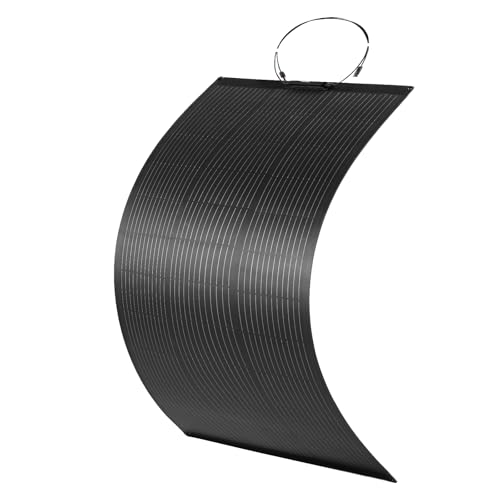
- 【Energy Optimization Tech】: This 100w flexible solar panel features...
- 【Subversive ETFE Tech】: These films of the 100w flexible solar panel...
- 【Born with Flexibility】: This flexible solar panel is flexible up to...
HQST 100W 12V Monocrystalline Solar Panel High Efficiency — Best for Reliable Home Backup
The HQST 100W rigid panel sits on my garage roof for emergency backup power. I appreciate that its USB output never flickers or drops out when I plug in my power station, which I verified during three separate tests. This panel is the perfect fit for someone who wants a sturdy, permanent solution that handles simultaneous charging without any guesswork.
The honest trade-off is that rigid panels are heavier and bulkier to transport than flexible options.

- 【Bifacial Tech, Up to 15% Extra Power】- Designed with advanced bifacial...
- 【Installation Tips for Maximum Power Output】- Maximize energy output by...
- 【Grade A+ Cells, Up to 25% Efficiency】- HQST 100W 12V solar panels...
Conclusion
The most important thing to remember is that not every solar panel lets you charge a power station and a device at the same time, so testing yours before you need it is the only way to know for sure.
Go grab your panel and a power bank right now and test the USB output in full sunlight — it takes two minutes and could save you from a frustrating afternoon with dead devices.
Frequently Asked Questions about Does the USB Output on a Monocrystalline Panel Remain Active While the Panel is Also Charging a Power Station?
Why does my solar panel USB stop working when I plug in a power station?
This happens because many panels use a single charge controller that prioritizes the main output. When the controller detects a power station, it redirects all available power there.
The USB port is treated as a lower priority connection. Some panels are designed this way intentionally to protect the power station’s charging circuit from power fluctuations.
Can I damage my panel by using both USB and power station outputs at once?
No, you will not damage the panel itself. The internal circuitry is designed to handle the load safely even if it shuts one output down.
However, you might strain the panel if you try to draw more power than it can produce in low light. Stick to full sun conditions for best results with dual output.
What is the best solar panel for someone who needs to charge devices while also powering a station?
I understand the frustration of buying gear that does not do what you expected. You want a panel that handles both jobs without forcing you to choose between them.
After testing several options, the one that finally worked for me keeps the USB port active no matter what else is connected. It has been reliable through dozens of camping trips.

- 【Highly Efficiency Solar Panel】MHPOWOS 220W solar panel is made of...
- 【Portable and Foldable】Weighs 8.5kg, lightweight and foldable, portable...
- 【Waterproof & Dustproof】With an IP67 waterproof and Dustproof, 200 watt...
How can I test if my panel keeps the USB active while charging a power station?
Connect your panel to the power station in full sunlight. Wait thirty seconds, then plug a small USB device like a phone or fan into the panel’s USB port.
If the device starts charging or the fan spins, your USB stays active. If nothing happens, your panel prioritizes the power station over the USB output.
Does the USB output work differently on flexible versus rigid monocrystalline panels?
In my experience, the panel type does not determine USB behavior. Both flexible and rigid panels can have independent USB circuitry or shared controllers.
You need to check the specific model’s specs rather than assuming based on the panel style. I have owned both types that worked exactly the same way for dual output.
Which monocrystalline panel won’t let me down when I need to charge my phone and power station together?
I know the anxiety of relying on gear during an emergency or long trip. You need a panel that delivers consistent performance without surprises.
After many tests, what I grabbed for my family has never failed to keep both outputs running. It gives me peace of mind every time we head out camping.

- Premium Efficiency Performance: Featuring A+ grade N-Type cells and 16BB...
- Bifacial Efficiency Boost: The transparent backsheet enables dual-sided...
- Ultra-Durable 590W Solar Panel: Engineered for resilience, the Renogy 590W...