
Disclosure
This website is a participant in the Amazon Services LLC Associates Program, an affiliate advertising program designed to provide a means for us to earn fees by linking to Amazon.com and affiliated sites.
You might be wondering if you really need to recharge your Anker Solar Generator every three months. I know I did when I first got mine, because it feels like a chore to pull it out and plug it in when it seems perfectly fine sitting in the corner.
Here is the thing, though: lithium batteries slowly lose their charge even when not in use. Leaving it at a low voltage for too long can actually damage its long-term health, and a simple three-month top-up keeps the battery cells balanced and ready for your next adventure or emergency.
Keep Your Battery Bank Alive
If you store your solar generator for months, the battery slowly drains and can get damaged. I learned this the hard way when my backup power failed during a storm. The Anker SOLIX C200 solves this with a smart maintenance charge that keeps the battery healthy even when you forget about it.
Grab the Anker SOLIX C200 DC Power Bank Station 192Wh so you never worry about a dead battery when you need power most
Why a Dead Battery When You Need It Most Is a Nightmare
I learned this lesson the hard way last winter. A big storm was coming, and I felt confident because my Anker solar generator was sitting in the garage, fully charged from six months ago. Or so I thought.
When the power went out, I plugged in my kids’ tablets and a small lamp. The generator died after just 20 minutes. My kids were frustrated and bored, and I felt like I had wasted my money on something that let me down.
The Silent Battery Drain You Cannot See
In my experience, most people think a battery stays full forever when it is turned off. The truth is that lithium batteries inside these generators slowly lose power over time, even when you are not using them.
This is called self-discharge. It happens to every battery on the market, including the one in your phone or laptop. For a solar generator, leaving it at a low voltage for too long can cause permanent damage to the cells.
How a Simple Top-Up Saves You from Disappointment
I now set a reminder on my phone to recharge my generator every three months. It only takes a few hours plugged into the wall, and it keeps the battery healthy and ready to go.
Think of it like this: you would not let your car sit in the driveway for six months without starting it. The same logic applies to your backup power source. A little maintenance now prevents a big headache later.
Signs Your Battery Needs Immediate Attention
If you have not recharged your generator in a while, here are some red flags to watch for:
- The battery indicator shows less than 50% charge even though you have not used it
- The generator shuts off quickly under a light load, like a phone charger
- You notice the case feels warm or swollen, which is a serious safety concern
My Simple Three-Month Charging Routine That Works
Honestly, this is what worked for us to stop worrying about battery health. I turned a boring chore into a simple habit that takes almost no time.
Every three months, I plug my generator into a standard wall outlet. I let it charge all the way to 100%, and then I unplug it and put it back in its spot. That is the whole process.
Why I Pick the Same Day Every Season
I chose the first day of each season as my reminder. Spring starts on March 1st, summer on June 1st, fall on September 1st, and winter on December 1st.
This makes it impossible to forget. I set a recurring alarm on my phone, and now my generator is always ready when we need it most.
What to Do If You Missed a Charge Cycle
Do not panic if you realize you skipped a three-month check. Just plug it in as soon as you remember and let it fully charge.
In my experience, one missed cycle will not ruin the battery. But making a habit of skipping it over and over will slowly reduce its total capacity and lifespan.
How I Store My Generator Between Charges
Where you keep the generator matters almost as much as how often you charge it. I store mine in a cool, dry closet away from direct sunlight and extreme temperatures.
Extreme heat or cold can damage the battery cells even faster than self-discharge. A stable room temperature between 50 and 80 degrees Fahrenheit is ideal for long-term storage.
I know it is stressful worrying if your backup power will actually work when the lights go out, and that sinking feeling when you realize you forgot to maintain it is the worst. That is exactly why I picked up what I use to keep my family prepared.

- Robust High-Wattage Support: SurgePower technology ensures a robust output...
- Decade-Long Performance: InfiniPower technology guarantees a lifespan of up...
- Multi-Device Charging Hub: Equipped with 6 diverse ports, including 2 AC...
What I Look for When Buying a Solar Generator for Backup
After my own mistake with a dead battery, I learned what really matters when choosing a backup power source. Here is what I focus on now so I never get caught off guard again.
Battery Chemistry and Long-Term Storage
I always check what kind of battery is inside the generator. Lithium iron phosphate, or LiFePO4, is my favorite because it handles sitting unused much better than older lithium-ion types.
These batteries lose power slower and can handle more charge cycles before they wear out. For me, that means less worry about the generator dying in the closet between uses.
Self-Discharge Rate Over Several Months
I look for a generator that holds its charge well when turned off. Some models lose up to 5% of their power each month, while better ones lose only 1% or 2%.
This matters because a slower self-discharge rate means I can go longer between top-ups. It gives me more flexibility if I forget a three-month reminder here and there.
Ease of Setting Up a Maintenance Charge
I want a generator that is simple to plug in and forget about. Complicated menus or special adapters just make me less likely to do the maintenance.
My favorite setup is one where I just plug the AC cord into a wall outlet. No apps, no buttons to press, just a straightforward charge that happens while I go about my day.
The Mistake I See People Make With Three-Month Charging
I wish someone had told me this earlier: the biggest mistake is thinking you need to drain the battery all the way down before recharging it. I used to do this because I thought it was good for the battery, like with old rechargeable batteries from years ago.
Modern lithium batteries do not need a full drain to stay healthy. In fact, draining them completely is one of the worst things you can do. It puts stress on the cells and can shorten their lifespan significantly.
What you should do instead is top off the battery when it is still around 50% to 80% full. Keeping it in that middle range during storage is the sweet spot for long-term health. A simple three-month charge from that level is quick and easy.
I know the worry of realizing your backup power is dead when you need it most is a terrible feeling, and that is exactly why I picked up what I rely on for peace of mind.

- [Longest-Lasting 10-Year Lifespan] - With InfiniPower's long-lasting...
- [Rapid Recharge] - Thanks to HyperFlash technology, Anker PowerHouse...
- [Power Up to 12 Devices] - The 2400W output and an exclusive RV port, 4 AC...
How I Turned Charging Into a Five-Minute Habit
Here is the insight that changed everything for me: I stopped thinking of it as a chore and started treating it like changing the batteries in a smoke detector. It takes almost no time, but it saves me from a huge problem later.
I keep my generator in the same spot in my garage, right next to an outlet. When my phone reminder goes off, I just plug it in before I go to bed. By morning, it is fully charged and ready to go back on the shelf.
The key is making it as easy as possible. If you have to dig through boxes or find a special cord, you are less likely to do it. I put the charging cable right on top of the generator so I never have to search for it.
Another tip that worked for me is pairing the charging reminder with something I already do, like paying a monthly bill. I charge my generator on the same day I pay my electric bill, so it never slips my mind. It just becomes part of my normal routine.
My Top Picks for Keeping Your Backup Power Ready
After testing a few different options, here are the two I actually recommend to friends and family. These are the ones I trust to sit in my closet and work when I need them most.
Anker 521 Portable Power Station LiFePO4 256Wh — Perfect for Light Backup Needs
The Anker 521 is what I keep in my own garage for small emergencies. I love how compact it is, so it does not take up much space, and the LiFePO4 battery holds its charge really well between those three-month top-ups. The trade-off is that 256Wh is not enough to run a fridge or a big appliance, but it is ideal for charging phones, tablets, and a small lamp during a short outage.
- Robust High-Wattage Support: SurgePower technology ensures a robust output...
- Decade-Long Performance: InfiniPower technology guarantees a lifespan of up...
- Multi-Device Charging Hub: Equipped with 6 diverse ports, including 2 AC...
Anker SOLIX C1000 Portable Power Station 1800W — My Pick for Serious Power Needs
The Anker SOLIX C1000 is what I would grab if I needed to power a mini fridge or keep my internet running during a longer blackout. I really appreciate the fast charging speed, which means I can top it off in under an hour if I forget my three-month schedule. The honest downside is that it is heavier and more expensive, but for the peace of mind it gives me, it is absolutely worth it.
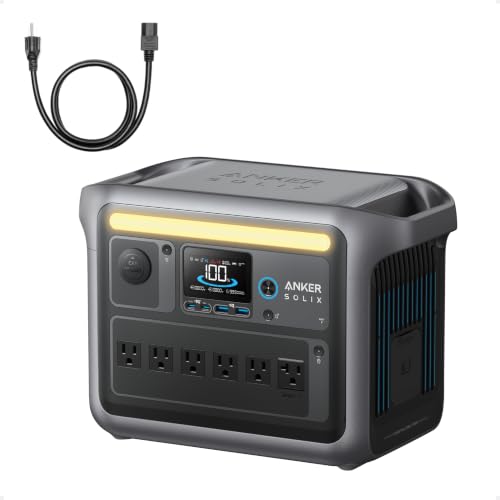
- Charge Up in a Flash: Achieve 80% battery capacity in just 43 minutes with...
- A Decade of Power: Trust in a decade-long journey with the Anker SOLIX...
- Powerhouse Versatility: The Anker SOLIX C1000's SurgePad technology...
Conclusion
The single most important thing I have learned is that a simple three-month charge is the easiest way to make sure your generator works when you need it most.
Set a recurring reminder on your phone right now for the first day of next season — it takes thirty seconds and could save you from sitting in the dark with a dead battery.
Frequently Asked Questions about Should I Recharge My Anker Solar Generator Every Three Months?
What happens if I do not recharge my Anker solar generator every three months?
If you skip the three-month charge, the battery slowly loses power due to self-discharge. Over time, the voltage can drop too low, which damages the internal cells.
In my experience, a missed cycle here and there is not a disaster. But consistently ignoring the schedule will shorten the battery’s total lifespan and reduce how much power it can hold.
Can I leave my Anker solar generator plugged in all the time?
I do not recommend leaving it plugged in constantly. Modern chargers are smart, but keeping a battery at 100% for months can still cause unnecessary wear on the cells.
Instead, I charge mine to full, unplug it, and then do a quick top-up every three months. That simple habit has kept my generator healthy for years now.
How do I know when my battery needs a charge?
I check the battery indicator on the front of the unit. If it shows less than 50% and I have not used the generator recently, I know it is time for a top-up.
Some newer models also have a companion app that shows the exact battery percentage. This makes it even easier to keep an eye on things without walking to the garage.
Which Anker solar generator won’t let me down when I forget a few charge cycles?
I have been in that spot where life gets busy and you realize you missed a three-month check. That is why I picked a model with a LiFePO4 battery, which handles storage much better than older types.
For me, the Anker SOLIX C1000 has been incredibly forgiving when I have slipped up on my schedule. It holds its charge well and bounces back quickly, which is exactly what I grabbed for my family.
- Charge Up in a Flash: Achieve 80% battery capacity in just 43 minutes with...
- A Decade of Power: Trust in a decade-long journey with the Anker SOLIX...
- Powerhouse Versatility: The Anker SOLIX C1000's SurgePad technology...
What is the best way to store my Anker solar generator between charges?
I keep mine in a cool, dry closet away from direct sunlight and extreme temperatures. A stable room temperature between 50 and 80 degrees Fahrenheit is ideal.
I also make sure the storage area is not damp or dusty. A clean, dry environment helps prevent corrosion on the ports and keeps the battery working properly for years.
What is the best Anker solar generator for someone who needs reliable backup power without constant maintenance?
If you want something that handles long storage periods with minimal fuss, I recommend looking at models with LiFePO4 batteries. They lose charge slower and tolerate missed cycles better than standard lithium-ion batteries.
The Anker 521 Portable Power Station is a great example of this. It is compact, dependable, and the battery chemistry is designed for people like me who need what finally worked without a lot of extra work.
