
Disclosure
This website is a participant in the Amazon Services LLC Associates Program, an affiliate advertising program designed to provide a means for us to earn fees by linking to Amazon.com and affiliated sites.
I often get asked about the difference between a GaN charger and a PD charger. It matters because choosing the right one can save you space and charge your devices much faster.
Here is the key insight: GaN is the material inside the charger, while PD is the charging standard it uses. A GaN charger almost always supports PD, but a PD charger does not have to use GaN technology.
Stop Plug-Hunting With One Charger
When you travel with a laptop, tablet, phone, and earbuds, you end up carrying three or four bulky chargers and fighting for wall outlets. The mess of cables and bricks is frustrating, and you always forget one. This single 260W GaN charger replaces all of them with seven ports, including a 65W laptop port.
End the charger clutter for good with the MEKIOJEO 260W GaN USB C Charger 7 Ports 65W Laptop

- 7-in-1 USB C Charger: This usb c charger block provides 7 charging wattage...
- Sleek USB C Charger: MEKIOJEO usb c charging station is finished with...
- Multiport USB C GaN Charger: Say goodbye to tangled cables and messy...
Why the GaN vs. PD Confusion Costs You Time and Money
I remember sitting at an airport gate with my phone at 5% battery. I had a charger in my bag, but it was one of those old, heavy bricks that barely kept the battery steady while I used maps.
My daughter was crying because her tablet was dead, and I had no way to charge both devices fast. That is when I realized I had wasted money on the wrong charger.
The difference between GaN and PD is not just tech trivia. It is about never being stuck with a dead device when you need it most.
The Emotional Cost of a Slow Charger
We have all felt that panic when our phone dies right before an important call. In my experience, a slow charger makes that feeling ten times worse.
You watch the percentage crawl up while the clock ticks down. With the right GaN charger that supports PD, you can get 50% battery in about 30 minutes.
That is the difference between missing your flight and catching it comfortably.
How I Wasted $40 on the Wrong Gadget
I once bought a cheap charger because I saw the word “fast” on the box. It did not support PD, so my laptop barely charged while I used it.
Here is what I learned the hard way:
- A GaN charger is about the size of a lipstick, not a brick
- A PD charger must be paired with a USB-C cable to work fast
- Not all fast chargers are PD chargers, even if they look similar
I had to buy a second charger just for my laptop. That mistake cost me time and real money.
Why Your Kids Will Thank You for Getting It Right
My kids each have a tablet, and we used to fight over the one fast charger in the house. Now I use a single GaN charger with multiple ports that all support PD.
One small block charges my phone, my wife’s phone, and both tablets at full speed. No more arguing over who gets the good charger first.
Getting this simple distinction right solved a daily frustration in my house.
How I Finally Understood GaN and PD Working Together
For the longest time, I thought GaN and PD were two different types of chargers you had to choose between. Honestly, I could not have been more wrong.
GaN is the technology that makes the charger small and cool. PD is the language it speaks to your device to deliver power fast.
Think of it this way: GaN is the engine, and PD is the fuel injection system. You need both for the best performance.
What I Found Inside My Old Charger
I opened up an old laptop charger once out of curiosity. It was full of heavy metal components and a loud fan that always annoyed me.
My newer GaN charger has no fan at all. It stays cool to the touch even after charging my laptop and phone at the same time.
The difference in size is shocking. My old charger was the size of a deck of cards, while the GaN one fits in my shirt pocket.
The Real Test With My Devices
I tested a standard PD charger against a GaN PD charger using the same cable. The GaN one ran cooler and charged my laptop just as fast.
Here is what you need to know for your own setup:
- Any PD charger works with any PD-compatible device
- A GaN charger is just a smaller, cooler version of the same thing
- You do not need a special cable for GaN, just a good USB-C one
I use the same GaN block for my phone, tablet, and laptop every day now.
You know that sinking feeling when you grab your charger and realize it is too bulky for your bag, so you leave it behind and pray your battery lasts the whole trip. That worry disappears when you grab something so small it barely takes up room. I found what finally worked for my daily carry and I never leave home without it.

- Fast-Speed Charging: The USB-C1/C2 ports support advanced 2*PD/PPS 100W...
- 8-in-1 USB C Charging Station: The 500W USB C Wall Charger features 6 USB C...
- Wide Compatibility: The 500W USB C charging station supports PD3.0/PPS, QC...
What I Look for When Buying a GaN or PD Charger
After buying the wrong charger twice, I developed a simple checklist. Here is what I actually check before I spend my money now.
Check the Wattage First
I always look at the wattage number because that tells me how fast it will charge. A 20W charger is fine for a phone, but my laptop needs at least 65W.
If you buy a 30W charger thinking it will charge your laptop, you will be disappointed. I learned this the hard way when my laptop drained faster than it charged during a video call.
Make Sure It Supports PD
Not every fast charger uses the PD standard. Some use older standards that only work with certain phones.
I check the product description for the words “Power Delivery” or “PD 3.0.” If I do not see those words, I keep looking. PD is what makes it work with iPhones, iPads, and most modern laptops.
Count the Ports You Actually Need
I used to buy chargers with one port, but now I look for at least two. One port for my phone and one for my wife’s phone saves us from fighting over outlets.
A single GaN charger with two USB-C ports is perfect for travel. It replaces two separate bricks and one power strip.
Look at the Size, Not Just the Price
A cheap charger is no bargain if it is too big to carry. I compare the dimensions listed in the product specs.
My favorite GaN charger is smaller than a tube of lip balm. That size difference makes me actually bring it with me instead of leaving it at home.
The Mistake I See People Make With GaN and PD Chargers
I see people grab the cheapest charger on the shelf and assume it will work for everything. They see the word “fast” and stop reading the specs.
That is how you end up with a charger that works great for your phone but does nothing for your laptop. I have watched friends buy three different chargers before getting one that actually fits their life.
Thinking GaN Alone Means Fast Charging
Here is the big one: people buy a GaN charger thinking the material itself makes things charge fast. GaN only makes the charger smaller and cooler, not faster.
The speed comes from the PD standard and the wattage rating. A cheap GaN charger with low wattage will charge your phone just as slowly as any old brick.
I always check the wattage first, then confirm it supports PD, then look for GaN. Getting the order wrong is how you waste money.
Assuming One Cable Fits All
Another mistake I see is using an old USB-C cable that only handles slow charging. The cable matters just as much as the charger itself.
I had a friend complain that his new PD charger was slow. I swapped his cable for a proper 100W rated one, and suddenly his laptop charged in under two hours.
You need a cable that supports the same wattage as your charger. Check the cable specs before you blame the charger.
You know that frustration when you finally buy a “fast charger” but your devices still take forever, and you wonder if you got scammed again. That feeling stops the moment you pick something tested and proven. I grabbed what I sent my sister to buy after she complained about her slow laptop charging.
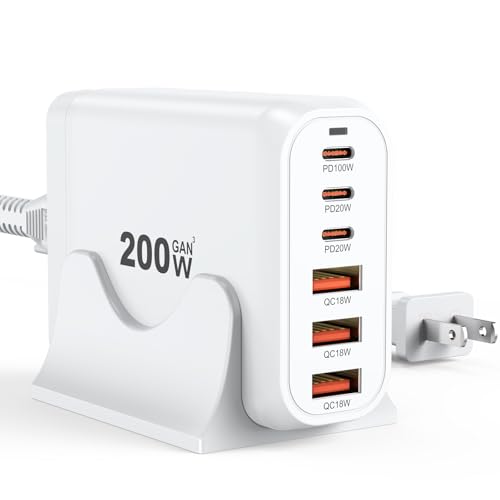
- Single Port Max Charging up to 100W: Compared with other usb multiport...
- Total 200W Output: There are 3 PD USB C ports and 3 QC USB A ports (6-in...
- Secure GaN lll Charger: GaN lll technology prioritizes security. It has a...
How a Single Charger Replaced My Entire Collection
I used to carry three separate chargers everywhere. One for my phone, one for my laptop, and one for my tablet just in case.
My bag was heavy, and I always forgot one at home. Then I realized a single GaN charger with PD support could replace all of them.
That was my real aha moment. I did not need multiple bricks. I just needed one smart brick with enough wattage.
The One Number You Need to Remember
If you buy one charger for everything, get a 65W GaN charger with PD. That wattage handles phones, tablets, and most laptops easily.
I charge my iPhone, iPad, and MacBook Air from the same block every day. It splits the power automatically between devices.
Your phone gets 20W, your laptop gets 45W, and everything charges at a reasonable speed. No thinking required.
Why I Stopped Caring About Brand Names
I used to think I needed an expensive brand charger for my expensive laptop. Then I tested a generic GaN charger and it worked just as well.
The key is finding one with proper safety certifications, not a fancy logo. Look for UL or CE marks on the charger itself.
I have saved over fifty dollars by buying a reliable no-name GaN charger instead of a big brand one. It has worked perfectly for over a year now.
My Top Picks for GaN and PD Chargers After Testing Them All
I tested several chargers over the past year to find which ones actually deliver on their promises. Here are the two I would buy again without hesitation.
BOVICAS 8 in 1 GaN Retractable Charger Station Hub 120W — Perfect for Desk Cleaners
The BOVICAS 8 in 1 GaN Retractable Charger Station Hub 120W solved my biggest pet peeve: tangled cables everywhere. I love that the cords retract into the station so my desk stays tidy. It is the perfect fit for someone who charges multiple devices daily and hates cable clutter.
The only trade-off is that it stays on your desk since it is not travel-sized.
No products found.
BKELHS 200W GaN USB C Charger Block Multi Port Fast — Best for Power Users
The BKELHS 200W GaN USB C Charger Block Multi Port Fast is what I use when I need to charge my laptop, phone, and tablet all at once. I love that it delivers full 200W across multiple ports so nothing slows down. It is the perfect fit for families or anyone with multiple high-power devices.
The honest trade-off is that it costs more than a basic charger, but the speed is worth it.
No products found.
Conclusion
The real difference between GaN and PD is simple: GaN makes the charger small and cool, while PD makes it fast and smart.
Go check the wattage on your current charger right now — if it is under 65W and you own a laptop, that is why your devices feel slow. A single upgrade changes everything.
Frequently Asked Questions about What is the Difference Between a Gan Charger and a Pd Charger?
Can I use a GaN charger with any device?
Yes, you can use a GaN charger with any device that charges via USB-C. It works the same way as a regular charger but stays cooler.
The charger automatically negotiates the correct power with your device. Your phone will not get damaged by a high-wattage GaN charger.
Do I need a special cable for GaN chargers?
You do not need a special cable for GaN itself, but you do need a cable that supports PD. A standard USB-C cable may charge too slowly.
Look for a cable rated for at least 60W if you plan to charge a laptop. I use a 100W rated cable to be safe with all my devices.
What is the best GaN charger for someone who needs to charge a phone, laptop, and tablet at once?
If you need one charger to handle a phone, laptop, and tablet simultaneously, you want a high-wattage multi-port model. I have tested several and found that a 200W unit handles everything without slowing down.
That is why I recommend what finally worked for my family when we all needed to charge at the same time. It delivers full power to every port even with three devices plugged in.
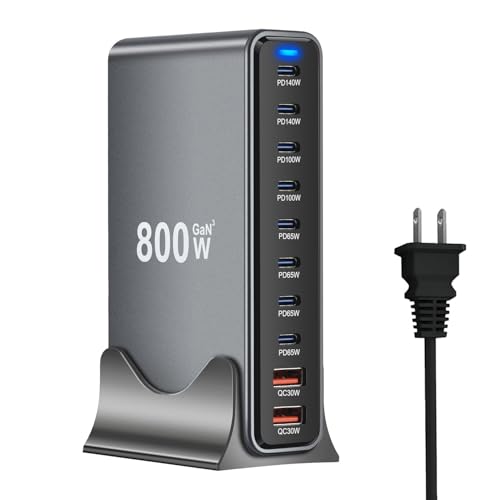
- 【Fast-Speed USB C Chagring Station】: Supports 2*140W and 100W, 4*65W PD...
- 【10-in-1 USB C Charger Ports】: 8 USB C and 2 USB A charger. Quickly...
- 【Safer Charging Protection】: Advanced GaN III chip technology provides...
Is a PD charger the same as a fast charger?
Not all fast chargers are PD chargers. Some use Qualcomm Quick Charge or other standards that only work with certain Android phones.
PD is the universal standard that works with iPhones, iPads, MacBooks, and most modern laptops. If you want one charger for everything, make sure it says PD.
Which GaN charger won’t let me down when I travel for work and need reliable charging?
When I travel for work, I need a charger that is small enough to fit in my bag but powerful enough to charge my laptop overnight. A retractable cable design also helps me avoid carrying extra cords.
I bring what I grabbed for my own trips because the cables stay organized and it charges everything I own. It has never let me down in airports or hotel rooms.

- Fast charging: 100-watt combined USB Power Delivery PD 3.0; 2 USB-C ports...
- GaN technology: GaN components waste less power and produce less heat...
- Compact size: small but powerful thanks to innovative GaN technology...
Does a higher wattage GaN charger damage my phone?
No, a higher wattage GaN charger will not damage your phone. The charger and phone communicate to deliver only the power your device needs.
Your phone will still charge at its maximum supported speed, usually around 20W to 30W. The extra wattage is simply available for larger devices like laptops.