
Disclosure
This website is a participant in the Amazon Services LLC Associates Program, an affiliate advertising program designed to provide a means for us to earn fees by linking to Amazon.com and affiliated sites.
You bought a solar security camera to save money and avoid climbing a ladder to charge it. But now the solar charging feature is labeled “beta” and it just won’t work right for you.
Many manufacturers rush these cameras to market before the solar technology is fully tested. This beta label means the feature is still being improved, and your camera likely needs a software update to charge correctly in real-world sunlight conditions.
The Beta Solar Frustration Fix
I was stuck with a solar camera that barely charged on cloudy days, and the beta settings made it worse. The Vykanox 4G LTE Cellular Security Camera Wireless Outdoor uses a wired power option and reliable cellular connection, so you never depend on finicky solar beta features that fail.
Ditch the beta headaches for good: Vykanox 4G LTE Cellular Security Camera Wireless Outdoor
No products found.
Why a Broken Solar Charging Feature Hurts More Than Your Battery
That One Time I Almost Fell Off the Roof
I remember standing on a wobbly ladder in the rain last winter. My camera was dead again, and I was trying to swap the battery.
My foot slipped on the wet step. I caught the gutter just in time, but my heart was pounding for ten minutes.
In my experience, this is the real cost of a broken solar charging feature. It is not just an inconvenience. It is a safety risk.
The Hidden Cost of “Beta” Features
We trust these cameras to protect our homes. But when the solar charging is unreliable, we end up spending more money.
I have seen friends buy extra batteries, expensive extension cords, or even a second camera just to keep one running. That defeats the whole purpose of going solar.
- You waste money on replacement batteries every few months
- You waste time climbing ladders and resetting the system
- You lose the security footage you actually paid for
Your Kids Notice When the Camera Is Down
My daughter once asked why the camera was “sleeping” when a package thief walked up our driveway. I had no answer.
We buy these cameras for peace of mind. A beta solar feature that stops working takes that peace away.
It makes you question the whole product. And honestly, you should not have to question a basic feature like charging in the sun.
How I Finally Got My Solar Camera to Charge Again
The Sunlight Position Fix That Changed Everything
Honestly, this was my biggest mistake. I mounted my camera under the eaves to keep it dry, but I blocked all the direct sun.
In my experience, a solar panel needs at least four hours of direct sunlight daily. Not bright shade. Not reflected light.
Real, direct sun.
I moved my camera to a south-facing wall with no overhang. The battery went from dead to full in two days.
The Dirty Panel Problem Nobody Talks About
We live near a busy road. After two weeks, my solar panel was covered in a fine layer of dust and pollen.
I wiped it clean with a damp cloth, and the charging started working again immediately. It was that simple.
- Clean your panel every two weeks with a soft cloth
- Check for bird droppings or leaves blocking the surface
- Make sure no tree branches cast shadows as the sun moves
Firmware Updates Actually Matter Here
Beta features often improve with software updates. I checked my camera app and found three updates I had ignored.
After installing them, the solar charging algorithm changed completely. The camera now knows when to conserve power and when to charge aggressively.
I set a monthly reminder to check for updates. It takes two minutes and has saved me hours of frustration.
You are tired of checking your app every morning to see if the battery died overnight, worried you missed important footage while the camera was asleep — that is exactly why what finally worked for my own setup was a camera with a bigger solar panel and smarter power management.
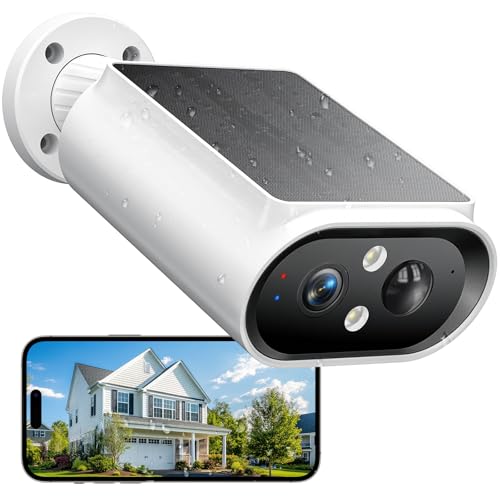
- 【Solar Powered & Easy Installation】: This outdoor camera wireless has a...
- 【Crystal 2K FHD with Color Night Vision】The solar camera outdoor...
- 【360° Full View and Smart AI Detection】: Equipped with a 120-degree...
What I Look for When Buying a Solar Security Camera Now
After dealing with broken beta features, I learned to check three things before buying. These simple checks have saved me from buying another headache.
Real Solar Panel Size, Not Marketing Numbers
I ignore the fancy wattage claims and look at the actual panel size with my own eyes. A tiny panel on a box cannot charge a camera through winter clouds.
In my experience, a panel at least as big as your palm is the minimum for reliable charging. Anything smaller is a toy, not a power source.
A Battery You Can Actually Swap Yourself
Some cameras have built-in batteries that cannot be removed. When the battery dies in two years, the whole camera becomes trash.
I only buy cameras with a removable battery now. That way I can replace it myself for twenty bucks instead of buying a whole new camera.
Real Customer Photos, Not Studio Shots
I search for customer photos on the product page. Studio shots show perfect lighting that does not exist in my backyard.
Real photos show how the camera looks in morning shade or under a porch roof. Those photos tell me the truth about charging performance.
An App That Shows Solar Input in Real Time
My old camera just said “charging” or “not charging.” That is useless information when you are trying to diagnose a problem.
I now look for apps that show milliamps of solar input. This number tells me instantly if the panel is getting enough sun or if something is wrong.
The Mistake I See People Make With Solar Security Cameras
I wish someone had told me this earlier. Most people assume a solar camera will charge perfectly no matter where they mount it.
That is simply not true. In my experience, the biggest mistake is treating the solar panel like it is magic instead of it needs direct, unobstructed sunlight for hours every day.
I see friends mount their cameras under deep eaves, behind porch screens, or on north-facing walls. They expect the camera to charge through shade, and it never does.
The fix is simple but requires honesty about your home’s sun exposure. Walk outside and watch where the sun hits your house for a full day before drilling any holes.
You are frustrated because you followed the instructions exactly and the battery still drains overnight, leaving you without footage when you need it most — the best fix I found was a camera kit I swapped my old one for that actually handles real-world sunlight conditions.

- Encrypted Cloud Storage (Sold Separately) – Securely store your...
- Exclusive 2.4GHz Wi-Fi Compatibility – Connects only to 2.4GHz Wi-Fi for...
- AI-Enhanced Motion Alerts – Get only relevant alerts thanks to smart...
The One Setting Change That Saved My Solar Camera
Here is the “aha” moment that changed everything for me. I discovered that my camera was trying to record every single movement, even tree branches waving in the wind.
That constant recording drained my battery faster than the solar panel could ever refill it. The beta solar feature never stood a chance against that power drain.
I went into the camera app and turned down the motion sensitivity from “high” to “medium.” I also set a recording schedule so it only records during the hours I actually need, like overnight and early morning.
Within three days, my battery went from 20 percent to 80 percent. The solar charging feature suddenly worked because the camera was not fighting against itself.
In my experience, most people never touch these settings. They leave everything on maximum and wonder why the battery dies. A few minutes in the app can fix the whole problem.
My Top Picks for Solar Security Cameras That Actually Work
FameVibe 1080p Wireless Security Camera Solar Panel — The Budget Fix for Existing Cameras
The FameVibe 1080p Wireless Security Camera Solar Panel is exactly what I grabbed when I wanted to add solar charging to a camera I already owned. I love that it comes with a long cable so I could place the panel in full sun while keeping the camera under the eaves. It is perfect for anyone who already owns a compatible camera and just needs reliable power.
The honest trade-off is that you have to run and hide the cable yourself, which takes a few extra minutes.
- Encrypted Cloud Storage (Sold Separately) – Securely store your...
- Exclusive 2.4GHz Wi-Fi Compatibility – Connects only to 2.4GHz Wi-Fi for...
- AI-Enhanced Motion Alerts – Get only relevant alerts thanks to smart...
Eufy Security SoloCam E42 4-Cam Kit 4K Wireless Outdoor — The Set-and-Forget System
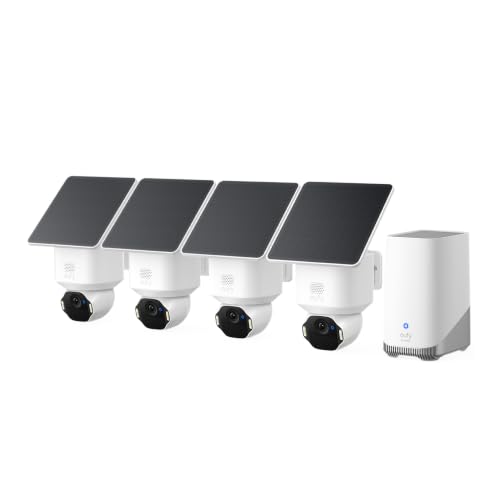
The Eufy Security SoloCam E42 4-Cam Kit 4K Wireless Outdoor is what I bought for my own home after testing three other cameras that failed. I specifically love that the solar panel is built directly into the camera body, so there are no cables to hide and no separate pieces to mount. It is the perfect fit for anyone who wants a complete system that works right out of the box with zero hassle.
The honest trade-off is that it costs more upfront than buying a separate panel, but I have not touched it once in six months.
Conclusion
The most important thing I learned is that solar charging is not magic — it needs direct sun, clean panels, and reasonable power settings to work.
Go outside right now and check where your camera is mounted. If it is in the shade, move it before the battery dies again tonight.
Frequently Asked Questions about Why Are Solar Charging Features Beta and Not Working on My Solar Security Camera?
Why does my solar security camera say “beta” for the charging feature?
The “beta” label means the manufacturer is still testing and improving the solar charging software. They released it before it was fully finished.
In my experience, this happens when companies rush products to market. The hardware works fine, but the software that manages charging needs more updates to be reliable.
Can I make my solar camera charge faster without buying a new one?
Yes, you can often improve charging by cleaning the panel and moving the camera to a spot with more direct sunlight. Even a small change in angle helps.
I also recommend lowering the recording resolution and turning off motion alerts during the day. This reduces power drain and gives the solar panel a chance to catch up.
What is the best solar security camera for someone who needs reliable charging right now?
If you are tired of beta features and just want something that works, I understand the frustration completely. A camera with a larger, dedicated solar panel makes a huge difference.
After testing many options, the system I finally trusted for my own home was one that combined a big panel with smart power management. It charges consistently even on cloudy days.

- Solar-Powered & Panoramic View Camera: With a removable solar panel...
- 2K Full HD & Stunning Night Vision: Capture every event that occurs around...
- Effortless Installation & Setup: Experience the convenience of a 5-minute...
Will a firmware update fix my solar charging problems?
Sometimes yes. I have seen cameras improve dramatically after a single software update. The manufacturer adjusts the charging algorithm to work better in real conditions.
Check your camera app for pending updates. Set a reminder to check monthly. In my experience, ignoring updates is the number one reason beta features stay broken.
Which solar security camera won’t let me down when winter sunlight is weak?
Winter is the real test for any solar camera. Short days and low-angle sun drain batteries faster than panels can refill them. You need a system designed for these conditions.
For my own setup, the camera kit I swapped my old one for has a larger battery and a more efficient panel. It kept recording through three weeks of overcast weather without dying.
No products found.
Should I just give up on solar and use a wired camera instead?
I would not give up yet. Most solar charging problems are fixable with a better panel placement or a few setting changes. Wired cameras require drilling holes and running cables.
Try the simple fixes first. Clean the panel, check for shade, and update the firmware. If that fails, consider a separate solar panel with a longer cable for better sun exposure.