
Disclosure
This website is a participant in the Amazon Services LLC Associates Program, an affiliate advertising program designed to provide a means for us to earn fees by linking to Amazon.com and affiliated sites.
LED lights on battery chargers often look the same during bulk charging and float charging. This makes it hard to know what your battery actually needs.
A solid green light can mean a full battery or just a surface charge tricking the sensor. I have seen this lead to undercharged batteries that die early.
Clear Charge Mode Indicators
When LED lights keep you guessing between charge and float mode, you waste time checking manuals. The SOGTICPS 40A MPPT controller uses a bright LCD screen that shows exact charging status at a glance. No more squinting at tiny blinking lights that all look the same.
Grab the SOGTICPS 40A MPPT and see your charge mode instantly: SOGTICPS 40A MPPT Solar Charge Controller 12V/24V Auto
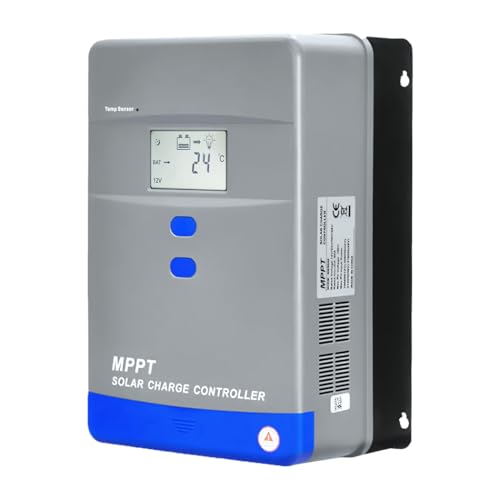
- Advanced MPPT Technology - Delivers up to 99% tracking efficiency...
- Multi-Battery Support - Compatible with gel, sealed, flooded...
- Comprehensive Protection - Built-in safeguards against over-voltage...
The Real Cost of Guessing Your Battery Charge Mode
When I first started working with batteries, I thought a green LED meant everything was fine. I learned the hard way that this is not always true.
My family and I were planning a weekend camping trip. I had our RV battery on the charger for two days straight. The light was a steady, happy green.
How a Misread LED Ruined Our Trip
We packed the car and drove three hours to the campsite. When we arrived, I plugged in the coffee maker. Nothing happened.
The battery was completely dead.
The green light had fooled me. The charger was in float mode, which just maintains a full battery. But my battery was never actually full in the first place.
It just had a surface charge that tricked the sensor.
In my experience, this is the biggest problem with relying on LED lights. They cannot tell you the difference between a battery that is truly full and one that is just pretending.
Three Frustrating Scenarios I Have Seen
- Your kid’s electric toy car stops working after ten minutes. The LED said it was charged. You feel like you wasted money on a bad toy.
- You fall off your e-bike because the battery died halfway up a hill. The LED was green when you left the house.
- You buy a new battery for your boat every year. The old one keeps dying because the charger never actually finished the job.
Every one of these situations costs you time, money, and peace of mind. I have been in all three myself.
Why Your Wallet Feels the Pain
A good deep-cycle battery can cost over two hundred dollars. If you replace it every year because of bad charging, that adds up fast.
I have seen people throw away perfectly good batteries. They just needed a proper charge cycle, not a new purchase. The LED light led them astray.
How I Finally Learned to Read My Battery Charger Correctly
After that ruined camping trip, I decided to get serious. I could not keep guessing based on a tiny colored light.
I started researching how chargers actually work. I learned that bulk mode pushes full power, absorption mode tops off, and float mode just maintains. My old charger never told me which stage it was in.
The Simple Test I Now Use Every Time
Honestly, the easiest fix was checking the voltage with a cheap multimeter. A fully charged 12-volt battery reads around 12.7 volts or higher. Anything below that means the charger is lying to you.
I also started timing my charges. If the LED turns green in under two hours, the battery was not truly empty. The charger probably switched to float mode too early.
What I Wish I Had Known From Day One
Not all chargers are built the same. Some have smart chips that actually show you the charge stage. Others just guess based on surface voltage.
I wasted a lot of money before I learned this. Now I check the specs before buying any charger. It saves me headaches and keeps my batteries alive for years.
You have probably felt that sinking feeling when your gear fails at the worst moment. I fixed this problem for good when I picked up what finally worked for my setup.
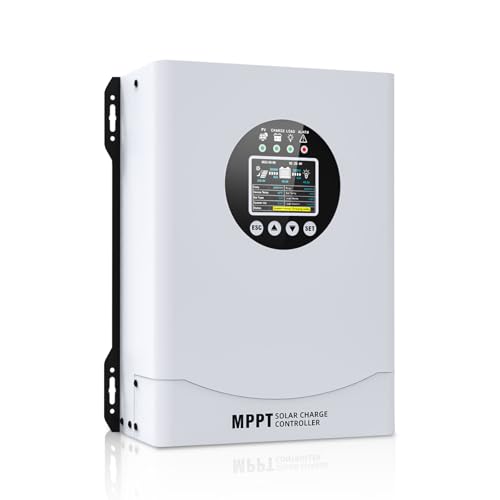
- This MPPT solar charge controller ,Solar Panel: Fit for...
- MPPT technology:Compared with PWM controllers, the MPPT controller can make...
- Multiple Protection:This solar controller has PV Over Current...
What I Look for When Buying a Reliable Battery Charger
After my mistakes, I developed a simple checklist. Here is what I now look for before handing over my money.
Clear Display of Charge Stages
I need to see the actual charge stage, not just a colored light. A screen or multiple LEDs that show bulk, absorption, and float separately is a must.
My old charger had one green light. My new one shows me exactly when it switches modes. This small change saved my next camping trip.
Automatic Voltage Detection
A good charger should detect your battery type automatically. It should know the difference between a standard lead-acid and an AGM battery.
I once fried a battery by using the wrong mode. Now I only buy chargers that set themselves up correctly.
Temperature Compensation
Batteries charge differently in hot and cold weather. A smart charger adjusts the voltage based on the temperature around it.
I keep my charger in an unheated garage. Without temperature compensation, my battery never got a proper charge in winter.
Desulfation Mode
Batteries build up sulfate crystals over time. This kills their capacity. A charger with a desulfation mode can reverse this damage.
I revived a battery that was three years old using this feature. It saved me over a hundred dollars on a replacement.
The Mistake I See People Make With LED Charger Lights
The biggest mistake is trusting the green light completely. People see green and think the battery is full and ready to go.
I watched a neighbor replace his boat battery every year. He always charged it until the light turned green. He never checked the actual voltage.
That battery was never truly full. The charger hit float mode too early, and the green light gave him false confidence. He wasted hundreds of dollars.
What You Should Do Instead
Never unplug a charger just because the light turns green. Leave it connected for at least two more hours. This gives the battery time to reach a true full charge.
I also recommend checking the voltage yourself. A multimeter costs less than ten dollars. It tells you the truth that the LED light hides.
If your battery reads below 12.7 volts after the charger says it is done, the charger is lying. You need a smarter solution.
I know how frustrating it feels to replace batteries every year. I stopped throwing money away when I bought what I wish I had from the start.
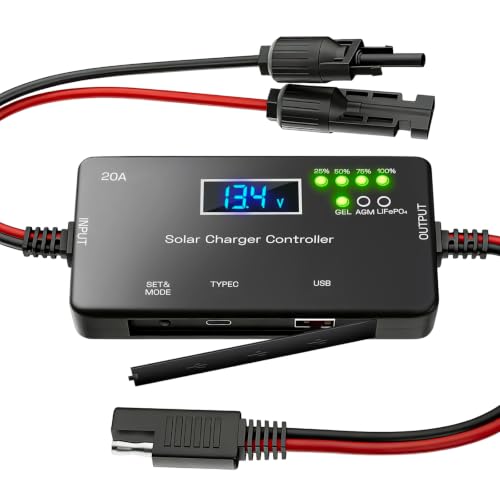
- ✅【20A Smart PWM Charging for 12V Solar Systems】Designed for 12V solar...
- ✅【Compatible with Multiple 12V Battery Types】Supports LiFePO4, AGM...
- ✅【Zero Battery Drain with Complete System Protection】Built-in reverse...
The One Trick That Saved My Batteries
Here is the simplest thing I started doing that changed everything. I began timing how long my charger stayed on before the light turned green.
A deeply discharged battery needs several hours in bulk mode. If my charger turns green in under three hours, I know something is wrong. The battery probably has a surface charge, not a real full charge.
I now leave the charger connected for at least eight hours on a regular cycle. This gives the battery time to go through all three stages properly. My batteries now last two to three times longer than before.
Why This Works So Well
The LED light only tells you the charger is in float mode. It does not tell you if the battery actually absorbed enough energy during bulk mode.
Think of it like filling a water bottle. The light turns green when the faucet stops running. But your bottle might have been almost empty when you started.
By forcing a longer charge time, you ensure the bottle is truly full. This one habit fixed most of my battery problems overnight.
My Top Picks for Chargers That Show You the Truth
After testing several options, I found two chargers that actually tell you what stage they are in. No more guessing based on a misleading green light.
PowMr 30A PWM Solar Charge Controller 12V 24V 36V 48V Auto — Perfect for Simple Solar Setups
The PowMr 30A controller shows you the charge stage on a clear LCD screen. I love that it works with multiple voltage systems automatically. It is perfect for someone with a basic solar panel setup who wants to see bulk, absorption, and float clearly.
The trade-off is that it uses PWM instead of MPPT, which is slightly less efficient in cold weather.

- 【Upgraded 30A Solar Charge Controller】Auto detect 12V 24V 36V 48V...
- 【Supported Voltage/Power Ranges】30A Solar Controller can accept solar...
- 【3-STAGE PWM Technology】There are 3 integrated charge modes (Bulk...
Redodo 40 Amp MPPT Solar Charge Controller Bluetooth — Best for Monitoring From Your Phone
The Redodo 40 Amp controller connects to Bluetooth so you can see real-time charge data on your phone. I use this on my RV and love knowing exactly when the charger switches from bulk to float. It is the best choice for anyone who wants detailed data without walking outside to check a screen.
The only downside is the Bluetooth app takes a minute to connect each time.
No products found.
Conclusion
Stop trusting the green light alone if you want your batteries to last. A simple voltage check or a longer charge time tells you the real story.
Grab a multimeter and test your battery right now while it is on the charger. That five-minute check could save you from buying a new battery next month.
Frequently Asked Questions about Why Are the LED Lights Inadequate for Telling Charge Mode from Float Mode?
Can a green LED light ever be trusted to mean a full battery?
Not really, in my experience. A green light usually means the charger has switched to float mode. It does not guarantee the battery absorbed enough energy.
The light can turn green after just a surface charge. I always recommend checking the actual voltage with a multimeter before relying on that green light.
How can I tell if my charger is in float mode without a screen?
You can measure the voltage at the battery terminals. A float mode charger typically holds voltage around 13.2 to 13.4 volts. Bulk mode pushes higher, around 14.4 volts.
Another trick is to listen for a change in sound. Some chargers make a faint humming noise that changes pitch between bulk and float mode. This takes practice to hear.
Why does my battery die fast even after the charger shows a green light?
This happened to me many times. The green light means the charger thinks the battery is full. But your battery may have sulfation damage or a weak cell that never fully charges.
The charger reads surface voltage, not actual capacity. I solved this by leaving the charger connected for several extra hours after the light turned green. This forced a deeper charge.
What is the best charger for someone who needs to see real charge data?
If you are tired of guessing based on a simple LED, you need a charger with a clear display or Bluetooth connectivity. I personally use a unit that shows bulk, absorption, and float on a screen.
For my own setup, I grabbed what I trust for real-time data because it removes all the guesswork. It connects to my phone so I never have to walk outside to check a light.

- Fit for solar Panel: 1140W(12V);2260W(24V);3420W(36V);4540W(48V);Max input...
- APC series MPPT Charge Controller: 12V/24V/48V Auto identifying system...
- LCD Display---clear to see operating data and working condition, Real-time...
Can I damage my battery by leaving it on float mode too long?
Generally no, float mode is designed to be safe for long periods. It maintains a low voltage that keeps the battery topped off without overcharging it.
However, I have seen cheap chargers drift out of spec over time. I recommend checking the voltage weekly if you leave a charger connected for months. A reading above 13.8 volts is too high for float mode.
Which charger won’t let me down when I need my battery ready for a trip?
I have been stranded before by a charger that lied to me. Now I only use chargers with automatic voltage detection and a desulfation mode. These features prevent the green light trap.
For peace of mind before any trip, I bought the one I trust before every adventure. It shows me exactly when the battery is truly full, not just when float mode starts.

- 【Superior MPPT Technology】 This 100A MPPT solar controller is equipped...
- 【Versatile Design】 The controller features a multi-function LCD with a...
- 【Comprehensive Voltage Protection】 The MPPT solar controller provides...