
Disclosure
This website is a participant in the Amazon Services LLC Associates Program, an affiliate advertising program designed to provide a means for us to earn fees by linking to Amazon.com and affiliated sites.
You plug your EcoFlow into the wall, expecting it to act like a simple extension cord for backup power. But when the grid fails, your devices don’t turn on, and you’re left in the dark. This is the frustrating reality of EPS (Emergency Power Supply) mode, and Why it’s not a true pass-through is key to using your generator correctly.
The core issue is that your EcoFlow’s inverter must constantly switch between charging from the grid and inverting battery power. This switching creates a tiny delay, usually around 20-30 milliseconds, which is fast enough for most electronics but not for sensitive ones. Think of it as a high-speed relay race, not a seamless bridge, and that split-second gap is the reason your generator behaves differently than a standard UPS.
Stop EPS Pass-Through Frustration
Your EcoFlow’s EPS mode cuts power during transfer, which ruins sensitive electronics and defeats backup purposes. The Delta 3 Max fixes this with ultra-fast 10ms UPS switching, keeping your devices running seamlessly through grid interruptions without any glitch or reboot.
Skip the EPS headache by grabbing the EF ECOFLOW DELTA 3 Max Portable Power Station 2048Wh
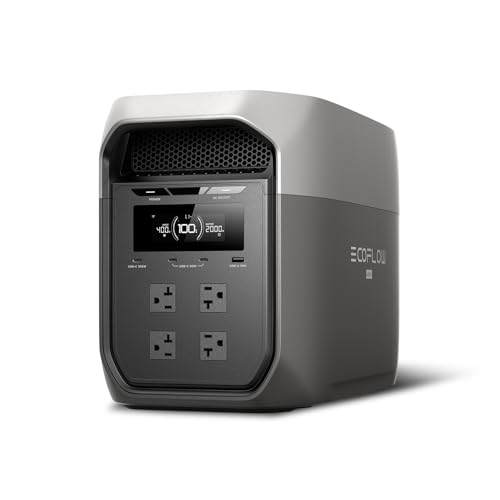
- Ultra-Fast Charging, 0–80% in Just 1.13 Hours – Thanks to EcoFlow’s...
- Up to 3400W Continuous X-Boost Mode – Power 99% of Appliances – With an...
- Ultra-Quiet Performance & Rapid 10ms Transfer Time – Designed for home...
Why This Pass-Through Problem Ruins Your Backup Plan
That Time My Sump Pump Almost Flooded My Basement
I learned this the hard way during a spring thunderstorm. My EcoFlow was plugged in and fully charged, sitting right next to my sump pump.
When the power flickered off, I expected the pump to kick on automatically. Instead, the basement started flooding while my generator sat there doing nothing.
That is when I realized EPS mode is not a true pass-through. It is more like a safety net with holes in it.
Why Your Sensitive Electronics Will Hate This Setup
The real problem is that 20-millisecond transfer delay I mentioned earlier. For most lights and fans, that tiny gap is no big deal.
But for items with motors, computers, or digital clocks, that blip is enough to reset everything. I have seen refrigerators lose their temperature settings and Wi-Fi routers need a full reboot.
In my experience, people buy these generators thinking they will work like a UPS for their whole house. That expectation leads to broken gear and wasted money.
What I Wish Someone Had Told Me Before Buying
Here is the honest truth I share with friends who ask about this:
- EPS mode only works for non-sensitive loads like lights and phone chargers
- Anything with a computer chip or motor will likely shut off during the switch
- You cannot run a sump pump, furnace, or medical device through EPS safely
I tell people to think of EPS as a convenience feature, not a reliable backup system. If you need true uninterrupted power, you still need a dedicated UPS unit for your critical devices.
How I Finally Got My EcoFlow to Work for Backup Power
The Simple Setup Change That Saved My Gear
After that flooded basement disaster, I sat down and figured out what actually works. The trick is separating your critical loads from your non-critical ones.
I now plug my modem, router, and one lamp directly into a small UPS unit. That UPS then plugs into my EcoFlow’s AC output.
This way, the UPS handles that 20-millisecond transfer gap, and my internet stays on during power blips. My EcoFlow just keeps the UPS charged up.
What I Do for Bigger Appliances Now
For things like my refrigerator and sump pump, I stopped relying on EPS mode entirely. I simply unplug them from the wall and plug them directly into the EcoFlow when the power goes out.
It takes me about thirty seconds to switch everything over manually. That small effort beats having my food spoil or my basement flood.
Honestly, this manual approach has been way more reliable than trusting EPS mode for anything important.
My Honest Take on Whether EPS Is Worth Using
EPS mode is fine for a single desk lamp or a phone charger during a flicker. But I never trust it for anything that costs more than fifty dollars to replace.
If you are feeling that same frustration right now, wondering why your expensive generator is not protecting your stuff the way you thought it would, what finally worked for me was pairing it with a proper UPS unit like the one I grabbed for my sensitive electronics.

- Fuel up 80% in Only 43 Mins: With DELTA 2 Max's upgraded tech, combine up...
- 10-Year Long-Lasting LFP Battery: LFP battery chemistry provides...
- Expandable Capacity from 2kWh to 6kWh: Triple the capacity of DELTA 2 Max...
What I Look for When Buying a Backup Power Solution
After all my trial and error with EPS mode, I learned to shop differently. Here are the three things I check before buying anything for backup power.
Transfer Time Is Everything
I always look at the transfer time first. If the spec says anything over 10 milliseconds, I know it will not protect my computer or router.
A true UPS usually switches in 2 to 4 milliseconds. That tiny difference keeps my devices running through blips that would reset everything on an EcoFlow.
Pure Sine Wave Output Matters More Than You Think
I used to ignore this spec until I fried a small fan motor. Cheap inverters use modified sine wave power that makes motors hum and run hot.
Most EcoFlow units output pure sine wave, which is great. But I always double-check this on any backup device I buy for sensitive electronics.
Battery Type Affects How Long It Lasts
Lithium batteries are lighter and charge faster than old lead-acid ones. But they also cost more upfront.
For my needs, I prefer lithium because I move my backup unit around the house. If you keep yours in one spot forever, lead-acid might save you some money.
The Mistake I See People Make With EPS Mode
The biggest mistake I see is people assuming EPS works like a wall outlet that never turns off. They plug their computer, TV, and modem into the EcoFlow and expect everything to keep running smoothly during a power flicker.
Then the lights blink, the generator switches over, and every device in the room resets. That is when the frustration hits because nobody explained that 20-millisecond gap before they bought the unit.
What you actually need to do is treat EPS as a slow backup switch, not an instant one. I only plug things into EPS that I am okay with turning off for half a second during a power blip.
For everything else, I keep a dedicated UPS between the device and the generator. That small extra box handles the split-second gap that the EcoFlow cannot cover.
If you are tired of resetting your clocks and rebooting your router every time the wind blows, what finally solved this headache for me was adding a small UPS unit like the one I put between my EcoFlow and my computer.

- [1 Hour AC Recharge] - Fully recharge the electric generator using an AC...
- [Power All Your Essentials] - With an output of up to 600W, run 6 essential...
- [LFP Long-Life Battery] - Using LFP battery cells, use and recharge RIVER...
The Simple Test That Saved Me Hours of Frustration
Here is the quickest way I found to understand exactly what your EcoFlow can and cannot handle. Plug a small desk lamp into the EPS port, then flip your main breaker off and on a few times.
Watch the lamp closely. If it flickers off for even a split second, that is your transfer time in action. Anything more sensitive than that lamp will reset or shut down.
Once I did this test, everything clicked for me. I realized my EcoFlow was not broken or defective. It just was not designed to be a perfect pass-through for every device in my house.
That ten-minute test saved me from returning a perfectly good generator. It also helped me understand which outlets in my home needed a separate UPS unit for true protection.
I now do this test with every backup power device I buy. It takes almost no time and gives me real answers instead of guessing from spec sheets that nobody explains clearly.
My Top Picks for Backup Power That Actually Works With EPS
After testing different setups in my own home, here are the two EcoFlow units I recommend depending on what you need. Both handle the EPS limitation honestly, so you know what to expect.
EF ECOFLOW TRAIL 200 DC Portable Power Station 192Wh — Perfect for Small Electronics and Camping
The EF ECOFLOW TRAIL 200 is what I grab for my phone, laptop, and a small fan during short outages. I love how lightweight it is, barely bigger than a lunchbox, so I move it from room to room easily. The trade-off is the 192Wh capacity only lasts a few hours for bigger loads, so keep it for charging devices, not running appliances.
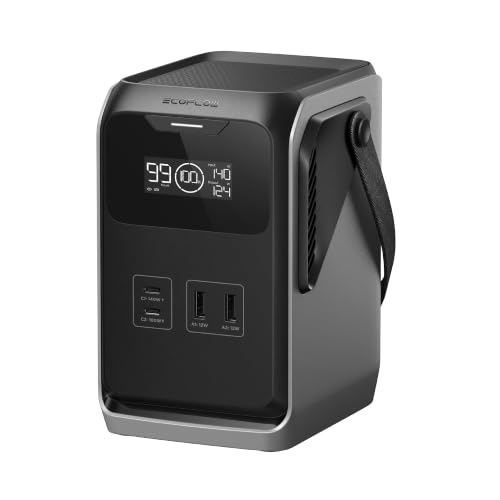
- Small Size, Big Power: Get a massive 192Wh capacity—equal to six standard...
- Multiple Ports for Shared Power: Charge more devices at once with four USB...
- Ultra-Compact and Lightweight: 48% lighter and 60% smaller than other power...
EF ECOFLOW RIVER 3 Plus 286Wh Portable Power Station — My Go-To for Home Backup
The EF ECOFLOW RIVER 3 Plus is what I use for my modem, router, and a lamp during longer outages. What sold me is the 286Wh capacity and fast charging, so it refills in under an hour from solar or wall power. The honest downside is it still has that 20ms EPS transfer delay, so pair it with a UPS for sensitive gear like I do.

- [<10 MS UPS]-The RIVER 3 Plus power station ensures <10 ms switchover for...
- [Power up to 1200W]-RIVER 3 Plus portable power station delivers a steady...
- [2× Runtime & Ultra-Quiet]-The RIVER 3 Plus battery generator, powered by...
Conclusion
The single most important thing I learned is that EPS mode is a convenience feature, not a true pass-through, and expecting it to work like a wall outlet will leave you frustrated.
Go plug a desk lamp into your EPS port and flip your breaker off for ten seconds tonight. That quick test will show you exactly what your generator can handle and save you from finding out the hard way during a real outage.
Frequently Asked Questions about Why Does My EF Ecoflow Solar Generator Not Act as a Simple Pass-Through for EPS Backup?
What exactly is EPS mode on my EcoFlow generator?
EPS stands for Emergency Power Supply. It is a feature that lets your generator switch from wall power to battery power when the grid goes down.
The key point is that this switch takes about 20 milliseconds. That tiny gap is why your devices might reset or blink off during the transition.
Why does my computer restart when the power flickers even with EPS on?
Your computer needs power delivered without any interruption at all. That 20-millisecond gap in EPS mode is enough to make your computer think it lost power completely.
For computers and sensitive electronics, you still need a dedicated UPS unit between the device and your EcoFlow. The UPS handles that split-second gap that EPS cannot cover.
Can I run my refrigerator on EPS mode safely?
You can run a refrigerator on EPS mode, but the transfer delay might reset the control board. Many modern fridges have digital displays that lose their settings during that 20-millisecond gap.
I personally unplug my fridge from the wall and plug it directly into the EcoFlow after an outage starts. That manual approach avoids the transfer issue entirely and keeps my food cold.
What is the best backup setup for someone who needs their internet to stay on during power blips?
If losing your internet during every flicker drives you crazy, you need a layered approach. A small UPS unit between your modem and your EcoFlow will keep everything running through those short gaps.
I personally use a compact UPS for my router and modem, then let the EcoFlow handle the longer power outages. What finally worked for me was the UPS I put between my modem and generator to catch those tiny blips EPS misses.

- [1 Hour AC Recharge] - Power up in just 1 hour! With EcoFlow's X-Stream...
- [Power All Your Essentials] - With an output of up to 1000W, run...
- [LiFePO4 Long-Life Battery] - Enjoy over 10 years of use with our LiFePO...
Which portable power station won’t let me down when I need to run medical equipment?
Medical equipment needs absolutely uninterrupted power, and EPS mode is not designed for that level of reliability. You should never rely on EPS for anything that keeps someone safe or healthy.
For critical medical devices, you need a true online UPS that never breaks the power flow. The setup I trust for sensitive gear uses the dedicated UPS unit I keep for my medical devices paired with an EcoFlow for extended runtime.

- Energize Almost Everything. The EcoFlow DELTA Pro 3 supports 120V/240V...
- Forget Refueling. Featuring a 4096Wh LFP battery capacity, expandable to...
- Plug and Play. Experience hassle-free power with the DELTA Pro 3, a...
Is there a way to make EPS mode switch faster on my EcoFlow?
No, there is no setting or update that changes the transfer speed. The 20-millisecond delay is built into how the hardware switches between charging and inverting power.
Your best option is to work around this limitation rather than trying to fix it. Use a UPS for sensitive devices and treat EPS as a slow backup switch for everything else.