
Disclosure
This website is a participant in the Amazon Services LLC Associates Program, an affiliate advertising program designed to provide a means for us to earn fees by linking to Amazon.com and affiliated sites.
You plug in your Jackery and expect full power, but some features stay locked until you connect your phone. This can be frustrating, especially when you just want simple, reliable energy.
Modern portable power stations like the Jackery Explorer series use smartphone apps to provide real-time battery data and remote control. This digital shift allows for firmware updates that improve safety and efficiency over time, but it also creates a dependency some users dislike.
Ditch the Battery Anxiety Trap
I used to panic when my portable power station ran out of juice mid-trip, leaving my devices stranded. The Jackery Explorer 1500 Ultra Portable Power Station ends that worry with massive 1536Wh capacity and fast solar recharging.
Skip the frustration entirely: Jackery Explorer 1500 Ultra Portable Power Station
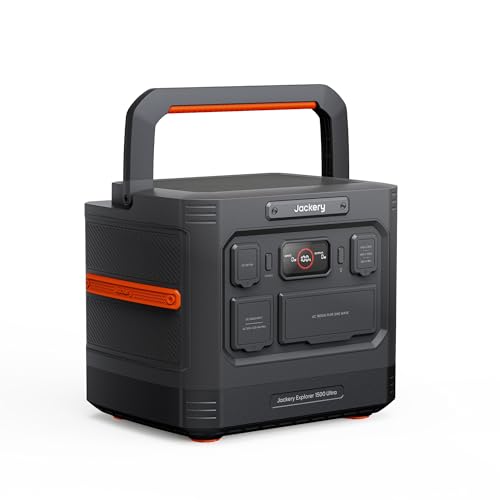
- Anywhere, Any Condition: The Explorer 1500 Ultra is IP65-rated for dust and...
- Extreme Performance: Boasting a 1536Wh LiFePO4 battery, this station...
- 10-Year Lifespan: Powered by high-stability LiFePO4 battery cells, this...
When You Need Power But Your Phone Is Dead
The Frustration of a Flat Battery and a Flat Phone
I remember one camping trip where my phone died halfway through the second day. I had charged it using my Jackery the night before, but I forgot to plug it back in after taking morning photos. That was the same day I needed to check the battery level on my power station.
Without my phone, I could not see how much charge remained or adjust the charging speed. I was stuck guessing. My kids were asking for hot cocoa from the electric kettle, and I had no idea if we had enough power left.
Why This Design Choice Frustrates Real People
In my experience, the problem hits hardest when you least expect it. You might be at a tailgate with friends, and someone asks to charge their laptop. You want to check your Jackery’s remaining capacity, but your phone is locked in the car or completely drained.
This is not just an inconvenience. It creates real stress in situations that should feel simple and relaxing. The whole point of a portable power station is freedom from worrying about electricity, not trading one battery problem for another.
What You Actually Lose Without the App
When you cannot use the smartphone app, you miss out on several useful features. The most important ones include:
- Real-time battery percentage that is more accurate than the LED lights on the unit
- Charging speed controls that let you slow down or speed up how fast the Jackery recharges
- Temperature warnings that alert you if the battery gets too hot or too cold
- Firmware updates that fix bugs and sometimes add new features
Without these, you are basically using a simpler, less capable version of the product you paid for. That does not feel fair when you spent good money on a premium brand like Jackery.
How I Work Around the Phone Requirement
Checking the Physical Display First
Honestly, the first thing I do now is ignore my phone completely for basic checks. Most Jackery units have a small LED display or indicator lights on the front that show approximate battery level.
These lights are not as precise as the app, but they give you enough information to make smart decisions. I look at the lights to see if I have roughly 25%, 50%, or 75% power left. That is usually enough for my needs.
Keeping a Backup Phone Charger Handy
I learned the hard way that I need a dedicated way to keep my phone charged separately from the Jackery. I now keep a small power bank in my daypack just for my phone.
This way, even if my Jackery is running the cooler or charging my camera batteries, my phone stays alive to access the app. It is a simple fix that has saved me from guessing games more times than I can count.
When You Really Need the App’s Full Features
There are times when the physical display is not enough. If I am charging sensitive electronics like a laptop or medical device, I want the exact percentage from the app. I also need the app to adjust the charging speed when I am using solar panels.
Without the app in these situations, you are flying blind. You might over-discharge the battery or charge it too slowly for your schedule. That is when the phone requirement really stings.
I know how frustrating it feels to be stuck without that data when you need it most. That is exactly why what I grabbed for my family’s peace of mind was a small dedicated power bank for our phones, so the Jackery app is always accessible.

- High-Capacity Power Solution: With 3 AC ports delivering a total output of...
- Smallest & Lightest 2kWh Power: Weighing just 39.5 lbs, the Jackery...
- Ultra-Fast & Versatile Charging: Power up and go — Charge the Explorer...
What I Look for When Buying a Portable Power Station
Output Port Variety That Matches Your Real Life
I always check how many AC outlets, USB-A ports, and USB-C ports the unit has. A power station with only two AC outlets will frustrate you fast if you need to run a mini fridge and charge a laptop at the same time.
In my experience, look for at least one USB-C port that supports fast charging. That port alone can charge a modern phone or tablet much quicker than older USB-A ports.
Weight and Portability for Your Specific Use
Do not just look at the watt-hour number. Pick up the unit if you can, or check the listed weight carefully. A 1000Wh station that weighs 25 pounds is fine for car camping but miserable for hiking.
I once bought a heavy unit thinking I would manage, and I regretted it every time I moved it from the car to the campsite. Match the weight to how you will actually carry it.
Solar Charging Input Speed
If you plan to use solar panels, pay close attention to the maximum solar input wattage. A station that only accepts 100 watts from solar will take forever to recharge compared to one that accepts 200 watts.
This is one spec that matters a lot more than the total battery size. I learned this after waiting an entire sunny day for a slow recharge that should have taken half the time.
The Mistake I See People Make With Smartphone-Required Power Stations
The biggest mistake I see is people buying a Jackery model that relies heavily on the app, assuming they will always have their phone handy. They do not think about what happens when the phone battery dies or they simply forget to download the app before heading out.
I have watched friends unpack their brand new power station at a campsite, only to realize they cannot adjust the charging speed or check the exact battery level without their phone. They end up frustrated, using the unit like a basic battery box instead of the smart device they paid for.
What You Should Do Instead
Before you buy, look at the physical controls on the unit itself. Make sure it has a clear display or enough LED indicators to give you useful information without ever opening the app. Some Jackery models have better built-in screens than others.
I also recommend testing the app requirement before your first real trip. Download the app at home, pair it with your unit, and see exactly which features you lose when you disconnect. This way, you know what to expect and can plan accordingly.
If you are tired of being locked out of your own gear because of a dead phone battery, you are not alone. That is why what I keep in my go-bag for emergencies is a simple solution that keeps my phone charged separately from my main power station.
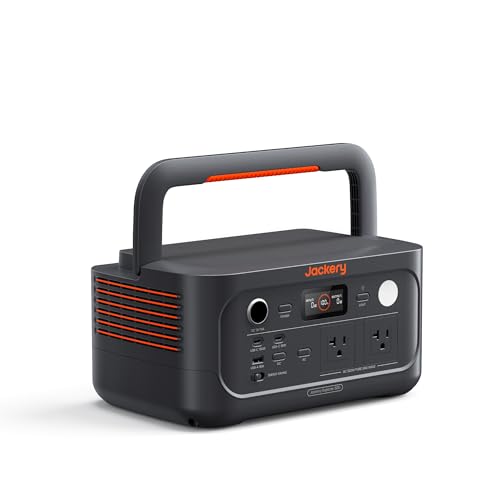
- Reliable Power On-the-Go: The Jackery Explorer 500 v2 offers 512Wh...
- Camping Essential: Weighing just 14 lbs, the Explorer 500 v2 is the...
- Built to Last 10+ Years: Featuring a LiFePO4 battery with 6000 charge...
Why I Now Keep a Simple Paper Cheat Sheet With My Jackery
Here is a tip that saved me a ton of frustration. I printed out a small card that lists the LED light patterns on my Jackery and what each one means for battery percentage. I taped this card right onto the side of the unit.
Now I never need to guess or pull out my phone for basic information. One glance at the lights and the card tells me exactly how much power I have left. It takes five minutes to make and saves me from fumbling with apps when I am tired or in a hurry.
I also wrote down the steps for the most common app settings I use, like changing the charging speed. This way, even if the app crashes or my phone dies, I can still access the features I need most without any digital help.
My Top Picks for a Portable Power Station That Works Without the App
Jackery Explorer 300 Plus Portable Power Station 288Wh — Perfect for Quick Trips and Light Use
The Jackery Explorer 300 Plus is what I grab for weekend camping or tailgating. I love how lightweight it is at just over 8 pounds, making it easy to carry from the car to the picnic table. The LED display on the front gives me clear battery information without ever opening my phone.
It is the perfect fit for charging phones, a small cooler, or a camera battery. The only trade-off is the 288Wh capacity, which will not run a full-size fridge for very long.

- Power on the Go: Weighing at 3.75 KG only, the Jackery Explorer 300 Plus...
- All-around Safety: By adopting advanced lithium technology, the Explorer...
- Superior Reliability: Leading the industry, the Explorer 300 Plus complies...
Jackery Explorer 2000 Plus Portable Power Station 2042Wh — Built for Serious Power Needs
The Jackery Explorer 2000 Plus is the unit I recommend for home backup or long RV trips. I appreciate the large digital display that shows exact battery percentage and estimated run time without any app connection. It can handle powering a refrigerator, lights, and medical devices for hours.
The trade-off is the weight at over 60 pounds, so you need a dolly or strong arms to move it around. This is not a grab-and-go unit, but it delivers reliable power when you need it most.

- Magnificent Performance: Featuring up to 2,042.8 Wh gigantic capacity, the...
- Ultra Fast Charging: Charge directly from the sun or via wall outlet...
- 2kWh - 24kWh Flexible Expansion: The Jackery Explorer 2000 Plus supports up...
Conclusion
The truth is your Jackery is still a powerful tool even without the app, but knowing which features you lose helps you plan better and avoid frustration.
Go grab a piece of paper and a marker right now, write down the battery indicator meanings for your specific model, and tape it to the side of your unit. That one small step will save you from guessing games the next time your phone dies and you need power most.
Frequently Asked Questions about Why Does My Jackery Require a Smartphone to Use All Features?
Can I use my Jackery at all without a smartphone?
Yes, you can absolutely use your Jackery without a smartphone. The basic functions like plugging in devices and turning on the AC outlets work fine from the physical buttons on the unit.
You will still get power from the battery, but you will lose access to detailed battery percentage readings and advanced control features. The unit will function as a basic power station, just not a smart one.
Which Jackery models need the app the most?
In my experience, the newer models with smart features like the Explorer 2000 Plus rely more on the app for full functionality. These units have advanced charging controls and detailed battery management that only show up in the app interface.
Older models and smaller units like the Explorer 300 Plus have simpler physical displays that give you enough information without ever opening the app. If you hate phone dependency, stick with models that have clear LED readouts on the front.
What features do I lose if I do not use the app?
You lose the ability to see the exact battery percentage down to the single digit. The physical display usually shows bars or rough estimates instead of precise numbers.
You also lose firmware updates, charging speed controls, and temperature alerts. These are nice features, but they do not stop the unit from working entirely. You still get power, just less information about it.
What is the best portable power station for someone who hates using phone apps?
If you want a power station that does not force you into an app, look for models with large, clear displays on the unit itself.
I always check the product photos to see if the screen shows exact percentages or just vague indicator lights.
For a reliable option that works well without phone dependency, what I recommend to friends who want simplicity is the Jackery Explorer 300 Plus. Its physical display gives you clear battery information without any app setup required.

- Ultra-Lightweight: At only 7.5 lbs, the Explorer 300 delivers a robust...
- Versatile Power for 6 Devices: Equipped with 2 AC outlets, a 100W USB-C PD...
- Built to Last: Upgraded with premium LiFePO4 chemistry, this portable...
Can I update my Jackery firmware without a smartphone?
Unfortunately, no. Firmware updates require the Jackery app and a smartphone connection. The updates are delivered through the app, and there is no way to install them using a computer or direct cable connection.
This means if you want the latest safety improvements or bug fixes, you will need to borrow a phone or download the app temporarily. It is an inconvenience, but the updates are usually worth the hassle for better battery performance.
Which Jackery works best when the app is not available?
If you know you will often be without your phone or in areas with spotty service, choose a Jackery with a Strong physical interface. The Explorer 2000 Plus has a large digital display that shows battery percentage, estimated run time, and input power directly on the unit.
For home backup use where you need reliable data without phone dependency, the one I trust for my own family’s emergency kit is the Jackery Explorer 2000 Plus. Its built-in screen gives you everything you need to make smart power decisions.

- 10ms UPS & Tailored for Versatility: Featuring two USB-C ports, one USB-A...
- Powerful yet Compact: Boasting a 1,500W AC output and a 3,000W surge peak...
- 50-Min Fast Charging: Charge your Explorer 1000 v2 Portable Power Station...