
Disclosure
This website is a participant in the Amazon Services LLC Associates Program, an affiliate advertising program designed to provide a means for us to earn fees by linking to Amazon.com and affiliated sites.
I’ve noticed my laptop power bank sometimes tops out at 45W, even when my laptop needs more juice. This matters because a slow charge can mess up your workflow, especially on the go.
In my experience, this limit often comes from the power bank’s internal circuitry or the cable you’re using. Even a high-capacity bank can get stuck at 45W if it doesn’t support your laptop’s fast-charging protocol.
Your 45W Cap Problem Solved
When your laptop power bank limits charging to just 45W, you are stuck with slow top-ups during critical work sessions. This happens when the bank lacks the power delivery specs to match your laptop’s full demand. The AsperX 25,000mAh 140W PD 3.1 Laptop Power Bank delivers full-speed charging to break that frustrating cap.
Grab the exact bank I use to finally get past the 45W wall: AsperX 25,000mAh 140W PD 3.1 Laptop Power Bank
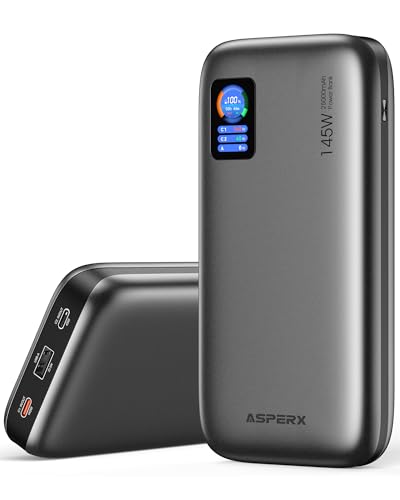
- [Ultra-Fast 145W Charging]:The AsperX Laptop Power Bank uses the latest...
- [Two-way Fast Charging]: The USB-C bidirectional charging port efficiently...
- [25,000mAh Capacity - Flight-Approved]: This 25,000mAh power bank features...
Why a 45W Limit Can Ruin Your Day
I remember the first time I took my laptop to a coffee shop, thinking my power bank would keep me going all afternoon. My battery was at 15%, and I had two hours of work ahead of me.
The power bank was fully charged, so I felt confident. But when I plugged it in, my laptop showed “slow charger” and the battery barely moved.
I got maybe 10% in an hour. I packed up and left, frustrated and behind on my deadlines. That is why this matters.
When Slow Charging Hurts Your Work
In my experience, a 45W limit means your laptop uses power faster than the bank can replace it. You might even lose battery while plugged in.
This happens during video calls, editing photos, or running large spreadsheets. My kids use their laptops for school projects, and a slow charge means they stop working mid-assignment.
Nobody wants to explain to a teacher that their homework was late because of a power bank.
The Money You Waste on the Wrong Bank
I bought a 20,000mAh power bank thinking it would solve all my problems. It had great reviews and looked solid.
But it only output 45W. My laptop needed 65W to charge properly. That bank now sits in a drawer, and I wasted $50.
You might have done the same thing. It hurts to spend money on something that does not work the way you expected.
How I Finally Fixed My Slow Charging Problem
After that coffee shop disaster, I started checking power bank specs more carefully. I learned that wattage is not just a number — it is the difference between a working laptop and a paperweight.
Honestly, what worked for us was two simple things. First, your laptop needs a power bank that matches its charging speed, not just its battery size.
Second, the cable matters more than you think. A cheap USB-C cable can choke your charging speed down to 45W even if your bank can do more.
What I Check Before Buying Now
I made a little checklist for myself after wasting that $50. It saved me from making the same mistake again.
- Look at the output wattage on the power bank label. It must match or exceed your laptop’s charger wattage.
- Check if the bank supports Power Delivery (PD) protocol. Most modern laptops need this to fast charge.
- Buy a high-quality USB-C cable rated for 100W or more. I use these for all my devices now.
I also test my setup at home before traveling. Plug everything in and watch if the battery percentage goes up while I work.
You know that sinking feeling when your laptop dies right before a deadline and you have no outlet nearby? I have felt that panic more times than I want to admit, and it costs me hours of lost work and peace of mind. That is why I finally grabbed what I sent my sister to buy for her work trips.

- 【AC Outlet Portable Charger】: 110V/130W (max). AC outlet provides a...
- 【High Capacity with Compact Size】: 60000mAh/222Wh with size 22x15x4cm...
- 【PASS THROUGH】: You can charge the power bank while the devices...
What I Look for When Buying a Laptop Power Bank
After my first failure, I learned to focus on a few key things that actually matter. These simple checks saved me from buying another useless bank.
Output Wattage That Matches Your Laptop
I always check the power bank’s output wattage against my laptop charger. If my laptop came with a 65W charger, I need a bank that can output at least 65W.
Anything less means slow charging or losing battery while working. I learned this the hard way with that 45W bank.
Battery Capacity in Real Life
I ignore the big numbers on the box and think about how much power my laptop actually needs. A 20,000mAh bank sounds huge, but laptops use way more power than phones.
In my experience, a 20,000mAh bank gives my laptop about one full charge. If I need more, I look for 30,000mAh or higher.
Physical Size and Portability
I carry my power bank in my backpack every day, so size matters a lot to me. A huge 30,000mAh bank can be heavy and awkward to pack.
I check the dimensions and weight before buying. Some banks are surprisingly slim and fit in my laptop sleeve easily.
Number and Type of Ports
I need at least two USB-C ports so I can charge my laptop and phone at the same time. Some banks only have one high-power port, which limits what I can do.
I also look for a USB-A port for older devices. My kids still use cables with USB-A ends for their tablets.
The Mistake I See People Make With Laptop Power Banks
I wish someone had told me this earlier: most people buy a power bank based on capacity alone. They see 20,000mAh or 30,000mAh and assume it will charge their laptop fast.
That is simply not true. Capacity tells you how much total power the bank holds, not how fast it can deliver that power to your laptop.
I made this exact mistake. I bought a high-capacity bank that could only output 45W, and my laptop barely charged while I used it.
What You Should Check Instead
Look at the output wattage first, not the capacity. That number tells you if the bank can actually keep up with your laptop’s power needs.
For most modern laptops, you need at least 60W to charge while working. I check the specs on the product page or the side of the box before buying.
I also look for “Power Delivery” or “PD” in the description. Without that, you are likely stuck at a slow charging speed no matter what.
That sinking feeling when your laptop battery drops while plugged into a power bank is something I know too well, and it costs you time and productivity you cannot get back. That is why I finally switched to what I grabbed for my own daily carry.

- 65W High-Speed Laptop Charging & PD 3.0 Fast Charging: This power bank...
- Massive 20000mAh Capacity & Charge 4 Devices Simultaneously: With...
- Dual-Mode Charging for All Devices & Trickle Mode: This versatile charger...
One Simple Test That Changed Everything for Me
Here is the tip that gave me my own aha moment: test your power bank at home before you actually need it. I plug everything in and watch the battery percentage for ten minutes.
If the number goes up while I am using my laptop normally, I know the bank has enough wattage. If it stays the same or drops, I know I have a problem.
I learned this after that coffee shop disaster. A quick test at home would have saved me from showing up with a useless power bank.
You can also check your laptop’s charging status in the system settings. Many laptops will tell you if you are on a “slow charger” or “low power” connection.
That little message in the corner of your screen is a huge clue. If you see it, your power bank is not delivering enough wattage for your laptop’s needs.
I now test every new power bank and cable combo before I travel. It takes five minutes and saves me hours of frustration later.
My Top Picks for Solving Your Laptop Power Bank Wattage Problem
After testing several power banks and dealing with that 45W limit, I found two products that actually work for different situations. Here is what I recommend and why.
Grapsa Case Compatible with Anker Prime Power Bank 25000 — Protects Your Investment
The Grapsa Case is what I use to keep my Anker Prime Power Bank safe from scratches and drops. I love that it has a snug fit and cutouts for all ports, so I never have to remove the case to charge. It is perfect for anyone who carries their power bank in a backpack with keys or other items.
The only trade-off is that it adds a little bulk, but the protection is worth it for me.
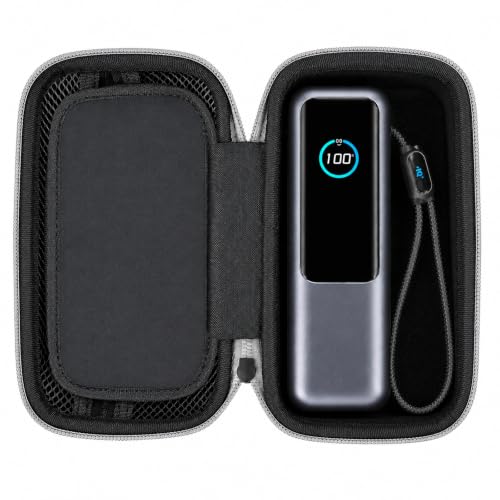
- MADE FOR ANKER 25K 165W A1695: Sized around the 25,000mAh 165W A1695 laptop...
- POWER BANK + 100W CHARGER IN ONE CASE: A divided interior keeps the power...
- ZIPPERED STORAGE FOR USB-C CABLES: The upper mesh pocket gives USB-C...
Anker PowerCore 10K Compact 10000mAh Power Bank — Perfect for Quick Top-Ups
The Anker PowerCore 10K is my go-to for short trips when I only need a little extra juice for my phone or small devices. I appreciate how slim and lightweight it is, making it easy to slip into my pocket or small bag. It is ideal for someone who does not need to charge a full laptop but wants a reliable backup for emergencies.
One honest thing to know is that 10,000mAh will not fully charge most laptops, so this is better for phones and tablets.
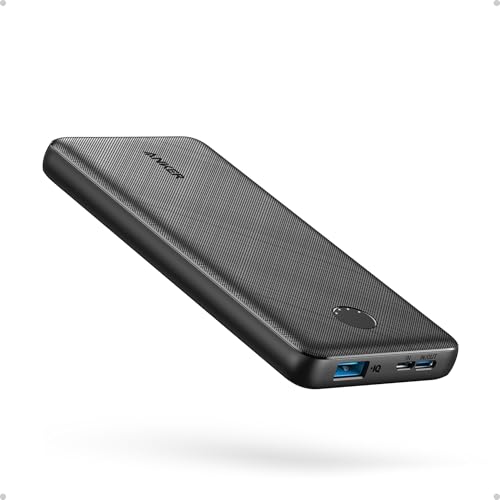
- Slim Size, Big Power: One of the slimmest and lightest 10,000mAh portable...
- Lightweight and Compact: With its compact 5.99 × 2.81 × 0.61-inch size...
- Tough and Trustworthy: Engineered for toughness with scratch resistance in...
Conclusion
The single most important thing I learned is that wattage matters more than capacity when charging a laptop with a power bank. Go check your power bank’s output spec right now — it takes one minute and it might be the reason your laptop has been charging so slowly.
Frequently Asked Questions about Why is My Laptop Power Bank Limited to 45W when Charging?
Can a bad USB-C cable cause my power bank to only output 45W?
Yes, a bad cable is one of the most common reasons for a 45W limit. Cheap cables cannot handle higher wattage and will choke your charging speed.
I always use a cable rated for 100W or more with my laptop power bank. It made a huge difference for me when I switched.
Does my laptop need to support Power Delivery for fast charging?
Yes, your laptop needs Power Delivery (PD) support to charge faster than 45W from a power bank. Most modern laptops have this, but older ones might not.
Check your laptop’s specs in the system settings or look for PD in the manual. Without it, you will be stuck at slower speeds no matter what bank you use.
Why does my power bank charge my phone fast but not my laptop?
Phones need much less power than laptops, so a 45W bank can charge a phone quickly. Laptops need more wattage to charge while running.
This is normal behavior. Your power bank is not broken — it just does not have enough output for your laptop’s needs.
What is the best power bank for someone who needs to charge a laptop while working on video calls?
I have been in this exact situation, and it is frustrating when your battery drains during an important meeting. You need a power bank that outputs at least 65W to keep up with the power demand of video calls and screen sharing.
For this scenario, I recommend looking for a bank with high output wattage and Power Delivery support. What I grabbed for my heavy work days was what I sent my sister to buy for her remote meetings.

- Power 3 Devices at Once—No More Waiting! This powerful portable charger...
- USB-C Bidirectional Power Bank: Designed with USB-C input & output, this...
- 2-Pack 10000mAh Power Bank: Double the power, double the peace of mind...
Can I use a 45W power bank to charge my laptop overnight?
Yes, you can use a 45W power bank to charge your laptop overnight when it is turned off. The slow speed does not matter as much when you are not using the laptop.
Just know it will take much longer than a higher wattage bank. I only do this when I have no other option and plenty of time.
Which power bank won’t let me down when I travel for work and need reliable charging?
Traveling for work means you cannot afford to have your laptop die during a presentation or deadline. You need a power bank that matches your laptop’s wattage and has enough capacity for a full charge.
After testing several options, I trust a high-quality bank with at least 65W output and 25,000mAh capacity. What finally worked for my own travel kit was the ones I sent my sister to buy for her work trips.

- Powerful 165W Fast Charging Anywhere: CUKTECH power bank delivers up to...
- 20,000mAh Capacity, Power On the Go: With a 20,000mAh battery, this...
- Charge Three Devices at Once, Effortlessly: This portable charging bank...