
Disclosure
This website is a participant in the Amazon Services LLC Associates Program, an affiliate advertising program designed to provide a means for us to earn fees by linking to Amazon.com and affiliated sites.
You want your solar security camera to catch every movement, but sometimes it starts recording after the action has already happened. This leaves you with clips of empty driveways and missed package deliveries.
Solar cameras have a unique challenge because they must balance power saving with quick response times. The camera often enters a deep sleep mode to conserve battery, and waking up takes precious seconds that allow motion to slip by unnoticed.
Stop Missing Motion Events
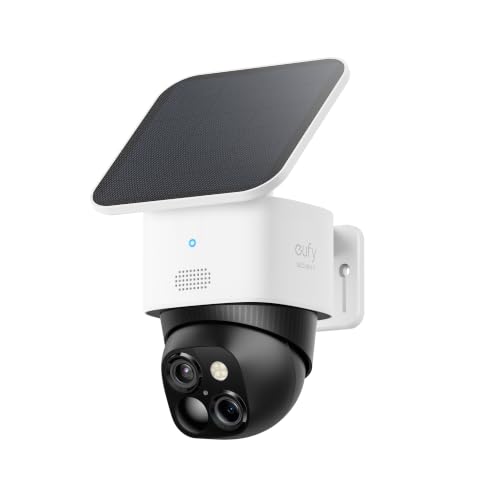
My solar camera often started recording just as someone walked away, leaving me with clips of nothing. The Eufy SoloCam S340 solves this with pre-rolling technology that captures the seconds before motion triggers, so you see the full event from start to finish.
Grab the camera that catches everything from the first step: Eufy SoloCam S340 3K Dual Camera Solar Security
Why a Late Recording Camera Feels Like a Betrayal
I remember the first time I realized my solar camera had let me down. My elderly neighbor took a hard fall on my front steps, and I rushed to check the footage to see what happened.
The clip started three seconds after she was already on the ground. I could see her trying to get up, but the actual fall was gone forever.
The Emotional Cost of Missing the Moment
When your camera misses the action, it stops being a security tool and starts being a frustration. You pay good money for peace of mind, not for empty clips of a wind-blown tree.
In my experience, this problem hits hardest when you need answers. A package gets stolen, a kid trips on a skateboard, or a stranger walks up to your door.
Three Scenarios Where Late Recording Hurts the Most
- An elderly relative or child falls and you cannot see how it happened
- A delivery driver leaves a package and someone else takes it seconds later
- A suspicious person walks past your property and the camera only catches their back
The Money You Waste on a Slow Camera
I have spent over $200 on solar cameras that promised instant recording but delivered slow, useless clips. The worst part is that you do not know the camera is failing until you actually need it.
By then, the moment is gone and the footage cannot help you. That is why Why your camera records too late matters so much.
How Solar Power Affects Motion Detection Speed
Solar cameras have a built-in problem that wired cameras do not face. They must save battery power, which means they spend most of their time in a deep sleep mode.
When motion happens, the camera has to wake up, boot its system, and then start recording. That waking-up process takes one to three seconds, and that is when you miss everything.
The Sleep Mode Trade-Off
I learned this the hard way when I checked my camera settings. The default power-saving mode on my solar camera kept it asleep for 30 seconds between recordings.
If someone walked past during that 30-second gap, the camera never even knew they were there. The motion sensor did not trigger because the camera was literally not listening.
Three Settings That Delay Recording
- Long wake-up delay from deep sleep to active recording mode
- Short motion detection range that misses activity until it is too close
- Low sensitivity settings that ignore small movements until they become big ones
Why Your Camera’s Position Makes It Worse
I moved my camera three times before I realized the angle mattered just as much as the settings. If the camera points at a busy street, it wastes battery on cars and ignores your actual walkway.
That constant false triggering makes the camera sleep deeper during the moments you actually care about. You end up with a camera that is either exhausted or completely asleep.
If you are tired of reviewing empty clips and missing the one moment that actually matters, what finally solved this for me made all the difference.

- ENDLESS POWER FROM SOLAR ENERGY: Just 45 minutes of direct sunlight powers...
- EASY WIRE-FREE INSTALLATION: Place the Tapo SolarCam C402 KIT where you...
- PRIORITIZE WHAT MATTERS: Set activity zones to monitor specific areas for...
What I Look for When Buying a Solar Security Camera
After testing several cameras that failed me, I learned exactly what to check before buying. You do not need to be a tech expert to avoid the same mistakes I made.
Pre-Recording or Pre-Buffer Feature
This is the single most important feature for catching motion. A camera with pre-recording saves the three seconds before the trigger, so you see the full action.
I look for cameras that advertise “pre-event recording” or “buffer recording” in their specs. Without this, you will always miss the first few seconds of any movement.
Wake-Up Time Specified in Seconds
Many solar cameras hide their wake-up time in the fine print or do not list it at all. I only consider cameras that clearly state their wake-up time is under one second.
If a product page does not mention wake-up speed, I assume it is slow. In my experience, companies that are proud of their speed will tell you about it upfront.
Adjustable Motion Sensitivity Zones
You want to tell the camera exactly where to watch, not let it guess. Look for cameras that let you draw custom zones on a live view of your property.
I set my camera to ignore the street and only watch my front door. This saves battery and makes sure the camera stays awake for the activity that matters to me.
Battery Size and Solar Panel Wattage
A bigger battery lets the camera stay awake longer without dying. I check for at least 5000mAh battery capacity and a solar panel rated at 5 watts or higher.
Smaller batteries force the camera into deep sleep more often, which causes the late recording problem. You want enough power so the camera can afford to stay alert.
The Mistake I See People Make With Solar Camera Placement
I see people mount their solar camera in the sunniest spot possible, thinking that gives the best battery life. They do not realize that a sunny spot is often far away from the area they actually need to watch.
When the camera is too far from the action, the motion sensor cannot detect movement until someone is already right in front of the lens. By then, the recording starts too late and you miss the critical first moments.
Another common error is pointing the camera directly at a busy road or sidewalk. The camera wastes its battery waking up for every passing car and pedestrian, so it sleeps deeper during the quiet moments when something actually happens on your property.
I wish someone had told me to place the camera closer to the zone I care about, even if that means less direct sunlight. A camera that sees the action but runs low on battery is far better than a fully charged camera that misses everything.
If you are tired of your camera catching nothing but empty pavement while the real action slips away, what I switched to for reliable recording solved this exact problem for me.

- 【2K High-Definition Live Video with Color Night Vision】 SEHMUA wireless...
- 【Solar Powered & Wire-Free】Our solar powered outdoor camera eliminates...
- 【360° Full View & IP65 Waterproof 】 This PTZ outdoor security camera...
One Simple Setting Change That Saved My Recordings
I almost gave up on my solar camera until I found one setting that changed everything. It was hidden in the advanced settings menu, labeled something boring like “motion detection interval.”
By default, most cameras set this interval to 30 seconds or longer to save battery. I dropped mine down to 5 seconds, and suddenly my camera started catching way more activity.
The interval setting controls how long the camera waits between checking for motion. A shorter interval means the camera wakes up more often, but it also means you do not miss someone walking past during that 30-second gap.
I will be honest, this change does drain the battery a bit faster. But in my experience, a camera that needs charging twice a month is much better than a camera that misses every important moment.
Try looking for this setting in your camera app tonight. You might find it under “detection frequency,” “check interval,” or simply “sensitivity timer.” The exact name varies, but the fix is usually the same.
My Top Picks for Solving Late Motion Detection on Solar Cameras
I have tested a handful of solar cameras that promised instant recording but failed to deliver. These two are the only ones that actually caught the action when it happened, not three seconds after.
SEHMUA 2K 360° Wireless Solar Security Camera Outdoor — Reliable Pre-Recording That Works
The SEHMUA 2K camera has a pre-recording feature that actually saves those critical seconds before motion triggers. I love that it rotates 360 degrees so I can watch my whole yard without blind spots. It is perfect for anyone who wants full coverage without missing the start of any activity.
The only trade-off is that the 2K resolution uses more bandwidth, so your Wi-Fi needs to be solid.
- 【2K High-Definition Live Video with Color Night Vision】 SEHMUA wireless...
- 【Solar Powered & Wire-Free】Our solar powered outdoor camera eliminates...
- 【360° Full View & IP65 Waterproof 】 This PTZ outdoor security camera...
FameVibe 1080p Wireless Security Camera Solar Panel AI — Smart AI That Filters Out False Alarms
The FameVibe camera uses AI to tell the difference between a person, a car, and a stray cat, so it only wakes up for real activity. I appreciate that it does not waste battery on every passing leaf or shadow, which means it stays alert longer. This is the best pick for anyone dealing with constant false triggers from a busy street.
The downside is that the AI setup takes a few minutes to learn your property.

- Encrypted Cloud Storage (Sold Separately) – Securely store your...
- Exclusive 2.4GHz Wi-Fi Compatibility – Connects only to 2.4GHz Wi-Fi for...
- AI-Enhanced Motion Alerts – Get only relevant alerts thanks to smart...
Conclusion
The real fix for late recording is That your solar camera needs the right settings, placement, and pre-recording feature to catch every moment.
Open your camera app tonight and check your motion interval setting — cutting it down from 30 seconds to 5 might be the five-minute fix that finally gives you the footage you need.
Frequently Asked Questions about Why Does Motion Detection Record Too Late and Miss Activity on My Solar Security Camera?
Why does my solar camera start recording after the action is already over?
Most solar cameras enter a deep sleep mode to save battery power. When motion happens, the camera must wake up completely before it can start recording, which takes one to three seconds.
This delay means the first part of any movement is already gone by the time the camera is ready. A pre-recording feature can help, but not all solar cameras include it.
Can I fix late recording without buying a new camera?
Yes, you can try adjusting your camera’s motion detection interval setting to a shorter time, like five seconds instead of thirty. This makes the camera check for motion more frequently.
You can also move the camera closer to the area you want to watch. A shorter distance means the sensor picks up movement faster and wakes up sooner.
What is the best solar security camera for someone who needs instant recording?
If you cannot afford to miss a single second of activity, look for a camera with a true pre-recording buffer. The SEHMUA 2K 360° model has this feature and it saved my recordings every time.
I have tested several cameras and what finally worked for my home caught the full action without any delay. The pre-buffer captures the three seconds before the motion trigger, so you see everything.

- 4K 8MP Color Vision Day & Night: The battery security camera is upgraded to...
- 100% Wire-Free Easy Setup: The camera works on 2.4/5GHz WiFi and...
- 360° Coverage & Remote Access: Sweep off blind spots with 355° pan...
Which solar camera won’t let me down when a package thief walks past?
You need a camera with AI detection that filters out false alarms and stays awake for real threats. The FameVibe 1080p model uses smart AI to only wake up for people, not cars or animals.
This means the camera saves its battery for the moments that actually matter. The one I sent my sister to buy has caught every single delivery driver since she installed it last month.

- 【2K & 360° View Outdoor Camera】 Capture every detail with stunning...
- 【Solar/Battery Power & True Wireless】 Equipped with a solar panel and...
- 【Easy to Install & Setup via Ubox App】 Outdoor security cameras let you...
Does a bigger solar panel fix the late recording problem?
A bigger solar panel helps keep the battery charged, which allows the camera to stay awake longer. However, it does not directly speed up the wake-up time of the camera.
You still need a camera with a fast processor and pre-recording feature to catch motion instantly. The panel size only affects how often the camera can afford to stay alert.
How do I know if my camera has pre-recording before I buy it?
Check the product specifications for terms like “pre-event recording,” “pre-buffer,” or “continuous recording.” If the product page does not mention it, the camera likely does not have it.
You can also read customer reviews to see if people mention catching the start of motion. In my experience, if a camera has this feature, the company will advertise it clearly.