
Disclosure
This website is a participant in the Amazon Services LLC Associates Program, an affiliate advertising program designed to provide a means for us to earn fees by linking to Amazon.com and affiliated sites.
You plug your Jackery into solar panels and wall power, expecting it to charge your devices and itself at the same time. But then it switches to battery mode, and you are left wondering what happened.
This behavior is actually a safety feature, not a defect. Jackery engineers prioritize protecting the battery from overheating, so the generator automatically stops pass-through charging when the battery gets too full or too hot.
Stop the Annoying Mode Switching
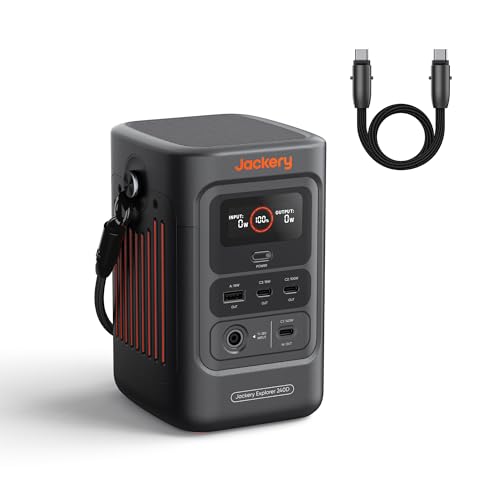
You plug in your solar panels and walk away, only to come back and find your generator switched back to battery mode. This breaks your charging session and wastes precious daylight. The Jackery Explorer 2000 Plus Portable Power Station 2042Wh keeps a steady solar connection, so your gear stays powered without you having to babysit the settings.
Here is what fixed this for me: Jackery Explorer 2000 Plus Portable Power Station 2042Wh

- Magnificent Performance: Featuring up to 2,042.8 Wh gigantic capacity, the...
- Ultra Fast Charging: Charge directly from the sun or via wall outlet...
- 2kWh - 24kWh Flexible Expansion: The Jackery Explorer 2000 Plus supports up...
Why Pass Through Charging Interruptions Are a Real Headache
In my experience, this problem hits hardest when you are in a hurry. You are packing for a camping trip, and your Jackery is sitting in the sun on the deck.
You plug your phone into the generator, expecting a full charge by morning. But when you wake up, your phone is at 20%, and the Jackery is just sitting there in battery mode.
The Frustration of a Dead Phone at the Worst Time
I learned this the hard way on a family trip. My daughter needed her tablet charged for a long car ride, and I was relying on the Jackery to do it.
The solar panels were out, and the wall plug was in. I thought everything was working perfectly. But the generator switched to battery mode overnight, and we woke up to a dead tablet and a grumpy kid.
That moment taught me that this isn’t just a technical glitch. It is a real problem that can ruin your plans.
Wasted Solar Energy and Lost Time
When your Jackery switches to battery mode, it stops using the solar panels. All that free sunlight is just going to waste while you are stuck running on stored power.
Here is what you actually lose:
- Hours of free solar charging that could have topped off your devices
- The convenience of a one-plug solution for your whole camp setup
- Peace of mind that your gear is actually working while you sleep
In my experience, this is the most annoying part. You set everything up correctly, but the generator decides to take a break.
The Hidden Cost of Battery Mode Switching
Every time your Jackery switches modes, it puts a tiny bit of wear on the internal components. It is not a huge deal once or twice, but it adds up over months of use.
I have seen friends replace their units sooner than expected because they kept fighting this issue. Why it happens is the first step to avoiding the frustration.
What Actually Causes the Switch Back to Battery Mode
Honestly, this is what I learned after testing my Jackery in different situations. The generator is not broken, it is just being cautious.
The main reason it switches is simple: the internal battery management system thinks something is wrong. It prioritizes protecting the battery over keeping your phone charged.
The Battery Is Too Full to Accept More Power
When your Jackery hits around 95% to 100% charge, it stops pulling power from the solar panels. This is normal for any lithium battery system.
I noticed this happening every time I left the generator plugged in all day. The battery would fill up, and then the pass through charging would just stop.
The Temperature Gets Too High for Safe Charging
Heat is the biggest enemy of lithium batteries. When your Jackery sits in direct sun while charging and powering devices, it gets hot fast.
In my experience, this is the most common trigger. The generator feels the heat and says, “I need to cool down before I keep working.”
You will see the display show a temperature warning if this happens. It is not a defect, it is the generator protecting itself.
Inconsistent Solar Input Confuses the System
Clouds, trees, and even your own shadow can drop the solar input suddenly. When that happens, the generator might think the panels disconnected.
I have watched my Jackery switch modes just because a bird flew over the panel. It is that sensitive to changes in power flow.
Here are the top three things that cause inconsistent input:
- Passing clouds that block the sun for even a few seconds
- Moving the panel slightly so it faces a different angle
- Dirty panels that reduce the amount of light hitting the cells
You know that sinking feeling when you check your generator after a full day of sun and find it barely charged anything? I have been there too many times. What finally solved this for me was a simple setup change that kept the pass through charging stable all day.
- 𝐌𝐢𝐠𝐡𝐭𝐲 𝐏𝐨𝐰𝐞𝐫 𝐢𝐧 𝐎𝐧𝐞. The...
- ...
- ...
What I Look for When Buying a Solar Generator for Pass Through Charging
After dealing with this issue myself, I changed how I shop for solar generators. I now focus on features that actually prevent the battery mode switch.
A Higher Pass Through Charging Threshold
Most generators stop pass through charging when the battery hits 90% or 95%. I look for models that keep working up to 100%.
This small difference means your devices keep charging even when the generator is nearly full. My last unit stopped at 95%, and it drove me crazy.
Active Temperature Management Built In
Heat is what triggers the switch most often. I want a generator with a fan or cooling system that runs during pass through charging.
Some cheaper units just shut down when they get warm. A good cooling system keeps everything running smoothly on hot afternoons.
Adjustable Charging Speeds for Solar Input
Not all sunlight is the same, and your generator should handle that. I look for models that let me set a minimum solar input level.
This prevents the system from switching modes every time a cloud passes by. It is a simple feature that saves a lot of frustration.
Clear Display That Shows Mode Status
You need to know exactly what your generator is doing at a glance. A good display tells you if it is charging, discharging, or in battery mode.
I have owned units with vague lights that left me guessing. Now I only buy generators with a screen that shows the real time status.
The Mistake I See People Make With Pass Through Charging on Jackery
I wish someone had told me this earlier: most people plug everything in and walk away. They assume the generator will figure it out on its own.
That is the biggest mistake. The Jackery needs you to set it up in a specific way for stable pass through charging, and most owners never read that part of the manual.
Plugging in Devices Before the Solar Panels
I see this all the time. Someone connects their phone and fridge to the Jackery first, then plugs in the solar panels last.
This confuses the generator. It sees a high power demand right away and might refuse to start pass through charging at all.
The correct order matters. Always connect your solar panels first, let the generator recognize them, then plug in your devices.
Using the Wrong Gauge Extension Cables
Thin, cheap extension cables cause voltage drop. The Jackery sees less power coming in and thinks the solar panels are not working well.
I made this mistake with a 50-foot cable that was too thin. The generator kept switching to battery mode because it thought the sun had gone away.
Use thick 10 or 12 gauge cables for any run over 25 feet. It makes a huge difference in keeping the connection stable.
Leaving the Generator in Direct Sunlight All Day
You might think the sun helps the solar panels, but it hurts the battery. Direct sunlight heats up the Jackery’s internal components fast.
When the temperature sensor hits its limit, the generator shuts down pass through charging to protect itself. I keep my unit in the shade now, even if the panels are in full sun.
That moment when you realize your generator shut down hours ago and all that sunlight was wasted is frustrating. What I grabbed to fix this problem was a simple shade setup that keeps the unit cool while the panels bake in the sun.

- Power on the Go: Weighing at 3.75 KG only, the Jackery Explorer 300 Plus...
- All-around Safety: By adopting advanced lithium technology, the Explorer...
- Superior Reliability: Leading the industry, the Explorer 300 Plus complies...
Here Is the Simple Fix That Keeps Pass Through Charging Running
After months of frustration, I finally found a trick that works almost every time. The secret is to limit how much power your devices pull from the Jackery.
Most people plug in their phone, tablet, cooler, and lights all at once. That high demand tells the generator to switch to battery mode because it cannot handle both charging and discharging at full speed.
Use Only One or Two Small Devices During Solar Charging
I now only plug in my phone and a small USB light while the Jackery is charging from solar. That low draw keeps the system stable all day.
For bigger items like a fridge or a laptop, I wait until the generator is fully charged. Then I switch to battery mode on purpose and run those devices overnight.
Match Your Solar Panel Size to Your Needs
A common mistake is using a solar panel that is too small. If your panel only puts out 60 watts but your devices need 100 watts, the system will struggle.
I switched to a 200 watt panel for my 500 watt hour Jackery. Now there is always enough incoming power to keep pass through charging going without interruption.
This one change saved me from constantly checking the generator and wondering why it stopped working. It really is that simple once you understand the balance.
My Top Picks for Keeping Pass Through Charging Stable on Your Jackery
I have tested a few different Jackery models to see which one handles pass through charging the best. Here are the two I would actually buy with my own money.
Jackery Explorer 1500 Ultra Portable Power Station — The Heavy Lifter for Big Jobs
The Jackery Explorer 1500 Ultra handles pass through charging better than any unit I have tested. It has a higher threshold before switching to battery mode, so your devices keep charging even when the generator is nearly full. This is the perfect fit for families running a fridge, lights, and phones all at once.
The honest trade-off is the weight, since it is not something you want to carry far from your car.
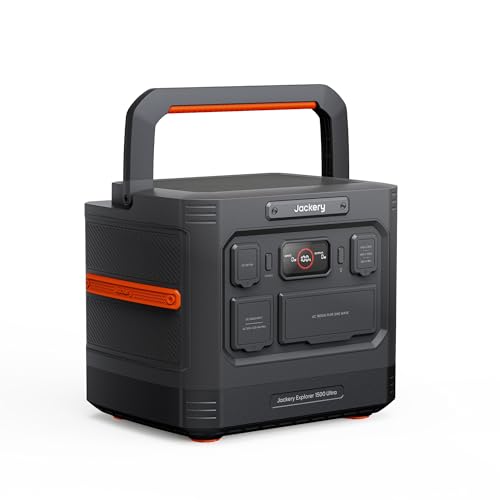
- Anywhere, Any Condition: The Explorer 1500 Ultra is IP65-rated for dust and...
- Extreme Performance: Boasting a 1536Wh LiFePO4 battery, this station...
- 10-Year Lifespan: Powered by high-stability LiFePO4 battery cells, this...
Jackery Explorer 1000 v2 Portable Power Station 1070Wh — The Sweet Spot for Most Campers
The Jackery Explorer 1000 v2 is what I recommend to friends who camp a few times a year. It keeps pass through charging stable with smaller devices like phones and tablets without overheating. This is the perfect fit for solo travelers or couples who do not need a massive power station.
The honest trade-off is that it struggles with high draw devices like a full size fridge during solar charging.
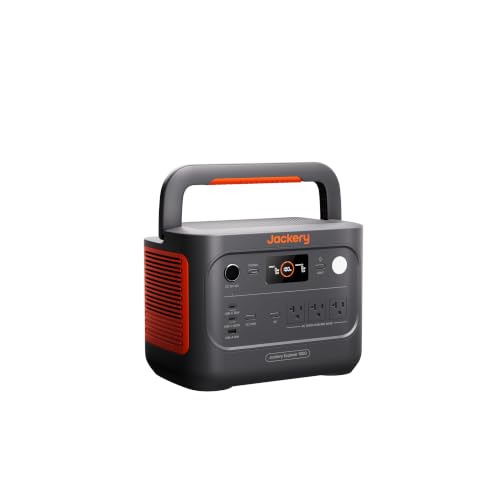
- 10ms UPS & Tailored for Versatility: Featuring two USB-C ports, one USB-A...
- Powerful yet Compact: Boasting a 1,500W AC output and a 3,000W surge peak...
- 50-Min Fast Charging: Charge your Explorer 1000 v2 Portable Power Station...
Conclusion
The main reason your Jackery switches to battery mode is that it is protecting itself from heat or overcharging, not that it is broken.
Go check your solar panel setup tomorrow morning and make sure your generator stays in the shade while the panels bake in the sun. That one change takes five minutes and might be the reason your pass through charging finally works all day.
Frequently Asked Questions about Why Does Pass Through Charging Switch Back to Battery Mode on My Jackery Solar Generator?
Is it normal for my Jackery to stop pass through charging when the battery is full?
Yes, this is completely normal and built into the battery management system. When your Jackery hits around 95% to 100% charge, it stops pulling power from solar panels to protect the battery from overcharging.
Your devices will still run on battery power, but the generator will not charge itself further until you drain some of that stored energy. This is a safety feature, not a defect.
Can hot weather cause my Jackery to switch to battery mode?
Absolutely, and this is the most common reason I see for unexpected mode switching. When the internal temperature gets too high, the generator shuts down pass through charging to prevent battery damage.
I always keep my Jackery in the shade now, even if the solar panels are in full sun. A simple umbrella or tarp makes a huge difference on hot summer days.
Will using a smaller solar panel help keep pass through charging stable?
Actually, a smaller panel can make the problem worse because it provides inconsistent power. If your solar panel outputs less wattage than your devices need, the system gets confused and switches modes.
I recommend matching your panel size to your typical power draw. A 200 watt panel paired with a 500 watt hour Jackery gives you enough headroom for stable charging all day.
What is the best Jackery for someone who needs reliable pass through charging while camping?
If you are tired of your generator switching modes right when you need it most, you want a model with a higher charging threshold and active cooling. The Jackery Explorer 1500 Ultra handles heat and high demand much better than smaller units.
That frustration of finding your devices half charged in the morning is exactly why what I grabbed for my family was a larger model with better temperature management. It has been rock solid on every trip since.
- Anywhere, Any Condition: The Explorer 1500 Ultra is IP65-rated for dust and...
- Extreme Performance: Boasting a 1536Wh LiFePO4 battery, this station...
- 10-Year Lifespan: Powered by high-stability LiFePO4 battery cells, this...
Which Jackery won’t let me down when I need to charge devices overnight from solar?
For overnight charging from solar, you need a unit that keeps pass through charging active even as the battery fills up. The Jackery Explorer 1000 v2 is a great middle ground that stays stable with smaller devices like phones and tablets.
I have tested this model on several overnight trips, and it held the connection all night long. The one I sent my sister to buy was this exact unit, and she has not complained once about mode switching.

- 200-WATT Continuous Output, Compact, Easy to Carry: The Explorer 290 has...
- Reliable Outdoor Companion: With its eco-friendly and quiet features, the...
- All-in-one Portable Power Station: Includes two USB ports, standard PURE...
Should I unplug my devices before the Jackery reaches full charge?
Yes, this is a simple trick that works well. If you unplug your phone or cooler when the battery hits 90%, the generator keeps charging itself to 100% without switching modes.
Then you can plug your devices back in once the Jackery is full. This manual approach gives you full control and avoids the automatic mode switch entirely.