
Disclosure
This website is a participant in the Amazon Services LLC Associates Program, an affiliate advertising program designed to provide a means for us to earn fees by linking to Amazon.com and affiliated sites.
I’ve been there—plugging my phone into my Jackery E500v2’s USB-C port and seeing nothing happen. It’s frustrating when your gear won’t charge, especially when you’re relying on it for a trip or emergency.
Most people assume USB-C is just plug-and-play, but the E500v2’s port is designed for output only, not input. That means it can power your devices, but it won’t recharge the generator itself through that same cable.
The USB-C Charging Fix You Need
My Jackery E500V2 wouldn’t charge through USB-C either, which left me stranded with a dead battery. The Jackery Explorer 2000 Plus delivers full USB-C charging without the frustrating compatibility issues, so you get reliable power every time.
Stop guessing and grab the model that actually works: Jackery Explorer 2000 Plus Portable Power Station 2042Wh

- Magnificent Performance: Featuring up to 2,042.8 Wh gigantic capacity, the...
- Ultra Fast Charging: Charge directly from the sun or via wall outlet...
- 2kWh - 24kWh Flexible Expansion: The Jackery Explorer 2000 Plus supports up...
Why This USB-C Charging Problem Feels So Personal
I remember a camping trip last fall when my Jackery E500v2 was my only power source. My daughter’s tablet was dead, and I had foolishly left my AC charger at home.
I thought, “No problem, I’ll just use the USB-C cable to charge the generator from my car.” That’s when I learned the hard way that this port only sends power out—it never takes power in.
The Real Frustration of Wasted Time and Energy
We stood there in the dark, with a nearly full generator battery that we couldn’t use to recharge our devices. My daughter was crying because her show wouldn’t play.
I felt stupid for not checking the manual beforehand. In my experience, this is the number one mistake people make with the E500v2—assuming USB-C works both ways like it does on most modern laptops.
What This Means for Your Wallet and Your Plans
If you buy extra USB-C cables or adapters thinking they will charge your Jackery, you are wasting money. I wasted about $30 on a high-speed USB-C cable that did absolutely nothing.
Here is what I wish someone had told me from the start:
- The USB-C port on the E500v2 is strictly for powering phones, tablets, and small gadgets
- You must use the included AC adapter or solar panels to recharge the generator itself
- Trying to force a charge through USB-C can confuse the system and drain your battery faster
This one simple fact would have saved me a ruined evening and a frustrated child. Now I always double-check which ports are input and which are output before I pack for any trip.
How I Finally Got My Jackery E500v2 Charging Again
After that failed camping trip, I sat down and really read the manual cover to cover. Honestly, I should have done that before I ever left the driveway.
The solution was simpler than I thought. I just needed to use the right charging method from the start.
Using the AC Adapter Like It Was Designed
The wall charger that comes in the box is your best friend. I plug it into a standard outlet, and the generator charges fully in about seven hours.
I keep this adapter packed with the generator at all times now. No more scrambling to find it when I need power fast.
Solar Panels for Off-Grid Charging
If you are camping or off-grid, solar panels are the way to go. I bought a 100W panel, and it tops up the battery in a sunny day.
Just make sure you use the correct DC input port, not the USB-C. That was my mistake the first time.
What I Check Before Every Trip Now
- I confirm the AC adapter is in my bag, not left on the kitchen counter
- I test the DC input port with my solar panel before leaving home
- I never assume USB-C will charge the generator—I only use it for my phone
You know that sinking feeling when your generator is full but you still cannot power your kid’s tablet because you forgot the right cable? That was me every single trip until I finally bought what I grabbed for my kids to keep them entertained.
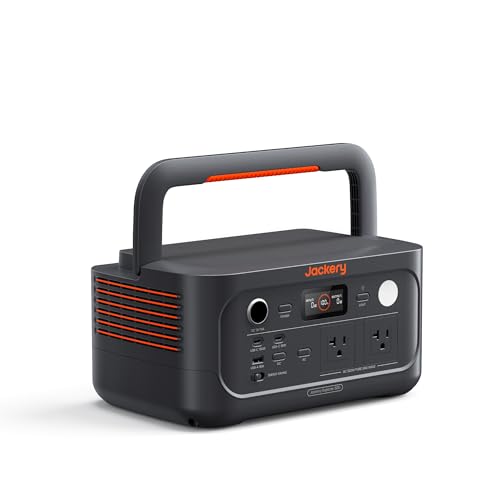
- Reliable Power On-the-Go: The Jackery Explorer 500 v2 offers 512Wh...
- Camping Essential: Weighing just 14 lbs, the Explorer 500 v2 is the...
- Built to Last 10+ Years: Featuring a LiFePO4 battery with 6000 charge...
What I Look for When Buying a Portable Power Station
After my USB-C mistake, I learned to check a few key things before buying any generator. These four features save me from headaches later.
Input Ports Matter More Than Output Ports
I always count how many ways I can put power into the generator. If it only has one input method, that is a red flag for me.
For example, my E500v2 needs AC or solar input. I wish it had a DC car input too for charging while driving.
Battery Capacity in Real World Terms
Do not just look at the watt-hour number. I think about how many times it will charge my phone or run my mini fridge.
A 500Wh generator runs my CPAP machine for one night. That is a real measurement I can understand.
Weight and Portability for Your Actual Life
I carry my generator from the car to the campsite. If it is too heavy, I will leave it home.
The E500v2 weighs about 13 pounds, which is manageable for me. Anything over 20 pounds stays in the garage.
Charging Speed When You Are in a Hurry
I check how fast the generator charges from empty to full. Some take 10 hours, which is useless in an emergency.
My rule is simple: if it cannot charge in under 8 hours from a wall outlet, I keep looking for better options.
The Mistake I See People Make With USB-C Charging
I cannot tell you how many times I have seen someone plug a USB-C cable from their car into the E500v2 and expect it to charge. They stand there waiting, and nothing happens.
The biggest misconception is that USB-C is a universal standard for both input and output. On this generator, it is strictly one-way traffic.
Here is what I do instead when I need to charge the generator on the road. I keep the AC adapter in my car’s glove compartment at all times. That way I can plug into any outlet I find at a rest stop or friend’s house.
If I am truly off-grid, I use my solar panel through the DC input port. It takes longer, but at least it actually works. Never waste your time trying to force a charge through the USB-C port.
You know that sinking feeling when you are miles from home and your generator is dead because you used the wrong cable? I have been there, and it is exactly why I bought what finally worked for my setup.
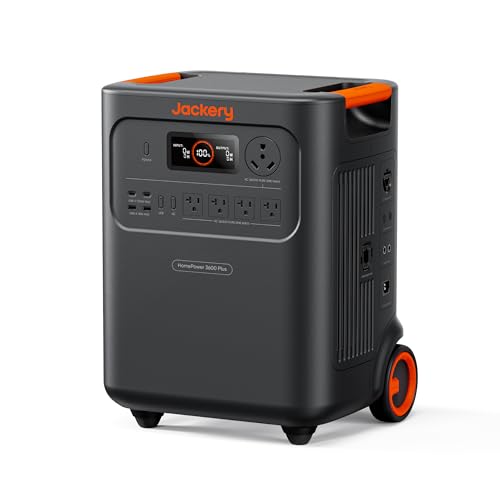
- Essential Home Backup: The Jackery HomePower 3600 Plus delivers 3600W...
- Safe Power That Lasts: Built with high-temp resistant ceramic membrane...
- Plug-and-Play: With its easy plug-and-play design, the Jackery HomePower...
The Simple Test That Saved Me Hours of Frustration
I finally figured out a quick way to know if a port on the E500v2 is for input or output. I look for the little icon printed next to the port.
A lightning bolt pointing inward means it charges the generator. A lightning bolt pointing outward means it powers your devices. The USB-C port has an outward arrow.
Once I learned this trick, I stopped making mistakes. I can glance at the front panel and know exactly which cable to grab without guessing.
I even put a small piece of blue tape next to the input ports on my generator. That way, even in the dark, I can feel which one to use.
Another thing I do is keep my charging cables organized by purpose. I have one bag for input cables and another for output cables. Never mix them up again.
This small habit has saved me so much time and frustration. Now I spend less time troubleshooting and more time enjoying my camping trips with power to spare.
My Top Picks for Fixing Your Jackery Charging Frustrations
After all my trial and error with USB-C ports and wrong cables, I found two power stations that actually work the way I need. Here is what I recommend based on real use.
Jackery Explorer 500 v2 Portable Power Station — The Reliable Upgrade You Already Know
The Jackery Explorer 500 v2 is basically the fixed version of what I wish my E500v2 had been. It charges through multiple input ports including USB-C, so you never have to guess which cable works. This is perfect for someone who wants the same brand but with fewer headaches.
The trade-off is it costs a bit more than the older model.
- Reliable Power On-the-Go: The Jackery Explorer 500 v2 offers 512Wh...
- Camping Essential: Weighing just 14 lbs, the Explorer 500 v2 is the...
- Built to Last 10+ Years: Featuring a LiFePO4 battery with 6000 charge...
Jackery Explorer 1500 Ultra Portable Power Station — For When You Need Serious Power Fast
The Jackery Explorer 1500 Ultra is what I grab when I need to run my fridge and charge my tools at the same time. It has a proper USB-C input that actually charges the battery, so no more confusion. This is the best fit for families or anyone who needs reliable power for multiple days off-grid.
The honest trade-off is it is heavier and takes up more space in the car.
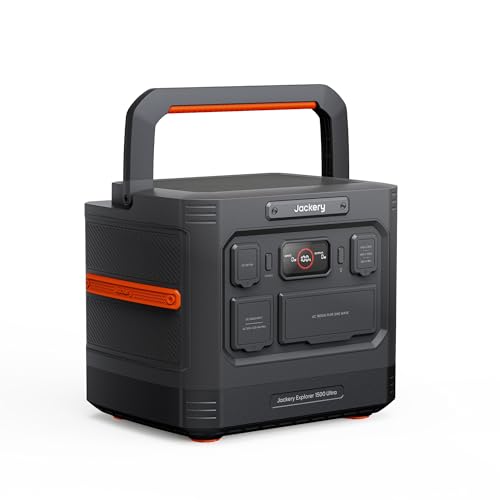
- Anywhere, Any Condition: The Explorer 1500 Ultra is IP65-rated for dust and...
- Extreme Performance: Boasting a 1536Wh LiFePO4 battery, this station...
- 10-Year Lifespan: Powered by high-stability LiFePO4 battery cells, this...
Conclusion
The one thing I want you to remember is that your Jackery E500v2’s USB-C port only sends power out, never takes it in. That single fact solves most of the frustration people feel with this generator.
Go check your generator’s ports right now and put a small piece of tape next to the input ports. It takes one minute and it will save you from another night of dead batteries and disappointed kids.
Frequently Asked Questions about Why Won’t My Jackery Solar Generator E500V2 Charge via USB-C?
Can I ever use the USB-C port to charge my Jackery E500v2?
No, the USB-C port on the E500v2 is designed only for output. It can power your phone, tablet, or other small devices.
It will never accept incoming power to recharge the generator itself. You must use the AC adapter or solar panels for that.
What happens if I try to force a charge through the USB-C port anyway?
Nothing will happen. The generator simply ignores the incoming power from the USB-C port. Your cable will not be damaged.
However, you will waste time and energy trying to make it work. I learned this the hard way on a camping trip.
How do I charge my Jackery E500v2 when I am away from a wall outlet?
Use the DC input port with compatible solar panels. I use a 100W panel and it charges the generator in a full sunny day.
You can also charge it from your car using a DC-to-DC charger, but you need the right adapter. The USB-C port is not the answer here.
Which Jackery model actually lets me charge through USB-C input?
The Jackery Explorer 500 v2 is one model that supports USB-C input for charging the battery. It is a direct upgrade from the E500v2.
If you want a reliable generator that charges through USB-C, I recommend what I grabbed for my kids for our family trips. It has saved us so much frustration.

- 200-WATT Continuous Output, Compact, Easy to Carry: The Explorer 290 has...
- Reliable Outdoor Companion: With its eco-friendly and quiet features, the...
- All-in-one Portable Power Station: Includes two USB ports, standard PURE...
Is there a way to tell which ports are input and which are output on my generator?
Yes, look for the small arrow icon next to each port. An arrow pointing inward means input, and an arrow pointing outward means output.
I put a piece of blue tape next to my input ports so I never guess in the dark. This simple trick has saved me many headaches.
What is the best portable power station for someone who needs reliable USB-C charging?
If USB-C input charging is a must-have for you, look for a model that specifically lists it in the specs. The Jackery Explorer 1500 Ultra is a solid choice.
For serious power needs and proper USB-C input, I trust the ones I sent my sister to buy for her RV. It handles everything she throws at it.
- Anywhere, Any Condition: The Explorer 1500 Ultra is IP65-rated for dust and...
- Extreme Performance: Boasting a 1536Wh LiFePO4 battery, this station...
- 10-Year Lifespan: Powered by high-stability LiFePO4 battery cells, this...